Getting Started with Flutter Mobile App Development
Last updated:
10 min read

Flutter is Google's open-source UI framework: from a single Dart codebase you can ship apps for iOS, Android, the web and desktop. This post is the front door of the series. It walks the road from installation to a first running app, including the spots where people get stuck most often, and ends with the order in which to tackle the next topics.
Live Demo: Flutter Starter Example
Before installing anything, you can see what Flutter looks like right in the browser. Try your first Flutter application interactively:
💡 If the example above doesn't load, click DartPad to run it in a new tab.
Changing a text or a color in the code and running it again is enough to grasp Flutter's core idea: the UI is code made of nested widgets.
How Does Flutter Work?
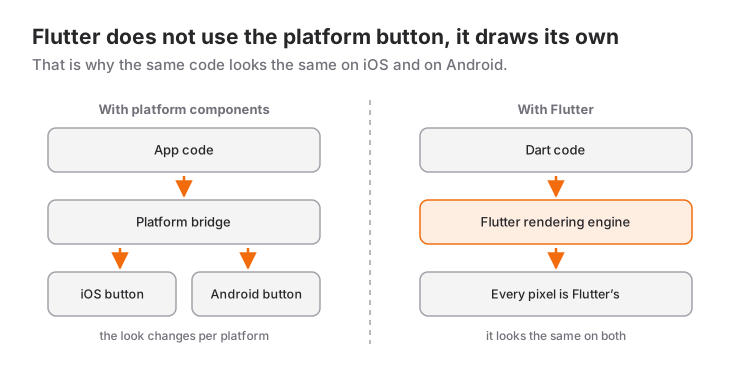
Flutter doesn't use the platform's own buttons and lists. It paints every pixel on screen with its own rendering engine. In practice that means the same code looks the same on iOS and Android, and the design isn't held back by platform constraints. The code is written in Dart, a type-safe, null-safe language that anyone who knows Java, C# or JavaScript gets used to within a few days:
void main() {
  print('Hello Flutter!');

  var name = 'Ahmet';
  int age = 25;

  print('My name is $name and I am $age years old');
}
The feature you feel most during development is hot reload: when you save the code, the change reaches the device within seconds, without restarting the app and without losing the state on screen.
Installation: The Big Picture
Version numbers and download steps change often, so I'm not giving step-by-step screenshots here; the current steps always live on the official install page. What you need to know is that the setup has three parts:
- Flutter SDK: the framework itself plus the
fluttercommand-line tool. The Dart SDK ships inside it and isn't installed separately. After downloading the SDK, itsbinfolder has to be added to the system'sPATHvariable. - Editor: VS Code or Android Studio. Both need the Flutter plugin, which brings code completion, debugging and the hot reload buttons. VS Code is lighter; Android Studio offers emulator management in the same window.
- Tools for the target platform: for Android, the Android SDK that comes with Android Studio, plus an emulator. For iOS, Xcode, which is why building for iOS requires a Mac. If you work on Windows, you can start with the Android and web targets.
Trying to set up every platform on day one is unnecessary. A single target, such as an Android emulator or Chrome, is enough to start learning.
Verifying the Setup with flutter doctor
The first command to run after installing:
flutter doctorIt scans your environment and prints one line per component. Lines that start with a check mark are ready; lines with an exclamation mark or a cross are missing something, and what to do is written underneath them. The important point: not every line has to be green. If you only develop for Android, a warning on the Xcode or Visual Studio line won't stop you. To see the details of a warning, use flutter doctor -v.
Creating and Running Your First Project
flutter create first_app
cd first_app
flutter run
flutter create generates a working sample app. flutter run installs it on a connected device or a running emulator. With more than one target available it asks which one you want; to choose directly, use -d:
flutter devices          # Lists available devices
flutter emulators        # Lists installed emulators
flutter run -d chrome    # Runs in the browser
In an editor you do the same by picking the target in the device selector at the bottom right and pressing F5.
Project Structure
The generated folder contains a lot of files at first glance, but in the beginning you work with only two of them:
| Path | What is it for? |
|---|---|
lib/main.dart |
The app's entry point. All the Dart code you write lives under lib/ |
pubspec.yaml |
Project name, dependencies (packages), asset declarations such as images and fonts |
android/, ios/, web/ |
Platform-specific shell projects. You go in there for permissions, the app name and the icon |
test/ |
Automated tests |
analysis_options.yaml |
Code analysis (lint) rules |
build/, .dart_tool/ |
Generated files; never edited by hand |
To add a package you can run flutter pub add package_name instead of editing pubspec.yaml by hand. For images and icons, the posts on adding images with assets and creating an app icon are the next steps.
The Code of Your First App
Delete everything in lib/main.dart and write the smallest meaningful app:
import 'package:flutter/material.dart';

void main() {
  runApp(const MyApp());
}

class MyApp extends StatelessWidget {
  const MyApp({super.key});

  @override
  Widget build(BuildContext context) {
    return MaterialApp(
      title: 'My First App',
      theme: ThemeData(
        colorScheme: ColorScheme.fromSeed(seedColor: Colors.orange),
      ),
      home: Scaffold(
        appBar: AppBar(title: const Text('Hello Flutter')),
        body: const Center(
          child: Text(
            'I am building apps with Flutter!',
            style: TextStyle(fontSize: 24),
          ),
        ),
      ),
    );
  }
}
Let's read it top to bottom. main() is where the app starts, and runApp hands the root widget to the screen. MaterialApp carries app-wide settings such as theme, title and page transitions. Scaffold is the skeleton of a single page: top bar, body, a bottom menu if there is one. Center and Text are the content itself. In Flutter everything is a widget; even alignment (Center) is a widget.
Widgets come in two kinds. A StatelessWidget only displays the data it receives. A StatefulWidget holds a value that changes over time and redraws itself when setState is called.
Hot Reload and Hot Restart
While the app is running, change the text and save the file; the screen updates immediately. If you run from a terminal, the r key does the same.
- Hot reload (
r): injects the changed code into the running app and re-runs thebuildmethods. State such as a counter value, the open page or the text in form fields is preserved. - Hot restart (
R): starts the app from scratch and resets the state. Changes insidemain(), insideinitState, or to the initial values of global and static variables only show up this way. - Full stop and re-run: needed for changes that touch the native side, for example after adding a package that contains platform code or after editing files under
android/andios/.
When you hit "I changed the code but nothing happened on screen", trying these three in order solves it most of the time.
Mini Scenario: A Water Tracker
Instead of memorising the stock counter sample, let's write a small but real screen: a page that counts the glasses of water you drink during the day and shows how far you are from the goal. All you have to do is set home in MaterialApp to const WaterPage().
class WaterPage extends StatefulWidget {
  const WaterPage({super.key});

  @override
  State<WaterPage> createState() => _WaterPageState();
}

class _WaterPageState extends State<WaterPage> {
  static const int _goal = 8;
  int _glasses = 0;

  @override
  Widget build(BuildContext context) {
    final done = _glasses >= _goal;

    return Scaffold(
      appBar: AppBar(title: const Text('Water Tracker')),
      body: Center(
        child: Column(
          mainAxisSize: MainAxisSize.min,
          children: [
            Text(
              '$_glasses / $_goal glasses',
              style: Theme.of(context).textTheme.headlineMedium,
            ),
            const SizedBox(height: 16),
            SizedBox(
              width: 220,
              child: LinearProgressIndicator(
                value: (_glasses / _goal).clamp(0.0, 1.0),
              ),
            ),
            const SizedBox(height: 16),
            Text(done ? 'Daily goal reached!' : 'Keep going, almost there.'),
          ],
        ),
      ),
      floatingActionButton: FloatingActionButton(
        onPressed: () => setState(() => _glasses++),
        child: const Icon(Icons.local_drink),
      ),
    );
  }
}
Every press of the button increments the variable inside setState, and Flutter re-runs the build method to update the screen. After adding a few glasses, change the title text or a color and save: the screen updates without the counter resetting. That is exactly what "hot reload preserves state" means. For the details of the pieces on this screen, see the posts on the FloatingActionButton and on input widgets and status indicators.
When to Use It and When Not To
Flutter is a strong choice in these situations: a small team or solo developer who wants to launch on iOS and Android at the same time, a brand-specific design that must look identical on both platforms, a need for fast prototypes.
In the following situations, think first:
- If the heart of the app is platform-specific capability (home screen widgets, watch apps, the operating system's very latest APIs), those parts are still written in native code. Flutter supports that, but the "single codebase" advantage shrinks accordingly.
- If you target only one platform and the team already knows that platform's native language, staying with Swift or Kotlin means fewer layers.
- For a content-heavy website that expects traffic from search engines, Flutter web is not the right tool; classic web technologies fit better there.
If you want to compare the two popular cross-platform options, there is a detailed assessment in the Flutter vs React Native post.
Common Mistakes
1. The flutter command isn't found
Symptom: command not found: flutter in the terminal, or on Windows "'flutter' is not recognized as an internal or external command". The SDK was downloaded but its bin folder was never added to PATH. After adding it, close and reopen the terminal; an open window keeps working with the old PATH.
2. Android licenses not accepted
Symptom: a warning about licenses on the Android line of the flutter doctor output. The fix is to run the command below and answer the prompts with y:
flutter doctor --android-licensesIf the same line says "cmdline-tools component is missing", open the SDK Manager in Android Studio and install "Android SDK Command-line Tools" from the SDK Tools tab.
3. Invalid project name
Symptom: flutter create First-App stops with "First-App" is not a valid Dart package name. The project name is a Dart package name: lowercase letters, digits and underscores only, and it must not start with a digit. first_app is valid. The app name shown in the stores is independent of this and is set later in the platform folders.
4. No device to run on
Symptom: flutter run exits with a message along the lines of "No supported devices connected". The emulator isn't running, or the phone connection wasn't recognized. You can start the emulator from Android Studio's Device Manager or with flutter emulators --launch <emulator_id>. On a real Android device, USB debugging has to be enabled in the developer options. If none of that is available, flutter run -d chrome is always at hand.
What to Learn Next
The most common mistake when learning Flutter is skipping Dart and diving straight into memorising widgets. This is the order I recommend:
- Dart basics. First type conversions and the static concept, then the List, Set and Map collections. Almost everything you put on screen in Flutter comes from a list.
- Object-oriented Dart. Every widget is a class written with
extends, so inheritance and polymorphism directly makes Flutter code easier to read. - Asynchronous programming. Fetching data from the internet or reading a file works with
Future; the try-catch and async/await post covers this part. - Widget tree and layout. The post on the widget tree, Row, Column and Stack is the real start of Flutter, showing how to divide up the screen.
- Your own widgets and navigation between pages. Once you can extract repeated pieces into your own widget and move between pages with Navigator, you are able to write a real multi-page app.
All topics are listed in order on the Flutter lessons page. If you are thinking of working through that order in one-to-one lessons, the post on what to look for when choosing the best Flutter teacher collects the criteria to judge by. As official sources, the Flutter documentation and the Dart language guide deserve a permanently open tab.
Frequently Asked Questions
Do I need to know Dart before learning Flutter?
You don't have to finish a separate Dart course, but without variables, functions, classes, collections and async/await, widget code is hard to read. If you have programmed in another language before, a few days on Dart basics is enough.
Can I develop iOS apps on a Windows computer?
You can write the code on Windows and test on Android and the web, but the iOS build requires Xcode, and Xcode only runs on macOS. To ship the iOS version you need a Mac or a cloud build service that provides macOS.
Should I use Android Studio or VS Code?
Both are officially supported and offer the same core features through the Flutter plugin. VS Code is lighter and starts faster; Android Studio keeps emulator and Android SDK management in one place. If you target Android, installing Android Studio for the SDK and writing code in VS Code is a common setup.
Do I have to fix every warning in flutter doctor?
No. Only the lines related to the platform you target need to be clean. If you develop just for Android and the web, for example, warnings about Xcode or Visual Studio won't get in your way.
Related Posts
Flutter Camera Without Forcing Orientation: Three Bugs and Their Fixes
A rotated preview, a freeze when recording starts and a dead camera: three Flutter camera bugs from Recapday and the code that fixed each one.
Dart Interfaces and implements: Contracts for Classes
Contracts with implements in Dart, Dart 3's interface class and abstract interface class, how mixins with differ, and an example of testable code.
Dart Inheritance and Polymorphism: A Practical Guide
Inheritance in Dart with extends, super and @override, polymorphism, abstract classes, safe type checks, and Dart 3's sealed, final and base class modifiers.