Dart Error Handling: Try-Catch and Asynchronous Operations
Last updated:
8 min read

Error handling and asynchronous code are where learners first feel the difference between "it works" and "it works reliably." The two habits I see most often in lessons: catching everything with catch (e) and silently swallowing the error, and forgetting to await an async function and then not understanding why the error was never caught. This post covers both from the ground up.
After collections, this is the last big piece of the Dart fundamentals. The examples are written for Dart 3.
Live Demo: Try-Catch and Async-Await
Learn error handling and asynchronous programming interactively:
Try-Catch: Catching Errors
Programs don't always behave as expected: the user types something wrong, a file is missing, the connection drops. Let's look at this program that reads a number from the console:
import 'dart:io';

void main() {
  print('Enter a number:');
  final input = stdin.readLineSync() ?? '';
  final number = int.parse(input); // FormatException if the user types "abc"
  print('You entered: $number');
}
If the user types "abc", int.parse throws a FormatException and the program stops. We saw this behavior in the post on type conversions. (stdin only works in console apps; to try this in DartPad, put the input in a variable.)
Targeted Catching with on
void main() {
  const input = 'abc';

  try {
    final number = int.parse(input);
    print('You entered: $number');
  } on FormatException catch (e) {
    print('Please enter a valid number. (${e.message})');
  }
}
on FormatException catches only that type of error. The bare catch (e) common in older examples catches everything that's thrown, including your programming mistakes. The Effective Dart guide also advises against catch clauses without on. Catch the error you expect by name; let the unexpected ones stay visible so you can fix them.
You can handle several error types separately. Order matters: the specific one comes first, the general one last:
void process(String input) {
  try {
    final number = int.parse(input);
    if (number < 0) throw ArgumentError.value(number, 'input', 'Must not be negative');
    print('Result: ${100 ~/ number}');
  } on FormatException {
    print('Not a number.');
  } on ArgumentError catch (e) {
    print('Invalid value: ${e.message}');
  } catch (e, stackTrace) {
    print('Unexpected error: $e');
    print(stackTrace); // Shows where the error happened
    rethrow;           // Passes the error up instead of swallowing it
  }
}
Note three details here:
catch (e, stackTrace)gives you the stack trace as the second parameter. When debugging, it's as valuable as the error itself.rethrowthrows the caught error again together with its original stack trace. Use it when you want to log the error and leave it to a higher layer. Writingthrow eloses the stack trace.ArgumentErroris anError. In Dart, anExceptionrepresents an expected situation that can happen at runtime (invalid input, a network failure), while anErrorrepresents a programmer mistake (a wrong argument, accessing null). As a general rule, you fix the code instead of catchingErrors and carrying on; theon ArgumentErrorhere only exists to show the two kinds side by side.
Asking Again Until the Input Is Valid
import 'dart:io';

void main() {
  int? number;

  while (number == null) {
    print('Enter a number:');
    number = int.tryParse(stdin.readLineSync() ?? '');
    if (number == null) print('Please enter a valid number!');
  }

  print('Well done! You entered: $number');
}
The earlier version of this example used try-catch inside the loop. Since invalid input is an expected situation here rather than an exceptional one, tryParse fits better: a null check is enough instead of throwing and catching an error.
The finally Block
A finally block runs whether an error occurred or not:
void main() {
  try {
    print('Connection opened');
    int.parse('abc'); // FormatException
  } on FormatException catch (e) {
    print('Error: ${e.message}');
  } finally {
    print('Connection closed'); // Runs in every case
  }
}
Use it for things that must be closed no matter what, such as a file, a database connection or a loading indicator.
Your Own Exception Class
For errors specific to your app, you can write a class that implements Exception. The calling code can then catch it by name with on:
class InsufficientBalance implements Exception {
  final double missing;
  const InsufficientBalance(this.missing);

  @override
  String toString() => 'InsufficientBalance: $missing short';
}

double pay(double balance, double amount) {
  if (amount > balance) throw InsufficientBalance(amount - balance);
  return balance - amount;
}

void main() {
  try {
    pay(100, 150);
  } on InsufficientBalance catch (e) {
    print('Payment failed, ${e.missing} short.'); // Payment failed, 50.0 short.
  }
}
Throwing a String, as in throw 'Something went wrong', also compiles, but the catching side is left with no type information. Throw a meaningful class.
Asynchronous Operations: async and await
Some operations take time: fetching data from the network, reading a file, writing to a database. We don't want the app to freeze while waiting for them.
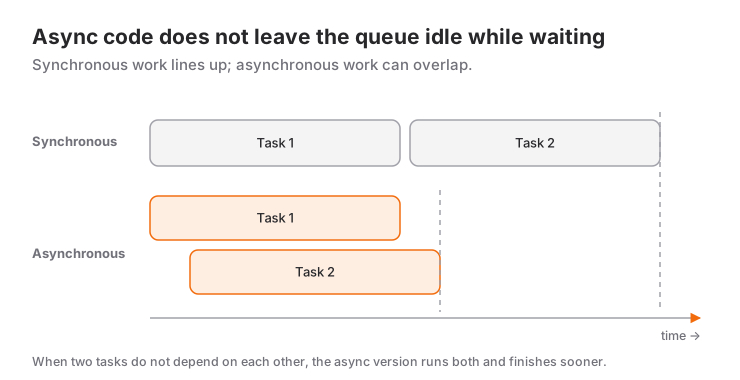
Let's correct a common misconception right away: asynchronous code in Dart doesn't run on a separate thread. Dart runs on a single event loop. await only pauses that function and lets the event loop do other work until the awaited task (a network response, for example) arrives. If the awaited work happens outside your code, such as network or file I/O, the UI stays smooth in the meantime. But putting a heavy computation in an async function doesn't make it faster and still freezes the UI; for that kind of work you use a separate isolate with Isolate.run.
Future, async, await
- Future: Represents an operation whose value will be ready later. It completes either with a value or with an error.
- async: Marks a function in which
awaitcan be used; the function automatically returns aFuture. - await: Pauses that function until the Future completes and gives you the result.
Future<void> main() async {
  print('Waiting for data...');

  final data = await fetchFromDatabase();

  print('Data received: $data');
}

Future<String> fetchFromDatabase() async {
  // Simulating database latency
  await Future.delayed(const Duration(seconds: 3));
  return 'User data';
}
What Happens If You Forget await?
Future<void> main() async {
  // String data = fetchFromDatabase(); // Compile error: a Future<String> is not a String
  final data = fetchFromDatabase();     // Compiles, but data is a Future
  print(data); // Instance of 'Future<String>'
}
The first line doesn't compile, because the function doesn't return the value but a promise that the value will arrive later (a Future). The second line is sneakier: with final, type inference gives you Future<String>, the code compiles, and Instance of 'Future<String>' is printed instead of the data. Whenever you see that output, the first thing to look for is a missing await.
An Example That Shows Progress
Future<void> main() async {
  print('1. Waiting for data...');
  final data = await fetchFromDatabase();
  print('2. Data received: $data');
}

Future<String> fetchFromDatabase() async {
  for (var i = 1; i <= 5; i++) {
    await Future.delayed(const Duration(seconds: 1));
    print('Loading... ${i * 20}%');
  }
  return 'Database set';
}
Output:
1. Waiting for data...
Loading... 20%
Loading... 40%
Loading... 60%
Loading... 80%
Loading... 100%
2. Data received: Database set
Catching Asynchronous Errors
If an awaited Future completes with an error, the error is thrown at the await line and can be caught with a normal try-catch:
import 'dart:async';

class ServerError implements Exception {
  final String message;
  const ServerError(this.message);
}

Future<String> fetchFromApi() async {
  await Future.delayed(const Duration(seconds: 2));
  throw const ServerError('Could not connect to the server');
}

Future<void> main() async {
  try {
    print('Fetching data from the API...');
    final data = await fetchFromApi().timeout(const Duration(seconds: 5));
    print('Data: $data');
  } on TimeoutException {
    print('The server did not respond in time.');
  } on ServerError catch (e) {
    print('Error: ${e.message}');
  }
}
timeout ends a Future that doesn't complete within the given time with a TimeoutException. Setting a timeout on network requests keeps users from staring at a loading indicator forever.
Futures That Aren't Awaited, and unawaited
The error from a Future that isn't awaited is not caught by the surrounding try-catch. The try block starts the Future and finishes immediately; the error happens later:
Future<void> main() async {
  try {
    fetchFromApi(); // no await: the error is NOT caught here
  } on ServerError {
    print('Never reached');
  }
}
Such an error ends up in the app's handler for uncaught errors. The fix is usually simple: add await. If you deliberately don't want to wait for an operation (sending an analytics event in the background, for example), say so explicitly with unawaited from dart:async and handle the error on the Future itself:
import 'dart:async';

Future<void> sendEvent(String event) async {
  // Imagine an analytics event being sent in the background
}

void onButtonPressed() {
  unawaited(
    sendEvent('button').catchError((Object e) => print('Could not send event: $e')),
  );
}
unawaited tells both the reader and the analyzer "not waiting here is intentional." The catchError callback must return a value that matches the Future's type; here the type is void, so print is enough.
Waiting in Parallel
Awaiting independent operations one after another adds up their durations:
Future<String> fetchUser() async {
  await Future.delayed(const Duration(seconds: 1));
  return 'Ayse';
}

Future<int> fetchNotificationCount() async {
  await Future.delayed(const Duration(seconds: 1));
  return 3;
}

Future<void> main() async {
  // One after another: about 2 seconds
  final name = await fetchUser();
  final count = await fetchNotificationCount();

  // In parallel: about 1 second
  final (name2, count2) = await (fetchUser(), fetchNotificationCount()).wait;

  print('$name $count / $name2 $count2'); // Ayse 3 / Ayse 3
}
Thanks to Dart 3 records, you can wait for Futures of different types together with (a, b).wait and destructure the result in a single line. If one of the Futures fails, .wait throws a ParallelWaitError. For many Futures of the same type, the classic Future.wait([...]) works too and gives you the results as a List.
Asynchronous Code in Flutter
In Flutter, asynchronous code is everywhere: API calls, local databases, file reads, permission requests. The most common pattern is loading data in initState and showing the result with setState:
import 'package:flutter/material.dart';

class DataPage extends StatefulWidget {
  const DataPage({super.key});

  @override
  State<DataPage> createState() => _DataPageState();
}

class _DataPageState extends State<DataPage> {
  String _data = 'Loading...';

  @override
  void initState() {
    super.initState();
    _loadData();
  }

  Future<void> _loadData() async {
    try {
      // In a real app, an API call goes here
      await Future.delayed(const Duration(seconds: 2));
      if (!mounted) return; // Stop if the page was closed in the meantime
      setState(() => _data = 'Data loaded successfully!');
    } on Exception catch (e) {
      if (!mounted) return;
      setState(() => _data = 'Error: $e');
    }
  }

  @override
  Widget build(BuildContext context) {
    return Scaffold(
      body: Center(child: Text(_data)),
    );
  }
}
The if (!mounted) return; line is an important safeguard that older examples were missing. If the user leaves the page before the data arrives, the widget is removed from the tree; calling setState after an await without checking leads to an error. After every await, ask whether the widget is still on screen.
The Future.delayed here stands in for a real network request. Sending requests to a real API with the http package, checking status codes and adding a timeout are covered step by step in the HTTP requests and REST APIs post.
FutureBuilder
Flutter offers a ready-made widget that draws the UI based on the state of a Future:
class ProfilePage extends StatefulWidget {
  const ProfilePage({super.key});

  @override
  State<ProfilePage> createState() => _ProfilePageState();
}

class _ProfilePageState extends State<ProfilePage> {
  late final Future<String> _data = fetchFromDatabase(); // Created once

  @override
  Widget build(BuildContext context) {
    return FutureBuilder<String>(
      future: _data,
      builder: (context, snapshot) {
        if (snapshot.connectionState != ConnectionState.done) {
          return const CircularProgressIndicator();
        }
        if (snapshot.hasError) {
          return Text('Error: ${snapshot.error}');
        }
        return Text('Data: ${snapshot.data}');
      },
    );
  }
}
Notice that the Future is created in a field of the State, not inside build. If you write future: fetchFromDatabase(), the request is sent again on every rebuild. I cover it in detail in the FutureBuilder post; for data that keeps flowing rather than arriving once, its sibling StreamBuilder is there.
Rules and Common Mistakes
awaitcan only be used inasyncfunctions.
// WRONG
void doSomething() {
  await something(); // Compile error
}

// RIGHT
Future<void> doSomething() async {
  await something();
}
The return type of an async function should be a
Future.void f() asynccompiles, but the caller can't wait for the function or catch its errors. For asynchronous functions that return no value, writeFuture<void>.Don't await independent operations one after another. Start them in parallel with the record
.waitshown above or withFuture.wait.Catch errors by name.
on FormatException,on TimeoutException,on ServerError; a barecatch (e)belongs only at the very end, for logging andrethrow.Don't swallow errors silently. An empty
catchblock doesn't solve the problem, it only hides it.Check
mountedafterawait. In Flutter, the widget may have left the tree in the meantime.
Next Step
The code side of Dart is done; the next stop is the UI: Flutter's widget tree, Row, Column and Stack.
Resources
- Dart: Error handling
- Dart: Asynchronous programming (futures, async, await)
- Effective Dart: Usage (Error handling)
- Flutter: Handling errors
Have questions?
Frequently Asked Questions
What is the difference between catch (e) and on FormatException catch (e)?
catch (e) catches anything that is thrown, while on FormatException catch (e) catches only that type. Handling specific errors with on first and putting a general catch last keeps you from accidentally swallowing unexpected errors.
Why isn't the error from an async function caught when I call it without await?
Without await, the function returns a Future immediately and the error happens inside that Future, long after the try block has finished. Add await before the call, or, if you deliberately won't wait for the result, mark it with unawaited and catch the error on the Future with .catchError.
What is the difference between throw e and rethrow?
rethrow throws the caught error again together with its original stack trace. throw e behaves as if the error were thrown from a new place, and the information about where it first happened is lost. When you want to pass an error up from a catch block, use rethrow.
Why shouldn't I pass a function call directly to FutureBuilder's future parameter?
build runs on every rebuild, so writing future: loadData() fires the request again each time. Create the Future once in a field of the State (for example in initState or with late final) and hand that field to FutureBuilder.
Related Posts
Flutter: Asynchronous Listing with FutureBuilder
Flutter FutureBuilder: reading snapshot states in the right order, the Future-in-build mistake, the initState fix and refreshing with setState.
Flutter: Local Data Storage with SharedPreferences
Storing theme and settings with shared_preferences in Flutter: SharedPreferencesAsync, WithCache vs the legacy API, the migration helper and what not to store.
Flutter: HTTP Requests and REST APIs
GET, POST, PUT and DELETE with Flutter's http package, JSON to model classes, status codes, timeouts and loading and error states with FutureBuilder.