Flutter: Adding Images - Assets and Image.asset
Last updated:
8 min read

To add images to your Flutter project, you first place them in a folder and then declare them as assets in the pubspec.yaml file. It sounds simple, but one of the most frequent "why doesn't this work?" questions I get in lessons comes from small mistakes in exactly these two steps. This post covers the steps, resolution support, SVG and network images, and how to track down those mistakes.
Step 1: Create an Image Folder
Create an image folder in the root directory of your Flutter project (at the same level as the lib folder). If you're seeing the project structure for the first time, I explained what each folder is for in the getting started with Flutter guide:
my_flutter_app/
  ├── lib/
  ├── assets/
  │   └── images/
  │       ├── logo.png
  │       ├── profile.jpg
  │       └── banner.png
  ├── pubspec.yaml
└── ...Note: The folder is usually named assets, images or assets/images. You can choose any name, but in a team the layout everyone expects is assets/images/.
Step 2: Configure pubspec.yaml
Open pubspec.yaml and add the assets declaration under the flutter: section; the full syntax for this section is described in Flutter's "Adding assets and images" guide:
Adding a Single Image
flutter:
  uses-material-design: true

  assets:
    - assets/images/logo.png
Adding a Whole Folder
flutter:
  uses-material-design: true

  assets:
    - assets/images/
If the folder path ends with /, all files in that folder are added as assets. Subfolders are not included in this declaration; the only exception is resolution folders like 2.0x and 3.0x, which we'll look at below.
Including Subfolders
flutter:
  assets:
    - assets/images/
    - assets/images/icons/
    - assets/images/backgrounds/
Example pubspec.yaml
name: my_app
description: My Flutter application.

environment:
  sdk: ^3.9.0

dependencies:
  flutter:
    sdk: flutter

flutter:
  uses-material-design: true

  assets:
    - assets/images/
    - assets/icons/
You don't need to write the sdk line under environment by hand; flutter create fills it in based on your installed Dart version. The ^3.9.0 here corresponds to the Dart version that ships with Flutter 3.35.
Step 3: Use the Images
The Image.asset Widget
Image.asset is one of the constructors listed in the Image widget's API documentation, and like the others it's an ordinary widget; you can place it inside a Row, Column or Container in the widget tree:
Image.asset('assets/images/logo.png')Sizing
Image.asset(
  'assets/images/logo.png',
  width: 200,
  height: 200,
)
Fitting with BoxFit
Image.asset(
  'assets/images/banner.png',
  width: double.infinity,
  height: 200,
  fit: BoxFit.cover, // Cover the area
)
BoxFit values:
cover: Covers the whole area and crops what overflowscontain: The whole image is visible; empty space may remainfill: Fills the area; the aspect ratio may be distortedfitWidth: Fits to the widthfitHeight: Fits to the heightnone: Shows the image at its original sizescaleDown: Behaves likecontainbut never scales the image up
Practical Examples
Example 1: Showing a Logo
class LogoWidget extends StatelessWidget {
  const LogoWidget({super.key});

  @override
  Widget build(BuildContext context) {
    return Center(
      child: Image.asset(
        'assets/images/logo.png',
        width: 150,
        height: 150,
      ),
    );
  }
}
Example 2: Profile Picture
const CircleAvatar(
  radius: 50,
  backgroundImage: AssetImage('assets/images/profile.jpg'),
)
CircleAvatar expects an ImageProvider, not a widget, which is why AssetImage is used here instead of Image.asset.
Example 3: Banner Image
SizedBox(
  width: double.infinity,
  height: 200,
  child: Image.asset(
    'assets/images/banner.png',
    fit: BoxFit.cover,
  ),
)
When all you need is a size, using SizedBox instead of Container is both lighter and makes your intent clearer.
Example 4: Icon Image
Row(
  children: [
    Image.asset(
      'assets/images/icons/star.png',
      width: 24,
      height: 24,
    ),
    const SizedBox(width: 8),
    const Text('My Favorites'),
  ],
)SizedBox, which provides the gap between the icon and the text, is the most practical tool for small rows like this.
Example 5: Background Image
Container(
  decoration: const BoxDecoration(
    image: DecorationImage(
      image: AssetImage('assets/images/background.jpg'),
      fit: BoxFit.cover,
    ),
  ),
  child: const Center(
    child: Text(
      'Welcome',
      style: TextStyle(
        color: Colors.white,
        fontSize: 32,
        fontWeight: FontWeight.bold,
      ),
    ),
  ),
)
If you need to place several elements freely on top of the image, Stack and Positioned are a more flexible option.
Images for Multiple Screen Densities
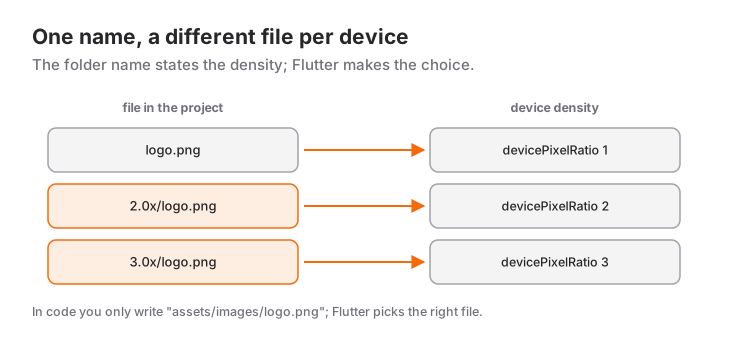
You can use images in different resolutions for different screen densities:
Folder Structure
assets/
  └── images/
      ├── logo.png          (1x, main file)
      ├── 1.5x/
      │   └── logo.png      (1.5x)
      ├── 2.0x/
      │   └── logo.png      (2x)
      ├── 3.0x/
      │   └── logo.png      (3x)
      └── 4.0x/
          └── logo.png      (4x)
The file in each folder has the same name; only the pixel dimensions differ. For example, if logo.png is 100x100 pixels, 2.0x/logo.png should be 200x200 and 3.0x/logo.png 300x300 pixels.
pubspec.yaml
flutter:
  assets:
- assets/images/logo.pngNote: Flutter automatically bundles the variants in the 1.5x, 2.0x, 3.0x and 4.0x folders together with the main file; you don't need to list them separately.
Usage
Image.asset('assets/images/logo.png')Flutter automatically picks the variant closest to the device's devicePixelRatio. In code, you always write the path of the main file. If you want the same image to fly and grow between two pages, just wrap Image.asset in a Hero; you'll find the details in the Hero animations post.
Image Naming Tips
Don't put the resolution in the file name; names like logo_low.png and logo_high.png bypass Flutter's automatic selection and force you to decide in code which file to use when. Use the 2.0x and 3.0x folders above for resolution instead.
These file naming rules make life easier:
onboarding_step1.png   // lowercase, words separated by underscores
icon_cart_24.png       // size at the end for icons used at different sizes
bg_login.jpg           // prefix by type (bg_, icon_, img_)
Avoid spaces, non-ASCII characters and capital letters. Some file systems are case-sensitive; a Logo.PNG that works on your machine may not be found in another environment.
Keep Paths in One Place
When image paths are repeated as strings across your code, a typo only shows up at runtime. Keeping the paths as constants in a single place reduces that risk:
abstract final class AppImages {
  static const logo = 'assets/images/logo.png';
  static const profile = 'assets/images/profile.jpg';
  static const banner = 'assets/images/banner.png';
}

// Usage
Image.asset(AppImages.logo)
abstract final class is Dart 3 syntax: the class can't be instantiated and can't be extended from outside, so it's clear it exists only to group constants.
Loading and Error States
Fading In (frameBuilder)
Image.asset(
  'assets/images/logo.png',
  frameBuilder: (context, child, frame, wasSynchronouslyLoaded) {
    if (wasSynchronouslyLoaded) {
      return child;
    }
    return AnimatedOpacity(
      opacity: frame == null ? 0 : 1,
      duration: const Duration(milliseconds: 300),
      curve: Curves.easeOut,
      child: child,
    );
  },
)
frame is null until the first frame has been decoded; this example keeps the image invisible until then and fades it in smoothly afterwards.
Error State
Image.asset(
  'assets/images/logo.png',
  errorBuilder: (context, error, stackTrace) {
    return Container(
      color: Colors.grey.shade300,
      child: const Center(
        child: Icon(Icons.error, color: Colors.red),
      ),
    );
  },
)
errorBuilder shows a widget of your choice instead of the red error screen when the file can't be found or decoded. For assets, this is usually a sign of a configuration mistake; before hiding the error, check the "Common Mistakes" section below.
Image.network vs. Image.asset
Image.asset (Local Image)
Image.asset('assets/images/logo.png')- Bundled with the app
- Doesn't need an internet connection
- Loads quickly
- Increases the app size
Image.network (Image from the Internet)
Image.network('https://example.com/image.png')- Downloaded from the internet at runtime
- Needs an internet connection
- May be delayed depending on connection speed
- Doesn't increase the app size
- Flutter keeps downloaded images only in memory (
ImageCache); they're downloaded again after the app is closed. For caching on disk, use thecached_network_imagepackage below.
Smooth Loading with FadeInImage
To show a local placeholder while an image loads from the network:
FadeInImage.assetNetwork(
  placeholder: 'assets/images/placeholder.png',
  image: 'https://example.com/image.png',
  fit: BoxFit.cover,
)
You can get the same result with ImageProviders:
FadeInImage(
  placeholder: const AssetImage('assets/images/placeholder.png'),
  image: const NetworkImage('https://example.com/image.png'),
  fit: BoxFit.cover,
)
Because the placeholder is an asset, it appears instantly; when the network image arrives, it replaces the placeholder with a smooth transition.
SVG Images
Flutter's Image widget can't draw SVG; for that you need the flutter_svg package. Add it from the terminal:
flutter pub add flutter_svgThis command writes the package's current version into the dependencies section of pubspec.yaml for you.
Usage
import 'package:flutter_svg/flutter_svg.dart';

SvgPicture.asset(
  'assets/images/logo.svg',
  width: 100,
  height: 100,
  semanticsLabel: 'App logo',
)
The SVG file must also be declared as an asset in pubspec.yaml. To change its color, use colorFilter: const ColorFilter.mode(Colors.orange, BlendMode.srcIn).
Cached Network Image
The cached_network_image package caches network images on disk:
flutter pub add cached_network_imageUsage
import 'package:cached_network_image/cached_network_image.dart';

CachedNetworkImage(
  imageUrl: 'https://example.com/image.png',
  placeholder: (context, url) => const CircularProgressIndicator(),
  errorWidget: (context, url, error) => const Icon(Icons.error),
)
Once an image has been downloaded, it's stored on the device and shown on later launches without going to the network.
Common Mistakes
1. pubspec.yaml Indentation
# ❌ WRONG
flutter:
uses-material-design: true
assets:
  - assets/images/

# ✅ RIGHT
flutter:
  uses-material-design: true
  assets:
    - assets/images/
Indentation carries meaning in YAML. The assets: line must be indented two spaces under flutter:; don't use tab characters.
2. Wrong Path
// ❌ WRONG
Image.asset('images/logo.png')  // 'assets/' is missing

// ✅ RIGHT
Image.asset('assets/images/logo.png')
The path in code must start exactly like the path in pubspec.yaml.
3. File Name Case
// If the file is named logo.PNG:
Image.asset('assets/images/logo.png') // Not found in some environments
Your file system may be case-sensitive; match the path in code to the file name letter for letter.
4. Forgetting to Declare a Subfolder
Declaring assets/images/ doesn't cover the files inside assets/images/icons/. Add every subfolder as its own line.
5. The Hot Reload Problem
For pubspec.yaml changes:
- Hot reload isn't enough
- Do a hot restart (the 🔄 button)
- If you still see "Unable to load asset", stop the app completely and start it again
Summary
Adding images in Flutter:
- Create a folder:
assets/images/ - Add images: PNG, JPG, WebP; for SVG, also
flutter_svg - Declare them in pubspec.yaml:
flutter: assets: - assets/images/ - Hot restart
- Use them:
Image.asset('assets/images/logo.png')
Recommendations:
- Create
2.0xand3.0xfolders for multiple resolutions - Use meaningful, lowercase file names
- Collect image paths in a single constants class
- Use
flutter_svgfor SVG images - Use
cached_network_imageto cache network images on disk
Performance Tips:
- Don't add images much larger than the size they'll be displayed at
- WebP usually gives smaller file sizes than PNG and JPG
- If you show a large image in a small area, pass
cacheWidthorcacheHeightso it's decoded at a smaller size in memory:Image.asset('assets/images/banner.png', cacheWidth: 600) - Use
ListView.builderfor long lists of images; only the items visible on screen are built - Delete unused images from the project
Images are an important part of a Flutter app's visual identity. Used at the right size, in the right place and in the right format, they make your app look both fast and polished. The app's own icon, however, is not an asset but a platform resource; I cover it separately in the creating an app icon post.
Frequently Asked Questions
I added it to pubspec.yaml but still get "Unable to load asset", why?
There are three usual suspects: the assets: line must be indented two spaces under flutter:, the path in code must be the full path such as assets/images/logo.png, and you must hot restart after changing pubspec. Also remember that subfolders have to be listed separately.
Can I put images inside the lib folder instead of assets?
Technically yes, and you still have to declare them in pubspec.yaml. But lib is for code; keeping images under assets/ at the project root keeps things tidy and is the layout your teammates will expect.
Images are making my app too large, what should I do?
Use WebP instead of PNG, shrink images to the size they'll actually be displayed at and delete unused files. For large images that are rarely shown, loading them from the network with cached_network_image instead of bundling them also cuts the size significantly.
Related Posts
Flutter: Light and Dark Themes with ThemeData
Building a Flutter theme with ThemeData: ColorScheme.fromSeed, light and dark themes, ThemeMode, reading with Theme.of, TextTheme, component themes, extensions.
Flutter: Using TextField and TextEditingController
Flutter TextField guide: TextEditingController and dispose, InputDecoration, keyboard types, inputFormatters, password fields, FocusNode and onChanged.
Flutter: Layering Widgets with Stack and Positioned
Flutter Stack and Positioned guide: how a Stack sizes itself, fit, alignment, clipBehavior, Positioned.fill, PositionedDirectional, badge and overlay recipes.