Dart Collections: List, Set and Map (HashSet, HashMap)
Last updated:
9 min read

Collections are everywhere in Flutter code: the product list on screen is a List, the selected tags are a Set, and the JSON from the server is a Map. The most common mistake learners make here is using List for everything and then answering "is this item in the list?" by walking through it from start to finish every time. Choosing the right collection is often the same thing as choosing the right algorithm.
This post covers the three core collections, the difference between HashSet and HashMap from dart:collection and the default Set and Map, the rule for using your own classes correctly in collections, and the handy syntax that arrived with Dart 3. The previous topic was interfaces and implements; here we learn how to keep the objects we designed together.
Live Demo: Dart Collections Examples
Try List, HashSet and HashMap usage interactively:
List: Ordered and Accessed by Index
A List is similar to arrays in other languages. Elements stay in the order they were added, each has an index starting at 0, and the same value can appear more than once.
void main() {
  final numbers = [3, 4, 5];                     // List<int>
  final names = <String>['Ahmet', 'Mehmet', 'Selda'];
  final rates = [3.2, 3.3, 3.5];                 // List<double>

  print(numbers); // [3, 4, 5]
  print(names);   // [Ahmet, Mehmet, Selda]
  print(rates);   // [3.2, 3.3, 3.5]
}
You don't need to write List<int> every time; Dart infers it from the literal. When you create an empty list, though, state the type (<String>[]), or you'll end up with a List<dynamic>.
Adding, Updating and Removing
void main() {
  final numbers = [3, 4, 5];

  numbers.add(32);          // Adds to the end: [3, 4, 5, 32]
  numbers.insert(0, 100);   // Adds to the start: [100, 3, 4, 5, 32]
  numbers.addAll([7, 8]);   // Adds several at once
  numbers[0] = 50;          // Update

  numbers.removeAt(0);      // Removes by index
  numbers.remove(32);       // Removes by value (the first match)
  numbers.removeWhere((n) => n > 6); // Removes by condition

  print(numbers); // [3, 4, 5]
}
Commonly Used Properties
void main() {
  final numbers = [10, 20, 30, 40];

  print(numbers.isEmpty);      // false
  print(numbers.isNotEmpty);   // true
  print(numbers.length);       // 4
  print(numbers.first);        // 10
  print(numbers.last);         // 40
  print(numbers.contains(20)); // true
  print(numbers.indexOf(30));  // 2

  for (final number in numbers) {
    print('Number: $number');
  }
}
first and last throw a StateError on an empty list. Where the list might be empty, firstOrNull and lastOrNull, added in Dart 3.0, are safer.
Collection if, for and spread
Dart lets you write conditions and loops inside a list literal. You'll use this constantly in Flutter when building widget lists:
void main() {
  const loggedIn = true;
  final base = ['Home', 'Search'];

  final menu = [
    ...base,                        // spread: unpacks another list
    if (loggedIn) 'Profile',        // conditional element
    for (var i = 1; i <= 2; i++) 'Page $i',
  ];

  print(menu); // [Home, Search, Profile, Page 1, Page 2]
}
A List of Objects: Sorting and Filtering
In real apps, lists mostly hold objects of your own classes:
class Student {
  final int id;
  final String name;
  final String grade;

  const Student(this.id, this.name, this.grade);

  @override
  String toString() => '$id - $name ($grade)';
}

void main() {
  final students = [
    const Student(33, 'Ahmet', 'Grade 3'),
    const Student(199, 'Ayse', 'Grade 4'),
    const Student(22, 'Mehmet', 'Grade 2'),
  ];

  for (final student in students) {
    print(student);
  }
}
An earlier version of this post declared the fields as nullable, like int? id, and wrote id! on every use. If a student's number will never be empty, making the field nullable only brings the ! operator and the risk of a runtime error into your code. If the value is always there, write final int id.
Overriding toString is a small but useful habit too: print(student) now prints a readable line instead of Instance of 'Student'.
Sorting
students.sort((a, b) => a.id.compareTo(b.id));
print(students); // [22 - Mehmet (Grade 2), 33 - Ahmet (Grade 3), 199 - Ayse (Grade 4)]

students.sort((a, b) => a.name.compareTo(b.name)); // By name
sort changes the list in place and returns nothing. Writing final sorted = students.sort(...) is a mistake I see very often in lessons; the compiler tells you a void value can't be used. If you want a sorted copy without touching the original list, copy it first: final sorted = [...students]..sort(...).
compareTo compares text by character codes, so letters with accents or diacritics (such as Ç, Ş or é) may not land where a reader expects in alphabetical order. For name lists shown to users that need locale-aware sorting, you have to handle that separately.
Filtering and Transforming
void main() {
  final students = [
    const Student(33, 'Ahmet', 'Grade 3'),
    const Student(199, 'Ayse', 'Grade 4'),
    const Student(22, 'Mehmet', 'Grade 2'),
  ];

  final lowIds = students.where((s) => s.id < 100).toList();
  final names = students.map((s) => s.name).toList();
  final hasAyse = students.any((s) => s.name == 'Ayse');
  final allPositive = students.every((s) => s.id > 0);
  final found = students.where((s) => s.id == 22).firstOrNull;

  print(lowIds);  // [33 - Ahmet (Grade 3), 22 - Mehmet (Grade 2)]
  print(names);   // [Ahmet, Ayse, Mehmet]
  print('$hasAyse $allPositive'); // true true
  print(found?.name); // Mehmet
}
where and map return a lazy Iterable; the elements are only computed when you iterate over them. If you want index access or need to use the result more than once, turn it into a concrete list with .toList(). In Flutter, features like a search box are written with exactly this where pattern.
Set: Elements Without Duplicates
A Set holds each element only once and answers "is this element in here?" much faster than a list. On a List, contains checks the elements one by one; on a Set, that lookup finishes in constant time on average. I explained why in the Big O post.
void main() {
  final tags = {'dart', 'flutter'}; // Set<String>

  final added = tags.add('mobile'); // true
  final again = tags.add('dart');   // false: already there
  print(tags);            // {dart, flutter, mobile}
  print('$added $again'); // true false

  final unique = [1, 2, 3, 4, 1].toSet();
  print(unique); // {1, 2, 3, 4}

  final a = {1, 2, 3};
  final b = {2, 3, 4};
  print(a.union(b));        // {1, 2, 3, 4}
  print(a.intersection(b)); // {2, 3}
  print(a.difference(b));   // {1}
}
One trap to watch for: writing {} gives you an empty Map, not an empty Set. For an empty Set, state the type: <String>{}.
Set vs. HashSet
The HashSet in this post's title comes from the dart:collection library. A {...} literal or Set() creates a LinkedHashSet by default. The difference:
- A
Setliteral (LinkedHashSet): Iterates over elements in insertion order. HashSet: Gives no ordering guarantee; iteration order may differ from insertion order.
import 'dart:collection';

void main() {
  final ordered = {5, 3, 8};                      // Always in the order 5, 3, 8
  final unordered = HashSet<int>.from([5, 3, 8]); // No order guarantee

  print(ordered);
  print(unordered);
}
In everyday code, a Set literal is almost always enough, and its predictable order makes debugging easier. Choose HashSet when order truly doesn't matter and you want to say so explicitly in your code.
Using Your Own Class in a Set: == and hashCode
A Set decides whether two objects are "the same" using the == operator and hashCode. By default, two separate objects count as different even if their fields are identical. If students with the same number should be treated as the same, you override both together:
class Student {
  final int id;
  final String name;
  const Student(this.id, this.name);

  @override
  bool operator ==(Object other) => other is Student && other.id == id;

  @override
  int get hashCode => id.hashCode;
}

void main() {
  final students = <Student>{};
  students.add(const Student(123, 'Ahmet'));
  students.add(const Student(124, 'Mehmet'));
  students.add(const Student(123, 'Another Name')); // Same number: not added

  print('Total students: ${students.length}'); // 2
}
The == method in the earlier version was written as (other as Student).id. That throws a TypeError when compared with something that isn't a Student, but == should never throw; for an object of a different type it should simply return false. The other is Student && ... pattern takes care of that.
The rule is clear: if == says two objects are equal, their hashCode values must be equal too. When you compare several fields, you can use Object.hash(id, name). This equality should rely only on fields that don't change (final); an object whose hash changes after it was added to a Set can no longer be found.
Map: From Key to Value
A Map links each value to a unique key. Think of an apartment building: each apartment has a number (the key) and someone living in it (the value).
void main() {
  final stock = {'apple': 12, 'pear': 0}; // Map<String, int>

  stock['banana'] = 30;                 // Add
  stock['apple'] = 10;                  // Update
  stock.update('pear', (v) => v + 5);   // Change an existing value
  stock.putIfAbsent('kiwi', () => 8);   // Add only if missing

  print(stock['apple']);             // 10
  print(stock['pineapple']);         // null: no such key
  print(stock['pineapple'] ?? 0);    // 0
  print(stock.containsKey('banana')); // true

  stock.remove('banana');
  print(stock); // {apple: 10, pear: 5, kiwi: 8}
}
A value read from a Map is always nullable (int?), because the key might not exist. Instead of forcing it with !, it's safer to provide a default with ?? or to check with containsKey first.
Finding a Person by ID Number
class Citizen {
  final String nationalId;
  final String firstName;
  final String lastName;
  const Citizen(this.nationalId, this.firstName, this.lastName);
}

void main() {
  const people = [
    Citizen('12345678901', 'Ahmet', 'Balaman'),
    Citizen('98765432109', 'Mehmet', 'Yilmaz'),
    Citizen('55555555555', 'Ayse', 'Demir'),
  ];

  // The ID number is the key, the person is the value
  final citizens = {for (final p in people) p.nationalId: p};

  final found = citizens['12345678901'];
  print('${found?.firstName} ${found?.lastName}'); // Ahmet Balaman
}
The earlier version stored the ID number as an int. Keep values that look like numbers but are never used in calculations (ID numbers, phone numbers, postal codes) as String: leading zeros are preserved, you don't run into length limits, and nobody accidentally adds two ID numbers together. The {for (...) key: value} syntax used to build the map is the Map version of collection for.
Iterating Over a Map
for (final MapEntry(key: id, value: person) in citizens.entries) {
  print('ID: $id');
  print('Name: ${person.firstName} ${person.lastName}');
}
Thanks to Dart 3 patterns, you can split each MapEntry into key and value right at the start of the loop. This is cleaner than iterating over the keys and reading a nullable value with citizens[id] each time. If you need only the values, use citizens.values; if you need only the keys, citizens.keys.
Map vs. HashMap
The distinction from Set applies here as well. A {...} literal creates a LinkedHashMap and iterates over the keys in insertion order; HashMap from dart:collection gives no ordering guarantee. In everyday code the literal is enough.
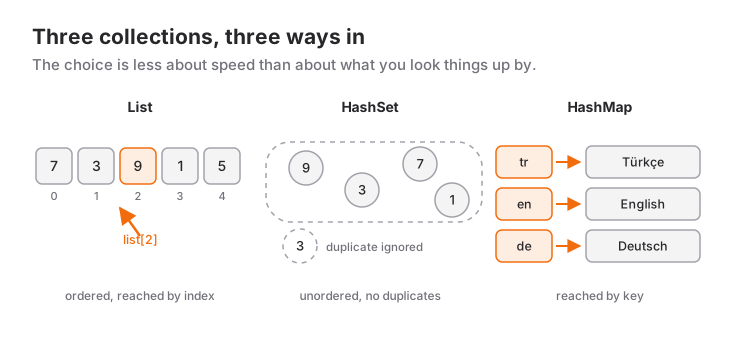
Comparing List, Set and Map
| Property | List | Set | Map |
|---|---|---|---|
| Order | Insertion order | Insertion order for literals, no guarantee for HashSet |
Insertion order for literals, no guarantee for HashMap |
| Duplicate values | Allowed | Not allowed | Keys no, values yes |
| Access | By index | Only "is it there?" and iteration | By key |
| Cost of "is it in there?" | Checks every element | Constant time on average | Constant time on average for a key |
The choice usually depends less on speed than on the question "what will I look the data up by?":
- List: Anything where order matters. A shopping cart, messages, results shown on screen.
- Set: Things where duplicates make no sense. Selected tags, favorite IDs, records already seen.
- Map: Anything looked up by a key. Settings, a cache by ID, JSON data.
Collections in Flutter
List is the most used collection in Flutter. A ListView builds one row for each element in the list:
import 'package:flutter/material.dart';

class ProductList extends StatelessWidget {
  const ProductList({super.key});

  static const products = ['Apple', 'Pear', 'Banana'];

  @override
  Widget build(BuildContext context) {
    return ListView.builder(
      itemCount: products.length,
      itemBuilder: (context, index) => ListTile(title: Text(products[index])),
    );
  }
}
A Set is a perfect fit for holding selection state. Asking whether an item is selected and toggling the selection each take a single line:
final selected = <String>{};

void toggleSelection(String product) {
  if (!selected.remove(product)) {
    selected.add(product); // remove returned false, so it wasn't there: add it
  }
}
The result of jsonDecode arrives as a Map<String, dynamic>; when reading its fields, the rules from the type conversions post apply.
Common Mistakes
- Using a List for everything and searching it with
containsover and over; for unique, frequently searched data, choose a Set. - Writing
{}for an empty Set; that creates a Map, so use<T>{}. - Trying to assign the result of
sortto a variable;sortchanges the list in place and returnsvoid. - Using
asinside==; it throws when compared with an object of another type. - Overriding
==and forgettinghashCode; Set and Map can't find the object. - Adding
!to a value read from a Map; the app crashes when the key is missing. - Using
firston a list that might be empty; preferfirstOrNull.
Next Step
When working with data, things don't always go to plan: a file is missing, JSON arrives in an unexpected shape, the network connection drops. The next topic is error handling with try-catch and async/await.
Resources
Contact:
Frequently Asked Questions
Is there a difference between HashSet and Set, or HashMap and Map?
Set and Map are abstract interfaces; the {} literal produces a LinkedHashSet or LinkedHashMap by default, which keeps insertion order. HashSet and HashMap from dart:collection give no ordering guarantee. In everyday Flutter code, Set and Map literals are usually all you need.
Why must hashCode and operator == be overridden together?
When Set and Map look up an element, they check hashCode first and then confirm with ==. If you override only one of them, objects that should be equal can be treated as different. Dart's rule is clear: if == says two objects are equal, their hashCode must be equal too.
Why does where return an Iterable instead of a List?
where returns a lazy Iterable; the elements are only computed when you iterate over them. To access items by index or pass the result to ListView.builder, call .toList().
How do I create an empty Set?
Write <String>{} or Set<String>(). An untyped {} creates an empty Map; writing var s = {}; and then calling s.add(...) is a compile error.
Related Posts
Flutter Camera Without Forcing Orientation: Three Bugs and Their Fixes
A rotated preview, a freeze when recording starts and a dead camera: three Flutter camera bugs from Recapday and the code that fixed each one.
Best Flutter Teacher Selection: Mobile App Expert Guide
Private Flutter tutor, video course or bootcamp? How to judge a teacher in a trial lesson, what order to learn in, and when tutoring is not worth it.
Dart Error Handling: Try-Catch and Asynchronous Operations
Targeted try-catch with on, rethrow, custom exceptions, Future, async/await, timeouts, parallel waiting, and safe setState calls in Flutter with Dart.