Dart Inheritance and Polymorphism: A Practical Guide
Last updated:
8 min read

Inheritance is the object-oriented tool that new programmers fall for fastest and overuse soonest. A pattern I see often in lessons: one class is derived from another because the two share a couple of fields, and a few weeks later there's a five-level hierarchy nobody dares to touch. This post covers everything you need to use inheritance in the right places: extends, super, @override, polymorphism, abstract classes, safe type checks, and the class modifiers that arrived with Dart 3, such as sealed, final and base.
In the previous post we built "has-a" relationships with enums and composition. Inheritance models the "is-a" relationship.
Live Demo: Inheritance and Polymorphism
Try inheritance and polymorphism concepts interactively:
What Is Inheritance?
With inheritance, one class takes over the fields and methods of another. The class that passes things down is the superclass (or parent), and the class that receives them is the subclass (or child).
The relationship goes one way: the subclass has everything the superclass has, while the superclass knows nothing about what the subclass adds. In Dart a class can extends only one class; to share behavior from several sources there are mixins, which we cover in the post on interfaces and implements.
A First Example: House, Palace and Villa
class House {
  final int windowCount;

  const House(this.windowCount);

  String describe() => 'a house with $windowCount windows';
}

class Palace extends House {
  final int towerCount;

  const Palace(super.windowCount, {required this.towerCount});

  @override
  String describe() => '${super.describe()} and $towerCount towers';
}

class Villa extends House {
  final bool hasGarage;

  const Villa(super.windowCount, {this.hasGarage = false});
}

void main() {
  const house = House(4);
  const palace = Palace(50, towerCount: 3);
  const villa = Villa(12, hasGarage: true);

  print(house.describe());  // a house with 4 windows
  print(palace.describe()); // a house with 50 windows and 3 towers
  print(villa.describe());  // a house with 12 windows
  print(villa.hasGarage);   // true
}
Palace and Villa get the windowCount field and the describe method from House; each one adds only what makes it different (towers, a garage). What's shared lives at the top; what varies lives below.
Reaching the Superclass with super
The super keyword shows up in two places:
- In the constructor:
Palace(super.windowCount, ...)passes the value straight to the superclass constructor. This is the "super parameters" feature from Dart 2.17, a shorter form of the: super(windowCount)syntax you'll see in older examples. - Inside a method:
super.describe()calls the superclass method. Instead of rewriting the parent's sentence,Palace.describereuses it and appends to it. Use this pattern when you want to extend behavior rather than replace it entirely.
@override: The Subclass's Own Behavior
A subclass can replace a method it inherited with its own body. This is called overriding:
class Animal {
  void makeSound() {
    print('No sound');
  }
}

class Mammal extends Animal {}

class Cat extends Mammal {
  @override
  void makeSound() => print('Meow');
}

class Dog extends Mammal {
  @override
  void makeSound() => print('Woof woof');
}

class Fox extends Mammal {
  // makeSound not written: the body from Animal is used
}

void main() {
  Cat().makeSound();    // Meow
  Dog().makeSound();    // Woof woof
  Fox().makeSound();    // No sound
  Animal().makeSound(); // No sound
}
Which body runs is decided starting from the object's actual class: if Fox has no makeSound, Dart looks at Mammal, and if it's not there either, at Animal. Whether the method exists at all is checked at compile time; if you call a method that isn't anywhere in the chain, the code doesn't compile.
The @override annotation is optional, but always write it. If the superclass has no method with that name (say you typed makesound without the capital letter), the analyzer warns you. Without the annotation, that typo silently defines a brand-new method.
Abstract Classes: A Contract Instead of "No Sound"
The example above has a design problem: we forgot to give Fox a sound, and the program glossed over it with "No sound." Putting a meaningless default body in the superclass hides forgotten overrides. The better approach is to make Animal abstract and leave the method without a body:
abstract class Animal {
  String get name;
  String makeSound(); // No body: every subclass must implement it

  void introduce() => print('$name: ${makeSound()}');
}

class Cat extends Animal {
  @override
  String get name => 'Cat';

  @override
  String makeSound() => 'Meow';
}

class Fox extends Animal {
  @override
  String get name => 'Fox';

  @override
  String makeSound() => 'Yip yip';
  // Without this method, the code would not compile.
}

void main() {
  // Animal(); // Error: an abstract class can't be instantiated
  Cat().introduce(); // Cat: Meow
  Fox().introduce(); // Fox: Yip yip
}
An abstract class can carry both a contract (the body-less makeSound) and shared behavior (introduce). That mix is what sets it apart from interfaces, which contain only the contract.
Polymorphism: Same Call, Different Behavior
Polymorphism means that even when a variable's type is the superclass, a call runs the body from the object's actual class.
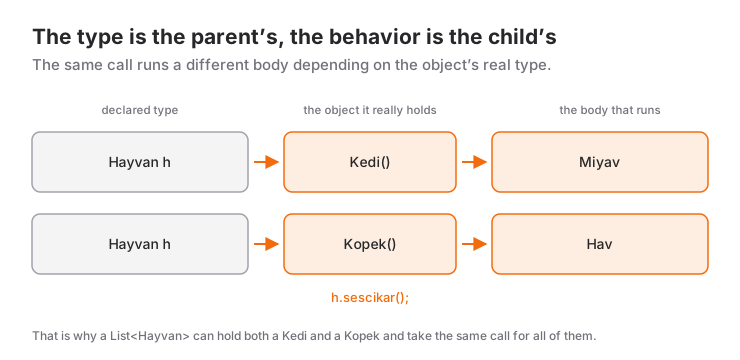
The diagram uses the Turkish names from the original example: Hayvan is Animal, Kedi is Cat, Kopek is Dog, and sesCikar is makeSound.
Animal a = Cat();
print(a.makeSound()); // Meow
The variable a has the type Animal, but the object it holds is a Cat. The compiler lets you call only members defined in Animal through a; at runtime, Cat's body is what runs.
The real power here is managing different subclasses through a single type, whether inside a List or as a function parameter:
void introduceAll(List<Animal> animals) {
  for (final animal in animals) {
    animal.introduce();
  }
}

void main() {
  introduceAll([Cat(), Fox()]);
  // Cat: Meow
  // Fox: Yip yip
}
introduceAll has no idea which animals exist. When you add a Dog class tomorrow, you don't have to touch a single line of this function. That's the mark of well-designed polymorphism: adding a new type doesn't require changing existing code.
Type Checks: is, as and Patterns
A subclass object can always be assigned to the superclass type (upcasting); this is automatic and safe. The other direction (downcasting) is risky:
void main() {
  House house = const Palace(50, towerCount: 3); // Upcasting: automatic

  // Villa villa = house as Villa; // TypeError: this object is not a Villa

  if (house is Palace) {
    // Inside the block, house is automatically promoted to Palace
    print('Towers: ${house.towerCount}');
  }
}
An earlier version of this post presented House(10) as Villa as a "forced conversion." That code compiles but throws a TypeError at runtime: as doesn't turn an object into another class, it only claims "this already is a Villa." We covered the general logic of as in the post on type conversions. The rule is simple: check with is first, and once you've checked, you don't need as.
Dart 3 patterns can do the same check together with fields:
String summarize(House house) => switch (house) {
      Palace(:final towerCount) => 'Palace with $towerCount towers',
      Villa(hasGarage: true) => 'Villa with a garage',
      Villa() => 'Villa without a garage',
      _ => 'Ordinary house',
    };

void main() {
  print(summarize(const Villa(12, hasGarage: true))); // Villa with a garage
  print(summarize(const House(4)));                   // Ordinary house
}
Palace(:final towerCount) checks the type and extracts the towerCount field into a variable of the same name. Villa(hasGarage: true) only matches villas that have a garage. Cases are tried from top to bottom, so the specific case comes before the general one.
Dart 3 Class Modifiers
Dart 3 introduced modifiers that control how a class may be extended or implemented. One important detail: these restrictions apply outside the library (usually the file) where the class is defined. Inside the same file you can still extend the class.
sealed: A Closed Hierarchy and Exhaustive switch
The one you'll use most in everyday app code is sealed. In the enum post we modeled screen states with an enum and hit a limit: enum values can't carry their own data. Sealed classes remove that limit:
sealed class LoadState {}

class Loading extends LoadState {}

class Success extends LoadState {
  final List<String> items;
  Success(this.items);
}

class Failure extends LoadState {
  final String message;
  Failure(this.message);
}

String summary(LoadState state) => switch (state) {
      Loading() => 'Loading...',
      Success(:final items) => '${items.length} records received',
      Failure(:final message) => 'Error: $message',
    };

void main() {
  print(summary(Success(['a', 'b'])));    // 2 records received
  print(summary(Failure('No connection'))); // Error: No connection
}
A sealed class is implicitly abstract, so it can't be instantiated directly. Its direct subclasses must be defined in the same library, which means the compiler knows all of them. The result: if you forget the Failure case in a switch, the code doesn't compile, just like with an enum. On top of that, each state carries its own data (items, message).
The Other Modifiers
abstract: Can't be instantiated and may contain body-less methods. Can be extended and implemented from anywhere.base: Outside its library it can only be extended withextends, not implemented withimplements. This guarantees that the superclass constructor and private members exist in every subtype.interface: Outside its library it can only be implemented withimplements, not extended withextends. Details in the interface post.final: Outside its library it can be neither extended nor implemented. It closes the hierarchy completely.sealed: Closed to the outside likefinal, and in addition it enables exhaustiveness checking over its subtypes.
Subtypes of a base or final class in the same library must themselves be marked base, final or sealed, so the restriction can't be bypassed further down the hierarchy.
If you work inside a single app, you'll rarely need the modifiers other than sealed. Their real value shows when you write a package or a module shared between teams: they state explicitly how a class may be used from outside and limit whose code can break when you change that class later.
Inheritance in Flutter
In Flutter, every widget starts with inheritance:
import 'package:flutter/material.dart';

class Greeting extends StatelessWidget {
  const Greeting({super.key, required this.name});

  final String name;

  @override
  Widget build(BuildContext context) {
    return Text('Hello $name');
  }
}
StatelessWidget is the superclass and Greeting the subclass. super.key is the super parameter we saw above, and the build method is an override. You set up this pattern every time you create your own widget.
One thing to keep in mind: Flutter uses inheritance only for this contract. You don't extend Text or Container to customize them; you combine them inside build. In other words, widgets themselves are built with inheritance, and their contents with composition.
Common Mistakes
- Using inheritance just for a few shared fields; if the relationship doesn't read as "is a," choose composition.
- Building deep hierarchies; chains longer than two or three levels make change hard.
- Putting meaningless default bodies like "No sound" in the superclass; an abstract method catches a forgotten override at compile time.
- Downcasting with
aswithout anischeck. - Leaving out
@override; a typo silently creates a new method. - Relying on switches with a
defaultbranch for state models instead ofsealed.
Next Step
To get past inheritance's "single superclass" limit and connect classes through a contract alone, the next topic is interfaces and implements. There we also cover abstract interface class and mixins.
Resources
For questions and suggestions:
Frequently Asked Questions
What is the difference between extends and implements?
extends inherits both the fields and the method bodies of the superclass, and you can only extend a single class. implements takes only the contract; you write every member yourself, and you can implement several interfaces at once.
What happens if I forget @override?
The code still compiles and the method is still overridden; the annotation is not mandatory. The analyzer does warn you, though, and it catches typos when the superclass has no method with that name, so always add it.
How do I avoid errors when downcasting?
Check with is before using as. Inside an if (house is Villa) block Dart automatically promotes the local variable to Villa (type promotion), so you usually don't need as at all. When several subtypes are involved, a switch with patterns is more readable.
What is a sealed class for?
All direct subtypes of a sealed class are defined in the same library, so the compiler knows every one of them. A switch over such a type must be exhaustive; if you forget a subtype, the code doesn't compile. It's ideal for modeling states that carry their own data (loading, success, error).
Related Posts
Dart Interfaces and implements: Contracts for Classes
Contracts with implements in Dart, Dart 3's interface class and abstract interface class, how mixins with differ, and an example of testable code.
Dart Enum and Composition: How to Organize Your Code
Dart 3 enums with fields and methods, exhaustive checks with switch expressions, and composition as a has-a relationship, with examples and common mistakes.
Flutter Camera Without Forcing Orientation: Three Bugs and Their Fixes
A rotated preview, a freeze when recording starts and a dead camera: three Flutter camera bugs from Recapday and the code that fixed each one.