Dart Type Conversions and Static Variables Explained
Last updated:
7 min read

I tell everyone who starts Flutter the same thing in the first lessons: getting a few core Dart behaviors right before touching widgets saves hours in the weeks that follow. This post covers two of them. The first is type conversion, because almost everything you receive in Flutter (the contents of a TextField, a JSON response) rarely arrives in the type you need. The second is static members, because answering "does this value belong to the object or to the class?" correctly is the first step of class design.
Live Demo: Dart Type Conversions
Try type conversions and static concepts interactively:
Why Doesn't Dart Convert Automatically?
Dart is statically typed and never converts between types silently. This is the first surprise for learners coming from JavaScript:
void main() {
  // int number = "3";        // Compile error: a String can't be assigned to int
  // print("Age: " + 25);     // Compile error: can't add an int to a String

  final age = 25;
  print("Age: $age");         // The right way: string interpolation
}
That strictness is not an obstacle but a guarantee: you write every conversion explicitly, so you also know exactly where an error can occur.
From String to Number: parse and tryParse
Each number type has its own parse method for turning text into a number:
void main() {
  final a = int.parse('42');          // 42
  final b = double.parse('3.14');     // 3.14
  final c = num.parse('7');           // 7 (int)
  final d = num.parse('7.5');         // 7.5 (double)

  final hex = int.parse('ff', radix: 16);    // 255
  final binary = int.parse('1010', radix: 2); // 10

  print('$a $b $c $d $hex $binary');
}
The parse methods throw a FormatException when the text is not a valid number. Both int.parse('3a') and int.parse('3.5') fail; the second one surprises learners the most, because "3.5" is a number, just not an integer.
Use tryParse for data you can't trust. Instead of throwing, it returns null, and you supply a default with ??:
void main() {
  final number = int.tryParse('3a');       // null
  final safe = int.tryParse('3a') ?? 0;    // 0
  print('$number $safe');
}
Sometimes catching the error is the better choice; see try-catch and async/await in Dart for that. As a rule of thumb: if invalid input is an expected situation, use tryParse; if it is truly exceptional, use parse with try-catch.
Converting User Input
In Flutter, a TextField always hands you a String. A function that calculates an age could look like this:
String futureAgeMessage(String input) {
  final age = int.tryParse(input.trim());

  if (age == null) return 'Please enter your age as a number.';
  if (age < 0 || age > 130) return 'Please enter a valid age.';

  // Here age is no longer int? but int: the null check narrowed the type.
  return 'In 5 years you will be ${age + 5}.';
}

void main() {
  print(futureAgeMessage(' 25 '));   // In 5 years you will be 30.
  print(futureAgeMessage('twenty')); // Please enter your age as a number.
}
There are three habits here: cleaning the input with trim(), converting it with tryParse, and checking that the converted value is in a sensible range. The last one is often forgotten; -5 is a valid integer but not a valid age.
The comment on the last line matters too: after the age == null check, Dart knows on its own that the variable is int, not int?. This is called type promotion, and it removes the need for the ! operator.
From Number to String
The other direction is easier, but formatting is usually the real work:
void main() {
  final price = 1249.5;

  print(price.toString());                 // 1249.5
  print(price.toStringAsFixed(2));         // 1249.50
  print('Total: \$${price.toStringAsFixed(2)}');
  print(7.toString().padLeft(2, '0'));     // 07 (for hours/minutes)
}
toStringAsFixed returns a String; don't feed the result back into calculations. If you need locale-aware formats such as currency symbols and thousands separators, the NumberFormat class in the intl package is built for exactly that.
Between int and double
Dart is flexible with number literals: double x = 3; is valid. But an int variable can't be assigned to a double variable directly:
void main() {
  int count = 3;
  // double ratio = count;     // Compile error
  double ratio = count.toDouble();

  const value = 3.7;
  print(value.toInt());   // 3  (drops the fractional part)
  print(value.round());   // 4  (rounds to nearest)
  print(value.floor());   // 3  (down)
  print(value.ceil());    // 4  (up)

  print((-3.7).toInt());  // -3 (truncates toward zero)
  print((-3.7).floor());  // -4
  print(-3.7.floor());    // -3 (careful: 3.7.floor() runs first, then the minus sign)
  print(ratio);
}
That last line is one of the misconceptions I see most often in lessons: the minus sign is applied after the method call. Don't forget the parentheses when working with negative numbers.
Division has a similar trap. The / operator always returns a double:
void main() {
  final total = 7;
  final count = 2;

  // int average = total / count;  // Compile error: the result is a double
  print(total / count);   // 3.5
  print(total ~/ count);  // 3  (integer division)
  print(total % count);   // 1  (remainder)
}
as, is and Patterns: Checks, Not Conversions
A point learners mix up constantly: as is not a conversion operator. It doesn't turn a value into another type; it only tells the compiler "this value already is of that type." If you're wrong, you get a TypeError at runtime:
void main() {
  Object value = '42';

  // final number = value as int;   // TypeError: a String is not an int

  if (value is String) {
    // Inside this block, value is automatically promoted to String.
    final number = int.parse(value);
    print(number + 1); // 43
  }
}
So you get the number 42 out of the text '42' with int.parse, not with as. is, on the other hand, checks the type and promotes the variable to that type inside the block.
In real projects this shows up most often with JSON. jsonDecode produces a Map<String, dynamic>, and a price field may arrive as 20 one time and 19.9 the next. The first decodes as an int, the second as a double; code that says json['price'] as double breaks on the first. Dart 3 switch expressions and patterns solve this cleanly:
double readPrice(Object? raw) {
  return switch (raw) {
    int n => n.toDouble(),
    double n => n,
    String s => double.tryParse(s) ?? 0.0,
    _ => 0.0,
  };
}

void main() {
  final json = <String, dynamic>{'name': 'Pencil', 'price': 20};
  print(readPrice(json['price']));  // 20.0
  print(readPrice('19.9'));         // 19.9
  print(readPrice(null));           // 0.0
}
There is also a shorter route: for a field you know is numeric, (json['price'] as num).toDouble() accepts both int and double values.
Dart 3.0 also added bool.parse and bool.tryParse. By default they recognize only the strings 'true' and 'false'; pass caseSensitive: false to ignore letter case.
Static Members: They Belong to the Class, Not the Object
A regular (instance) field lives as a separate copy in every object. A static field belongs to the class, and there is exactly one copy no matter how many objects you create.
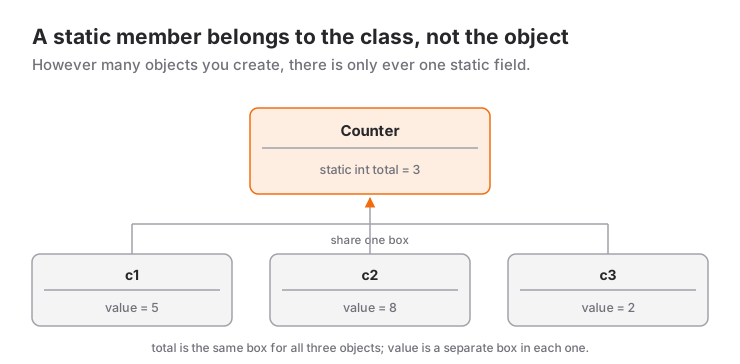
Let's turn the diagram into code:
class Counter {
  static int total = 0; // Belongs to the class, one copy
  int value = 0;        // Separate in each object

  void increment() {
    value++;
    total++; // Accessible without a prefix from inside the class
  }
}

void main() {
  final c1 = Counter();
  final c2 = Counter();

  c1.increment();
  c1.increment();
  c2.increment();

  print(c1.value);      // 2
  print(c2.value);      // 1
  print(Counter.total); // 3
  // print(c1.total);   // Compile error: static members aren't accessed through instances
}
From outside the class you reach a static member only through the class name (Counter.total). People coming from Java may be used to accessing it through an instance; Dart doesn't allow that.
static const, static final and static variables
All three belong to the class; they differ in when the value is determined and whether it can change:
class Settings {
  static const maxUsernameLength = 20;             // Known at compile time
  static const requestTimeout = Duration(seconds: 10);
  static final startedAt = DateTime.now();         // Computed once, on first access
  static int launchCount = 0;                      // Mutable
}
static const: The value must be known at compile time. The right choice for fixed limits, durations and key names.static final: The value is computed at runtime, once, the first time the field is accessed, and never changes afterwards. Static fields in Dart aren't initialized until they're used anyway.- Mutable fields like
static int: These create state shared by the whole app. Harmless in small examples, but keeping the data a Flutter screen displays in such a field leads to problems like the UI never learning about changes. That job belongs to state management tools such as Provider.
Earlier versions of this post had an example like static late int value;. Here late promises the compiler "I will assign this before reading it"; if the promise is broken, you get a LateInitializationError. If you can give an initial value (static int value = 0;), you don't need late.
Static Methods
Static methods belong to the class too and don't run on an object. That's why they have no this and can't access instance fields:
class Temperature {
  final double celsius;
  const Temperature(this.celsius);

  static double fromFahrenheit(double f) => (f - 32) * 5 / 9;

  // static void printIt() => print(celsius); // Error: no this in a static method
}

void main() {
  print(Temperature.fromFahrenheit(212)); // 100.0
}
Don't Put Everything in a Static Class
Learners with a Java or C# background often collect helper functions like this:
class Calculation {
  static double add(double a, double b) => a + b;
  static double subtract(double a, double b) => a - b;
}
In Dart this is unnecessary, because functions don't have to live inside a class. The Effective Dart guide also recommends avoiding classes that contain only static members. Top-level functions do the same job more simply:
double add(double a, double b) => a + b;
double subtract(double a, double b) => a - b;

void main() {
  print(add(5, 3)); // 8.0
}
The guide's exception is grouping related constants; the Settings class above is that kind of use. A fixed set of related values, however, is often better expressed as an enum.
Common Mistakes
- Converting user input with
parseinstead oftryParse, and withouttrim(). - Believing
as intcan turn a string into a number. - Assigning the result of
/to anint; integer division uses~/. - Forgetting parentheses with negative numbers:
-3.7.floor()and(-3.7).floor()give different results. - Reading a JSON number with
as double; going throughnumandtoDouble()is safer. - Keeping state that the screen displays in mutable static fields.
Next Step
Once types and static members are solid, the natural continuation is enums and composition, which model fixed sets of values. When the Dart foundation is complete, you can move on to the UI side with Flutter's widget tree and layout logic.
Resources
Contact me:
Frequently Asked Questions
What is the difference between int.parse and int.tryParse?
int.parse throws a FormatException when the text is not a valid number. int.tryParse returns null instead, which makes it the more practical choice for data you can't trust, such as user input.
Can I convert a String to an int with as?
No. as doesn't convert anything; it only asserts that the value already has that type. '42' as int throws a TypeError at runtime; to get a number from text, use int.parse or int.tryParse.
Can I access a static variable through an object?
No. From outside the class, Dart lets you reach static members only through the class name (Counter.total); trying to reach them through an instance does not compile. Inside the class's own methods you can use them without a prefix.
What is the difference between static final and static const?
const requires the value to be known at compile time. A static final field is computed once at runtime, the first time it is accessed, and never changes afterwards.
Related Posts
Flutter Camera Without Forcing Orientation: Three Bugs and Their Fixes
A rotated preview, a freeze when recording starts and a dead camera: three Flutter camera bugs from Recapday and the code that fixed each one.
Dart Interfaces and implements: Contracts for Classes
Contracts with implements in Dart, Dart 3's interface class and abstract interface class, how mixins with differ, and an example of testable code.
Dart Inheritance and Polymorphism: A Practical Guide
Inheritance in Dart with extends, super and @override, polymorphism, abstract classes, safe type checks, and Dart 3's sealed, final and base class modifiers.