Dart Interfaces and implements: Contracts for Classes
Last updated:
8 min read

In the post on inheritance and polymorphism we saw that with extends a class derives from exactly one superclass. Real objects, however, often have several abilities: an apple can be eaten and squeezed, and a payment service should keep a log while also being replaceable by a fake during tests. Dart offers three separate tools for these needs: abstract classes, interfaces and mixins.
The point learners confuse most is assuming these three do the same job. Let's separate them briefly:
- Abstract class: Partial implementation and contract together. It sets up an "is-a" relationship.
- Interface: Contract only. It says "can do this," and the implementing class writes the code.
- Mixin: A ready-made package of behavior. It hands you code but doesn't create an "is-a" relationship.
This post covers all three, together with Dart 3's class modifiers.
Live Demo: Abstract Class and Implements
Learn abstract class and implements usage interactively:
In Dart, Every Class Is an Interface
People coming from Java or C# are used to declaring a separate construct with the interface keyword. In Dart, every class implicitly defines its own interface as well. That means you can implements any class:
class Greeter {
  final String name;
  Greeter(this.name);

  String greet(String who) => 'Hello $who, I am $name.';
}

class FakeGreeter implements Greeter {
  @override
  String get name => 'Test';

  @override
  String greet(String who) => 'Hi $who';
}
implements takes only the contract; none of Greeter's bodies come along. Notice that even the name field had to be written again. Fields are part of the interface too and must be implemented as getters (and as setters for mutable fields).
Dart 3: abstract interface class
Implementing a concrete class is possible, but it leaves your intent unclear. The interface modifier introduced in Dart 3 is the explicit way to say "this class is a contract." For a pure interface that contains only a contract, you write abstract interface class:
abstract interface class Eatable {
  void howToEat();
}

abstract interface class Squeezable {
  void howToSqueeze();
}

class Apple implements Eatable, Squeezable {
  @override
  void howToEat() => print('Bite and chew');

  @override
  void howToSqueeze() => print('Put it in a juicer and squeeze');
}

void main() {
  final apple = Apple();

  print('How do you eat an apple?');
  apple.howToEat();

  print('\nHow do you squeeze an apple?');
  apple.howToSqueeze();
}
Output:
How do you eat an apple?
Bite and chew

How do you squeeze an apple?
Put it in a juicer and squeeze
An earlier version of this post defined the interfaces as void howToSqueeze() {}, with empty braces. That small-looking difference matters: {} gives the method an empty body, so the method is no longer abstract. If someone extends such a class and forgets to write the method, the compiler says nothing, and a method that does nothing runs silently. When you're defining a contract, leave the method without a body and end it with a semicolon.
Why Two Separate Interfaces?
Because not every object has every ability. A stone can't be eaten but can be broken; bread can be eaten but not squeezed. Splitting abilities into small interfaces lets each class take on only the contracts it can actually fulfill:
abstract interface class Breakable {
  void howToBreak();
}

class Stone implements Breakable {
  @override
  void howToBreak() => print('With a hammer');
}
If you do the opposite and put eating, squeezing, peeling and drying methods into one big "Fruit" interface, every class that implements it has to fill the methods it doesn't need with empty bodies. @override methods left empty are a sign that the interface is too big.
The Difference Between extends and implements
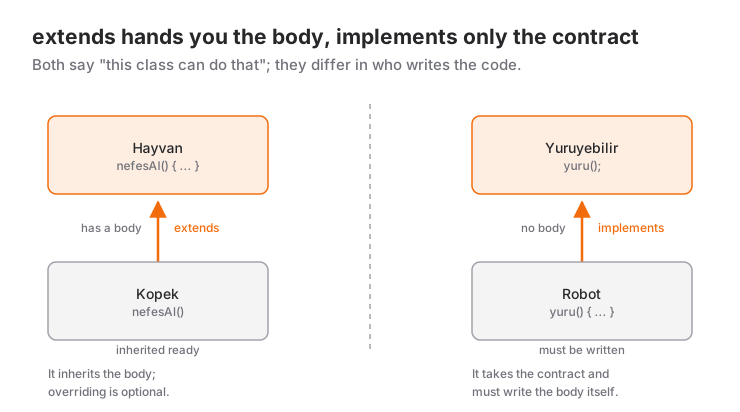
| extends | implements | with (mixin) | |
|---|---|---|---|
| How many? | Only one | Several | Several |
| Do bodies come along? | Yes | No | Yes |
| Must you write every member? | No, only the abstract ones | Yes, all of them | No |
| Relationship | "Is a" | "Can do" | "Uses this behavior" |
The code for the diagram's example uses the same Turkish names (Hayvan = animal, Kopek = dog, nefesAl = breathe, Yuruyebilir = can walk, yuru = walk):
class Hayvan {
  void nefesAl() => print('Breathing');
}

class Kopek extends Hayvan {
  // nefesAl came ready made; we may override it if we want
}

abstract interface class Yuruyebilir {
  void yuru();
}

class Robot implements Yuruyebilir {
  @override
  void yuru() => print('The robot walks'); // Must be written
}
A class can also use both at once, as in class Cat extends Animal implements Walkable.
The Same Abstract Class, Two Different Uses
This is the situation that confuses learners the most: an abstract class can be used with both extends and implements, and the result is different.
abstract class Shape {
  void draw() => print('Drawing a shape');
  double area();
}

class Square extends Shape {
  final double side;
  Square(this.side);

  @override
  double area() => side * side;
  // draw() came ready made
}

class Circle implements Shape {
  final double r;
  Circle(this.r);

  @override
  double area() => 3.14159 * r * r;

  @override
  void draw() => print('Drawing a circle'); // Must be written even though it has a body
}Square, which uses extends, only writes the abstract area method. Circle, which uses implements, has to write everything, including draw, whose body was already there.
Dart 3 Modifiers: Who Can Do What?
Since Dart 3 you can decide how a class may be used from outside the library (usually the file) that defines it:
| Declaration | Can be instantiated? | extends from outside | implements from outside |
|---|---|---|---|
class |
Yes | Yes | Yes |
abstract class |
No | Yes | Yes |
interface class |
Yes | No | Yes |
abstract interface class |
No | No | Yes |
base class |
Yes | Yes | No |
final class |
Yes | No | No |
If you're wondering why interface class exists: when a class's methods call each other, someone who extends it from outside and overrides one method can break the others in unexpected ways. interface closes off that risk; using and implementing the class is allowed, but nobody can inherit from it and change its internals. These restrictions matter most when you write a package; inside a single app, the form you'll use most is abstract interface class.
Mixins: Ready-Made Behavior, Not a Contract
Sometimes what you need isn't a contract but a piece of code that repeats across several classes. Instead of copying a behavior like logging into every class, you use a mixin:
mixin Logger {
  void log(String message) => print('[$runtimeType] $message');
}

class PaymentService with Logger {
  void pay(double amount) {
    log('Payment of \$$amount started');
  }
}

class CartService with Logger {
  void clear() => log('Cart cleared');
}

void main() {
  PaymentService().pay(250); // [PaymentService] Payment of $250.0 started
  CartService().clear();     // [CartService] Cart cleared
}
If a mixin should only be used with a particular type, you restrict it with on. That lets the mixin access that type's members:
abstract class Animal {
  String get name;
}

mixin Swimmer on Animal {
  void swim() => print('$name is swimming');
}

class Duck extends Animal with Swimmer {
  @override
  String get name => 'Duck';
}

void main() {
  Duck().swim(); // Duck is swimming
}
A pattern common in older tutorials no longer works in Dart 3: mixing in a plain class declaration with with. In Dart 3 a class can only be used as a mixin if it's declared as mixin or mixin class. A mixin class can be used both as a class and as a mixin; Flutter's ChangeNotifier is declared this way, which is why you can write either extends ChangeNotifier or with ChangeNotifier. In your own code, following Effective Dart's advice and declaring either a pure mixin or a pure class is clearer.
Interfaces in Real Projects: Testable Code
The most valuable use of interfaces in everyday Flutter development is making a dependency replaceable. Think of a layer that fetches user data. In the app it loads the data from a server; in tests it should return fixed data without ever touching the server:
class User {
  final int id;
  final String name;
  const User(this.id, this.name);
}

abstract interface class UserRepository {
  Future<User?> fetch(int id);
}

class FakeUserRepository implements UserRepository {
  @override
  Future<User?> fetch(int id) async =>
      id == 1 ? const User(1, 'Ayse') : null;
}

class ProfileService {
  final UserRepository repository; // Depends on the contract, not a concrete class

  ProfileService(this.repository);

  Future<String> title(int id) async {
    final user = await repository.fetch(id);
    return user?.name ?? 'Unknown user';
  }
}

Future<void> main() async {
  final service = ProfileService(FakeUserRepository());
  print(await service.title(1)); // Ayse
  print(await service.title(2)); // Unknown user
}
ProfileService doesn't know where the data comes from; it only knows the UserRepository contract. In the app, an ApiUserRepository class that sends an HTTP request implements the same contract, and in tests FakeUserRepository is used. Here composition and interfaces work together: the service has a repository, and which class that repository is gets decided from outside. For details on async and await, see try-catch and async/await.
Flutter itself works on this idea. For example, ChangeNotifier, ValueNotifier and animation controllers all implement the shared Listenable contract, which is why any of them can be handed to the same widget, such as ListenableBuilder. You also don't need to write your own "tappable" interface for touch events; GestureDetector takes care of that.
Help from Your Editor
When you type implements Eatable on a class in VS Code or Android Studio, an error marker appears because of the missing methods. The quick-fix menu (the light bulb icon) offers to create the missing overrides and adds all the method signatures for you. Then you only fill in the bodies.
Common Mistakes
- Defining interface methods with
{}; the method stops being abstract, and forgotten implementations slip through silently. - Designing one big interface and filling the implementing classes with empty methods.
- Using
implementsjust to share code; if you need ready-made behavior, a mixin or composition fits better. - Trying to use a plain
classwithwithin Dart 3; you needmixinormixin class. - Tying services to concrete classes; code that depends on a contract stays testable.
Next Step
Now that you can design objects, we can move on to ways of keeping them together: Dart collections: List, Set and Map. The same distinction exists in C#; you'll find the counterpart in the post on interfaces vs. abstract classes.
Resources
If you want to work with me:
Frequently Asked Questions
Does Dart have a separate interface keyword?
In Dart every class implicitly defines an interface, so you can implement any class. The interface modifier introduced in Dart 3 prevents a class from being extended outside its own library and allows only implements. For a pure contract, write abstract interface class.
Can a class use both extends and implements?
Yes. With something like class Cat extends Animal with Swimmer implements Walkable, Runnable you can derive from one superclass, use a mixin and implement several interfaces at the same time. The order is always extends, with, implements.
Can an abstract class contain methods with a body?
Yes, an abstract class can contain both methods with a body and abstract methods without one. Classes that extend it get the implemented methods ready made; classes that implement it have to rewrite every method, with or without a body.
What is the difference between a mixin and implements?
implements takes only the contract and requires you to write every body. A mixin (with) adds the bodies to the class ready made. If you want to share a behavior's code, use a mixin; if you want to guarantee that a class has a certain ability, use an interface.
Related Posts
Dart Inheritance and Polymorphism: A Practical Guide
Inheritance in Dart with extends, super and @override, polymorphism, abstract classes, safe type checks, and Dart 3's sealed, final and base class modifiers.
Dart Enum and Composition: How to Organize Your Code
Dart 3 enums with fields and methods, exhaustive checks with switch expressions, and composition as a has-a relationship, with examples and common mistakes.
Flutter Camera Without Forcing Orientation: Three Bugs and Their Fixes
A rotated preview, a freeze when recording starts and a dead camera: three Flutter camera bugs from Recapday and the code that fixed each one.