Flutter Life Cycle: StatefulWidget and AppLifecycleState
Last updated:
5 min read

The first time I needed to make an API call, I wondered "Where should I write this?" In the build() method? No, because it would be called every time the screen refreshes. This is where the life cycle comes into play.
In Flutter, there are two types of widgets: StatelessWidget and StatefulWidget. StatelessWidget doesn't have a special life cycle (because it doesn't change), but StatefulWidget has a very rich life cycle. If the difference between the two, or how the widget tree is built, is still unclear, the widget tree and layout post is a good place to start.
Live Demo: Life Cycle Methods
Try StatefulWidget life cycle methods interactively:
💡 If the example above doesn't load, click DartPad to run it in a new tab.
StatefulWidget Life Cycle
A StatefulWidget's life progresses like this:
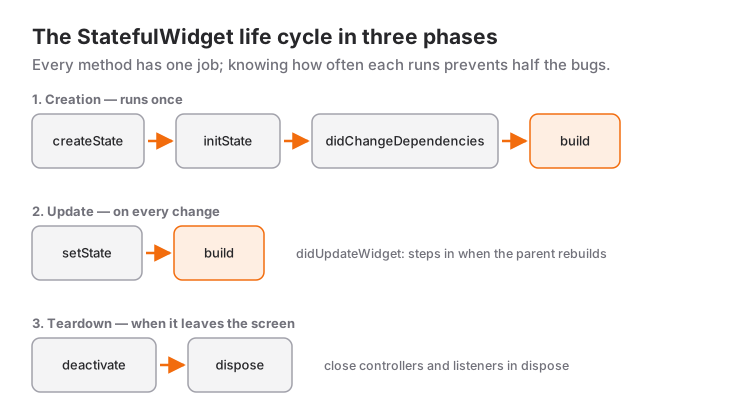
createState() → initState() → didChangeDependencies() → build()
                                         ↓
                    setState() ←→ build() ←→ didUpdateWidget()
                                         ↓
                                    dispose()
1. createState()
Called when the widget is first created. Creates the State object.
class MyWidget extends StatefulWidget {
  @override
  _MyWidgetState createState() {
    print('createState executed');
    return _MyWidgetState();
  }
}
When called: When the widget is created, only once.
What it's for: Returning the State class. Usually doesn't need customization.
2. initState()
Called immediately after the State object is created. Initial setup is done here.
class _MyWidgetState extends State<MyWidget> {
  int counter = 0;
  late Timer timer;

  @override
  void initState() {
    super.initState(); // Must call this!

    print('initState executed');

    // Initial setup
    counter = 0;
    _loadData();
    _startTimer();
  }

  void _loadData() async {
    // API call
    final data = await fetchDataFromAPI();
    setState(() {
      // Save data to state
    });
  }

  void _startTimer() {
    timer = Timer.periodic(Duration(seconds: 1), (timer) {
      setState(() {
        counter++;
      });
    });
  }

  @override
  Widget build(BuildContext context) {
    return Text('Counter: $counter');
  }
}
When called: When the widget is first created, only once.
What it's for:
- Assigning initial values to variables
- Making API calls
- Creating streams/controllers
- Starting timers
- Adding event listeners
Important: Don't forget to call super.initState()!
3. didChangeDependencies()
Called when the widget's dependencies change.
@override
void didChangeDependencies() {
  super.didChangeDependencies();

  print('didChangeDependencies executed');

  // Did theme change?
  final theme = Theme.of(context);

  // Did MediaQuery change? (screen size, orientation)
  final screenSize = MediaQuery.of(context).size;
}
When called:
- Right after
initState() - When InheritedWidget changes (Theme, MediaQuery, etc.)
What it's for:
- Operations dependent on context
- Catching Theme, Locale changes
Note: Can't use context in initState(), but can use it here.
4. build()
Creates the widget's view.
@override
Widget build(BuildContext context) {
  print('build executed');

  return Scaffold(
    appBar: AppBar(title: Text('Page')),
    body: Center(
      child: Text('Counter: $counter'),
    ),
  );
}
When called:
- After
didChangeDependencies() - Every time
setState()is called - After
didUpdateWidget() - When parent widget rebuilds
What it's for: Creating UI.
Important:
- Don't make API calls here!
- Don't start timers here!
- Can be called frequently, watch performance.
5. didUpdateWidget()
Called when parent widget changes and sends a new configuration.
class ParentWidget extends StatefulWidget {
  final String title;

  ParentWidget({required this.title});

  @override
  _ParentWidgetState createState() => _ParentWidgetState();
}

class _ParentWidgetState extends State<ParentWidget> {
  @override
  void didUpdateWidget(ParentWidget oldWidget) {
    super.didUpdateWidget(oldWidget);

    print('didUpdateWidget executed');

    // Compare old and new widget
    if (oldWidget.title != widget.title) {
      print('Title changed: ${oldWidget.title} → ${widget.title}');
      // Make necessary updates
    }
  }

  @override
  Widget build(BuildContext context) {
    return Text(widget.title);
  }
}
When called: When parent widget changes and rebuilds.
What it's for:
- Comparing old and new widgets
- Updating based on changed parameters
6. setState()
Used to update state and rebuild the widget.
class _CounterState extends State<Counter> {
  int count = 0;

  void _increment() {
    setState(() {
      count++; // State change
    });
    // At this point, build() is called again
  }

  @override
  Widget build(BuildContext context) {
    return Column(
      children: [
        Text('Count: $count'),
        ElevatedButton(
          child: Text('Increment'),
          onPressed: _increment,
        ),
      ],
    );
  }
}
When called: You call it manually.
What it's for: Notifying Flutter of state changes.
Important:
- Be careful with async operations
- Avoid unnecessary setState calls
- Don't call after widget is disposed
7. dispose()
Called before the widget is removed. Cleanup is done here.
class _MyWidgetState extends State<MyWidget> {
  late Timer timer;
  late StreamSubscription subscription;
  TextEditingController controller = TextEditingController();

  @override
  void initState() {
    super.initState();

    timer = Timer.periodic(Duration(seconds: 1), (timer) {
      // ...
    });

    subscription = someStream.listen((data) {
      // ...
    });
  }

  @override
  void dispose() {
    print('dispose executed - cleaning up');

    // Cancel timer
    timer.cancel();

    // Close stream
    subscription.cancel();

    // Dispose controller
    controller.dispose();

    super.dispose(); // Must call this last!
  }

  @override
  Widget build(BuildContext context) {
    return Container();
  }
}
When called: Before the widget is removed from the widget tree.
What it's for:
- Stopping timers
- Closing streams
- Disposing controllers
- Removing event listeners
- Preventing memory leaks
Important: super.dispose() must be called last!
Practical Example: API Call with Life Cycle
The pattern below is a hand-written loading flow: fetch the data in initState and push it to the screen with setState. If you want the same result with less code, FutureBuilder handles the loading, error and success states for you; for data that keeps arriving, StreamBuilder is the better fit.
class UserProfilePage extends StatefulWidget {
  final int userId;

  UserProfilePage({required this.userId});

  @override
  _UserProfilePageState createState() => _UserProfilePageState();
}

class _UserProfilePageState extends State<UserProfilePage> {
  bool isLoading = true;
  String? userName;
  String? errorMessage;

  @override
  void initState() {
    super.initState();
    print('1. initState - Making API call');
    _loadUserData();
  }

  @override
  void didChangeDependencies() {
    super.didChangeDependencies();
    print('2. didChangeDependencies - Context ready');
  }

  @override
  void didUpdateWidget(UserProfilePage oldWidget) {
    super.didUpdateWidget(oldWidget);
    print('3. didUpdateWidget - Did userId change?');

    // Reload if userId changed
    if (oldWidget.userId != widget.userId) {
      setState(() {
        isLoading = true;
        errorMessage = null;
      });
      _loadUserData();
    }
  }

  Future<void> _loadUserData() async {
    try {
      print('API call started: userId=${widget.userId}');

      // Simulated API call
      await Future.delayed(Duration(seconds: 2));

      // Check if widget is still mounted
      if (!mounted) return;

      setState(() {
        userName = 'User ${widget.userId}';
        isLoading = false;
      });

      print('API call completed');
    } catch (e) {
      if (!mounted) return;

      setState(() {
        errorMessage = 'Error: $e';
        isLoading = false;
      });
    }
  }

  @override
  Widget build(BuildContext context) {
    print('4. build - Creating UI');

    return Scaffold(
      appBar: AppBar(title: Text('Profile')),
      body: Center(
        child: isLoading
            ? CircularProgressIndicator()
            : errorMessage != null
                ? Text(errorMessage!)
                : Text('Hello, $userName!'),
      ),
    );
  }

  @override
  void dispose() {
    print('5. dispose - Cleaning up widget');
    super.dispose();
  }
}
One thing to keep in mind: this state disappears together with dispose as soon as the page is popped. For data that several screens share and that has to survive navigation, reach for something like Provider or Riverpod instead of widget state.
Application Life Cycle (App Life Cycle)
Different from widget life cycle, the application itself also has a life cycle.
AppLifecycleState
class _MyAppState extends State<MyApp> with WidgetsBindingObserver {
  @override
  void initState() {
    super.initState();
    WidgetsBinding.instance.addObserver(this);
  }

  @override
  void dispose() {
    WidgetsBinding.instance.removeObserver(this);
    super.dispose();
  }

  @override
  void didChangeAppLifecycleState(AppLifecycleState state) {
    super.didChangeAppLifecycleState(state);

    switch (state) {
      case AppLifecycleState.resumed:
        print('App active - User in app');
        // Update data, start animations
        break;

      case AppLifecycleState.inactive:
        print('App inactive - Temporary state');
        // Phone call, notification pull down
        break;

      case AppLifecycleState.paused:
        print('App in background');
        // Save data, stop operations
        break;

      case AppLifecycleState.detached:
        print('App terminating');
        // Final cleanup
        break;
    }
  }

  @override
  Widget build(BuildContext context) {
    return MaterialApp(home: HomePage());
  }
}
State Descriptions
- resumed: App is visible and user is interacting
- inactive: App is visible but no interaction (phone call)
- paused: App is in background, not visible
- detached: App is terminating
Practical Use: Video Player
class VideoPlayerPage extends StatefulWidget {
  @override
  _VideoPlayerPageState createState() => _VideoPlayerPageState();
}

class _VideoPlayerPageState extends State<VideoPlayerPage>
    with WidgetsBindingObserver {
  late VideoPlayerController videoController;

  @override
  void initState() {
    super.initState();
    WidgetsBinding.instance.addObserver(this);

    videoController = VideoPlayerController.network('video_url');
    videoController.initialize();
    videoController.play();
  }

  @override
  void didChangeAppLifecycleState(AppLifecycleState state) {
    if (state == AppLifecycleState.paused) {
      // App moved to background - pause video
      videoController.pause();
    } else if (state == AppLifecycleState.resumed) {
      // App active - resume video
      videoController.play();
    }
  }

  @override
  void dispose() {
    WidgetsBinding.instance.removeObserver(this);
    videoController.dispose();
    super.dispose();
  }

  @override
  Widget build(BuildContext context) {
    return Scaffold(
      body: Center(
        child: AspectRatio(
          aspectRatio: videoController.value.aspectRatio,
          child: VideoPlayer(videoController),
        ),
      ),
    );
  }
}
deactivate() Method
Rarely used, called when widget is temporarily removed from the tree.
@override
void deactivate() {
  super.deactivate();
  print('Widget deactivated');
  // Temporary cleanup operations
}
When called:
- During page changes with Navigator
- When widget is repositioned
Common Mistakes
1. Using Context in initState
// ❌ Wrong
@override
void initState() {
  super.initState();
  final theme = Theme.of(context); // ERROR!
}

// ✅ Correct
@override
void didChangeDependencies() {
  super.didChangeDependencies();
  final theme = Theme.of(context); // Correct
}
2. setState After dispose
// ❌ Wrong
Future<void> loadData() async {
  final data = await api.fetchData();
  setState(() {
    this.data = data; // Widget might be disposed!
  });
}

// ✅ Correct
Future<void> loadData() async {
  final data = await api.fetchData();
  if (mounted) { // mounted check
    setState(() {
      this.data = data;
    });
  }
}
3. Side Effects in build()
// ❌ Wrong
@override
Widget build(BuildContext context) {
  fetchData(); // Called on every build!
  return Text('...');
}

// ✅ Correct
@override
void initState() {
  super.initState();
  fetchData(); // Called once
}
4. Forgetting super Call
// ❌ Wrong
@override
void initState() {
  // No super.initState()!
  loadData();
}

// ✅ Correct
@override
void initState() {
  super.initState(); // Must call this!
  loadData();
}
Best Practices
- Always check
mountedafter an async operation. - Clean up timers, stream subscriptions and controllers in
dispose. - Don't forget to call the
supermethods. - Keep
initStateminimal and defer heavy work. - Keep
build()free of side effects.
Summary
StatefulWidget Life Cycle:
createState()- Create StateinitState()- Initial setupdidChangeDependencies()- Dependency changebuild()- Create UIdidUpdateWidget()- Parent changesetState()- Update statedispose()- Cleanup
App Life Cycle:
resumed- Activeinactive- Temporarily inactivepaused- Backgrounddetached- Terminating
Understanding the life cycle methods is fundamental to writing performant, bug-free Flutter applications.
Confused about life cycle?
See you in the next article! 🚀
Frequently Asked Questions
Should I make my API call in initState?
Yes — for a one-off load, initState is the right place. Never put it in build(), which runs on every repaint. Instead of using await directly in initState, call an async method and write the result with setState.
What exactly should I clean up in dispose?
Everything you created yourself: TextEditingController, AnimationController, ScrollController, any Timer and every StreamSubscription. Left alone, they keep running after the widget leaves the tree and leak memory.
How do I avoid "setState() called after dispose()"?
That error means an async operation finished after the widget was already gone. Guard the call with if (!mounted) return; before setState, and where possible cancel the operation or subscription in dispose.
Related Posts
Flutter: Modern State Management with Riverpod 3
State management in Flutter with Riverpod 3: Notifier, AsyncNotifier, ref.watch vs ref.read, family, autoDispose and migration notes for old StateNotifier code.
Flutter: State Management with Provider
State management with Provider package in Flutter, ChangeNotifier, Consumer, MultiProvider usage and best practices.
Navigation and Data Transfer Between Pages in Flutter
Page navigation, data transfer and back stack management with Flutter's Navigator: push, pop, pushReplacement and the current PopScope for the back button.