Flutter: Asynchronous Listing with FutureBuilder
Last updated:
7 min read

FutureBuilder connects the result of a one-off asynchronous job (an API request, a database query, a file read) to the widget tree. The build method is synchronous and you cannot await inside it; FutureBuilder subscribes to the Future you give it and calls builder again for each of the waiting, error and result states. Whenever a screen has to open with the "loading, error, data" trio, this is the first tool to reach for. The real subject of this post, though, is the most common mistake: creating the Future inside build.
Live Demo
You can try this widget in the interactive example below:
💡 If the example above doesn't load, click DartPad to run it in a new tab.
Basic Usage
class GreetingPage extends StatefulWidget {
  const GreetingPage({super.key});

  @override
  State<GreetingPage> createState() => _GreetingPageState();
}

class _GreetingPageState extends State<GreetingPage> {
  // The Future is created once; every build call reuses the same object
  late final Future<String> _greeting = fetchGreeting();

  @override
  Widget build(BuildContext context) {
    return FutureBuilder<String>(
      future: _greeting,
      builder: (context, snapshot) {
        if (snapshot.connectionState == ConnectionState.waiting) {
          return const CircularProgressIndicator();
        }
        if (snapshot.hasError) {
          return Text('Error: ${snapshot.error}');
        }
        return Text('Data: ${snapshot.data}');
      },
    );
  }
}

Future<String> fetchGreeting() async {
  await Future.delayed(const Duration(seconds: 2));
  return 'Hello Flutter!';
}
The snapshot handed to builder is a photograph of the job at that moment: which phase it is in, whether data arrived, whether there was an error. If async/await and Future are not second nature yet, read asynchronous operations and error handling in Dart first; FutureBuilder builds on that knowledge.
Important Properties
| Property | Description |
|---|---|
future |
The Future to wait for; with null the state is none |
builder |
Called on every state change, returns the widget to show |
initialData |
Value exposed as snapshot.data until the Future completes |
Reading the Snapshot in the Right Order
AsyncSnapshot carries three things: connectionState, data and error. For a Future these are the states you can see (active is only used by StreamBuilder):
| State | Meaning |
|---|---|
none |
The future field is null, there is nothing to wait for |
waiting |
The Future is running, no result yet |
done |
The Future finished; either data or error is set |
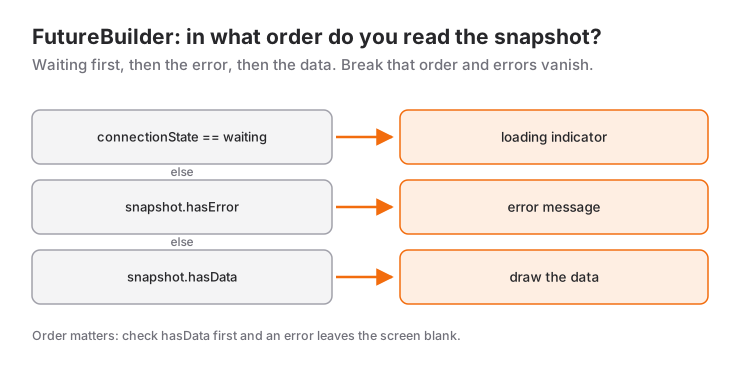
The order of the checks matters. First waiting, then hasError, data last:
builder: (context, snapshot) {
  if (snapshot.connectionState == ConnectionState.waiting) {
    return const Center(child: CircularProgressIndicator());
  }
  if (snapshot.hasError) {
    return Center(child: Text('Error: ${snapshot.error}'));
  }
  final items = snapshot.data ?? const [];
  if (items.isEmpty) {
    return const Center(child: Text('No records'));
  }
  return ListView.builder(/* ... */);
}
hasData tells you the data is not null. If you are waiting for a Future<void> or a Future that may resolve to null, hasData never becomes true; detect completion with connectionState == ConnectionState.done instead.
FutureBuilder with ListView
The most common use is showing a list from an API with ListView.builder. FutureBuilder wraps the whole body; the list is only built once the data has arrived:
class MyListPage extends StatefulWidget {
  const MyListPage({super.key});

  @override
  State<MyListPage> createState() => _MyListPageState();
}

class _MyListPageState extends State<MyListPage> {
  late final Future<List<String>> _items = fetchItems();

  Future<List<String>> fetchItems() async {
    await Future.delayed(const Duration(seconds: 2)); // API call simulation
    return ['Flutter', 'Dart', 'Firebase', 'Android', 'iOS'];
  }

  @override
  Widget build(BuildContext context) {
    return Scaffold(
      appBar: AppBar(title: const Text('List')),
      body: FutureBuilder<List<String>>(
        future: _items,
        builder: (context, snapshot) {
          if (snapshot.connectionState == ConnectionState.waiting) {
            return const Center(child: CircularProgressIndicator());
          }
          if (snapshot.hasError) {
            return Center(child: Text('Error: ${snapshot.error}'));
          }
          final items = snapshot.data ?? const [];
          if (items.isEmpty) {
            return const Center(child: Text('No data found'));
          }
          return ListView.builder(
            itemCount: items.length,
            itemBuilder: (context, index) {
              return ListTile(
                leading: CircleAvatar(child: Text('${index + 1}')),
                title: Text(items[index]),
              );
            },
          );
        },
      ),
    );
  }
}
The same pattern works with GridView.builder; only the widget you return changes. See the GridView post for the grid settings.
Refreshing: Reassigning the Future with setState
When a different object arrives in the future field, FutureBuilder drops the old subscription and waits for the new one. For a refresh button or pull-to-refresh, all you have to do is create a new Future and assign it inside setState:
class _MyPageState extends State<MyPage> {
  late Future<List<String>> _futureData;

  @override
  void initState() {
    super.initState();
    _futureData = fetchData();
  }

  void _reload() {
    setState(() {
      _futureData = fetchData(); // New Future, FutureBuilder starts waiting again
    });
  }

  @override
  Widget build(BuildContext context) {
    return Scaffold(
      appBar: AppBar(
        title: const Text('Data'),
        actions: [
          IconButton(icon: const Icon(Icons.refresh), onPressed: _reload),
        ],
      ),
      body: FutureBuilder<List<String>>(
        future: _futureData,
        builder: (context, snapshot) {
          // ...
        },
      ),
    );
  }
}
A small but useful detail: when future changes, the snapshot goes back to waiting but the previous data is not cleared. So if you want to keep showing the old list while refreshing, combine the waiting check with !snapshot.hasData; the scenario below does exactly that.
When to Use It and When Not To
Pick FutureBuilder for data that a screen or section loads once on open and then only displays: a user profile, a product detail, settings values. If the data can be forgotten when the screen closes and does not need to be shared with other screens, this is its home.
In these cases another tool fits better:
- If the data changes over time (chat messages, live prices, a Firestore query), a one-off
Futureis not enough; use StreamBuilder. - If the same data is needed on several screens, or you add and delete items and show the list again, that state cannot live inside a
FutureBuilder. Move it to aChangeNotifierwith Provider or to aFutureProviderin Riverpod;AsyncValuegives you the same "loading, error, data" trio independent of any screen. - For jobs started by a button tap (save, submit)
FutureBuilderis the wrong shape; anasynconPressedwith an_isSavingflag managed throughsetStateis simpler. - Fetching in
initStatewiththenand callingsetStateis also a valid route, but then themountedcheck and the three states are your responsibility. On small screensFutureBuildertakes that burden away.
Common Mistakes
1. Creating the Future inside build
The classic:
// WRONG
FutureBuilder<List<User>>(
  future: fetchUsers(), // A new request on every build
  builder: (context, snapshot) { /* ... */ },
)
Symptom: on every setState, when the keyboard opens, when the screen rotates or when a parent widget repaints, the list disappears and the spinner comes back; the network tab shows the same request over and over. The cause is simple: each time build runs, fetchUsers() returns a new Future, and FutureBuilder sees "the future changed" and starts waiting from scratch. The fix is to create the Future once and keep it:
// RIGHT
class _UsersPageState extends State<UsersPage> {
  late final Future<List<User>> _users = fetchUsers();
  // or inside initState: _users = fetchUsers();

  @override
  Widget build(BuildContext context) {
    return FutureBuilder<List<User>>(
      future: _users,
      builder: (context, snapshot) { /* ... */ },
    );
  }
}
A StatelessWidget has nowhere to keep it; turn the widget that uses FutureBuilder into a StatefulWidget.
2. Using data! without checking for an error
Symptom: when the Future throws you get the red screen and this message:
Null check operator used on a null valueFutureBuilder catches the error and puts it in snapshot.error; data stays null. Skip the hasError check, write snapshot.data!, and it is your code that crashes. Always check hasError first and give the user a "try again" path. One more thing to remember: exceptions thrown inside the builder function itself do not end up in hasError; they crash directly.
3. Waiting for hasData on a Future
Symptom: the job is finished but the screen stays on the spinner. A Future<void> never carries data, so hasData is always false. Detect completion like this:
if (snapshot.connectionState == ConnectionState.done) {
  return const Text('Done');
}
return const CircularProgressIndicator();
4. Never renewing a Future that depends on a widget parameter
If you wrote late final Future _detail = fetchDetail(widget.id);, that Future is fixed for the lifetime of the widget. If widget.id changes while the same State is alive (for example the same widget reused with different ids inside a PageView), the old data stays on screen. In that case reassign the Future inside didUpdateWidget after checking oldWidget.id != widget.id.
Mini Scenario: A User List from an API
Picture an admin screen: users come from the API on open, pulling down refreshes the list, and a "Try again" button appears if the request fails. During a refresh the old list stays visible; the spinner only shows on the first load.
import 'dart:convert';
import 'package:flutter/material.dart';
import 'package:http/http.dart' as http;

class User {
  const User({required this.id, required this.name, required this.email});

  final int id;
  final String name;
  final String email;

  factory User.fromJson(Map<String, dynamic> json) => User(
        id: json['id'] as int,
        name: json['name'] as String,
        email: json['email'] as String,
      );
}

Future<List<User>> fetchUsers() async {
  final response = await http.get(
    Uri.parse('https://jsonplaceholder.typicode.com/users'),
  );
  if (response.statusCode != 200) {
    throw Exception('Failed to load users (${response.statusCode})');
  }
  final data = jsonDecode(response.body) as List<dynamic>;
  return data.map((e) => User.fromJson(e as Map<String, dynamic>)).toList();
}

class UsersPage extends StatefulWidget {
  const UsersPage({super.key});

  @override
  State<UsersPage> createState() => _UsersPageState();
}

class _UsersPageState extends State<UsersPage> {
  late Future<List<User>> _usersFuture;

  @override
  void initState() {
    super.initState();
    _usersFuture = fetchUsers();
  }

  Future<void> _refresh() async {
    final next = fetchUsers();
    setState(() => _usersFuture = next);
    try {
      await next; // RefreshIndicator keeps spinning until this Future completes
    } catch (_) {
      // The error will be shown by FutureBuilder
    }
  }

  @override
  Widget build(BuildContext context) {
    return Scaffold(
      appBar: AppBar(title: const Text('Users')),
      body: FutureBuilder<List<User>>(
        future: _usersFuture,
        builder: (context, snapshot) {
          final isFirstLoad =
              snapshot.connectionState == ConnectionState.waiting &&
                  !snapshot.hasData;
          if (isFirstLoad) {
            return const Center(child: CircularProgressIndicator());
          }
          if (snapshot.hasError) {
            return Center(
              child: Column(
                mainAxisSize: MainAxisSize.min,
                children: [
                  Text('Error: ${snapshot.error}'),
                  const SizedBox(height: 12),
                  FilledButton(
                    onPressed: _refresh,
                    child: const Text('Try again'),
                  ),
                ],
              ),
            );
          }
          final users = snapshot.data ?? const [];
          return RefreshIndicator(
            onRefresh: _refresh,
            child: ListView.separated(
              physics: const AlwaysScrollableScrollPhysics(),
              itemCount: users.length,
              separatorBuilder: (context, index) => const Divider(height: 1),
              itemBuilder: (context, index) {
                final user = users[index];
                return ListTile(
                  leading: CircleAvatar(child: Text(user.name[0])),
                  title: Text(user.name),
                  subtitle: Text(user.email),
                );
              },
            ),
          );
        },
      ),
    );
  }
}
Four decisions are at work here. The Future is created once in initState; however many times build runs, the request is not repeated. _refresh creates a new Future, assigns it through setState and awaits the same Future so the RefreshIndicator ring keeps spinning until it completes; the error is swallowed by catch because showing it is FutureBuilder's job. The isFirstLoad check keeps the old list on screen during a refresh. And AlwaysScrollableScrollPhysics allows the pull gesture even when the list is short; without it, a two-user list could never be refreshed. Do not forget to add the http package to pubspec.yaml. For the networking side in more depth, such as POST, PUT and DELETE requests, checking status codes and timeouts, see the HTTP requests and REST APIs post.
Frequently Asked Questions
Why does my FutureBuilder keep reloading?
Because the future field receives a function called inside build (future: fetchData()). Every build produces a new Future and FutureBuilder starts waiting again. Create the Future once, in initState or in a late final field, and pass that field in build.
How do I refresh data with FutureBuilder?
Create a new Future and assign it to the field inside setState. When FutureBuilder sees the new object it drops the old subscription and waits for the new one; pull-to-refresh with RefreshIndicator works the same way.
What is the difference between FutureBuilder and StreamBuilder?
FutureBuilder waits for a single result and never changes again after done; StreamBuilder listens to a stream and rebuilds on every new value. Use the first for a one-off API request and the second for sources that keep changing, such as chat or live data.
Why does snapshot.hasData stay false?
hasData is only true when data is not null. For a Future<void> or a Future that returns null it never becomes true; check completion with connectionState == ConnectionState.done instead.
Related Posts
Flutter: HTTP Requests and REST APIs
GET, POST, PUT and DELETE with Flutter's http package, JSON to model classes, status codes, timeouts and loading and error states with FutureBuilder.
Flutter: Local Data Storage with SharedPreferences
Storing theme and settings with shared_preferences in Flutter: SharedPreferencesAsync, WithCache vs the legacy API, the migration helper and what not to store.
Flutter: Real-Time Data Streams with StreamBuilder
Flutter StreamBuilder guide: connectionState for streams, initialData, broadcast vs single-subscription, closing the StreamController, listen() compared.