Flutter: Modern State Management with Riverpod 3
Last updated:
10 min read

Riverpod is a state management solution by Remi Rousselet, the author of the Provider package. It was designed to remove the limitations that come from Provider being built on InheritedWidget: it moves missing-provider errors to compile time, makes combining providers easy and simplifies testing. The full installation steps and "Hello world" samples live in Riverpod's official getting started guide.
This post is written for Riverpod 3 (flutter_riverpod 3.x). Many examples online were written for Riverpod 2 and use StateProvider or StateNotifier. Those still exist in Riverpod 3, but they were moved to a separate "legacy" import; near the end of the post I explain how to read and update that older code.
Why Does State Management Matter?
Modern applications have complex data flows:
- User login and session management
- Instant messaging and notifications
- Offline data synchronization
- Multiple API integrations
- Real-time updates
When several screens read the same data and one piece of data depends on another, you need a clear structure for your state.
Limitations of Provider
Provider is a good tool; I covered how it works with ChangeNotifier, Consumer and MultiProvider in the Provider post. Riverpod's documentation lists these Provider limitations as the reason Riverpod exists:
1. Reading requires a BuildContext
// Provider is built on InheritedWidget: reading needs a context
final user = Provider.of<UserProvider>(context);
Reading another provider with context.watch inside a provider's create function is not reliable either.
2. Missing providers fail at runtime
// If the provider is not in the tree, the app fails WHILE RUNNING
final data = context.read<SomeProvider>(); // ProviderNotFoundException
This error shows up especially often during refactors.
3. Combining providers is tedious
When one provider depends on another you need constructs such as ProxyProvider, and the code gets complicated quickly.
4. Two providers of the same type are unreliable
If you declare two separate Provider<Item>s, InheritedWidget only finds one of them.
5. No automatic disposal or parameters
Provider cannot tell when nobody listens to a value anymore, so it cannot clean up unused state on its own. There is also no built-in way to declare a provider that produces a different value per parameter (for example, a product by its ID).
How Does Riverpod Solve These?
✅ Providers are not tied to the widget tree, but you still need a ref
In Riverpod, providers are declared as global variables and their state lives in the ProviderScope at the top of your app. To read a provider you use a ref instead of a BuildContext. That does not mean "access from anywhere without context"; where the ref comes from depends on where you are:
// 1) Inside a widget: the WidgetRef that ConsumerWidget gives you
final user = ref.watch(userProvider);

// 2) Inside another provider: that provider's own Ref
final greetingProvider = Provider<String>((ref) {
  final name = ref.watch(userNameProvider);
  return 'Hello $name';
});

// 3) Outside the widget tree (tests, Dart scripts): a ProviderContainer
final container = ProviderContainer();
final name = container.read(userNameProvider);
container.dispose();
You cannot read a provider from inside an arbitrary service class; that class either has to be a provider itself or receive the values it needs from outside. The real win is that providers can read each other with ref.watch without needing the widget tree at all.
✅ Missing providers are caught at compile time
// A provider is a variable: if it is misspelled or undefined, the code does NOT compile
final data = ref.watch(someProvider);
There is no ProviderNotFoundException in Riverpod. The one requirement is wrapping the root of your app in ProviderScope; forget it and you get a runtime error on the first read.
✅ Easy provider composition
// A provider can watch other providers
final userOrdersProvider = FutureProvider<List<Order>>((ref) async {
  final user = await ref.watch(userProvider.future);
  return fetchOrders(user.id);
});
When userProvider changes, userOrdersProvider recomputes automatically.
✅ Testability
// Fake data instead of the real API in a test
final container = ProviderContainer.test(
  overrides: [
    userProvider.overrideWith((ref) async => fakeUser),
  ],
);
ProviderContainer.test() arrived with Riverpod 3 and disposes itself when the test ends. In widget tests you can pass the same overrides list to ProviderScope.
✅ Memory management with autoDispose
A provider declared with .autoDispose clears its state when nobody listens to it anymore.
What Changed in Riverpod 3?
If you are coming from Riverpod 2, these are the most important changes (see the official "What's new" page):
NotifierandAsyncNotifierare the recommended way.StateProvider,StateNotifierProviderandChangeNotifierProviderare now imported frompackage:flutter_riverpod/legacy.dartand are discouraged in new code.- AutoDispose and Family classes were merged. There are no separate
AutoDisposeNotifierorFamilyNotifierclasses; a family argument reaches the Notifier through its constructor. Refis no longer generic, and there isref.mountedto check whether a provider is still alive after an async gap.- Automatic retry: providers that fail are retried by default with increasing delays. If you do not want that, turn it off with
ProviderScope(retry: (retryCount, error) => null, ...). - Listeners of invisible widgets are paused: widgets that are not on screen temporarily stop listening to providers.
- All providers filter updates with
==. If the new value equals the old one, listeners are not notified. AsyncValueis sealed, andvaluereplacesvalueOrNull.
When Should You Use Riverpod?
| Situation | Provider | Riverpod |
|---|---|---|
| Simple apps | ✅ | ✅ |
| Large projects | ⚠️ | ✅ |
| Many dependent providers | ❌ | ✅ |
| Heavy testing requirements | ⚠️ | ✅ |
| Reading outside the widget tree | ❌ | ✅ (with ProviderContainer) |
| New projects | ⚠️ | ✅ |
Rule of thumb: If you are starting a new project, or you have many pieces of state that depend on each other, Riverpod is a good choice.
Provider vs Riverpod
| Feature | Provider | Riverpod |
|---|---|---|
| Reading | With BuildContext |
With a ref (WidgetRef, Ref, ProviderContainer) |
| Missing provider | Runtime error | Compile error |
| Two providers of the same type | Unreliable | Works |
| Combining providers | With ProxyProvider, tedious |
With ref.watch |
| Automatic disposal | No | autoDispose |
| Parameterized providers | No | family |
Before either of them, remember that transient data belonging to one screen is fine in the widget's own state; how initState and dispose handle that is covered in the life cycle post.
⚠️ Important Note: Riverpod is an external package and does not work in DartPad. To run the examples on your own machine, follow the installation steps below.
Installation
The easiest way is to add the package from the terminal; this writes the latest version from pub.dev into your pubspec.yaml:
flutter pub add flutter_riverpodIf you prefer adding it by hand, check the current version on the flutter_riverpod pub.dev page. When this post was updated the latest version was 3.4.3:
dependencies:
  flutter:
    sdk: flutter
  flutter_riverpod: ^3.4.3
If you want to work with code generation (the @riverpod annotation), there are also the riverpod_annotation and riverpod_generator packages. The examples in this post use the syntax you can write directly, without code generation.
Basic Setup
Wrap your app with ProviderScope:
import 'package:flutter/material.dart';
import 'package:flutter_riverpod/flutter_riverpod.dart';

void main() {
  runApp(
    const ProviderScope(
      child: MyApp(),
    ),
  );
}
Provider Types
1. Provider (Constant or derived values)
// Simple value
final greetingProvider = Provider<String>((ref) {
  return 'Hello Flutter!';
});

// Usage
class MyWidget extends ConsumerWidget {
  const MyWidget({super.key});

  @override
  Widget build(BuildContext context, WidgetRef ref) {
    final greeting = ref.watch(greetingProvider);
    return Text(greeting);
  }
}
2. NotifierProvider (Changing state)
In Riverpod 3 the recommended way to hold changing state is a Notifier. The build() method returns the initial value, and the operations that change state are methods on the class:
class Counter extends Notifier<int> {
  @override
  int build() => 0; // Initial value

  void increment() => state++;
  void decrement() => state--;
  void reset() => state = 0;
}

final counterProvider = NotifierProvider<Counter, int>(Counter.new);

// Usage
class CounterPage extends ConsumerWidget {
  const CounterPage({super.key});

  @override
  Widget build(BuildContext context, WidgetRef ref) {
    final count = ref.watch(counterProvider);

    return Scaffold(
      body: Center(child: Text('$count')),
      floatingActionButton: FloatingActionButton(
        onPressed: () => ref.read(counterProvider.notifier).increment(),
        child: const Icon(Icons.add),
      ),
    );
  }
}
ref.watch(counterProvider) gives you the value (int), while ref.read(counterProvider.notifier) gives you the Counter object. Do not change state from outside the class with ref.read(counterProvider.notifier).state = 5: the state setter is marked @protected and the analyzer warns about it. Always go through a method; that way everything that changes the state lives in one class.
3. FutureProvider (Read-only async data)
final userProvider = FutureProvider<User>((ref) async {
  final response = await http.get(Uri.parse('https://api.example.com/user'));
  return User.fromJson(jsonDecode(response.body));
});

// Usage
class UserPage extends ConsumerWidget {
  const UserPage({super.key});

  @override
  Widget build(BuildContext context, WidgetRef ref) {
    final userAsync = ref.watch(userProvider);

    return userAsync.when(
      loading: () => const CircularProgressIndicator(),
      error: (error, stack) => Text('Error: $error'),
      data: (user) => Text('Hello ${user.name}'),
    );
  }
}
Because AsyncValue is a sealed class in Riverpod 3, you can also use a Dart switch expression instead of when:
return switch (userAsync) {
  AsyncData(:final value) => Text('Hello ${value.name}'),
  AsyncError(:final error) => Text('Error: $error'),
  _ => const CircularProgressIndicator(),
};
4. AsyncNotifierProvider (Async data you can also change)
If you load data from a server and then also operate on it, use an AsyncNotifier. Here build() returns a Future:
class ProfileNotifier extends AsyncNotifier<User> {
  @override
  Future<User> build() => fetchUser();

  Future<void> rename(String newName) async {
    final current = await future;
    state = const AsyncLoading();
    state = await AsyncValue.guard(
      () => saveUser(current.copyWith(name: newName)),
    );
  }
}

final profileProvider =
    AsyncNotifierProvider<ProfileNotifier, User>(ProfileNotifier.new);

// Usage: ref.watch(profileProvider) returns an AsyncValue<User>
// ref.read(profileProvider.notifier).rename('Alice');
AsyncValue.guard turns the state into AsyncError if the operation throws and into AsyncData if it succeeds, so you do not need a try/catch.
5. StreamProvider (Streaming data)
final messagesProvider = StreamProvider<List<Message>>((ref) {
  return FirebaseFirestore.instance
      .collection('messages')
      .snapshots()
      .map((snapshot) => snapshot.docs.map((doc) => Message.fromDoc(doc)).toList());
});

// Usage
class MessagesPage extends ConsumerWidget {
  const MessagesPage({super.key});

  @override
  Widget build(BuildContext context, WidgetRef ref) {
    final messagesAsync = ref.watch(messagesProvider);

    return messagesAsync.when(
      loading: () => const CircularProgressIndicator(),
      error: (error, stack) => Text('Error: $error'),
      data: (messages) => ListView.builder(
        itemCount: messages.length,
        itemBuilder: (context, index) => ListTile(
          title: Text(messages[index].text),
        ),
      ),
    );
  }
}
ConsumerWidget vs Consumer
ConsumerWidget (Whole widget)
class MyPage extends ConsumerWidget {
  const MyPage({super.key});

  @override
  Widget build(BuildContext context, WidgetRef ref) {
    final count = ref.watch(counterProvider);
    return Text('$count');
  }
}
Consumer (Only one part)
class MyPage extends StatelessWidget {
  const MyPage({super.key});

  @override
  Widget build(BuildContext context) {
    return Scaffold(
      appBar: AppBar(title: const Text('Page')), // Does not rebuild
      body: Consumer(
        builder: (context, ref, child) {
          final count = ref.watch(counterProvider);
          return Text('$count'); // Only this rebuilds
        },
      ),
    );
  }
}
For screens that need initState, dispose or a TextEditingController, use ConsumerStatefulWidget and ConsumerState; there ref is available as a field of the State class.
ref.watch vs ref.read
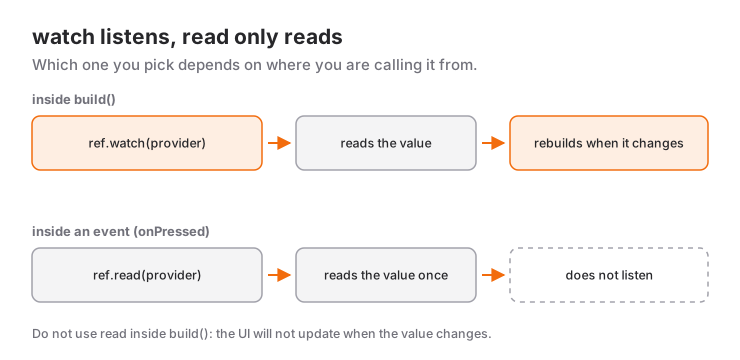
// ✅ Use watch in the build method (listens to changes)
Widget build(BuildContext context, WidgetRef ref) {
  final count = ref.watch(counterProvider);
  return Text('$count');
}

// ✅ Use read in event handlers (one-time read)
onPressed: () {
  ref.read(counterProvider.notifier).increment();
}

// ❌ Don't use read in the build method
Widget build(BuildContext context, WidgetRef ref) {
  final count = ref.read(counterProvider); // Won't update when the value changes
  return Text('$count');
}
Real-World Example: Todo App
// Todo model
class Todo {
  final String id;
  final String title;
  final bool isCompleted;

  const Todo({required this.id, required this.title, this.isCompleted = false});

  Todo copyWith({String? title, bool? isCompleted}) {
    return Todo(
      id: id,
      title: title ?? this.title,
      isCompleted: isCompleted ?? this.isCompleted,
    );
  }
}

// Todo list
class TodoList extends Notifier<List<Todo>> {
  @override
  List<Todo> build() => [];

  void add(String title) {
    state = [
      ...state,
      Todo(id: DateTime.now().microsecondsSinceEpoch.toString(), title: title),
    ];
  }

  void toggle(String id) {
    state = [
      for (final todo in state)
        if (todo.id == id) todo.copyWith(isCompleted: !todo.isCompleted) else todo,
    ];
  }

  void remove(String id) {
    state = state.where((todo) => todo.id != id).toList();
  }
}

final todoListProvider = NotifierProvider<TodoList, List<Todo>>(TodoList.new);

// Filter
enum TodoFilter { all, completed, uncompleted }

class TodoFilterNotifier extends Notifier<TodoFilter> {
  @override
  TodoFilter build() => TodoFilter.all;

  void change(TodoFilter filter) => state = filter;
}

final todoFilterProvider =
    NotifierProvider<TodoFilterNotifier, TodoFilter>(TodoFilterNotifier.new);

// Filtered list: derived from two providers
final filteredTodosProvider = Provider<List<Todo>>((ref) {
  final todos = ref.watch(todoListProvider);
  final filter = ref.watch(todoFilterProvider);

  return switch (filter) {
    TodoFilter.completed => todos.where((todo) => todo.isCompleted).toList(),
    TodoFilter.uncompleted => todos.where((todo) => !todo.isCompleted).toList(),
    TodoFilter.all => todos,
  };
});

// UI
class TodoPage extends ConsumerWidget {
  const TodoPage({super.key});

  @override
  Widget build(BuildContext context, WidgetRef ref) {
    final todos = ref.watch(filteredTodosProvider);

    return Scaffold(
      appBar: AppBar(
        title: const Text('Tasks'),
        actions: [
          PopupMenuButton<TodoFilter>(
            onSelected: (filter) {
              ref.read(todoFilterProvider.notifier).change(filter);
            },
            itemBuilder: (context) => const [
              PopupMenuItem(value: TodoFilter.all, child: Text('All')),
              PopupMenuItem(value: TodoFilter.completed, child: Text('Completed')),
              PopupMenuItem(value: TodoFilter.uncompleted, child: Text('Uncompleted')),
            ],
          ),
        ],
      ),
      body: ListView.builder(
        itemCount: todos.length,
        itemBuilder: (context, index) {
          final todo = todos[index];
          return ListTile(
            leading: Checkbox(
              value: todo.isCompleted,
              onChanged: (_) => ref.read(todoListProvider.notifier).toggle(todo.id),
            ),
            title: Text(
              todo.title,
              style: TextStyle(
                decoration: todo.isCompleted ? TextDecoration.lineThrough : null,
              ),
            ),
            trailing: IconButton(
              icon: const Icon(Icons.delete),
              onPressed: () => ref.read(todoListProvider.notifier).remove(todo.id),
            ),
          );
        },
      ),
      floatingActionButton: FloatingActionButton(
        onPressed: () => _showAddDialog(context, ref),
        child: const Icon(Icons.add),
      ),
    );
  }

  void _showAddDialog(BuildContext context, WidgetRef ref) {
    final controller = TextEditingController();

    showDialog<void>(
      context: context,
      builder: (context) => AlertDialog(
        title: const Text('New Task'),
        content: TextField(
          controller: controller,
          decoration: const InputDecoration(hintText: 'Task name'),
        ),
        actions: [
          TextButton(
            onPressed: () => Navigator.pop(context),
            child: const Text('Cancel'),
          ),
          ElevatedButton(
            onPressed: () {
              if (controller.text.isNotEmpty) {
                ref.read(todoListProvider.notifier).add(controller.text);
                Navigator.pop(context);
              }
            },
            child: const Text('Add'),
          ),
        ],
      ),
    );
  }
}
In examples written for Riverpod 2 you will usually see a StateProvider for the filter. In Riverpod 3 a small Notifier like the one above does the same job; because every change goes through the change method, anyone reading the code can see at a glance where the filter is modified.
Combining Providers
// User provider
final userProvider = FutureProvider<User>((ref) async {
  return fetchUser();
});

// The user's orders (depends on userProvider)
final userOrdersProvider = FutureProvider<List<Order>>((ref) async {
  final user = await ref.watch(userProvider.future);
  return fetchOrders(user.id);
});

// Total order amount
final totalOrderAmountProvider = Provider<double>((ref) {
  final orders = ref.watch(userOrdersProvider).value ?? [];
  return orders.fold(0.0, (sum, order) => sum + order.amount);
});
In Riverpod 3, AsyncValue.value returns null when there is no data (while loading or on error); it replaces Riverpod 2's valueOrNull.
Family Modifier
Creating parameterized providers:
// Product detail provider
final productProvider = FutureProvider.family<Product, String>((ref, productId) async {
  final response = await http.get(
    Uri.parse('https://api.example.com/products/$productId'),
  );
  return Product.fromJson(jsonDecode(response.body));
});

// Usage
class ProductPage extends ConsumerWidget {
  final String productId;

  const ProductPage({super.key, required this.productId});

  @override
  Widget build(BuildContext context, WidgetRef ref) {
    final productAsync = ref.watch(productProvider(productId));

    return productAsync.when(
      loading: () => const CircularProgressIndicator(),
      error: (error, stack) => Text('Error: $error'),
      data: (product) => Text(product.name),
    );
  }
}
When you use a family with a Notifier, Riverpod 3 passes the argument through the constructor:
class ProductQuantity extends Notifier<int> {
  ProductQuantity(this.productId);
  final String productId;

  @override
  int build() => 1;

  void increment() => state++;
}

final productQuantityProvider =
    NotifierProvider.family<ProductQuantity, int, String>(ProductQuantity.new);

// Usage
// ref.watch(productQuantityProvider('product-42'));
// ref.read(productQuantityProvider('product-42').notifier).increment();
Family arguments are compared with ==. If you pass a list created fresh on every build, or an object without a proper ==, you get a new provider every time; use a String, an int, or value objects with a correctly defined == as arguments.
AutoDispose Modifier
Add .autoDispose to clear state when nobody listens. For a request that reruns on every keystroke, such as a search box, the debounce pattern from the Riverpod documentation looks like this:
final searchProvider =
    FutureProvider.autoDispose.family<List<Product>, String>((ref, query) async {
  // If the user keeps typing, this provider gets disposed
  var didDispose = false;
  ref.onDispose(() => didDispose = true);

  await Future<void>.delayed(const Duration(milliseconds: 500));
  if (didDispose) {
    throw Exception('Cancelled');
  }

  return searchProducts(query);
});
In Riverpod 3 you can do the same check with if (!ref.mounted) ...; ref.mounted tells you whether the provider is still alive after an await.
Side Effects with ref.listen
class MyPage extends ConsumerWidget {
  const MyPage({super.key});

  @override
  Widget build(BuildContext context, WidgetRef ref) {
    // Run a side effect when state changes
    ref.listen<int>(counterProvider, (previous, next) {
      if (next == 10) {
        ScaffoldMessenger.of(context).showSnackBar(
          const SnackBar(content: Text('You reached 10!')),
        );
      }
    });

    return Text('${ref.watch(counterProvider)}');
  }
}
Refreshing with ref.invalidate
// Re-run the provider
ElevatedButton(
  onPressed: () {
    ref.invalidate(userProvider);
  },
  child: const Text('Refresh'),
)
Best Practices
1. Define providers globally
// ✅ At the top level of the file
final counterProvider = NotifierProvider<Counter, int>(Counter.new);

// ❌ Don't define them inside a widget: every build creates a new provider
class MyWidget extends ConsumerWidget {
  final counterProvider = NotifierProvider<Counter, int>(Counter.new); // Wrong!
}
2. Create small, focused providers
// ✅ Correct: each provider does one thing
final userProvider = FutureProvider<User>(...);
final userOrdersProvider = FutureProvider<List<Order>>(...);
final userBalanceProvider = Provider<double>(...);

// ❌ Wrong: a provider that does too much
final everythingProvider = FutureProvider<Everything>(...);
3. Avoid unnecessary rebuilds with select
// ✅ Rebuilds only when the number of tasks changes
final count = ref.watch(todoListProvider.select((todos) => todos.length));

// ❌ Rebuilds on any change to the list
final todos = ref.watch(todoListProvider);
Legacy Code: StateProvider and StateNotifier
When you upgrade a Riverpod 2 project to 3, files that use StateProvider and StateNotifierProvider stop compiling, because those classes were removed from the main import. You have two options.
Quick fix: add the legacy import to the files that use the old classes. The code keeps working as it is:
import 'package:flutter_riverpod/flutter_riverpod.dart';
import 'package:flutter_riverpod/legacy.dart'; // StateProvider, StateNotifierProvider, ChangeNotifierProvider
Long-term fix: move to Notifier over time. The conversion is mostly mechanical:
// Riverpod 2: StateNotifier
class CounterNotifier extends StateNotifier<int> {
  CounterNotifier() : super(0);
  void increment() => state++;
}
final counterProvider =
    StateNotifierProvider<CounterNotifier, int>((ref) => CounterNotifier());

// Riverpod 3: Notifier
class Counter extends Notifier<int> {
  @override
  int build() => 0; // build() instead of super(0)
  void increment() => state++;
}
final counterProvider = NotifierProvider<Counter, int>(Counter.new);
The widget-side calls ref.watch(counterProvider) and ref.read(counterProvider.notifier).increment() stay the same. Where you used a StateProvider, you write a small Notifier with a method, as in the filter example above, instead of ref.read(provider.notifier).state = x. For a step-by-step guide, see the Riverpod 3 migration guide.
Summary
Riverpod: a state management package designed to remove Provider's limitationsProviderScope: the scope that wraps the app and holds the stateref: what you need to read providers (WidgetRef,Ref,ProviderContainer)NotifierProvider: for changing synchronous stateAsyncNotifierProvider: for async state you load and changeFutureProvider/StreamProvider: for read-only async dataref.watch: use in build (listens)ref.read: use in events (doesn't listen)family: parameterized providersautoDispose: automatic cleanuplegacy.dart: for oldStateProviderandStateNotifierProvidercode
Riverpod is a strong choice for state management in Flutter projects with many interdependent pieces of state. For something as narrow as showing the result of a single async request, you may not need a package at all; FutureBuilder does the job.
Frequently Asked Questions
Should I migrate from Provider to Riverpod?
There's no need to replace a working Provider setup just for novelty. If you're starting a new project, or if ProviderNotFoundException and awkward provider combinations keep hurting you, moving to Riverpod makes sense, and the migration can be done gradually.
Will my Riverpod 2 code work in Riverpod 3?
Most of it will. Files that use StateProvider, StateNotifierProvider or ChangeNotifierProvider need the package:flutter_riverpod/legacy.dart import. Classes such as AutoDisposeNotifier and FamilyNotifier were removed, so you have to convert them to Notifier and move the family argument into the constructor.
What's the difference between ref.watch and ref.read?
ref.watch reads the value and rebuilds the widget whenever the provider changes; use it inside build. ref.read only grabs the current value without subscribing, which makes it the right choice in event handlers such as button callbacks.
When should I use ConsumerWidget and when Consumer?
If the whole widget depends on a provider, ConsumerWidget is the cleaner option. If only a small part of the screen changes, wrap that part in a Consumer so the rebuilt subtree stays small.
Related Posts
Flutter: State Management with Provider
State management with Provider package in Flutter, ChangeNotifier, Consumer, MultiProvider usage and best practices.
Flutter Life Cycle: StatefulWidget and AppLifecycleState
Understanding Flutter StatefulWidget life cycle methods and application life cycle management. Using initState, dispose, didUpdateWidget, and setState.
Navigation and Data Transfer Between Pages in Flutter
Page navigation, data transfer and back stack management with Flutter's Navigator: push, pop, pushReplacement and the current PopScope for the back button.