Flutter: Real-Time Data Streams with StreamBuilder
Last updated:
9 min read
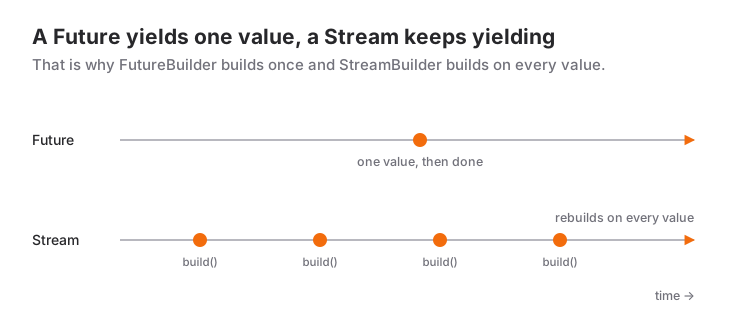
StreamBuilder connects a source that produces many values over time (chat messages, an order status, sensor readings, a Firestore query) to the widget tree. It subscribes to the Stream you hand it, calls builder again for every new value and takes the State plus setState bookkeeping off your hands. For a single result FutureBuilder is enough; the moment you say "the screen should update as data arrives", this is the tool. Besides the basics, this post focuses on the three things people trip over most: creating the stream inside build, listening to the same stream twice and forgetting to close the StreamController.
Stream vs Future
| Aspect | Future | Stream |
|---|---|---|
| Number of values | One | Zero, one or many |
| When it ends | When the value arrives | When the source closes (done) |
| Example | HTTP request, file read | WebSocket, Firestore snapshots(), timer |
| Widget | FutureBuilder |
StreamBuilder |
A Future is a promise that a result will come; a Stream is an open channel: values arrive, an error may show up in between, and eventually the channel closes, or it never does. If async/await and Future are not solid yet, read error handling and async in Dart first; streams build on that foundation.
Live Demo
You can try this widget in the interactive example below:
💡 If the example above doesn't load, click DartPad to run it in a new tab.
Basic Usage
Let's bind a stream that emits a number every second to the screen. The stream is created once in State; no matter how many times build runs, the same object is used:
class CounterStreamPage extends StatefulWidget {
  const CounterStreamPage({super.key});

  @override
  State<CounterStreamPage> createState() => _CounterStreamPageState();
}

class _CounterStreamPageState extends State<CounterStreamPage> {
  // The stream is created once; every build call reuses the same object
  late final Stream<int> _counter = _createCounter();

  Stream<int> _createCounter() async* {
    for (var i = 1; i <= 10; i++) {
      await Future.delayed(const Duration(seconds: 1));
      yield i; // emit a value into the stream
    }
  }

  @override
  Widget build(BuildContext context) {
    return Scaffold(
      appBar: AppBar(title: const Text('Counter Stream')),
      body: Center(
        child: StreamBuilder<int>(
          stream: _counter,
          builder: (context, snapshot) {
            if (snapshot.hasError) {
              return Text('Error: ${snapshot.error}');
            }
            switch (snapshot.connectionState) {
              case ConnectionState.none:
              case ConnectionState.waiting:
                return const Text('Starting...');
              case ConnectionState.active:
                return Text(
                  '${snapshot.data}',
                  style: const TextStyle(fontSize: 72, fontWeight: FontWeight.bold),
                );
              case ConnectionState.done:
                return Text('Finished, last value: ${snapshot.data}');
            }
          },
        ),
      ),
    );
  }
}
A function written with async* returns a Stream when called; its body only runs once someone listens, and each yield emits a value. When the loop ends the stream closes by itself and the snapshot moves to done.
Key Properties
| Property | Description |
|---|---|
stream |
The Stream to listen to; null puts the snapshot in state none |
builder |
Called for every new value, error and state change |
initialData |
Shown as snapshot.data until the first value arrives |
Reading connectionState for a Stream
With FutureBuilder, waiting and done were enough; for a stream all four states mean something:
| State | Meaning |
|---|---|
none |
stream is null, no subscription |
waiting |
Subscribed, but no value has arrived yet |
active |
At least one value (or error) arrived, the channel is still open |
done |
The source closed; the last data or error stays in the snapshot |
Two details matter. First, done does not wipe the last value; if you want "the broadcast ended but the final state stays on screen", keep reading snapshot.data. Second, when you pass a different object to stream, StreamBuilder cancels the old subscription, subscribes to the new one and keeps the previous data while doing so, so the screen does not go blank during a source switch.
initialData: Filling the First Frame
Streams often produce their first value only after a while. If you do not want a spinner in that gap, pass initialData:
StreamBuilder<int>(
  stream: _counter,
  initialData: 0,
  builder: (context, snapshot) {
    // snapshot.data is 0 from the first frame, then the incoming values
    return Text('${snapshot.data}');
  },
)
Careful: with initialData set, hasData is true from the very first frame. Detect the "loading" state with connectionState == ConnectionState.waiting, not with !snapshot.hasData.
Producing Your Own Stream with StreamController
When you produce the data yourself (a button tap, a socket message, a timer) you use a StreamController. The example below keeps a message list; on every addition it emits a fresh copy of the list, and StreamBuilder renders it:
import 'dart:async';
import 'package:flutter/material.dart';

class MessageStreamPage extends StatefulWidget {
  const MessageStreamPage({super.key});

  @override
  State<MessageStreamPage> createState() => _MessageStreamPageState();
}

class _MessageStreamPageState extends State<MessageStreamPage> {
  final _controller = StreamController<List<String>>();
  final List<String> _messages = [];

  void _addMessage(String text) {
    _messages.add(text);
    _controller.add(List.unmodifiable(_messages)); // emit the new value
  }

  @override
  void dispose() {
    _controller.close(); // prevents dangling subscriptions and memory leaks
    super.dispose();
  }

  @override
  Widget build(BuildContext context) {
    return Scaffold(
      appBar: AppBar(title: const Text('Message Stream')),
      body: Column(
        children: [
          Wrap(
            spacing: 8,
            children: [
              FilledButton(onPressed: () => _addMessage('Hello!'), child: const Text('Hello')),
              FilledButton(onPressed: () => _addMessage('How are you?'), child: const Text('How are you?')),
            ],
          ),
          Expanded(
            child: StreamBuilder<List<String>>(
              stream: _controller.stream,
              initialData: const [],
              builder: (context, snapshot) {
                final messages = snapshot.data ?? const [];
                if (messages.isEmpty) {
                  return const Center(child: Text('No messages yet'));
                }
                return ListView.builder(
                  itemCount: messages.length,
                  itemBuilder: (context, index) => ListTile(
                    leading: const Icon(Icons.message),
                    title: Text(messages[index]),
                  ),
                );
              },
            ),
          ),
        ],
      ),
    );
  }
}
The builder only renders the incoming value; it never appends to the list itself. That distinction matters: Flutter may call builder as often as it likes, and if you mutate a list inside it the same message gets added several times.
Broadcast vs Single-Subscription Streams
The stream produced by StreamController() is a single-subscription stream: it accepts exactly one listener, and a second one throws. Streams returned by async* functions behave the same way. When several widgets need the same source, use broadcast:
// Single listener: a second listen() call throws
final single = StreamController<int>();

// Multiple listeners: as many StreamBuilders and listen() calls as you like
final shared = StreamController<int>.broadcast();
The price of a broadcast stream: values emitted while nobody is listening are lost, and a late subscriber never sees earlier values. If you need a source that "remembers the last value", keep it in a field as well and pass it as initialData; the scenario below does exactly that. If all you have is a single-subscription stream, asBroadcastStream() makes it shareable, but the cleaner fix is usually to move a single StreamBuilder higher up the tree.
Stream Transformations
Before listening, you can shape a stream with methods such as map, where and take; each returns a new stream:
final ticks = Stream.periodic(const Duration(seconds: 1), (count) => count).take(10);

final evenOnly = ticks.where((n) => n.isEven);
final labels = ticks.map((n) => 'Second: $n');
Do the transformation outside build too; writing stream: ticks.map(...) creates a new stream on every build and walks straight into the first mistake below.
StreamBuilder or listen() in initState?
Both listen to the same stream; the difference is intent. StreamBuilder turns the incoming value into UI and manages the subscription itself (subscribe, resubscribe when the stream changes, cancel when the widget dies). listen() is for triggering a side effect when a value arrives: showing a SnackBar, navigating, writing to a local database. Side effects do not belong in builder, because builder runs during painting and calling Navigator.push or showSnackBar there causes errors.
late final StreamSubscription<OrderStatus> _sub;

@override
void initState() {
  super.initState();
  _sub = tracker.status.listen((status) {
    if (!mounted) return;
    if (status == OrderStatus.delivered) {
      ScaffoldMessenger.of(context).showSnackBar(
        const SnackBar(content: Text('Your order has been delivered')),
      );
    }
  });
}

@override
void dispose() {
  _sub.cancel(); // release the subscription
  super.dispose();
}
If you also want to push the value onto the screen from listen(), you call setState, and then the mounted check and the cancel are your responsibility. Why the order inside dispose matters is covered in the StatefulWidget lifecycle post.
When to Use It and When Not To
Pick StreamBuilder where a single screen directly mirrors a live source: a chat list, an order status, a counter, Firestore snapshots() or WebSocket messages. If the screen goes away together with the source and nobody else uses the data, you need nothing more.
In these cases another tool fits better:
- The source produces one result (an API request, a file read): wrapping it in a
Streamis pointless; use FutureBuilder. - Several screens listen to the same stream, or the last value must survive across screens: tying the subscription to one widget's
Stategets fragile.StreamProviderin Riverpod (or in theproviderpackage) keeps the subscription independent of the screen and gives you the same "loading, error, data" trio. - The value only changes inside the same widget (a counter, a selected tab): a
Streamis heavy for that;ValueNotifierwithValueListenableBuilderor plainsetStateis enough. - You need to navigate or show a notification in response to a value: that is
listen(), notStreamBuilder; see the section above.
Common Mistakes
1. Creating the stream inside build
The classic trap, which the old version of this very post contained:
// WRONG: the getter produces a new stream every time it is read
Stream<int> get counterStream async* { /* ... */ }

// inside build
StreamBuilder<int>(stream: counterStream, ...)
Symptom: the counter restarts on every setState, when the keyboard opens or when the device rotates; the logs show the same job starting over and over. Every time build runs, counterStream returns a new Stream object, StreamBuilder sees "the stream changed", drops the old one, subscribes to the new one and production starts from scratch. The fix is to create the stream once, in a late final field or in initState; the code in the basic usage section does that. The same rule applies to transformations such as stream: controller.stream.map(...).
2. Listening to the same stream in two places
Symptom: the second StreamBuilder or listen() call fails with:
Bad state: Stream has already been listened to.Cause: the stream is single-subscription. Fix: either use StreamController<T>.broadcast(), or better, listen once with a single StreamBuilder higher up and pass the data down to child widgets as parameters. You can also see this error during hot reload; make sure the stream is created in State, not in build.
3. Not closing the StreamController, or writing after closing
Two symptoms. If you never close it, listeners keep running after the page is gone; a setState inside listen() produces the "setState() called after dispose()" warning and memory leaks. If you call add after closing, you get:
Bad state: Cannot add event after closingFix: _controller.close() in dispose, and cancel() for every StreamSubscription. If the code that closes the source can run from more than one place, add an isClosed guard: if (!_controller.isClosed) _controller.add(value).
4. Using data! without checking hasError
Symptom: when the source emits an error the screen crashes with:
Null check operator used on a null valueIn a stream an error does not have to end the flow: StreamController.addError leaves the channel open and the next value clears the error. When an error arrives snapshot.data becomes null, so code that writes data! without looking at hasError goes down. Check hasError first, then the data, and give the user a "try again" path. In async* functions a throw closes the stream with an error, followed by done.
Mini Scenario: Live Order Tracking
Picture a food order screen: the status moves through "received, preparing, on the way, delivered". The screen draws the steps with StreamBuilder and shows a SnackBar at delivery through listen(). The source is a broadcast StreamController; the latest status is also stored in a field and passed as initialData, so a late-subscribing widget never sees an empty frame.
import 'dart:async';
import 'package:flutter/material.dart';

enum OrderStatus {
  received('Order received'),
  preparing('Preparing'),
  onTheWay('On the way'),
  delivered('Delivered');

  const OrderStatus(this.label);
  final String label;
}

/// In a real app this would be a WebSocket or Firestore listener.
class OrderTracker {
  final _controller = StreamController<OrderStatus>.broadcast();
  Timer? _timer;
  OrderStatus _current = OrderStatus.received;

  Stream<OrderStatus> get status => _controller.stream;
  OrderStatus get current => _current;

  void start() {
    _timer = Timer.periodic(const Duration(seconds: 3), (timer) {
      _current = OrderStatus.values[_current.index + 1];
      _controller.add(_current);
      if (_current == OrderStatus.delivered) {
        timer.cancel();
        _controller.close(); // flow finished: StreamBuilder moves to done
      }
    });
  }

  void dispose() {
    _timer?.cancel();
    if (!_controller.isClosed) _controller.close();
  }
}

class OrderPage extends StatefulWidget {
  const OrderPage({super.key});

  @override
  State<OrderPage> createState() => _OrderPageState();
}

class _OrderPageState extends State<OrderPage> {
  final _tracker = OrderTracker();
  late final StreamSubscription<OrderStatus> _sub;

  @override
  void initState() {
    super.initState();
    _sub = _tracker.status.listen((status) {
      if (!mounted || status != OrderStatus.delivered) return;
      ScaffoldMessenger.of(context).showSnackBar(
        const SnackBar(content: Text('Enjoy, your order is at the door!')),
      );
    });
    _tracker.start();
  }

  @override
  void dispose() {
    _sub.cancel();
    _tracker.dispose();
    super.dispose();
  }

  @override
  Widget build(BuildContext context) {
    final scheme = Theme.of(context).colorScheme;
    return Scaffold(
      appBar: AppBar(title: const Text('Order Tracking')),
      body: StreamBuilder<OrderStatus>(
        stream: _tracker.status,
        initialData: _tracker.current,
        builder: (context, snapshot) {
          if (snapshot.hasError) {
            return Center(child: Text('Connection error: ${snapshot.error}'));
          }
          final status = snapshot.data ?? OrderStatus.received;
          final finished = snapshot.connectionState == ConnectionState.done;
          return ListView(
            children: [
              for (final step in OrderStatus.values)
                ListTile(
                  leading: Icon(
                    step.index <= status.index
                        ? Icons.check_circle
                        : Icons.radio_button_unchecked,
                    color: step.index <= status.index ? scheme.primary : null,
                  ),
                  title: Text(step.label),
                ),
              if (finished)
                const Padding(
                  padding: EdgeInsets.all(16),
                  child: Text('Tracking finished.'),
                ),
            ],
          );
        },
      ),
    );
  }
}
Four decisions live here. The source is broadcast because both StreamBuilder and listen() subscribe to the same stream; with a single-subscription stream the second one would throw. Thanks to initialData: _tracker.current the first frame is not empty; the current step is drawn immediately. At delivery close() is called; StreamBuilder moves to done, but because the last value (delivered) stays in the snapshot all steps remain checked. The order inside dispose is deliberate too: cancel the subscription first, then close the source, then super.dispose().
Frequently Asked Questions
Why does StreamBuilder keep restarting from the beginning?
Because you are passing an object created inside build (a getter, an async* call or a .map(...) transformation) to stream. Every build creates a new stream and StreamBuilder resubscribes to it. Create the stream once in initState or in a late final field.
What does "Stream has already been listened to" mean?
You are trying to listen to a single-subscription stream a second time. If you need several listeners, use StreamController<T>.broadcast(), or listen once with a single StreamBuilder higher up and pass the data down to child widgets.
What is the difference between StreamBuilder and FutureBuilder?
FutureBuilder waits for one result and never changes after done; StreamBuilder listens to a channel, rebuilds on every new value and becomes done when the channel closes. Use the first for a one-off request, the second for live data.
When should I close the StreamController?
When the object that created it dies: in the dispose method if it lives in a State, or in the service's own dispose method if it lives in a service class. If you do not close it, listeners keep running and memory leaks.
Related Posts
Flutter: Local Data Storage with SharedPreferences
Storing theme and settings with shared_preferences in Flutter: SharedPreferencesAsync, WithCache vs the legacy API, the migration helper and what not to store.
Flutter: HTTP Requests and REST APIs
GET, POST, PUT and DELETE with Flutter's http package, JSON to model classes, status codes, timeouts and loading and error states with FutureBuilder.
Flutter: Asynchronous Listing with FutureBuilder
Flutter FutureBuilder: reading snapshot states in the right order, the Future-in-build mistake, the initState fix and refreshing with setState.