Introduction to Swift: Optionals, Guard Let and If Let
Last updated:
7 min read

Everyone who starts learning Swift hits the same wall in the first week: Optionals. The compiler won't let you use a value, the screen fills up with Value of optional type 'String?' must be unwrapped, and the ! that looks like the quickest way out gets sprinkled everywhere. A few weeks later, the app crashes in unexpected places.
This post treats Optionals not as an obstacle but as Swift's most powerful safety tool. If you're coming from Flutter and Dart, there's good news: most of the concepts are familiar. I'll point out the few places where things differ. The examples compile with current Swift versions, including Swift 6.
What Is an Optional?
In Swift, a variable either holds a value or holds nothing. The "nothing" case is expressed with nil, but for a variable to be nil, its type must be marked as Optional. Apple's Optional documentation describes it as "a type that represents either a wrapped value or the absence of a value."
var name: String = "Ahmet"   // can't be nil
var surname: String? = nil   // Optional: can be nil
surname = "Balaman"
String? is actually shorthand for Optional<String>, and Optional is an enum with two cases: .none (no value) and .some(value). This detail will come in handy later when we handle Optionals with switch.
You won't only meet Optionals in variables you declare yourself. In the standard library, every operation that "can fail" returns an Optional:
let age = Int("42")          // Int?  (nil if the text isn't a number)
let first = [3, 5, 8].first  // Int?  (nil if the array is empty)
let capitals = ["TR": "Ankara", "DE": "Berlin"]
let capital = capitals["FR"] // String?  (nil if the key is missing)
Int("42") is the counterpart of Dart's int.tryParse: when the conversion fails, it doesn't throw, it returns nil.
An Important Difference for Dart Developers
In Dart, once a variable passes a null check, the compiler narrows its type on its own. Swift doesn't:
let email: String? = "[email protected]"

if email != nil {
    // print(email.count) // Error: email is still String?
}
In Swift, you have to explicitly unwrap the value before you can use it. All of the methods below do exactly that.
Ways to Unwrap an Optional
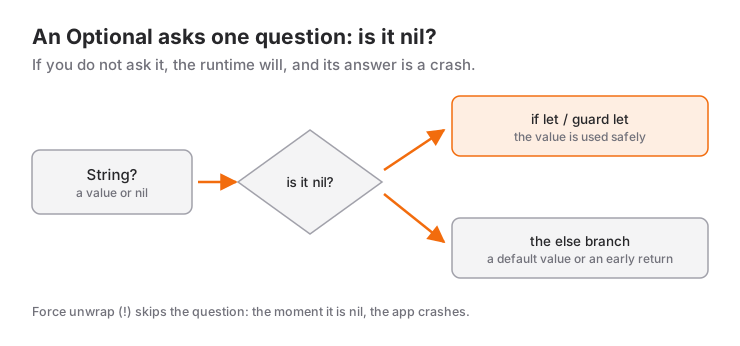
1. Force Unwrapping (!)
The shortest but most dangerous method. If the value is nil, the app crashes at runtime:
let age: Int? = 25
print(age!)  // 25; if age were nil, the app would crash
This is the habit I correct most often in lessons. Writing ! tells the compiler "this will never be nil, I take responsibility." There are few situations where you can truly make that promise, such as a resource file you added to the project and know exists. Never use ! on data that comes from the user, the network or the disk.
2. if let: Use the Value If It Exists
let email: String? = "[email protected]"

if let email {
    print("Email: \(email)") // Here email is a plain String
} else {
    print("No email found")
}
The if let email { syntax arrived in Swift 5.7 and is shorthand for if let email = email: inside the block it creates an unwrapped copy with the same name. There's no longer any need to invent new names like if let userEmail = email, as older tutorials often do.
You can unwrap several values and add extra conditions in a single line:
let username: String? = "ahmet"
let age: Int? = 25

if let username, let age, age >= 18 {
    print("\(username) is an adult user")
}
The block runs only if all comma-separated conditions hold. This reads far better than nested if let blocks (the structure learners call "the pyramid").
3. guard let: Exit Early If the Value Is Missing
func printUserInfo(name: String?, age: Int?) {
    guard let name, let age else {
        print("Name and age are required")
        return
    }

    // From here on, name and age are unwrapped and ready to use
    print("\(name) - \(age) years old")
}

printUserInfo(name: "Ahmet", age: 25) // Ahmet - 25 years old
printUserInfo(name: nil, age: 25)     // Name and age are required
The else block of a guard must leave the current scope (return, throw, break or continue); the compiler checks this. In return, the unwrapped values are available for the rest of the function after the guard line. You'll use this pattern most with network requests using async/await, where missing fields in server data are filtered out one by one with guard let.
if let or guard let?
Although they seem to do the same job, they steer the shape of your code in different directions.
if let is for cases where work continues whether or not there's a value. If there's a value, do one thing; if not, do another:
let discounts: [String: Double] = ["SUMMER10": 10, "STUDENT": 25]

func finalPrice(total: Double, couponCode: String?) -> Double {
    if let couponCode, let discount = discounts[couponCode] {
        return total - discount
    }
    return total // Regular price if there's no coupon or it's invalid
}

print(finalPrice(total: 100, couponCode: "SUMMER10")) // 90.0
print(finalPrice(total: 100, couponCode: nil))        // 100.0
guard let is for cases where the function can't continue without the value. Preconditions are checked first, and the real work comes last, without extra indentation:
func charge(card: String, amount: Double) {
    print("Charged \(amount) to card \(card)")
}

func processPayment(amount: Double?, cardNumber: String?) {
    guard let amount, amount > 0 else {
        print("A valid payment amount is required")
        return
    }

    guard let cardNumber, !cardNumber.isEmpty else {
        print("A card number is required")
        return
    }

    charge(card: cardNumber, amount: amount)
}
A practical rule: once several if let blocks start nesting at the top of a function, that code almost always reads better with guard let. The "happy path" (the scenario where everything goes right) stays aligned to the left and uninterrupted.
The Nil-Coalescing Operator (??)
It specifies a default to use when the value is nil. It's the same as ?? in Dart:
let userName: String? = nil
let displayName = userName ?? "Guest"

print(displayName) // Guest
It's used a lot in UI code: "Guest" when there's no user name, a default image when there's no profile photo. Dictionaries also have a default: parameter: stock["apple", default: 0] returns 0 if the key is missing. You can see how an optional value is bound to the screen in the post on data flow with @State and @Binding in SwiftUI.
Optional Chaining
Use ?. to move safely through nested Optionals:
struct Address {
    var city: String?
}

struct Profile {
    var address: Address?
}

struct User {
    var profile: Profile?
}

let user = User(profile: Profile(address: nil))
let cityName = user.profile?.address?.city ?? "Unknown"
print(cityName) // Unknown
If any link in the chain is nil, the whole expression becomes nil and ?? kicks in. It's the same logic as ?. in Dart. In an earlier version of this post, these models were written as class; in Swift, struct is usually preferred for data models. I explain why in the post on the difference between struct and class.
Chaining works with methods as well as properties: user.profile?.address?.city?.uppercased() produces either a String or nil.
Handling an Optional with switch
Because Optional is an enum, you can also handle it with switch. It's a readable option when you want to treat the no-value case and the value case separately:
let score: Int? = 85

switch score {
case nil:
    print("No grade entered yet")
case let value? where value >= 50:
    print("Passed: \(value)")
case let value?:
    print("Failed: \(value)")
}
The case let value? pattern matches by unwrapping the value; where adds an extra condition.
Common Mistakes
- Adding
!to silence a compiler error; the error doesn't disappear, it's postponed to runtime. - Writing
x!after anif x != nilcheck; useif let xinstead. - Building nested
if letblocks; combine them with commas or useguard let. - Inventing a new name every time you unwrap with
if let; the shortif let x {form is enough. - Making every field of a data model Optional; if a value is always present, it shouldn't be Optional, or you'll need unwrapping all over your code.
Next Step
Once Optionals are solid, the natural continuation is the UI side: your first app with SwiftUI. If you'd like to work on these fundamentals with a tutor, the post on how to find the best Swift teacher explains what to look for.
Resources
- The Swift Programming Language: Optionals
- The Swift Programming Language: Optional Chaining
- Apple Developer: Optional
If you want to work with me:
Frequently Asked Questions
What is the short form if let email { }?
A shorthand introduced in Swift 5.7: instead of if let email = email you can write if let email {, which creates an unwrapped copy with the same name. It also works for guard let email else { return }.
When should I use an implicitly unwrapped optional like String!?
Only when you know the value will definitely be set right after the object is created; the classic example is @IBOutlet properties in UIKit. In code written with SwiftUI you almost never need it; when in doubt, use a normal ?.
Is there a difference between if x != nil and if let?
if x != nil only checks whether a value exists; inside the block x is still an Optional and needs unwrapping before use. If you're going to use the value, prefer if let or guard let.
Are Swift Optionals the same as nullable types in Dart?
The idea is the same: a type not marked with ? can't be nil (null in Dart), and both languages have ?? and ?.. The key difference is that Dart narrows a variable on its own after a null check, while Swift asks you to unwrap the value explicitly with if let or guard let.
Related Posts
SwiftUI @State, @Binding and @Observable: Data Flow Guide
When to use @State, @Binding, @Observable, @Bindable and @Environment in SwiftUI, how they map to ObservableObject, with a decision table and common bugs.
Swift Closures Explained: $0, @escaping and [weak self]
Learn Swift closure syntax step by step from the full form to $0 shorthand: trailing closures, capturing values, @escaping, retain cycles and [weak self].
Swift async/await Guide: Tasks, Actors and @MainActor
From completion handlers to async/await: Task, async let, TaskGroup, @MainActor, actors, cancellation and a JSON API call with URLSession in SwiftUI.