Swift Struct vs Class: Value and Reference Types Explained
Last updated:
8 min read

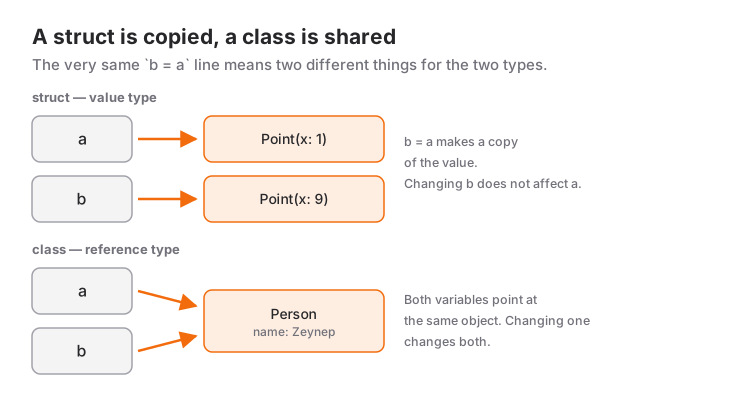
In Swift, struct and class look almost identical from the outside: both have properties, methods and initializers. The real difference shows up when you assign one variable to another. A struct is a value type: assignment copies it. A class is a reference type: assignment creates a second pointer to the same object. Truly understanding that one sentence resolves most exam questions and most "why did this value change?" bugs in real projects. Both are defined formally in the Structures and Classes chapter of the Swift book.
Every example below can be pasted into a Playground or a main.swift file and run.
Value Type: A Struct Is Copied
struct Point {
    var x: Int
    var y: Int
}

var a = Point(x: 1, y: 2)
var b = a          // copy
b.x = 10

print(a.x)  // 1
print(b.x)  // 10
On the line b = a, an independent copy of a is made. Changing b does not touch a. Int, String, Array, Dictionary and Bool are also defined as structs in Swift, so they all behave this way. That is why you can hand an array to a function and be sure the function cannot corrupt your array.
Notice that we did not write an initializer for Point. Structs get a memberwise initializer for free.
Reference Type: A Class Is Shared
final class Player {
    var name: String
    var score = 0

    init(name: String) {
        self.name = name
    }
}

let p1 = Player(name: "Ada")
let p2 = p1        // second reference to the same object
p2.score = 50

print(p1.score)    // 50
print(p1 === p2)   // true
No copy here. p1 and p2 point to a single Player object in memory; a change made through one is visible through the other. With the class we had to write the initializer ourselves; the compiler demands one whenever a property has no default value.
Mutability: mutating and let
If a struct method changes one of its own properties, it must be marked mutating:
struct Counter {
    private(set) var value = 0

    mutating func increment() {
        value += 1
    }
}

var counter = Counter()
counter.increment()
print(counter.value)   // 1

let fixedCounter = Counter()
// fixedCounter.increment()
// Error: cannot use mutating member on immutable value: 'fixedCounter' is a 'let' constant
A struct declared with let is frozen completely: none of its properties can change. A struct's value is the sum of its properties, so changing a property means changing the value itself.
With a class, let means something different:
let player = Player(name: "Linus")
player.score = 10          // allowed: the inside of the object changes
// player = Player(name: "Grace")
// Error: cannot assign to value: 'player' is a 'let' constant
Here let only fixes the reference: player cannot point to a different object, but the object it points to can still change. There is no mutating keyword for class methods either. This is why a struct is the safer choice when you want an immutability guarantee.
Identity and Equality: === vs ==
There are two different questions: "are these the same object?" and "is their content equal?"
struct Money: Equatable {
    var amount: Int
    var currency: String
}

let price1 = Money(amount: 100, currency: "TRY")
let price2 = Money(amount: 100, currency: "TRY")
print(price1 == price2)    // true

let first = Player(name: "Ada")
let second = Player(name: "Ada")
let alias = first

print(first === second)    // false
print(first === alias)     // true
=== exists only for class instances and compares identity: is it the same object in memory? Structs have no identity, only a value; 100 lira is 100 lira wherever it appears. To use ==, the type must be Equatable. For a struct whose properties are all Equatable, the compiler synthesises == for you; for a class you write it yourself.
Inheritance Is Class-Only
class Vehicle {
    var wheels: Int

    init(wheels: Int) {
        self.wheels = wheels
    }

    func describe() -> String {
        "Vehicle with \(wheels) wheels"
    }
}

class Car: Vehicle {
    init() {
        super.init(wheels: 4)
    }

    override func describe() -> String {
        "Car: " + super.describe()
    }
}

let vehicle: Vehicle = Car()
print(vehicle.describe())  // Car: Vehicle with 4 wheels
A struct cannot inherit from another struct; try it and you get inheritance from non-protocol type. Shared behavior for structs is defined with a protocol:
protocol Describable {
    func describe() -> String
}

struct Bicycle: Describable {
    func describe() -> String { "Bicycle with 2 wheels" }
}
The general tendency in Swift is protocols over inheritance. If you come from C# or Java, that habit takes a little while to change.
deinit: The Lifetime of an Object
Class instances live by the reference counting (ARC) described in the Automatic Reference Counting chapter. When the last strong reference to an object goes away, the object is freed and deinit runs:
final class FileSession {
    let name: String

    init(name: String) {
        self.name = name
        print("\(name) opened")
    }

    deinit {
        print("\(name) closed")
    }
}

var session: FileSession? = FileSession(name: "log.txt")  // log.txt opened
var sameSession = session
session = nil          // prints nothing yet, sameSession still holds it
sameSession = nil      // log.txt closed
Structs have no deinit, because they have no shared lifetime. If two class objects hold each other with strong references, neither is ever freed; that is a retain cycle, and you meet it most often with closures. The details are in the [weak self] section of the closures post.
Why Are SwiftUI Views Structs?
In SwiftUI, every piece of UI is written as struct SomeView: View. The reason is that a view is not a long-lived object on screen but a lightweight description of what the screen looks like right now. SwiftUI recreates these descriptions whenever data changes, so it needs a type that is cheap to create and has no secretly shared state.
Since a struct cannot change its own properties from inside body, data that changes is moved into storage managed by SwiftUI through wrappers such as @State. You can see what that looks like in practice in building your first app with SwiftUI. Data shared by several screens is where classes come in; that side is covered in the @State, @Binding and @Observable post.
A Realistic Scenario: A Shopping Cart
In a typical app you use both together: the data is a struct, the manager that shares that data is a class.
struct CartItem: Identifiable, Equatable {
    let id: Int
    var name: String
    var quantity: Int
    var unitPrice: Double

    var total: Double { Double(quantity) * unitPrice }
}

final class CartStore {
    private(set) var items: [CartItem] = []

    var total: Double {
        items.reduce(0) { $0 + $1.total }
    }

    func add(_ item: CartItem) {
        if let index = items.firstIndex(where: { $0.id == item.id }) {
            items[index].quantity += item.quantity
        } else {
            items.append(item)
        }
    }
}

let store = CartStore()
let checkoutStore = store            // two screens see the same cart

store.add(CartItem(id: 1, name: "Pen", quantity: 2, unitPrice: 15))
checkoutStore.add(CartItem(id: 1, name: "Pen", quantity: 1, unitPrice: 15))

print(store.items[0].quantity)   // 3
print(checkoutStore.total)       // 45.0

var snapshot = store.items       // a copy of the array
snapshot[0].quantity = 99
print(store.items[0].quantity)   // 3, the cart is unaffected
Both the product list screen and the checkout screen must see the same cart; sharing is exactly what we want here, so CartStore is a class. CartItem, on the other hand, is plain data with no identity; because it is a struct, experimenting on snapshot cannot corrupt the cart. The only door for changes is the add method.
When to Use It and When Not To
Make struct your default — Apple's guide to choosing between structures and classes gives the same recommendation. Move to a class when:
- Several places must share the same instance and all see its changes (a cart, a session, a settings manager).
- The object has an identity and a lifetime: an open file, a network connection, a timer. You need
deinitfor cleanup. - You need inheritance, or you work with an Apple API that expects a class, such as
UIViewController.
Stay with a struct for models (user, product, coordinate), Codable data from an API, SwiftUI views, and data that crosses threads. Because value types are copied, they are far less prone to shared-state bugs in concurrent code with async/await.
| Question | Struct | Class |
|---|---|---|
| What happens on assignment? | Copied | Reference is shared |
let instance |
Fully immutable | Only the reference is fixed |
| Inheritance | No (protocols instead) | Yes |
=== and deinit |
No | Yes |
| Free initializer | Memberwise | Only if every property has a default value |
Common Mistakes
1. Changing a copy and expecting the original to change
struct Todo {
    var title: String
    var isDone = false
}

var todos = [Todo(title: "Homework")]
var firstTodo = todos[0]
firstTodo.isDone = true
print(todos[0].isDone)   // false
Symptom: no error, but the list never updates. todos[0] returned a copy. Fix: mutate in place with todos[0].isDone = true.
2. Forgetting mutating
Symptom: cannot assign to property: 'self' is immutable or left side of mutating operator isn't mutable: 'self' is immutable. Fix: make the method a mutating func. If you get the same error inside a SwiftUI view, the fix is @State, not mutating.
3. Sharing a class without realising it
Symptom: an edit made on one screen shows up on another even though the user tapped "Cancel". You passed the class instance itself to the edit screen, not a copy. Fix: make the model a struct; the edit screen works on a copy, and it is written back only on "Save".
4. Not writing an initializer for a class
Symptom: class 'Player' has no initializers. The memberwise initializer structs get does not exist for classes. Either give every property a default value or write an init.
What Exams and Interviews Ask
"What does this code print?" questions almost always test whether an assignment is a copy or a reference. Look at the type first: with a struct the two variables are independent, with a class they are the same.
"Is Array a value type?" Yes. If its elements are classes, the array is copied but the elements keep pointing to the same objects. Had we written the Todo example above with a class, todos[0].isDone would print true.
"Isn't copying a large array slow?" Standard library collections use copy-on-write: the real copy happens only when one of the copies is mutated. That is not automatic for structs you write yourself, but the arrays inside them still behave this way.
"Do structs live on the stack and classes on the heap?" A common simplification; the compiler may decide differently depending on the situation. Base your answer on copy and sharing behavior, not on memory location. If you are preparing for questions like these, the exam support page may help.
Frequently Asked Questions
Is a struct or a class faster in Swift?
There is no general answer; structs carry no reference-counting overhead, which helps for most small models, but constantly copying very large structs can be costly too. Choose based on whether you need sharing, not on speed.
What happens if a struct contains a class property?
The struct is copied, but the class property inside keeps pointing to the same object. Copies can therefore affect each other through that object; if you want value semantics, keep the inner types structs as well.
Why can a property of a class instance declared with let still change?
Because let fixes the reference, not the contents of the object. If the property must not change, declare that property as let inside the class.
Can structs conform to protocols?
Yes. Structs cannot inherit, but they can conform to as many protocols as you like; Identifiable, Equatable and Codable are the most common ones.
Related Posts
SwiftUI @State, @Binding and @Observable: Data Flow Guide
When to use @State, @Binding, @Observable, @Bindable and @Environment in SwiftUI, how they map to ObservableObject, with a decision table and common bugs.
Swift Closures Explained: $0, @escaping and [weak self]
Learn Swift closure syntax step by step from the full form to $0 shorthand: trailing closures, capturing values, @escaping, retain cycles and [weak self].
Swift async/await Guide: Tasks, Actors and @MainActor
From completion handlers to async/await: Task, async let, TaskGroup, @MainActor, actors, cancellation and a JSON API call with URLSession in SwiftUI.