SwiftUI @State, @Binding and @Observable: Data Flow Guide
Last updated:
7 min read

In SwiftUI the screen is a function of your data: the data changes, body is evaluated again, the screen updates. So the real question is never "how do I refresh the view" but "who owns this piece of data". @State, @Binding, @Observable, @Bindable and @Environment are five different answers to that question. Pick the wrong one and the compiler usually stays quiet, while the screen answers with fields that reset themselves or labels that never update.
This post covers the current approach (the Observation framework) first, then the ObservableObject family you still meet in plenty of tutorials and codebases, the one-to-one mapping between them, and the bugs I see most often. If views themselves are still new to you, start with building your first app with SwiftUI.
@State: Data the View Owns
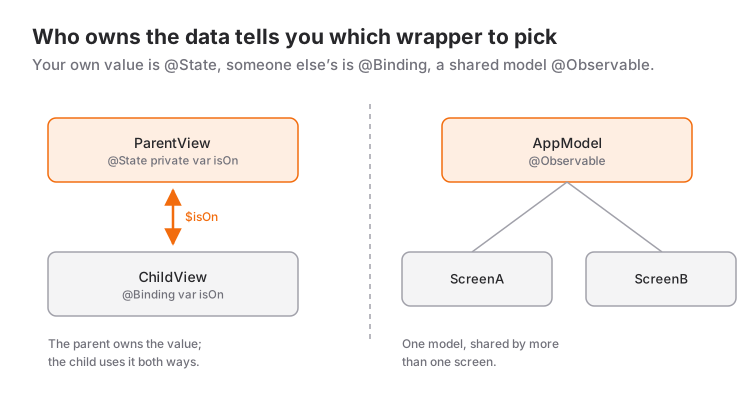
As Apple's State reference defines it, @State is for small values that matter only to one view: a counter, whether a switch is on, the draft text of a field. A view is a struct that gets recreated on every update, so it cannot keep the value inside itself. @State moves the value into storage managed by SwiftUI and keeps it alive while the view struct comes and goes.
import SwiftUI

struct CounterView: View {
    @State private var count = 0

    var body: some View {
        VStack(spacing: 12) {
            Text("Count: \(count)")
            Button("Increment") { count += 1 }
        }
    }
}
Make private a habit. @State says you are the owner of the data; a @State property that can be assigned from outside almost always means the wrong tool was chosen.
@Binding: Changing Data Someone Else Owns
When a child view needs to read and change a value but the parent owns it, use @Binding. As Apple's Binding reference stresses, a binding is not a copy, it is a two-way connection to the value in its owner. The parent creates it with the $ prefix.
struct NotificationToggle: View {
    @Binding var isOn: Bool

    var body: some View {
        Toggle("Notifications", isOn: $isOn)
    }
}

struct SettingsView: View {
    @State private var notificationsEnabled = true

    var body: some View {
        Form {
            NotificationToggle(isOn: $notificationsEnabled)
            Text(notificationsEnabled ? "On" : "Off")
        }
    }
}
If the child only displays the value, skip the binding and pass a plain let parameter. Think of a binding as write permission and hand it out only where it is needed.
@Observable: A Model Shared by Several Screens
Once the data grows beyond a single value, such as a cart, a session or a list, you move it into a class. With the Observation framework all it takes is @Observable in front of the class. It is available from iOS 17 onwards.
import Observation

struct CartItem: Identifiable {
    let id = UUID()
    var name: String
    var price: Double
    var quantity = 1
}

@Observable
final class CartModel {
    var items: [CartItem] = []
    var note = ""

    var total: Double {
        items.reduce(0) { $0 + $1.price * Double($1.quantity) }
    }

    func add(_ item: CartItem) {
        items.append(item)
    }
}
There is no @Published here. The macro makes every stored property observable, and SwiftUI records which properties a view actually reads inside body. When note changes, only views that read note are redrawn. If you wonder why the model is a class and not a struct, the struct vs class post goes into detail: several screens must share the same object here, so we want reference semantics.
The view that creates the model holds it with @State. A view that merely receives the model needs no wrapper at all:
struct CartScreen: View {
    @State private var cart = CartModel()

    var body: some View {
        List {
            ForEach(cart.items) { item in
                Text(item.name)
            }
            CartNoteField(cart: cart)
            CartTotalRow(cart: cart)
        }
    }
}

struct CartTotalRow: View {
    let cart: CartModel

    var body: some View {
        Text("Total: \(cart.total, format: .number.precision(.fractionLength(2)))")
    }
}
@Bindable: Bindings to a Model's Properties
TextField and Toggle want a Binding. To create one from a property of an @Observable model with $, mark the model as @Bindable:
struct CartNoteField: View {
    @Bindable var cart: CartModel

    var body: some View {
        TextField("Order note", text: $cart.note)
    }
}
@Environment: Passing the Model Down the Tree
Instead of threading the model through five layers of initializers, put it into the environment. Inject it at the root with .environment(_:) and read it by type wherever it is needed:
@main
struct ShopApp: App {
    @State private var cart = CartModel()

    var body: some Scene {
        WindowGroup {
            CartBadge()
                .environment(cart)
        }
    }
}

struct CartBadge: View {
    @Environment(CartModel.self) private var cart

    var body: some View {
        Text("\(cart.items.count) items in cart")
    }
}
If you need a binding to a model that comes from the environment, declare a local @Bindable inside body:
struct CheckoutNote: View {
    @Environment(CartModel.self) private var cart

    var body: some View {
        @Bindable var cart = cart
        TextField("Order note", text: $cart.note)
    }
}
The Older Approach: The ObservableObject Family
Projects that support anything below iOS 17, and most older tutorials, use the Combine-based setup. The idea is the same, the names differ:
final class LegacyCartModel: ObservableObject {
    @Published var items: [CartItem] = []
    @Published var note = ""
}

struct LegacyCartScreen: View {
    @StateObject private var cart = LegacyCartModel()   // owner

    var body: some View {
        LegacyCartSummary(cart: cart)
            .environmentObject(cart)
    }
}

struct LegacyCartSummary: View {
    @ObservedObject var cart: LegacyCartModel            // not the owner

    var body: some View {
        Text("\(cart.items.count) items in cart")
    }
}

struct LegacyCartBadge: View {
    @EnvironmentObject private var cart: LegacyCartModel

    var body: some View {
        Text("\(cart.items.count)")
    }
}
Two differences matter. First, with ObservableObject a change to any @Published property invalidates every view observing the object, whereas Observation tracks per property. Second, on the old side ownership and observation are separate wrappers (@StateObject and @ObservedObject), and mixing them up produces the classic bug described below.
| Situation | Observation (iOS 17+) | Older approach |
|---|---|---|
| Simple value private to a view | @State |
@State |
| Child changes the parent's value | @Binding |
@Binding |
| View creates and owns the model | @State + @Observable class |
@StateObject |
| View receives the model and reads it | plain let / var |
@ObservedObject |
$ binding to a received model |
@Bindable |
@ObservedObject |
| Model shared across the app | .environment(_:) + @Environment(Type.self) |
.environmentObject(_:) + @EnvironmentObject |
| Tracked property in the model | no annotation needed | @Published |
When to Use It and When Not To
For a new project whose minimum target is iOS 17 or later, start with Observation: less code and fewer unnecessary redraws. If you have to support an older release, ObservableObject still works perfectly well, and both can live side by side in one project, so you can migrate screen by screen.
Moving everything into a model is a mistake too. Whether a sheet is showing, a field's focus state or an animation flag belongs to the view and should stay @State. The reverse holds as well: if two screens show the same data, do not keep a separate @State in each, move it to a single owner. Reserve @Environment for models that really are used widely. Putting everything there hides dependencies, and a view that reads a model nobody injected crashes at runtime.
Common Mistakes
1. Creating the object with @ObservedObject
struct BadProfileView: View {
    @ObservedObject var model = LegacyCartModel()   // wrong
    var body: some View { Text(model.note) }
}
Symptom: every time the parent redraws, the model is created from scratch; typed data disappears and the network request fires again. @ObservedObject does not store the object, it only watches it. Fix: @StateObject in the view that creates the object, or @State if you use Observation.
2. Copying a parent value into @State
struct NameEditorBad: View {
    @State private var name: String

    init(name: String) {
        _name = State(initialValue: name)
    }

    var body: some View {
        TextField("Name", text: $name)
    }
}
Symptom: the name changes in the parent but the field keeps showing the old value, and edits in the field never reach the parent. @State uses its initial value only the first time the view appears. Fix: if the parent owns the data, declare @Binding var name: String and pass $name.
3. Keeping state in a short-lived view
A view inside an if branch leaves the tree when the condition turns false, and its @State is discarded with it. Symptom: collapse and reopen a details section and the note you typed is gone. The same happens to views whose .id(...) value changes. Fix: move the value that must survive into a parent that stays on screen and pass a binding down.
4. Forgetting @Bindable
struct CartNoteFieldBad: View {
    let cart: CartModel
    var body: some View {
        TextField("Note", text: $cart.note)   // error
    }
}
Symptom: the compiler reports cannot find '$cart' in scope. Fix: @Bindable var cart instead of let cart. One more detail: in @State private var model = Model(), the expression Model() runs every time the view struct is created, and SwiftUI keeps only the first instance. So do no heavy work in the model's init; load data inside .task instead. The async/await guide shows how.
Mini Scenario: A To-Do List
Let's see all five tools on one screen. The tasks live in a TodoStore shared across the app; the list screen reads it from the environment, and the add sheet keeps its own draft in @State.
struct TodoItem: Identifiable {
    let id = UUID()
    var title: String
    var isDone = false
}

@Observable
final class TodoStore {
    var items: [TodoItem] = []

    var remainingCount: Int {
        items.filter { !$0.isDone }.count
    }

    func add(title: String) {
        let trimmed = title.trimmingCharacters(in: .whitespaces)
        guard !trimmed.isEmpty else { return }
        items.append(TodoItem(title: trimmed))
    }
}

struct TodoListScreen: View {
    @Environment(TodoStore.self) private var store
    @State private var isAdding = false

    var body: some View {
        @Bindable var store = store

        NavigationStack {
            List($store.items) { $item in
                Toggle(item.title, isOn: $item.isDone)
            }
            .navigationTitle("Remaining: \(store.remainingCount)")
            .toolbar {
                Button("Add") { isAdding = true }
            }
            .sheet(isPresented: $isAdding) {
                AddTodoSheet(isPresented: $isAdding)
            }
        }
    }
}

struct AddTodoSheet: View {
    @Environment(TodoStore.self) private var store
    @Binding var isPresented: Bool
    @State private var draft = ""

    var body: some View {
        Form {
            TextField("Task", text: $draft)
            Button("Save") {
                store.add(title: draft)
                isPresented = false
            }
            .disabled(draft.isEmpty)
        }
    }
}
Who owns what? isAdding belongs to the list screen, draft to the sheet, the tasks to TodoStore. Thanks to the isPresented binding the sheet can dismiss itself without owning that value. List($store.items) hands each row a binding to its element, and when a Toggle flips, the title that reads remainingCount updates on its own. If the guard in add looks unfamiliar, see the post on optionals and guard let. At the app root, remember to inject a single instance held in @State rather than writing .environment(TodoStore()) inline.
Frequently Asked Questions
What is the difference between @State and @Binding?
@State owns the data and stores the value in SwiftUI's storage. @Binding stores nothing; it gives read and write access to a value owned by another view.
Do I still need to learn ObservableObject now that @Observable exists?
Yes, because a large share of existing projects and tutorials still use it, and it is the only option for apps that support releases before iOS 17. Prefer Observation in new code and know the older API well enough to read it.
Can I use @State instead of @StateObject?
Only if the model is marked with the @Observable macro. If you hold a class conforming to ObservableObject in @State, property changes will not update the view; those classes need @StateObject.
Why is my view not updating?
The three usual causes: the model is not marked @Observable or the property is not @Published, the view reads from a copy (a parent value copied into @State), or the change happens in a property that body never reads.
Related Posts
SwiftUI First App: A Step-by-Step Guide for Beginners
Build your first SwiftUI app from an empty Xcode project to the simulator: App, View, VStack, @State, List and TextField in a working to-do list.
Swift Closures Explained: $0, @escaping and [weak self]
Learn Swift closure syntax step by step from the full form to $0 shorthand: trailing closures, capturing values, @escaping, retain cycles and [weak self].
Swift async/await Guide: Tasks, Actors and @MainActor
From completion handlers to async/await: Task, async let, TaskGroup, @MainActor, actors, cancellation and a JSON API call with URLSession in SwiftUI.