Swift async/await Guide: Tasks, Actors and @MainActor
Last updated:
7 min read

Almost every screen in an iOS app does something it has to wait for: fetching data from the network, reading a file, processing an image. Do that work on the main thread and the interface freezes; push it to the background and you have to carry the result back to the interface safely. Swift's concurrency model, built on async/await, takes both problems into the language: waiting code reads like a plain function, and the compiler checks which data may be changed from which context.
The complete official description of the model lives in the Concurrency chapter of the Swift book. This guide starts at completion handlers, walks through Task, async let, TaskGroup, @MainActor, actors and cancellation, and finally puts it all together in a SwiftUI screen.
From Completion Handlers to async/await
An old-style network call looks like this:
import Foundation

struct User: Codable, Identifiable, Sendable {
    let id: Int
    let name: String
    let email: String
}

func fetchUser(id: Int, completion: @escaping @Sendable (Result<User, Error>) -> Void) {
    let url = URL(string: "https://example.com/api/users/\(id)")!
    URLSession.shared.dataTask(with: url) { data, _, error in
        if let error {
            completion(.failure(error))
            return
        }
        guard let data else {
            completion(.failure(URLError(.badServerResponse)))
            return
        }
        do {
            let user = try JSONDecoder().decode(User.self, from: data)
            completion(.success(user))
        } catch {
            completion(.failure(error))
        }
    }.resume()
}
The problems are familiar. Remembering to call completion on every branch is on you; the compiler does not check it. Two calls in a row produce nested indentation. Errors travel through Result rather than throws. I covered @escaping and capture behavior in the closures post; most of that complexity disappears here.
The same job as async, together with a generic get helper:
enum APIError: Error {
    case invalidResponse
    case badStatus(Int)
}

struct UserService: Sendable {
    let baseURL = URL(string: "https://example.com/api")!

    func fetchUser(id: Int) async throws -> User {
        try await get("users/\(id)")
    }

    func fetchUsers() async throws -> [User] {
        try await get("users")
    }

    private func get<T: Decodable>(_ path: String) async throws -> T {
        let url = baseURL.appendingPathComponent(path)
        let (data, response) = try await URLSession.shared.data(from: url)

        guard let http = response as? HTTPURLResponse else {
            throw APIError.invalidResponse
        }
        guard (200..<300).contains(http.statusCode) else {
            throw APIError.badStatus(http.statusCode)
        }
        return try JSONDecoder().decode(T.self, from: data)
    }
}
await is a suspension point: the function pauses there, the thread is released for other work, and execution resumes when the result arrives. No thread is blocked. Because the function must either return a value or throw, bugs of the "completion was never called" kind become impossible. If the guard let pattern is new to you, see optionals and guard let.
If you are stuck with a callback-based API you cannot change, wrap it in a continuation. One rule: the continuation must be resumed exactly once on every path.
func fetchUserAsync(id: Int) async throws -> User {
    try await withCheckedThrowingContinuation { continuation in
        fetchUser(id: id) { result in
            continuation.resume(with: result)
        }
    }
}
Task: Crossing from Synchronous Code into async
You can only call an async function from another async context. To start one from a synchronous place such as a button action, use Task:
Button("Refresh") {
    Task { await model.load() }
}
Task { } inherits the actor of the context it is created in; start it from a @MainActor view and the code inside starts on the main actor too. Keep the returned value and you can cancel it with cancel(). These are unstructured tasks: their lifetime is yours to manage.
async let and TaskGroup: Running Work in Parallel
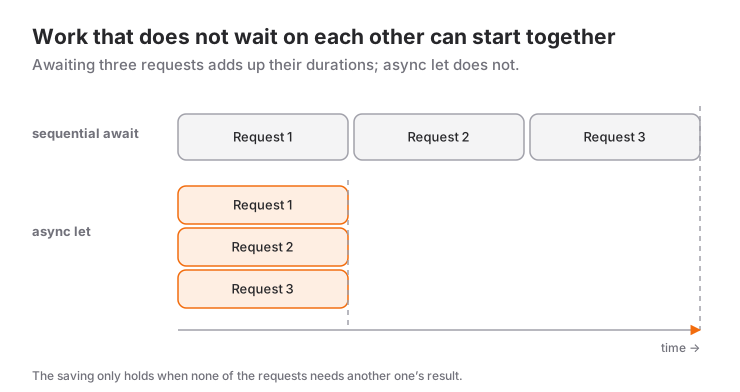
Write two independent requests as consecutive awaits and the second waits for the first to finish. async let starts both at once:
struct Post: Codable, Identifiable, Sendable {
    let id: Int
    let title: String
}

struct Dashboard: Sendable {
    let user: User
    let posts: [Post]
}

func loadDashboard(service: UserService, userID: Int) async throws -> Dashboard {
    async let user = service.fetchUser(id: userID)
    async let posts = service.fetchPosts(userID: userID)
    return try await Dashboard(user: user, posts: posts)
}(fetchPosts is a one-liner inside UserService: try await get("users/\(userID)/posts").)
When the number of jobs is not known at compile time, use a TaskGroup:
func fetchUsers(ids: [Int], service: UserService) async throws -> [User] {
    try await withThrowingTaskGroup(of: User.self) { group in
        for id in ids {
            group.addTask {
                try await service.fetchUser(id: id)
            }
        }

        var users: [User] = []
        for try await user in group {
            users.append(user)
        }
        return users.sorted { $0.id < $1.id }
    }
}
Results arrive in completion order, not in the order they were added; sort afterwards if order matters. Both constructs are structured concurrency: child tasks cannot outlive the function's scope, and if one throws, the others are canceled.
@MainActor: Updating the UI Safely
UI state must only be changed from the main thread. Instead of writing DispatchQueue.main.async, you mark the type with @MainActor — defined in Apple's MainActor reference — and the compiler enforces the rule:
import Observation

@MainActor
@Observable
final class UserListModel {
    private(set) var users: [User] = []
    private(set) var errorMessage: String?
    private(set) var isLoading = false

    private let service = UserService()

    func load() async {
        isLoading = true
        defer { isLoading = false }

        do {
            users = try await service.fetchUsers()
            errorMessage = nil
        } catch is CancellationError {
            // The screen went away, no need to show an error
        } catch let error as URLError where error.code == .cancelled {
            // URLSession reports cancellation with this error
        } catch {
            errorMessage = "Could not load the list: \(error.localizedDescription)"
        }
    }
}
On the line try await service.fetchUsers() the network work runs off the main actor; when await returns, the code is back on the main actor and assigning users is safe. @Observable and how the model connects to the view are the subject of the SwiftUI data flow post.
Actors: Protecting Shared Mutable State
Several tasks writing to the same dictionary is a textbook data race. An actor is a reference type that guarantees only one task at a time touches its state; you write no locks.
actor ImageCache {
    private var storage: [URL: Data] = [:]

    func data(for url: URL) -> Data? {
        storage[url]
    }

    func store(_ data: Data, for url: URL) {
        storage[url] = data
    }
}

func loadImageData(from url: URL, cache: ImageCache) async throws -> Data {
    if let cached = await cache.data(for: url) {
        return cached
    }
    let (data, _) = try await URLSession.shared.data(from: url)
    await cache.store(data, for: url)
    return data
}
Access from outside needs await because you may have to wait your turn. One thing to watch: at every await inside an actor method, other calls can interleave. Do not assume a value you read before the await is still the same afterwards.
Cancellation Is Cooperative
task.cancel() does not stop a task by force, it only raises a flag. System APIs such as URLSession and Task.sleep react to that flag on their own and throw. In your own long loops you add the check yourself:
func exportAll(_ users: [User]) async throws {
    for user in users {
        try Task.checkCancellation()
        try await upload(user)
    }
}
.task in SwiftUI
The .task modifier starts work when the view appears and cancels the task when the view disappears. .task(id:) cancels the previous task and starts a new one whenever the value changes, which is exactly what a search field needs:
struct SearchScreen: View {
    @State private var query = ""
    @State private var results: [User] = []

    var body: some View {
        List(results) { user in
            Text(user.name)
        }
        .searchable(text: $query)
        .task(id: query) {
            do {
                try await Task.sleep(for: .milliseconds(300))
                results = try await search(query)
            } catch {
                // A new character was typed: the previous task was cancelled
            }
        }
    }

    private func search(_ text: String) async throws -> [User] {
        let all = try await UserService().fetchUsers()
        return text.isEmpty ? all : all.filter { $0.name.localizedCaseInsensitiveContains(text) }
    }
}
While the user keeps typing, the waiting task is canceled; only the query present when they pause reaches the network.
Swift 6 and Data-Race Safety
In the Swift 6 language mode, data-race safety is checked at compile time. The core concept is Sendable: it states that a value can safely cross concurrency boundaries, from one actor to another or from one task to the next. Structs and enums made only of Sendable fields, actors and immutable final classes qualify; an ordinary class with mutable fields does not, and the compiler objects when you try to hand it to another task. That is why the models above are marked Sendable. In existing projects, turning the checks on gradually and clearing the warnings module by module hurts far less than switching all at once. Which types are values and which are references matters directly here; the details are in struct vs class.
When to Use It and When Not To
async/await should be the default for any asynchronous work you write today: network, files, database, anything that waits. Use a completion handler only when an old API you cannot change forces you to, and wrap that in a continuation.
Values that flow over time (text field changes, location updates) cannot be expressed by a single await; AsyncSequence or, still, Combine fit those. Making a synchronous, purely CPU-bound function async does not make it faster; async does not mean "runs in the background". And shared state does not always call for an actor: if the state is used only by the UI, @MainActor is enough.
Common Mistakes
1. Changing UI state from outside the actor
Symptom: the compiler reports main actor-isolated property 'users' can not be mutated from a nonisolated context; in older ObservableObject code you get the purple runtime warning about publishing changes from a background thread instead. Fix: mark the model @MainActor and make the change inside the model's own async method; do not patch it with DispatchQueue.main.async.
2. Awaiting independent requests one after another
let user = try await service.fetchUser(id: 1)
let posts = try await service.fetchPosts(userID: 1)   // waits for the previous line
Symptom: the screen opens as late as the sum of the request durations. Fix: if the second request does not need the result of the first, use async let.
3. Starting a Task in onAppear and forgetting it
Symptom: the request keeps running after you leave the screen, the same request fires again on every return, and sometimes an old response overwrites a newer one. Fix: use .task { }; the task's lifetime is tied to the view's.
4. Presenting cancellation as an error
Symptom: an error alert mentioning "canceled" flashes when the user leaves the screen or types in the search field. Fix: catch CancellationError and URLError.cancelled separately, as in the load() example above, and pass over them silently.
Mini Scenario: A User List Screen
Let's assemble the parts: UserService does the networking, UserListModel keeps state on the main actor, the view only displays.
import SwiftUI

struct UserListScreen: View {
    @State private var model = UserListModel()

    var body: some View {
        List(model.users) { user in
            VStack(alignment: .leading) {
                Text(user.name)
                Text(user.email).font(.caption)
            }
        }
        .overlay {
            if model.isLoading && model.users.isEmpty {
                ProgressView()
            } else if let message = model.errorMessage {
                Text(message)
            }
        }
        .task {
            await model.load()
        }
        .refreshable {
            await model.load()
        }
    }
}
When the screen opens, .task starts loading; if the user navigates back, the task is canceled, and thanks to the cancellation branches in load() no error message appears. .refreshable calls the same async method, and the pull indicator stays visible on its own until the await finishes. There is not a single DispatchQueue or callback in the view; the flow reads top to bottom.
Frequently Asked Questions
Does async/await run in the background?
Not by itself. await only says the function may be suspended at that point. Where code runs is decided by actor isolation: a method of a @MainActor type runs on the main actor except while it is suspended at an await.
What is the difference between Task and Task.detached?
Task { } inherits the actor and priority of the context it is created in. Task.detached inherits nothing. In everyday code Task { }, or better still structured concurrency (async let, TaskGroup, .task), is almost always enough.
What is the difference between an actor and a class?
Both are reference types. An actor prevents data races by serializing access to its mutable state, which is why access from outside requires await. Actors do not support inheritance.
Should GCD and completion handlers no longer be used?
They keep working and you will meet them in older code. Prefer async/await in new code; you can migrate gradually by wrapping older APIs in continuations.
Related Posts
SwiftUI @State, @Binding and @Observable: Data Flow Guide
When to use @State, @Binding, @Observable, @Bindable and @Environment in SwiftUI, how they map to ObservableObject, with a decision table and common bugs.
Swift Closures Explained: $0, @escaping and [weak self]
Learn Swift closure syntax step by step from the full form to $0 shorthand: trailing closures, capturing values, @escaping, retain cycles and [weak self].
SwiftUI First App: A Step-by-Step Guide for Beginners
Build your first SwiftUI app from an empty Xcode project to the simulator: App, View, VStack, @State, List and TextField in a working to-do list.