Swift Closures Explained: $0, @escaping and [weak self]
Last updated:
8 min read
![Swift Closures Explained: $0, @escaping and [weak self]](/assets/blog-covers/swift.webp)
A closure is an unnamed block of code that can be stored in a variable and passed to a function as an argument. In Swift, sorted, map, filter, completion handlers for network calls and every Button action in SwiftUI are closures, so you cannot use the language and avoid them. What trips beginners up is not the concept but the fact that the same thing can be written six different ways. In this post we go from the longest spelling to the shortest, then move on to the memory side: @escaping and [weak self]. Every one of those spellings is defined in the Closures chapter of the Swift book.
From Function to Closure
The only difference between a function and a closure is the name and the way it is written:
func greet(name: String) -> String {
    return "Hello, \(name)"
}

let greetClosure = { (name: String) -> String in
    return "Hello, \(name)"
}

print(greet(name: "Ada"))      // Hello, Ada
print(greetClosure("Ada"))     // Hello, Ada
In a closure, the parameters and return type move inside the braces, and the keyword in separates the signature from the body. The type of greetClosure is (String) -> String. Note that no argument label is written when you call it.
Six Steps from the Full Form to $0
Let's shorten the same sort step by step:
let numbers = [4, 1, 7, 3]

// 1. Full form
let s1 = numbers.sorted(by: { (a: Int, b: Int) -> Bool in
    return a < b
})

// 2. Types are inferred from context
let s2 = numbers.sorted(by: { a, b in return a < b })

// 3. A single expression needs no return
let s3 = numbers.sorted(by: { a, b in a < b })

// 4. Shorthand argument names
let s4 = numbers.sorted(by: { $0 < $1 })

// 5. Trailing closure
let s5 = numbers.sorted { $0 < $1 }

// 6. The operator itself is a function
let s6 = numbers.sorted(by: <)
All six produce [1, 3, 4, 7]. The compiler knows sorted(by:) expects (Int, Int) -> Bool, so you do not have to spell out the types. $0 is the first parameter, $1 the second.
Which one should you pick? If the body is one short expression, $0 reads well. If the body spans several lines or closures are nested, name the parameter; in nested closures $0 belongs to the innermost one, and it quickly becomes unclear which value you mean.
Trailing Closures
If the last parameter of a function is a closure, the closure can be written outside the parentheses:
func repeatTask(times: Int, task: (Int) -> Void) {
    for index in 1...times {
        task(index)
    }
}

repeatTask(times: 3) { index in
    print("Run \(index)")
}
This is why SwiftUI code looks so clean: VStack { … }, Button("Save") { … } and List { … } are all trailing closures.
Capturing Values
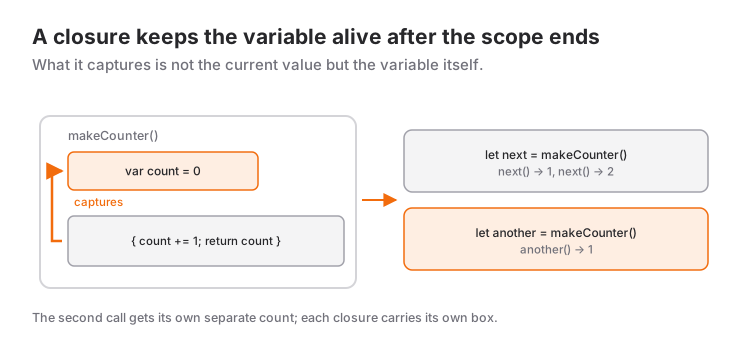
A closure captures the variables around the place where it is defined and keeps them alive after that scope has ended:
func makeCounter() -> () -> Int {
    var count = 0
    return {
        count += 1
        return count
    }
}

let next = makeCounter()
print(next())   // 1
print(next())   // 2

let another = makeCounter()
print(another())   // 1
When makeCounter returns, count should normally disappear. But the returned closure captured it, so it lives on. another gets its own separate count.
An important detail: a closure captures the variable itself, not its value at that moment. To freeze the value, use a capture list:
var level = 1
let printLive = { print("Level: \(level)") }
let printFrozen = { [level] in print("Level: \(level)") }

level = 5
printLive()     // Level: 5
printFrozen()   // Level: 1
Closures are reference types. Assign a closure to two variables and both share the same captured state. The value versus reference distinction is covered in depth in struct vs class in Swift.
@escaping: A Closure That Outlives the Function
By default, a closure parameter is non-escaping: it is called before the function returns and then it is done. If the closure will be called after the function has finished, meaning it is stored in a property or handed to asynchronous work, it must be marked @escaping:
import Foundation

func fetchGreeting(completion: @escaping (String) -> Void) {
    DispatchQueue.main.asyncAfter(deadline: .now() + 1) {
        completion("Hello")
    }
}

fetchGreeting { text in
    print(text)   // after 1 second: Hello
}
Remove @escaping and the compiler reports Escaping closure captures non-escaping parameter 'completion'. The marker is not a formality; it is a warning that this closure may hold on to whatever it captured for a long time, so think about memory. For the same reason, escaping closures inside a class make you write self. explicitly; leave it out and you get reference to property … in closure requires explicit use of 'self' to make capture semantics explicit.
Retain Cycles and [weak self]
The problem arises like this: an object stores a closure in a property, and the closure captures self. Each holds the other with a strong reference, so neither is ever freed; Swift's behavior here is spelled out in the Automatic Reference Counting chapter.
final class Stopwatch {
    var seconds = 0
    var onTick: (() -> Void)?

    deinit {
        print("Stopwatch deallocated")
    }

    func start() {
        onTick = {
            self.seconds += 1      // self -> onTick -> self
        }
    }
}

var stopwatch: Stopwatch? = Stopwatch()
stopwatch?.start()
stopwatch = nil     // the deinit message never appears
The fix is to capture self weakly:
func start() {
    onTick = { [weak self] in
        guard let self else { return }
        self.seconds += 1
    }
}
With [weak self], self becomes optional inside the closure and is nil once the object is gone. The guard let self else { return } pattern is the cleanest way to unwrap it; the logic is the same as in the guard let post. After this change, stopwatch = nil prints the deinit message.
[unowned self] is also an option, but if the closure runs after the object has been freed, the app crashes. Unless you are certain the closure cannot outlive the object, use weak.
You do not need [weak self] in every closure. Non-escaping closures such as those passed to map, filter and sorted end together with the function and cannot form a cycle.
map, filter, sorted and reduce
Collections are where closures are most enjoyable:
struct Student {
    let name: String
    let grade: Int
}

let students = [
    Student(name: "Ada", grade: 85),
    Student(name: "Linus", grade: 42),
    Student(name: "Grace", grade: 97),
    Student(name: "Alan", grade: 68)
]

let passedNames = students
    .filter { $0.grade >= 50 }
    .sorted { $0.grade > $1.grade }
    .map { $0.name }

print(passedNames)   // ["Grace", "Ada", "Alan"]

let total = students.reduce(0) { sum, student in sum + student.grade }
let average = Double(total) / Double(students.count)
print(average)       // 73.0
filter keeps the elements that satisfy a condition, sorted orders them, map transforms each element into something else, and reduce folds everything into a single value. In reduce the two parameters mean different things, so naming them is more readable than $0 + $1.grade. If you only pull out one property, a key path is shorter still: students.map(\.grade).
SwiftUI Button Actions
import SwiftUI

struct CounterView: View {
    @State private var count = 0

    var body: some View {
        VStack(spacing: 16) {
            Text("\(count)")
                .font(.largeTitle)

            Button("Increment") {
                count += 1
            }

            Button(action: { count = 0 }) {
                Label("Reset", systemImage: "arrow.counterclockwise")
            }
        }
    }
}
The first button receives its action as a trailing closure. The second has two closures: action, and label, which builds the appearance. Because SwiftUI views are structs, you do not write [weak self] here; try it and you get 'weak' may only be applied to class and class-bound protocol types. The retain cycle risk is not in the view but in the class-based model objects the view uses. To see this whole structure built from scratch, read building your first app with SwiftUI.
A Realistic Scenario: The Model Behind a Search Screen
import Foundation

final class SearchViewModel {
    private(set) var results: [String] = []
    var onResultsChanged: (([String]) -> Void)?

    private let allItems = ["Swift", "SwiftUI", "Xcode", "Flutter", "Dart"]

    func search(_ query: String) {
        loadItems(matching: query) { [weak self] found in
            guard let self else { return }
            self.results = found
            self.onResultsChanged?(found)
        }
    }

    private func loadItems(matching query: String,
                           completion: @escaping ([String]) -> Void) {
        let items = allItems
        DispatchQueue.global().async {
            let found = items.filter { $0.localizedCaseInsensitiveContains(query) }
            DispatchQueue.main.async {
                completion(found)
            }
        }
    }
}

let viewModel = SearchViewModel()
viewModel.onResultsChanged = { print("Results:", $0) }
viewModel.search("swift")   // Results: ["Swift", "SwiftUI"]
This small class contains everything from the post. completion is @escaping because it is handed to a background queue. The user may close the screen before results arrive; thanks to [weak self] the model does not linger in memory, and the closure quietly exits. The closure inside filter is non-escaping, so it stays short with $0. Passing a copy of items to the background closure instead of self is a deliberate choice too: an array is a value type, so it travels safely between queues.
When to Use It and When Not To
A closure is the right tool for passing behavior as a parameter (sorted, filter), for short event reactions (a button action), and for an object that reports a single event to the outside (onResultsChanged).
Look at an alternative when:
- Asynchronous steps start nesting, that is, a completion inside a completion. async/await is far more readable; the transition is covered in the async/await guide.
- The closure body has grown to dozens of lines. Move it into a named method and pass the method as a reference:
Button("Add", action: addItem). - An object reports three or four different events. A protocol (delegate) is tidier than a handful of separate closure properties.
Common Mistakes
1. Forgetting @escaping
Symptom: Escaping closure captures non-escaping parameter 'completion', or, when assigning the closure to a property, assigning non-escaping parameter … to an '@escaping' closure. Fix: add @escaping in front of the parameter type.
2. Capturing self strongly in a stored closure
Symptom: no compile error, but deinit never runs even though the screen was closed, and timers and listeners keep working in the background. Fix: [weak self] plus guard let self else { return }. Adding a temporary deinit { print(…) } to the class you suspect is the quickest way to diagnose it.
3. Assuming the value was frozen
Symptom: the closure prints the value at the time it runs, not at the time it was defined. A closure captures the variable, not the value. Fix: use a capture list such as { [level] in … }.
4. Using $0 in nested closures
Symptom: you think $0 refers to the outer element, but it refers to the inner closure's parameter; the result is silently wrong or you get a type error. Fix: name the parameter of the outer closure. For let matrix = [[1, 2], [3, 4]], writing matrix.map { row in row.filter { $0 > row[0] } } makes row the outer element and $0 the inner one, with no confusion.
Frequently Asked Questions
What is the difference between a closure and a function?
Functions are really closures with a name. A closure is unnamed, written in place, and can capture surrounding variables; in both cases the type has the form (Parameters) -> ReturnType.
What does $0 mean?
It is the automatic name of the closure's first parameter; the second is $1, the third $2. You can use it when you do not name the parameters with in, and it suits short, single-expression closures.
Should I write [weak self] in every closure?
No. It is only needed when the closure is stored or long-lived and self is a class instance. It is unnecessary in non-escaping closures such as map and filter, and in SwiftUI views, which are structs.
When is @escaping required?
When the closure will be called after the function it was passed to has returned: it is stored in a property or array, or handed to asynchronous work. Closures that are called and finished inside the function do not need it.
Related Posts
SwiftUI @State, @Binding and @Observable: Data Flow Guide
When to use @State, @Binding, @Observable, @Bindable and @Environment in SwiftUI, how they map to ObservableObject, with a decision table and common bugs.
Swift async/await Guide: Tasks, Actors and @MainActor
From completion handlers to async/await: Task, async let, TaskGroup, @MainActor, actors, cancellation and a JSON API call with URLSession in SwiftUI.
SwiftUI First App: A Step-by-Step Guide for Beginners
Build your first SwiftUI app from an empty Xcode project to the simulator: App, View, VStack, @State, List and TextField in a working to-do list.