
Space Bunny Alpha: 1M Context and Multimodal Input
7 min read
Space Bunny Alpha's two most striking numbers sit right next to each other: a one-million-token context window and image plus video input. Together they form a combination that most other models do not have.
But the size of the numbers alone does not tell you what you can do with them. A million tokens means "a very large window"; what fits in that window, and what does not, depends on what you put in it. This article works out what the window actually holds, explains the shared budget concept, and covers the practical way to measure and manage your token budget.
The setup itself is in a separate article; the feature comparison with other models is in the comparison article.
How much does a million tokens hold?
The answer depends on the language. And here honesty is required: Space Bunny Alpha's tokenizer has not been published. OpenRouter reports that field as Other, so we do not know its name or its rules. The figures below are therefore approximate; the real number is only available by sending the request and reading the usage field. The end of this article shows how to measure it.
For English prose, a rough rule is about four characters per token:
| Content | 1M tokens is roughly |
|---|---|
| English prose | 750,000 words, about 4 million characters |
| Turkish prose | 400,000 to 500,000 words |
| Dart, Swift or C# source code | 55,000 to 80,000 lines |
| A typical source file (200-400 lines) | 150 to 400 files |
| Markdown documentation | 25,000 to 40,000 lines |
The gap between Turkish and English is surprising but real. Suffixes and long words split into more tokens, so the same number of characters costs more tokens. Fitting a Turkish project into the same context budget as an English one is therefore more expensive.
The numbers can look startlingly large, but in practice the "context limit" problem from the opencode article is not solved by this model. The reason is simple: fitting a 400-file project into the window and understanding it are two different things.
Why 1M context does not solve everything
There are four concrete reasons.
Latency. Attention scales not with the number of tokens but with the number of comparisons between token pairs. Doubling the context multiplies the work quadratically. Reaching 1M tokens is far slower than 100 thousand. In a long session this is the first thing a user notices in the interface.
Diluted attention. Instructions buried in a long context can slip past the model. Asking a hundred pages of code to "only fix the bug on line 40" is a different job from asking it to "debug and explain". Putting your instruction at the end of the context works noticeably better than at the beginning.
A full window is not a useful window. Filling the window is not a goal. Putting ten thousand irrelevant lines in performs worse than putting the right five hundred in. Capacity is not meant to be spent.
The cost is not still zero. That is true for this model; it is not true for the others with the same window. In the calculation in the comparison article, gpt-6-luna came to $1.35 a month. Growing the context is a decision that grows the bill directly.
The practical conclusion: keep the million tokens for work that genuinely costs that much. That is usually reading an entire codebase and making a change, scanning long documentation, or interpreting dozens of screenshots together.
A shared budget: text, image and video
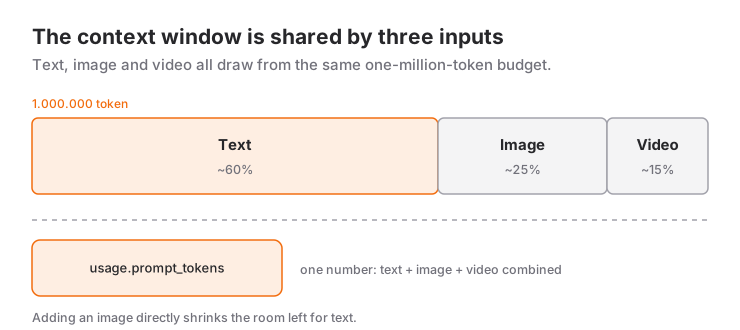
The input format is text + image + video. The important part: one million tokens is a single budget shared across all three. Adding an image reduces the room left for text.
The token cost of an image roughly depends on two parameters: resolution and tiling. A high-resolution screenshot costs far more tokens than a small version of the same scene. In a debugging session, sending screenshots uncropped can consume as much context as the problem itself.
The Python sample below is the cheapest way to measure what you actually spent after a request:
import os

from openai import OpenAI

client = OpenAI(
    api_key=os.environ["OPENROUTER_API_KEY"],
    base_url="https://openrouter.ai/api/v1",
)

response = client.chat.completions.create(
    model="stealth/space-bunny-alpha",
    messages=[{
        "role": "user",
        "content": [
            {"type": "text", "text": "Explain the error message in this screenshot."},
            {
                "type": "image_url",
                "image_url": {"url": "https://example.com/error.png"},
            },
        ],
    }],
)

usage = response.usage
print("input tokens :", usage.prompt_tokens)
print("output tokens:", usage.completion_tokens)
print("cost         :", usage.cost)
The usage.prompt_tokens field gives the combined token cost of text and image. Sending the same prompt with and without the image tells you what a screenshot costs, in a single measurement.
Video input
Video input is supported, but there is a catch: the token cost of video frames comes out of the context. Sending a video that fills the whole million-token budget means leaving the model no room for text at all.
The method used in practice is to process the video yourself and pick the frames. A typical flow:
- Split the video into frames.
ffprobetells you the frame rate. - Select an evenly spaced subset. This preserves the information while reducing token cost linearly.
- Tile the frames into a single image and send that one image to the model.
The full frame extraction and tiling process is covered in the on-device video merging article. The layout there produces a single frame grid summarizing a long daily vlog.
# 0.5 frames per second: one frame every two seconds
ffmpeg -i video.mp4 -vf "fps=0.5" frame-%04d.png
This approach has a side benefit: because you do the conversion, you know exactly which frames went out and how many tokens they cost. Uploading raw video hands that control to the model.
Managing the token budget
Four practical rules:
Do not calculate, measure. Because the tokenizer is unpublished, an offline token counter is not reliable. Reading usage.prompt_tokens is both faster and more accurate than estimating. Measure with a single request before you build anything elaborate.
Put the instruction at the end of the context. An instruction in the middle of a long context is missed far more often than one at the end. When you send a long document and ask for an operation on it, append the instruction last.
Repeat the constraint, not the context. Writing the same restriction three times is much cheaper than sending two thousand lines three times.
Set the output limit deliberately. The maximum output is 524,288 tokens, almost the size of the context window itself. Left open, the model can produce very long answers. If you do not want a long answer, bound it with max_tokens:
-d '{
    "model": "stealth/space-bunny-alpha",
    "messages": [{ "role": "user", "content": "Summarise this class." }],
    "reasoning_effort": "low",
    "max_tokens": 800
  }'
Reasoning draws on the budget too. A request running at reasoning_effort: max increases both latency and the output token count through the reasoning step. For a simple summary, low is both faster and cheaper.
What a 1M context is actually for
Four scenarios where the window genuinely earns its place:
Changing something across a whole codebase. A refactor that touches several files, or finding every use of a type. When 400 files fit, the agent keeps a map ready instead of searching for files on every step.
Scanning long documentation. Reading the full version history of an API and pulling out one behaviour change, for example.
Dozens of screenshots. Finding where a flow broke in a multi-screen journey. This is the one scenario where the multimodal side of the 1M window really switches on.
Bulk classification. Sorting hundreds of records in one request. The asset here is not the context but the consistency you lock down with response_format.
Against that, short and targeted work such as fixing a single function or translating a paragraph gains nothing from a 1M window. The fix for the "gets stuck in the middle of a multi-file refactor" problem described in the opencode article is not a bigger context; it is an agent that reads files in a sensible order.
Sources
- OpenRouter endpoint details: Space Bunny Alpha (input modalities, max output, tokenizer field,
max_tokenssupport) - OpenRouter model API (tokenizer report, context window, reasoning tiers)
- OpenRouter API documentation (
usagefields,max_tokens, multimodal content format)
Related Posts
Space Bunny Alpha vs Other AI Agents
Space Bunny Alpha compared with Claude, GPT, Gemini and free open models: price, the 1M context window, multimodal input and agent capabilities.
How to Install Space Bunny Alpha: Step by Step
Setting up Space Bunny Alpha via OpenRouter: the API key, the first request, Python and TypeScript samples, image input, open-source agents.
Building an AI Agent With Space Bunny Alpha
From tool schema to loop: writing a working coding agent on Space Bunny Alpha, feeding tool errors back to the model and locking the output to JSON.