Merging Videos on Device With ffmpeg: Turning Mixed Aspect Ratios Into One Vlog
Last updated:
6 min read
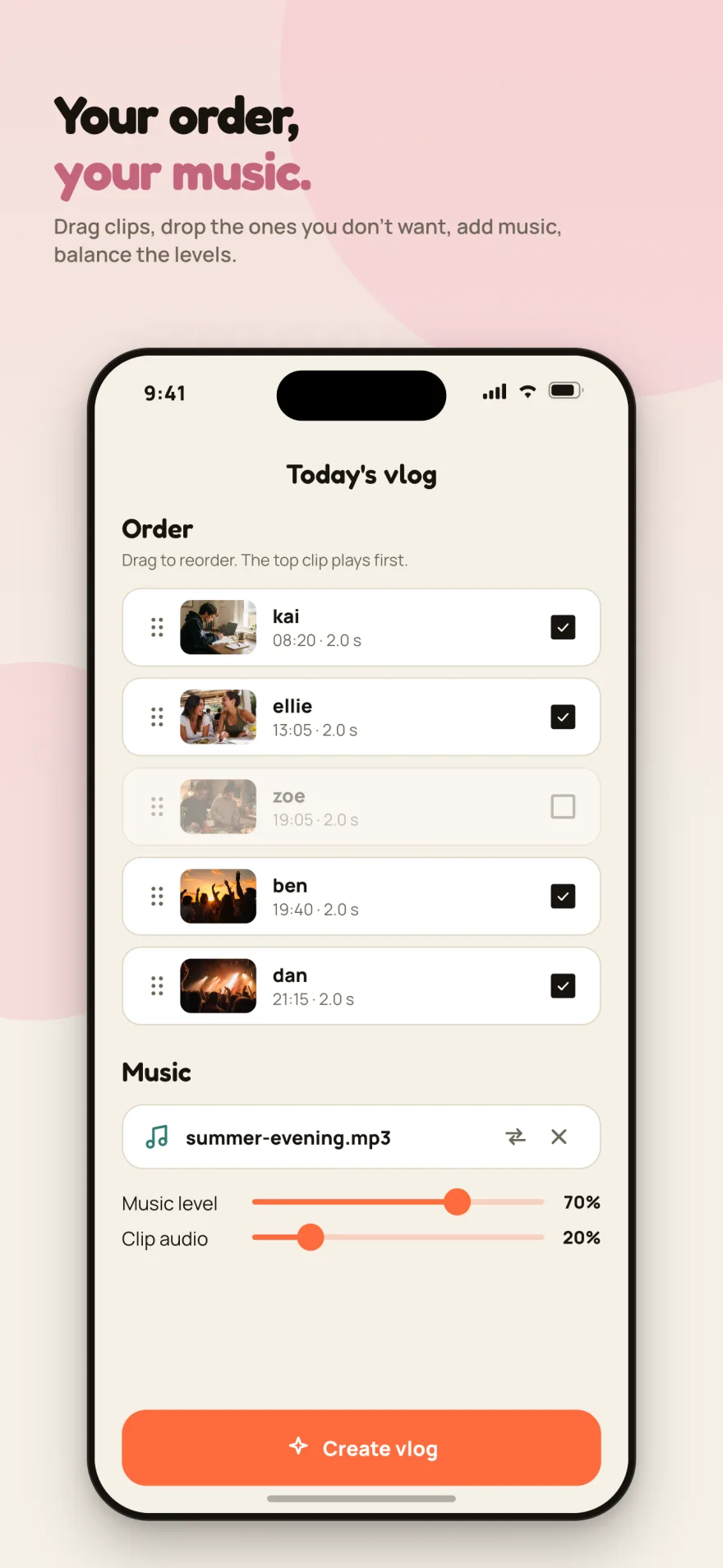
The core idea of Recapday is this: a group of friends records a few seconds at times they've chosen, and at the end of the day everything becomes one vlog.
Simple to say, but the input is unpredictable. Within a single day you can get all of these:
- A 2-second clip shot vertically
- A 10-second clip shot horizontally
- A single still photo
- Clips with audio and clips without
All of them have to meet in one 1920×1080 video and look right. And this runs on the phone — I don't run ffmpeg on a server.
Why on the phone?
Merging server-side would have been easier. Three reasons I didn't:
- Cost. On shared hosting ffmpeg is either unavailable or far too slow for this.
- Storage. The vlog file is never uploaded. If the largest file in your app is the vlog, never uploading it is the biggest saving available.
- Privacy. Being able to write "the daily vlog never leaves your device" is worth something precisely because it's true.
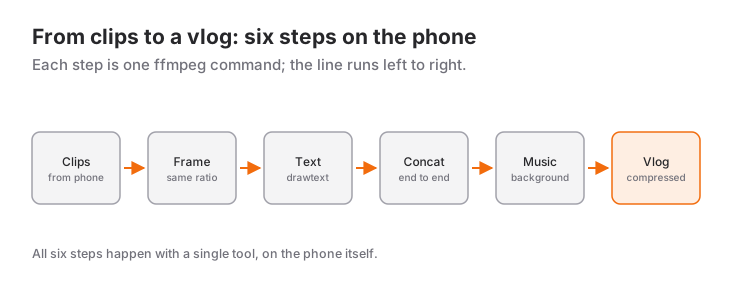
On the Flutter side I used the ffmpeg_kit_flutter_new package.
Step 1: Fitting every clip into a common frame
The classic way to combine different aspect ratios is padding the short sides with black. It looks bad.
I used blurred padding instead: a scaled-up, blurred copy of the same frame becomes the background, and the real image sits centered on top. The effect you know from Instagram and TikTok.
The filter chain:
[0:v]split=2[zemin][on];

[zemin]scale=1920:1080:force_original_aspect_ratio=increase,
       crop=1920:1080,
       gblur=sigma=28,
       eq=brightness=-0.18[bulanik];

[on]scale=1920:1080:force_original_aspect_ratio=decrease[sigan];

[bulanik][sigan]overlay=(W-w)/2:(H-h)/2,
                fps=30,setsar=1,
                format=yuv420p[v]
Reading it:
split=2forks the same input into two branches.- The background branch scales with
increaseso it overflows the frame, thencroptrims it. No gaps left. gblur=sigma=28blurs,eq=brightness=-0.18darkens. Without the darkening the background competes with the foreground.- The foreground branch scales with
decreaseso it fits inside the frame. overlaycentres it.
setsar=1 is mandatory. Some phones record with a non-square pixel aspect ratio; if you don't reset it, the merged output comes out horizontally squashed.
Photos go through the same chain, the only difference being -loop 1 -t <seconds> on the input.
Step 2: Burning in the text — including non-ASCII
Every clip carries the recorder's name, the capture time and an optional caption, drawn with the drawtext filter described in ffmpeg's official filter documentation.
There's a lesson I learned early here: never put user text directly in the filter string.
drawtext=text='öğle molası uzadı' ← fragileThe filter chain is one string, and : ' % \ inside it all need escaping. A user caption can contain any of them. A single apostrophe breaks the whole command.
The fix is textfile:
drawtext=fontfile=/.../Manrope.ttf:textfile=/.../caption.txt:x=76:y=h-th-64The text goes into a temporary file as UTF-8 and ffmpeg reads it from there. The escaping problem disappears completely.
Second point: without fontfile, ffmpeg falls back to a system font and non-ASCII characters render as boxes. I copy the app's own fonts (Manrope, Fredoka) out of the bundle into a temp directory and pass the path.
Step 3: Joining the clips
Once every clip is normalized to the same resolution, frame rate and audio format, joining is cheap:
-f concat -safe 0 -i list.txt -c copy out.mp4The concat demuxer defined in ffmpeg's formats documentation with -c copy doesn't re-encode — it takes seconds. But only if the inputs genuinely match. One clip at a different frame rate and audio drifts out of sync. Don't skip the normalization step.
The alternative concat filter re-encodes everything and is far slower on a phone.
Step 4: Adding music
Users can pick a track from their files and balance it against the clip audio. Three problems:
The track may be shorter than the vlog. Loop it on input:
-stream_loop -1 -i music.mp3Starting and stopping abruptly is unpleasant. One second in, two seconds out:
afade=t=in:st=0:d=1,
afade=t=out:st=<end-2>:d=2
The two audio streams have to merge:
[k][m]amix=inputs=2:duration=first:dropout_transition=0[a]duration=first matters: the looped music counts as infinite, so without first the output never ends. dropout_transition=0 stops one stream jumping in volume when the other goes quiet.
Step 5: Compression — and measuring it
Storage is finite, so uploaded clips get compressed. Which raises the question: how much quality did that cost?
"Looked fine to me" is not a measurement. ffmpeg can tell you:
ffmpeg -i original.mp4 -i compressed.mp4 \
  -lavfi "psnr;[0:v][1:v]ssim" -f null -
At CRF 23 with a scale down to 720p, on a real user clip:
| Metric | Result | Reading |
|---|---|---|
| PSNR | 43.35 dB | Above 40 dB is generally considered visually indistinguishable |
| SSIM | 0.974 | 1.0 is a perfect match |
Those numbers made the decision easy. File size dropped substantially while the quality loss stayed measurably negligible.
Advice: don't pick your compression setting by saying "looks fine". Two commands, two numbers, and you have a decision you can defend.
Five things to avoid
- Padding with black. Blurred padding costs almost the same and looks far better.
- Passing user text via
drawtext=text=. Usetextfile. - Omitting
fontfile. Non-ASCII characters turn into boxes. - Running
concat -c copywithout normalizing. Audio drifts out of sync. - Forgetting
setsar=1. Some devices produce a squashed image.
Recapday's full architecture and the context for these decisions is in a separate post.
Frequently Asked Questions
Why merge on the phone instead of on the server?
Three reasons: on shared hosting ffmpeg is either missing or far too slow for this; the vlog file is never uploaded at all, which is the biggest storage saving available; and the sentence "your daily vlog never leaves your device" ends up being literally true.
How are clips with different aspect ratios merged?
With a blurred fill instead of black bars: an enlarged, blurred copy of the same frame becomes the background and the real frame sits in the middle. Writing setsar=1 is essential, because some phones record with non-square pixels and the picture gets squeezed horizontally without it.
How should user-written text be passed to drawtext?
Through textfile, never directly through text=. The filter chain is a string, so : ' % and \ in the text all need escaping, and a single apostrophe breaks the whole command.
Why does concat sometimes drift the audio out of sync?
The concat demuxer with -c copy does not re-encode, so it only produces correct output when the inputs really are identical. A single clip at a different frame rate is enough to drift the audio, which is why the normalization step cannot be skipped.
How do you measure how much compression costs in quality?
With ffmpeg's own psnr and ssim filters. In the example in this post, CRF 23 plus scaling to 720p gave PSNR 43.35 dB and SSIM 0.974 — both indicating a loss that is not visible to the eye.
Related Posts
Flutter Camera Without Forcing Orientation: Three Bugs and Their Fixes
A rotated preview, a freeze when recording starts and a dead camera: three Flutter camera bugs from Recapday and the code that fixed each one.
Firebase Auth With Your Own PHP Server: Token Verification and Account Deletion Without Composer
Identity in Firebase, data on your own server: RS256 token verification in PHP without composer, plus the account-deletion flow the stores require.
Recapday Couple Mode: Why a Two-Person Group Needed Its Own Mode
How Couple Mode found its way into Recapday: what changes at two people, why a mode beat a separate app, and what I deliberately left out.