
Building an AI Agent With Space Bunny Alpha
5 min read

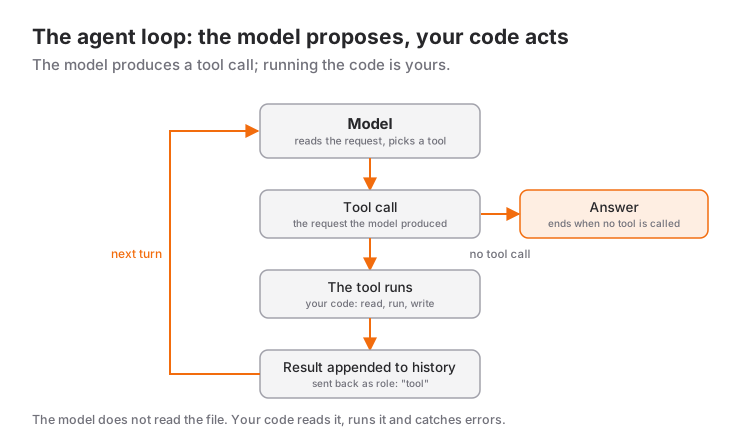
There is exactly one difference between calling a model and building an agent: the loop. A model answers once and stops. An agent reads the instruction in the model's answer, actually does the work, feeds the result back to the model, and repeats until an answer arrives.
In this article we build that loop from start to finish. The setup article covers the API connection and the 1M context article covers budget management. The focus here is how a model runs a program.
Why an agent is a "harness" was explained in the harness article; here we write the actual code.
What the model does not do, what the agent does
Before understanding the loop, draw the boundary. Space Bunny Alpha produces a tool call request; it does not execute it.
| The agent's job | The model's job |
|---|---|
| Reading the file | Deciding which file to read |
| Running the command | Saying which command to run |
| Catching the error | Explaining why the error happened |
| Formatting the result | Interpreting what the result means |
| Driving the loop | Suggesting when to stop |
The practical consequence: telling the model "open this file" is not enough, because the code that actually opens it is yours. The whole agent is that bridge.
Writing the tool schema
You tell the model which tools it may use with a tools array. The stricter the schema, the more accurately the model calls it. Let us start with two tools:
const tools = [
  {
    type: "function" as const,
    function: {
      name: "read_file",
      description: "Reads the contents of a file with line numbers.",
      parameters: {
        type: "object",
        properties: {
          path: {
            type: "string",
            description: "File path relative to the project root, for example lib/agent.ts",
          },
        },
        required: ["path"],
        additionalProperties: false,
      },
    },
  },
  {
    type: "function" as const,
    function: {
      name: "list_files",
      description: "Lists the files in a directory.",
      parameters: {
        type: "object",
        properties: {
          dir: {
            type: "string",
            description: "Directory to list, for example lib",
          },
        },
        required: ["dir"],
        additionalProperties: false,
      },
    },
  },
];
The more detail you put in description, the better. The model decides based on descriptions, not on tool names. Writing "Project root relative file path" instead of "searches something" is not a detail you will remember later, it is the difference between a right and a wrong call.
Do not skip additionalProperties: false and required. Without those two lines the model can omit a field you need or invent one you did not ask for.
Building the loop
The heart of an agent is a single while loop. The logic: send the message history to the model, and if the answer contains a tool call, run it and append the result to the history; otherwise leave the loop.
import OpenAI from "openai";
import { readFileSync, readdirSync } from "node:fs";
import { resolve, sep } from "node:path";

const client = new OpenAI({
  apiKey: process.env.OPENROUTER_API_KEY,
  baseURL: "https://openrouter.ai/api/v1",
  timeout: 180_000,
  maxRetries: 2,
});

type Msg = OpenAI.Chat.ChatCompletionMessageParam;

const PROJ_ROOT = process.cwd();

/** Stops the model-supplied path from escaping the project root. */
function safePath(relative: string): string {
  const full = resolve(PROJ_ROOT, relative);
  if (full !== PROJ_ROOT && !full.startsWith(PROJ_ROOT + sep)) {
    throw new Error(`Refusing to leave the project root: ${relative}`);
  }
  return full;
}

function runTool(name: string, rawArgs: string): string {
  const args = JSON.parse(rawArgs || "{}") as { path?: string; dir?: string };

  try {
    if (name === "read_file" && args.path) {
      return readFileSync(safePath(args.path), "utf8").slice(0, 40_000);
    }
    if (name === "list_files" && args.dir) {
      return readdirSync(safePath(args.dir)).join("\n");
    }
    return `Unknown tool: ${name}`;
  } catch (error) {
    // Hand the error back to the model as text; do not break the loop.
    return `Error: ${(error as Error).message}`;
  }
}

const messages: Msg[] = [
  {
    role: "system",
    content:
      "You are a software engineer. Read the files first, then explain. " +
      "Do not propose a change before you are sure you have read the file.",
  },
  {
    role: "user",
    content: "List the files in lib/ and explain what agent.ts does.",
  },
];

const MAX_TURNS = 8;

for (let turn = 0; turn < MAX_TURNS; turn += 1) {
  const completion = await client.chat.completions.create({
    model: "stealth/space-bunny-alpha",
    messages,
    tools,
    tool_choice: "auto",
    reasoning_effort: turn === 0 ? "high" : "low",
  });

  const message = completion.choices[0]?.message;
  if (!message) break;

  messages.push(message);

  const calls = message.tool_calls ?? [];
  if (calls.length === 0) {
    console.log(message.content);
    break;
  }

  for (const call of calls) {
    const result = runTool(call.function.name, call.function.arguments);
    messages.push({
      role: "tool",
      tool_call_id: call.id,
      content: result,
    });
  }
}
Four details make this loop usable in production.
safePath and the path boundary. If you resolve the model's path directly it can write ../../.env. Verifying it stays under PROJ_ROOT is the security step most often skipped when writing an agent. The validation logic from the safety article applies to the file system here too.
Do not swallow errors, feed them back. runTool catches the error and appends the message as role: "tool". The model can then learn that the file does not exist and try a different path. Catch the error and drop it, and the model repeats the same mistake.
Set a turn limit. Without MAX_TURNS the model can loop forever. Eight turns is far more than most real tasks need.
Tune reasoning per turn. On the first turn the model is discovering files, where high may be needed instead of max. On later turns it is only interpreting what it read, where low is enough. As the comparison article explains, reasoning arrives at max by default and that is real latency per turn.
Returning tool errors in a form the model understands
The catch block in runTool is short but critical. A raw error message (ENOENT: no such file or directory, open 'lib/agent.ts') is a strong signal to the model, but it does not say what to do next. Telling the model what happens next works:
function runTool(name: string, rawArgs: string): string {
  const args = JSON.parse(rawArgs || "{}") as { path?: string; dir?: string };

  try {
    if (name === "read_file" && args.path) {
      return readFileSync(safePath(args.path), "utf8").slice(0, 40_000);
    }
    if (name === "list_files" && args.dir) {
      return readdirSync(safePath(args.dir)).join("\n");
    }
    return `Unknown tool: ${name}. Available tools: read_file, list_files.`;
  } catch (error) {
    const message = (error as Error).message;
    if (message.includes("ENOENT")) {
      const dir = args.path ? args.path.split("/").slice(0, -1).join("/") || "." : ".";
      return `Error: ${args.path} not found. Call list_files on ${dir} first and use the real file name.`;
    }
    return `Error: ${message}. You can try a different path.`;
  }
}
These few lines visibly raise the agent's self-correction rate. The model now continues with "do this" information, not just "something went wrong".
Locking the output to JSON
The last turn of an agent does not have to produce free text. If a file-edit summary or a classification decision has to be JSON, you have two paths.
Path one: response_format with a schema. You send one final request and force the schema once the loop ends. The JSON schema from the setup article applies here too.
Path two: return JSON as a tool. The loop never really ends; the model keeps calling submit_result. This leaves the "I am done" decision to the model while the schema guarantees the shape:
const tools = [
  readFileTool,
  listFilesTool,
  {
    type: "function" as const,
    function: {
      name: "submit_result",
      description:
        "Called when the task is done. Delivers the result as JSON. " +
        "Must be called after all relevant files have been read.",
      parameters: {
        type: "object",
        properties: {
          summary: { type: "string", description: "Summary of the work done" },
          changedFiles: {
            type: "array",
            items: { type: "string" },
            description: "Paths of the files that were changed",
          },
          confidence: {
            type: "integer",
            minimum: 0,
            maximum: 100,
            description: "How much the task was trusted, 0-100",
          },
        },
        required: ["summary", "changedFiles", "confidence"],
        additionalProperties: false,
      },
    },
  },
];
The advantage of the second path is that it forces the model to read the files it needs before it calls submit_result. You close the loop when you see submit_result:
for (let turn = 0; turn < MAX_TURNS; turn += 1) {
  // ... request ...

  const submit = calls.find((c) => c.function.name === "submit_result");
  if (submit) {
    const result = JSON.parse(submit.function.arguments) as {
      summary: string;
      changedFiles: string[];
      confidence: number;
    };
    console.log(result);
    process.exit(0);
  }

  // ... run the other tools ...
}

console.error(`The agent produced no result within ${MAX_TURNS} turns.`);
process.exit(1);
Do not forget the turn limit. If the model burns through its turns without calling submit_result, the program errors out because it never saw one. That is still better than a silently half-finished task in production.
When to pick a different model
Space Bunny Alpha is not the right choice for every agent. Three results come out of the capability table in the comparison article.
tool_choice only accepts auto. If you do not need to force a specific tool, that is fine. If your flow needs a deterministic first step, you either push it hard in the prompt text or this model is the wrong fit for that flow.
There is no seed. Two calls with the same prompt give no guarantee of the same answer. If the agent you are writing needs reproducible output in tests, pick a model that supports seed.
Context cost is not free. If you are budgeting long sessions, look at the monthly table in the comparison article.
In short: Space Bunny Alpha makes sense for discovery, experiments and anywhere the cost genuinely has to be zero. For deterministic flows and code where reproducibility is a requirement, other models are the better choice.
Sources
- OpenRouter model page: Space Bunny Alpha (model id, context, reasoning tiers)
- OpenRouter endpoint details (
toolsandtool_choicesupport, supported parameters) - OpenRouter API documentation (
tools,tool_choice,role: "tool"message format, streaming)
Related Posts
Space Bunny Alpha vs Other AI Agents
Space Bunny Alpha compared with Claude, GPT, Gemini and free open models: price, the 1M context window, multimodal input and agent capabilities.
Space Bunny Alpha: 1M Context and Multimodal Input
What a one-million-token context window really holds, how image and video input share that budget, and how to measure and manage your token budget.
How to Install Space Bunny Alpha: Step by Step
Setting up Space Bunny Alpha via OpenRouter: the API key, the first request, Python and TypeScript samples, image input, open-source agents.