
How to Install Space Bunny Alpha: Step by Step
10 min read
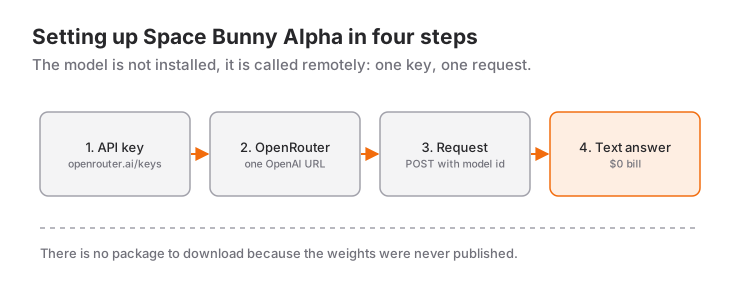
The short answer to "how do I install Space Bunny" is: you don't. Space Bunny Alpha is not a standalone program you run; it is a model you call over the network. There is no pip install and no npm i package to put on your machine. All you do is create an API key and send a first request.
That is not the same as saying it is simple. There are real decisions behind this model, and this article walks through all of them with code you can copy and run.
Let me first pin down what the model is, then set it up step by step.
What is Space Bunny Alpha?
Space Bunny Alpha is an unnamed ("anonymous") large language model served on OpenRouter under the id stealth/space-bunny-alpha. Its provider shows up as Stealth, and its weights have not been published. There is no model card on Hugging Face, no license file, and no downloadable checkpoint. That is also why the "installation" question never turns into a download.
The values below were verified against OpenRouter's model API and model page while writing this article:
| Property | Value |
|---|---|
| Model id | stealth/space-bunny-alpha |
| Added to OpenRouter | September 23, 2026 |
| Context window | 1,000,000 tokens |
| Max output | 524,288 tokens |
| Input modalities | text, image, video |
| Output modalities | text |
| Input price (per million tokens) | $0 |
| Output price (per million tokens) | $0 |
| Reasoning | mandatory, low / medium / high / xhigh / max |
| Default reasoning effort | max |
| Published weights | none |
| Published knowledge cutoff | none |
| Content moderation | none (is_moderated: false) |
Three rows here deserve their own paragraph.
The price is zero. Both input and output list at $0 per million tokens, which means your bill at the end of the month is zero. OpenRouter does apply rate and throughput limits to free models, so "unlimited" would not be the honest word.
The context window is 1 million tokens. In a single request that is roughly 750,000 lines of plain text, or a few hundred files of source code. The "context limit" problem I described in the opencode article shows up a lot later with this model.
Reasoning is mandatory and defaults to max. The model runs a reasoning step you cannot switch off, and the default is the highest tier. That setting drives latency directly, and I give it its own section right after the first request.
Why go through OpenRouter?
Because the weights were never published, you cannot run the model on your own machine, download it with ollama, or serve it with vllm. The only distribution channel is an API. That raises the next question: which API do you point at?
There are two paths.
Talking to the provider directly. When a provider has its own endpoint, that is the thinnest possible layer. But there is no public endpoint address and no first-party documentation for a provider listed as Stealth. The only documented address to call is OpenRouter's own.
Going through OpenRouter. OpenRouter is a routing layer that puts hundreds of models behind a single OpenAI-compatible address. It is also the only official distribution point for this model. There is a practical bonus: you use one client for curl, Python and TypeScript, and you can change the model id whenever you want.
Every code sample in this article uses the second path. The "the tool is free, you pick the token" split I described in the opencode article applies here too: OpenRouter is your tool, Space Bunny Alpha is the engine inside it.
Step 1: Get an OpenRouter API key
You need a key before you can call the model.
- Go to
openrouter.ai/keysand sign in to your account. - Click Create Key.
- Give the key a name. The name is only for you, but it helps when several keys are on screen.
- Copy the key. You cannot see it again after you close this screen. Do not close it before copying.
Write the key down, but not in your code. At minimum, define it as an environment variable:
# macOS / Linux
export OPENROUTER_API_KEY="sk-or-v1-..."

# PowerShell
$env:OPENROUTER_API_KEY = "sk-or-v1-..."
The reason for the insistence: if a key ends up in a file or in a repository, it goes into the git history, and cancelling it is the only remedy. Keeping it in env also lets the same code run both on your machine and on a server.
You still need an account to use the free tier. There is no "free without signing up" path.
Step 2: Send the first request with curl
The fastest way to know whether your setup works is to skip the setup and send one request. If something is broken, you debug it with the fewest possible variables.
curl https://openrouter.ai/api/v1/chat/completions \
  -H "Authorization: Bearer $OPENROUTER_API_KEY" \
  -H "Content-Type: application/json" \
  -d '{
    "model": "stealth/space-bunny-alpha",
    "messages": [
      { "role": "user", "content": "In one sentence, what is Space Bunny Alpha?" }
    ]
  }'
The response looks like this:
{
  "id": "gen-...",
  "choices": [
    { "message": { "role": "assistant", "content": "..." } }
  ],
  "usage": {
    "prompt_tokens": 24,
    "completion_tokens": 61,
    "total_tokens": 85,
    "cost": 0
  }
}
Look at the usage.cost field for a moment: it is 0. Because the price is zero, it really does report zero.
Two names are published for the model: the display name Space Bunny Alpha and the id used in the API, stealth/space-bunny-alpha. The API always wants the second one. If you pass the display name you get a 404.
Two optional headers let you see which application a call came from on the OpenRouter dashboard:
-H "HTTP-Referer: https://your-app.com" \
-H "X-Title: Your App"
Neither header changes what the model returns.
Step 3: Python
OpenRouter's API is OpenAI-compatible, which is one of my favorite shortcuts: if you already use the openai package, switching over means changing the base URL.
pip install openaiimport os
from openai import OpenAI
client = OpenAI(
api_key=os.environ["OPENROUTER_API_KEY"],
base_url="https://openrouter.ai/api/v1",
)
response = client.chat.completions.create(
model="stealth/space-bunny-alpha",
messages=[
{"role": "user", "content": "In one sentence, what is Space Bunny Alpha?"}
],
)
print(response.choices[0].message.content)
print("cost:", response.usage.cost)Apart from those two lines, there is no difference from OpenAI. That is also why switching models later means editing the model= line rather than the whole program.
Do not leave the timeout at zero. Because the default reasoning effort is max, the client default of 10 seconds can expire during a long reasoning pass:
client = OpenAI(
    api_key=os.environ["OPENROUTER_API_KEY"],
    base_url="https://openrouter.ai/api/v1",
    timeout=180.0,
    max_retries=2,
)
Step 4: TypeScript
npm install openaiimport OpenAI from "openai";
const client = new OpenAI({
apiKey: process.env.OPENROUTER_API_KEY,
baseURL: "https://openrouter.ai/api/v1",
timeout: 180_000,
maxRetries: 2,
});
const completion = await client.chat.completions.create({
model: "stealth/space-bunny-alpha",
messages: [{ role": "user", content: "In one sentence, what is Space Bunny Alpha?" }],
});
console.log(completion.choices[0]?.message?.content);
console.log("cost:", completion.usage?.cost);The only TypeScript detail worth noting is that process.env.OPENROUTER_API_KEY is typed. If you run strict: true in tsconfig.json, Node's process type has to be in scope, so make sure @types/node is installed.
Step 5: Control the reasoning effort
Space Bunny Alpha's reasoning cannot be turned off, but its level can be changed. There are five steps:
reasoning_effort |
When |
|---|---|
low |
Simple formatting, classification, short answers |
medium |
Everyday code questions, writing explanations |
high |
Debugging, changes that span several files |
xhigh |
Planning, architecture decisions, hard exam questions |
max |
The default. Long chains, complex debugging |
curl https://openrouter.ai/api/v1/chat/completions \
  -H "Authorization: Bearer $OPENROUTER_API_KEY" \
  -H "Content-Type: application/json" \
  -d '{
    "model": "stealth/space-bunny-alpha",
    "messages": [{ "role": "user", "content": "Write a 20-line quicksort." }],
    "reasoning_effort": "low"
  }'
Since the default is max, every request runs at the most expensive tier unless you set this. The price is zero but the latency is not: the difference between low and max is clearly visible in a chat interface.
To see the reasoning step separately from the answer, turn on the reasoning field:
-d '{
    "model": "stealth/space-bunny-alpha",
    "messages": [{ "role": "user", "content": "Why does line 18 throw?" }],
    "reasoning": { "enabled": true, "exclude": false }
  }'
The text of that step lands in choices[0].message.reasoning. If you are building an agent and do not want to show it to the user, set exclude: true.
Step 6: Image and video input
The model accepts text + image + video input. There are two ways to send an image.
As a remote URL. The shortest path is to point at a publicly reachable address:
-d '{
    "model": "stealth/space-bunny-alpha",
    "messages": [{
      "role": "user",
      "content": [
        { "type": "text", "text": "Explain the error message in this screenshot." },
        { "type": "image_url", "image_url": { "url": "https://example.com/error.png" } }
      ]
    }]
  }'
As a data URL. You read the file and embed it as base64. For large files a remote URL is cheaper, because base64 resends the bytes on every request:
import { readFileSync } from "node:fs";

const image = readFileSync("error.png").toString("base64");

const completion = await client.chat.completions.create({
  model: "stealth/space-bunny-alpha",
  messages: [
    {
      role: "user",
      content: [
        { type: "text", text: "Explain the error message in this screenshot." },
        {
          type: "image_url",
          image_url: { url: `data:image/png;base64,${image}` },
        },
      ],
    },
  ],
});
Video uses the same shape: an {"type": "video_url", "video_url": {...}} item in the content array. The detail worth remembering is that the model's 1 million token window is a shared budget across text, images and video. The token cost of video frames comes out of the same context.
There is more on the visual side in the 1M context and multimodal input article.
Step 7: Force the answer to JSON
When you want structured output, use response_format. The model supports this parameter:
-d '{
    "model": "stealth/space-bunny-alpha",
    "messages": [{
      "role": "user",
      "content": "Give the subject and urgency of this email as JSON."
    }],
    "response_format": {
      "type": "json_schema",
      "json_schema": {
        "name": "subject_analysis",
        "strict": true,
        "schema": {
          "type": "object",
          "properties": {
            "subject": { "type": "string" },
            "priority": { "type": "integer" },
            "label":   { "type": "string", "enum": ["sales", "support", "info", "spam"] }
          },
          "required": ["subject", "priority", "label"],
          "additionalProperties": false
        }
      }
    }
  }'
If you leave out strict: true and additionalProperties: false, the schema stays loose and the model may invent keys outside it. Not skipping those two lines is the cheapest insurance against a parse error later.
If all you need is "give me valid JSON", {"type": "json_object"} also works, but without a schema the field names are up to the model.
Step 8: Wire it into open-source agents
When a model goes inside an agent, the agent has to recognize the name. This is where OpenRouter's OpenAI compatibility pays off.
opencode. Add this block to the opencode.json file in your project root:
{
  "$schema": "https://opencode.ai/config.json",
  "provider": {
    "openrouter": {
      "npm": "@ai-sdk/openai-compatible",
      "name": "OpenRouter",
      "options": {
        "baseURL": "https://openrouter.ai/api/v1",
        "apiKey": "{env:OPENROUTER_API_KEY}"
      },
      "models": {
        "stealth/space-bunny-alpha": {
          "name": "Space Bunny Alpha",
          "limit": { "context": 1000000, "output": 524288 }
        }
      }
    }
  }
}
Getting the limit block right matters. Those context and output values are the model's real limits, and the tool uses them to work out when a session is full. Write them wrong and the session either cuts off early or errors.
The npm field must be @ai-sdk/openai-compatible, the correct package for providers speaking /v1/chat/completions. If you write @ai-sdk/openai you get an error about the tool expecting /v1/responses; it is the most common setup mistake described in the opencode article.
Note the {env:OPENROUTER_API_KEY} form. That file usually ends up in the repository, and the key should not live there.
VS Code extensions such as Cline, Roo Code and Continue. All three offer an "OpenAI compatible" or "custom provider" option. You enter the same three values:
| Field | Value |
|---|---|
| Provider | OpenAI Compatible / OpenRouter |
| Base URL | https://openrouter.ai/api/v1 |
| Model id | stealth/space-bunny-alpha |
All three use the same address; just do not forget the /v1 at the end.
Common errors
401 - could not authenticate. The key is wrong, or it picked up a leading or trailing space when you copied it. Check that the variable actually exported with echo $OPENROUTER_API_KEY | wc -c.
402 - insufficient credits. Even a free model requires a usable account. This error appears when you have no credit on OpenRouter. Top up from the dashboard.
404 - unknown model. You passed the display name. Write stealth/space-bunny-alpha, not Space Bunny Alpha.
429 - rate limited. Free models have a queue. Setting max_retries to 2 or 3 and retrying with exponential backoff solves it most of the time.
502 - upstream failure. Failed generations are not billed, so it is safe to retry.
The answer arrives, but very late. The default reasoning_effort: max runs every request at the most expensive tier. Try low for simple work, and raise the client timeout to 180 seconds.
Text arrives, but not JSON. You skipped the response_format part. Asking politely is not enough with a reasoning model; hand the schema to the API.
The model refuses an image. The model reports is_moderated: false, meaning there is no content filter on the OpenRouter side. You have to do your own checking on the input. The validation logic from the voice chat safety article applies in exactly the same way here.
Who should use it
Where it makes sense: anywhere the cost genuinely has to be zero. Personal projects, experiments, teaching material, coursework, prototypes. Anything you want to try before committing to a paid plan.
Where you should think twice: production. A 1M context window, a max reasoning tier and a zero price are all attractive, but there are three unknowns: you do not know who built it, you cannot see the weights, and no knowledge cutoff is published. Handing the critical code of a long-lived product to a model with those three gaps is a risk.
Also, "free" is not a permanent promise. Today's price list is not tomorrow's; the comparison article goes into which parts of this picture are likely to hold and which are not.
Sources
- OpenRouter model page: Space Bunny Alpha (model id, context, price, reasoning tiers)
- OpenRouter model API and endpoint details (input modalities, supported parameters, uptime,
is_moderated) - OpenRouter API documentation (request body, streaming, error codes)
Related Posts
Space Bunny Alpha vs Other AI Agents
Space Bunny Alpha compared with Claude, GPT, Gemini and free open models: price, the 1M context window, multimodal input and agent capabilities.
Space Bunny Alpha: 1M Context and Multimodal Input
What a one-million-token context window really holds, how image and video input share that budget, and how to measure and manage your token budget.
Building an AI Agent With Space Bunny Alpha
From tool schema to loop: writing a working coding agent on Space Bunny Alpha, feeding tool errors back to the model and locking the output to JSON.