Coding with Free AI: opencode and the Cheap Model Stack
8 min read
"Coding with AI is expensive" is no longer true. "Completely free" is not true either. Between the two sits a wide space most people never look at: working in cents instead of $20-a-month subscriptions, and at genuinely zero cost for some jobs.
The key is separating what you are actually paying for. Using a coding tool you buy two distinct things: the tool itself (the harness) and the model's compute (tokens). Closed products bundle them. Separate them and the tool becomes free while the model becomes very cheap.
This article covers installing open-source opencode, plugging in your own model, the free options, and what free actually costs.
Why the split matters
The distinction I drew in the harness article pays off exactly here: the model is a function that takes text and returns text; the harness is the program that runs it in a loop, reads files and executes commands. Output quality comes from both.
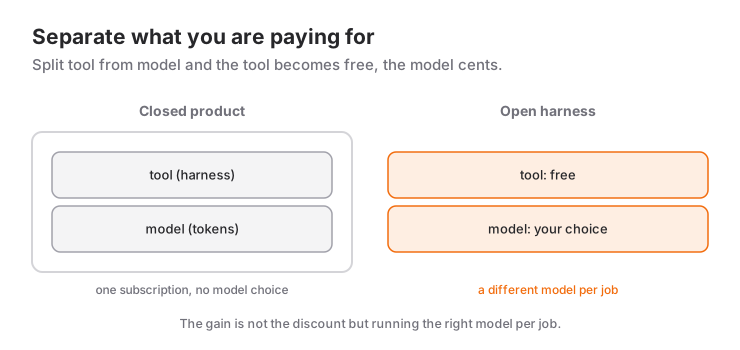
In a closed product they are not separable: the subscription covers both tool and tokens, and you do not get to choose the model. With an open-source harness the tool is free and the model choice is yours. Sometimes that does the same job at a tenth of the price — and sometimes it does it worse. How to tell the difference is below.
What opencode is
opencode is an open-source coding agent that runs in your terminal. You supply your own API key and decide which model runs. Its documentation covers 75+ providers, and on top of that you can add any OpenAI-compatible API by hand.
Two ways to start:
The easy path — OpenCode Zen. Connect with the /connect command. Zen is the list of models the team has tested and verified to work well with the tool. Lowest friction for a newcomer, and free-to-use models rotate through it.
The flexible path — your own provider. Write an opencode.json in your project root and define whatever API you want.
Defining your own provider
The skeleton of the config file:
{
  "$schema": "https://opencode.ai/config.json",
  "provider": {
    "myprovider": {
      "npm": "@ai-sdk/openai-compatible",
      "name": "Display Name",
      "options": {
        "baseURL": "https://api.example.com/v1",
        "apiKey": "{env:API_KEY_VAR}"
      },
      "models": {
        "model-id": {
          "name": "Model Display Name",
          "limit": { "context": 200000, "output": 65536 }
        }
      }
    }
  }
}
Three things to get right:
- The
npmfield.@ai-sdk/openai-compatiblefor providers speaking/v1/chat/completions,@ai-sdk/openaifor those using/v1/responses. Picking the wrong package is the most common mistake. - Do not put the key in the file. The
{env:API_KEY_VAR}syntax reads it from the environment.opencode.jsonusually ends up in the repo; the key must not. - The
limitblock. Getting context and output limits right stops the tool from truncating early or erroring out in long sessions.
OpenAI-compatible APIs such as DeepSeek drop straight into this shape: the provider's /v1 address as baseURL and the model IDs under models. Model names change often, so verify the current list in the provider's own documentation.
The free and near-free options
The landscape has three layers:
1. Genuinely free. Some models open up for free use in certain periods, and that list rotates — what is free today may not be in three months. So rather than memorising "model X is free", build the habit of checking the provider's current list.
2. Cents, not dollars. Open-weight models (DeepSeek, GLM and similar) price tokens far below closed flagship models. For someone coding a few hours a month the bill lands in cents.
3. Flat-rate coding plans. Both on the opencode side and at providers, there are monthly plans giving broad usage of open models for a fixed fee. If you work regularly, that is more predictable than pay-as-you-go.
The only way to know which fits you is counting how many requests you actually make in a month.
What free really costs
Now the honest part. Free or cheap models carry invisible costs:
Tool-calling quality. Inside an agent, the model's most critical ability is calling tools in the right format and the right order. A model that answers beautifully in chat is useless as an agent if it cannot get tool calls right. When trying a free model, this — not its intelligence — is the first thing to test.
Context limit. When context fills in a long session the tool either summarizes or truncates. A small-context model gets stranded in a multi-file refactor.
Speed. Free tiers are usually slower and queue you. In a thirty-turn agent loop a few seconds per turn becomes minutes overall.
Data policy. The most skipped item. If you are on a free tier, read whether your code is used for training. If you are sending client code, that is not a preference — it is a responsibility.
Correction time. A cheap model that burns twice the tokens and leaves you half an hour of fixing is not cheap. The thing to measure is not tokens but time to done.
Which jobs do free models handle?
My observation splits cleanly:
Enough: well-specified, repetitive work. Writing tests, generating boilerplate, converting a file to another format, simple bug fixes, commit messages, reading and summarizing code.
Not enough: ambiguous work requiring judgment. Architectural decisions, refactors spanning many files, finding the root cause of an unexplained bug, interface work needing design quality.
So the most productive setup is not one model but a model per job: carry the volume on the cheap one and ask the hard question of the strong one. Tools like opencode let you switch mid-session, which makes this easy in practice.
Running your own measurement
Do not trust "model X is great" comments in forums; measure on your own work. The method is simple:
- Pick five representative tasks you actually do. No synthetic examples.
- Run the same five on both setups.
- Note three things: tokens spent, whether the result was acceptable, and how long you spent fixing it.
- Write the third in minutes; that is where the decision actually comes from.
Run that test once and the debate ends: which model to run on which job falls out of your own data.
Security before you plug in a key
Handing an API key to a third-party tool is routine, but set the habits up front:
- Use a separate key with a spending limit, not your main account's key.
- Keep the key in an environment variable, never in the config file.
- Check the telemetry settings on first run.
- Start with automatic command execution restricted and widen it as you get to know the tool.
None of this is paranoia; it is the standard hygiene you would apply to any developer tool.
In short
Coding with free AI is possible, but the accurate sentence is: you can get the tool for free and the model very cheaply. That requires separating what you pay for and keeping the right to choose the model.
The real gain that follows is not the discount but flexibility: running the right model for each job and not being hostage to one vendor's pricing decision.
Model names, free tiers and prices change very fast; verify against the provider's current documentation before you set anything up.
Frequently Asked Questions
Can you write code with AI for free?
Partly. The coding tool itself — an open-source harness like opencode — is entirely free, and some models open up for free use periodically. But free tiers rotate, so rather than building a permanent plan on one, the realistic framing is "the tool is free, the model is very cheap".
What is opencode?
opencode is an open-source AI coding agent that runs in your terminal. You plug in your own API key and run whichever model you want; its documentation covers 75+ providers and any OpenAI-compatible API can be added by hand.
How do I add my own model to opencode?
Create an opencode.json in your project root and define the provider under provider: the @ai-sdk/openai-compatible package for APIs speaking /v1/chat/completions, the provider's baseURL, the key read from an environment variable with {env:...}, and the model IDs you intend to use. Never write the key into the file.
Are free models good enough for real work?
For well-specified, repetitive work — writing tests, format conversion, simple fixes, summarizing code — they usually are. For architectural decisions, multi-file refactors and debugging unexplained failures, the gap turns into a time loss far larger than the token saving.
Is a cheap model actually cheap?
You cannot know without measuring. Look at time to done rather than token cost: a model that burns twice the tokens and leaves you half an hour of fixing is not cheap. Run five real tasks on both setups and record the fixing time in minutes.
Is it safe to send code to a free model?
Do not assume it is without reading the provider's data policy; some free tiers may use submitted data for training. If you are sending client code that is a responsibility rather than a preference. Also use a separate key with a spending limit and keep it in an environment variable.
Related Posts
What Is a Harness? The Difference Between the Model and the Coding Tool (with DeepSeek)
Why does the same model give different results in different tools? Harness, agent loop and context management explained with DeepSeek.
What Is Hermes Agent? How to Install (Mac, Linux, Windows)
Hermes Agent is Nous Research's open-source terminal agent with memory and skills. One-line install, first setup and model choice, step by step.
Hermes Agent: Telegram, Scheduled Tasks and Security
Connect Hermes Agent to Telegram, automate it with cron and run it safely: BotFather, allowlists, approval modes and Docker isolation.