What Is Higgsfield? A Practical Start to Making Video with AI
Last updated:
9 min read
Two years ago, generating video with AI was at the "look at this funny thing" stage. Today the same tools are producing ad variants, in-app animation and product films. What changed was less about raw model quality and more about control: you now direct the camera, the character and the timing.
Higgsfield is one of the most talked-about tools in that shift. This article covers what it is, what it holds, how credits actually work and how to get your first shot out. The rest of the series goes into rewriting your own footage with Genjutsu, how it compares to Google Flow, and putting generated assets inside an app.
What Higgsfield actually is
Higgsfield describes itself as an "AI-native creative suite". In practice it gathers image and video models from several companies under one interface and layers its own tools on top.
The pieces it puts forward on its own site:
- Seedance 2.5 — the platform's headline video model.
- Nano Banana Pro — high-quality image generation from images.
- Genjutsu — a video-to-video model that keeps the motion and rebuilds the scene, or swaps a single element in the frame.
- Cinema Studio — building cinematic scenes.
- Higgsfield Effects — ready-made effect presets such as explosions and transformations.
- Higgsfield MCP — a connector that plugs Claude into the workflow, so the model itself can generate visuals for games, motion graphics and 3D work.
- Supercomputer — an agent that automates creative workflows.
- Higgsfield API — access to 50+ generative models through one interface.
The conclusion to draw from that list: Higgsfield is not a model, it is an aggregator. Its value is not in any single model but in putting many of them behind one credit balance and one interface.
Why "ease of use" keeps coming up
What tires people out in generative video tools is usually not the model but the distance between steps: you generate an image in one place, download it, upload it somewhere else to animate it, then edit it in a third. Higgsfield's pitch is closing that distance.
Three things it concretely makes easier:
Presets. Instead of writing a description for a camera move or an effect, you pick one. Anyone who has tried to describe "dolly in" or "explosion" in words knows that finding the right phrasing takes far longer than clicking a preset.
One credit pool. Whichever model you run, it draws from the same balance, and the cost is shown before you generate. That makes trial and error plannable.
References. You hand over your character, product or style as images instead of describing them. Most of the consistency problem is solved right there.
Credits: how to work out the real cost
Everyone makes the same mistake with these tools: they look at the monthly price and call it cheap. The real cost is a product of three things:
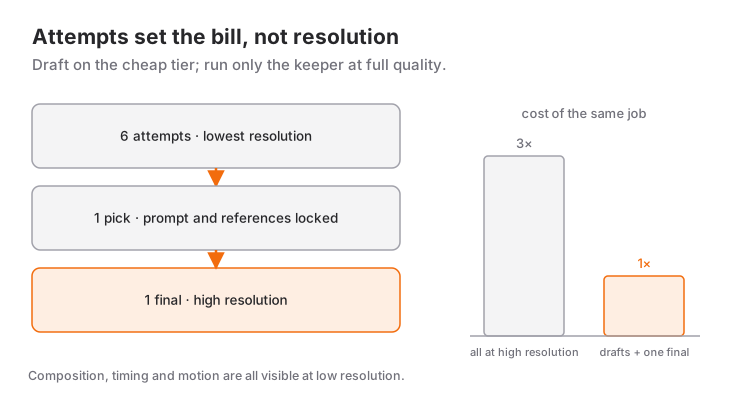
real cost = attempts × resolution × durationAttempts is the multiplier people underestimate. The chance your first generation is the one you keep is low; needing several attempts for a usable shot is normal. So I recommend this habit:
- Generate at the lowest resolution first. Composition, timing and motion all show up there.
- Lock the prompt and references you liked.
- Only run the final version at high resolution.
How much you save depends on the credit gap between low and high resolution; in the diagram's worked example the same job comes down to about a third. Starting at high resolution and running every attempt there is the most expensive way to learn.
There is also the API side: Higgsfield offers pay-as-you-go alongside subscriptions. If you generate a handful of videos a month, that usually works out cheaper; if you produce regularly, a subscription starts to make sense. To decide, just count how many real generations you did last month.
Your first shot: the anatomy of a prompt
The most common beginner mistake is a one-sentence prompt followed by blaming the model. A prompt that works has five parts:
| Part | What goes in | Example |
|---|---|---|
| Subject | who or what | "a young woman in a red jacket" |
| Action | what happens | "steps out of a glass door and turns right" |
| Place | where | "rain-soaked night street, neon signage" |
| Camera | how we see it | "shoulder height, slow tracking pull-back" |
| Light / texture | the feel | "cold blue light, light film grain" |
Write all five and the result tightens up noticeably. Every part you leave out, the model fills in on its own — and differently on every attempt. Inconsistency is usually not incompetence in the model; it is a gap in the prompt.
Two more rules:
- Do not phrase things negatively. Instead of "no phone in her hand", write "hands in her pockets". Generative models handle negation poorly.
- One event per shot. "Walks, sits, then gets up and leaves" is three shots. Ask for all three in one generation and all three come out badly.
Which tool for which job
The tools inside Higgsfield are not alternatives to each other; they are for different jobs.
- Generating a shot from scratch: text to video (a model like Seedance 2.5).
- You have footage and want to change something in it: Genjutsu. Because it preserves motion and camera, you can change wardrobe, location, cast or product without a reshoot.
- You have a single image and want it to move: image to video.
- You are generating in-app animation: call it from your code through the MCP connector — I covered that whole workflow in a separate article.
Picking the wrong tool costs more than writing a bad prompt. Trying to generate from text when you already have footage means reconstructing the camera move and the timing from nothing, when Genjutsu would have taken both from what you already shot.
Limits: what is still hard today
Being honest about the unsolved parts saves you the disappointment:
- Long takes. Models work in seconds. A one-minute piece comes from editing many short shots together, not from one generation.
- Consistency across shots. The same character will not come back identical in two separate generations. References and an identical prompt help; check anyway.
- Text in frame. Signage, screens and labels still break. Compositing the text in the edit is safer.
- Hands and fast motion. Much improved, still a risk zone; keep shots with fast hand movement short.
None of this means "unusable". It means generative video is not replacing the shoot — it is adding a source to the edit bay.
Rights and transparency
Settle two things up front:
Commercial use. Higgsfield states that what you generate is yours to publish across organic and paid channels, subject to its terms of use. Still, read the current terms of any tool before you put it in client work; these change often.
Real people. Do not generate a real person's face or voice without their permission. Beyond the legal side, it carries a cost that lands back on your product.
And on visibility: hiding the fact that something was made with AI is a losing long-term strategy. Explaining how you made it usually attracts more interest than the piece itself.
Where to start
The fastest way to learn is to finish one real job end to end:
- Pick a real 10–15 second need (a product teaser, an app launch clip).
- Draw the storyboard on paper: how many shots, how long each, what happens in each.
- Generate every shot at low resolution and note the keepers.
- Re-run only the selected ones at high resolution.
- Assemble in an editor, then layer text and sound on top.
Do those five steps once and you have not learned a tool — you have learned a method. Tools change every six months; the method stays.
Reference videos
One recording worth watching, which I also drew on while preparing this piece: Watch Me Vibe Code an Animated App with Claude Fable 5.1 + Seedance 2.5 — it shows end to end how a mobile app's character and animations get generated through Higgsfield's MCP connector.
Product names, limits and prices come from the vendors' own pages and change often; verify against the current page before deciding.
Frequently Asked Questions
What is Higgsfield and what is it for?
Higgsfield is a creative suite that gathers image and video generation models from several companies behind one interface. It offers text to video, image to video, changes to existing footage (Genjutsu), ready-made effect presets and an API reaching 50+ models. Because it is an aggregator rather than a single model, you can use different models for different jobs from the same credit pool.
Is Higgsfield free?
It runs on credits: every generation draws from your balance and the cost is shown before you generate. There is also a pay-as-you-go option alongside subscriptions, which is usually cheaper if you only produce a few videos a month. Check the vendor's page for current plans and prices.
Can I use AI-generated video commercially?
Higgsfield states that generated content is yours to publish across organic and paid channels, subject to its terms of use. For client work, read the current terms of every tool you use, and never generate a real person's face or voice without permission.
How long can an AI-generated video be?
Models work in seconds; a single generation typically spans a few seconds up to around half a minute. Longer pieces come from editing short shots together rather than from one generation, which is why having a storyboard matters more than which tool you pick.
How do I write a good video prompt?
Write all five parts: subject, action, place, camera and light/texture. Anything you leave out gets filled in differently on every attempt, and that is the real source of inconsistency. Also avoid negative phrasing ("hands in her pockets" beats "no phone") and ask for only one event per generation.
Should I use Higgsfield or Google Flow?
They lead on different jobs: Flow is a creative workspace built around the Veo models and is strong at assembling scenes, while Higgsfield gives you many models, effect presets and the ability to modify existing footage in one place. I go through the detailed comparison in a separate article.
Related Posts
Making Video with AI: The Complete Guide from Idea to Publish
Script to storyboard, generation to edit, captions to thumbnail: the whole workflow for making video with AI, with tool selection and the cost maths.
Higgsfield Genjutsu: Rewriting Footage You Already Shot (with Blender)
Genjutsu keeps the motion and rebuilds the scene. Here are its two modes, its real limits, and how to turn a rough Blender block-out into an action shot.
Google Flow or Higgsfield? Comparing the AI Video Tools
Flow's scene building against Higgsfield's model range: how credits work, what each is genuinely good at, and when to pick which.