Higgsfield Genjutsu: Rewriting Footage You Already Shot (with Blender)
8 min read
The most frustrating part of generative video used to be that you controlled almost nothing. Generating from text, you try to explain the camera, the timing and where the actor should look — and every attempt gives you something else.
Genjutsu solves that from the other end: you supply the motion, the model builds the rest. You upload the footage you shot, tell it what to change in frame, and the camera move, the timing and the cuts stay exactly as they were.
This article covers what Genjutsu does, its two modes, its limits, and my favorite combination — blocking a rough animation in Blender and running Genjutsu over it.
What Genjutsu does
Higgsfield describes Genjutsu as "reality manipulation for video": swap characters, outfits, locations and objects — or keep only the motion and rebuild the rest.
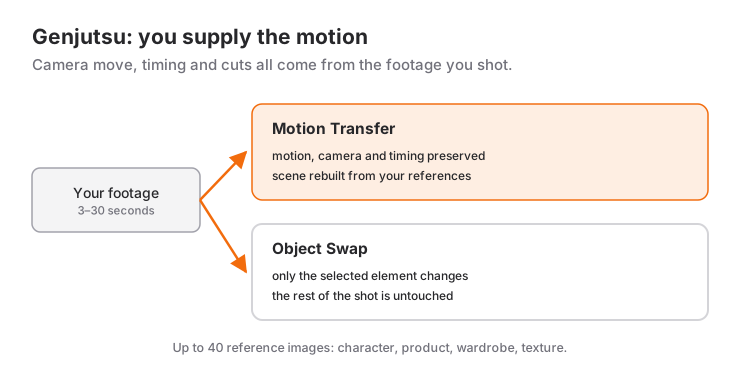
There are two modes, and the difference matters:
Motion Transfer. Preserves the motion, camera and timing while rebuilding the scene from your references. The frame can change completely; the camera move stays identical.
Object Swap. Changes the element you select (character, outfit, product, location) and leaves the rest of the shot alone. This is the mode when you want one thing different without a reshoot.
In practice: changing only the product in a product video is Object Swap; building a completely different world on the same camera move is Motion Transfer.
The technical limits
The frame given on the official page:
| Value | |
|---|---|
| Input video | 3 – 30 seconds |
| Reference images | up to 40 (characters, products, wardrobe, elements) |
| Editing experience | not required |
| Cost | credit system; shown before you generate |
| Commercial use | publishable, subject to the terms of use |
The flow is simple too: upload video → add references → pick Motion Transfer or Object Swap → describe the change → generate.
Third-party reviews have quoted roughly $2 for a 15-second generation at 480p, around $5 at 720p and around $7 at 1080p. Do not take those literally — the interface shows you the exact cost before generating — but the order of magnitude is enough to plan with.
The 30-second ceiling is the constraint people overlook. For a one-minute piece you have to split the footage into shots and run each separately. That sounds like bad news but it is actually the correct way to work: an edit is made of shots anyway.
Reference images: this is the real leverage
The allowance of 40 reference images is the most underused feature of the tool. Most people drop in one character image and move on — but consistency comes precisely from here.
For a character, give it:
- A front view with the face clearly visible
- A profile view
- A full-body view showing the whole outfit
- Close-ups of the key details (logo, accessory, texture)
Same logic for a product: one frame from every angle plus a close-up of the label. When the model reads what you want off an image instead of imagining it from a description, most of the cross-shot consistency problem disappears.
Blender + Genjutsu: the action-shot method
Now the interesting part. Since Genjutsu takes motion as input, that motion does not have to be real footage. You can block it out roughly in 3D.
The method:
1. Block it out in Blender. Do not chase photorealism; gray boxes, a simple character rig and the right camera are enough. You are controlling three things at this stage: composition, camera move and timing. All three are what Genjutsu will preserve.
2. Set the camera up like a real camera. Take your time here. Focal length, depth of field, a touch of handheld shake — these are what make the output feel shot. A perfectly smooth 3D camera move reads as artificial no matter how photoreal the result.
3. Keep the shot under 30 seconds. Action scenes are built from short shots anyway; two to four seconds keeps you inside the limit and gives the edit its rhythm.
4. Prepare the references. How the character looks, the texture of the location, the lighting mood — hand all of it over as images.
5. Run Motion Transfer. The rough 3D scene is the input, the references are the target; the model keeps the motion and builds the world.
6. Assemble in the edit. Sound design is half the work here. What sells an action shot is less the picture than the impact, the wind, the fabric.
What I like about this method is that it rescues you from both traps: leaving everything to the model and doing everything by hand. The creative decisions (framing, pacing, camera) stay with you; the laborious part (surfacing, lighting, detail) goes to the model.
Watch out for:
- Fast, complex motion is the risk zone. Edges can break down; keep those shots short.
- Do not hand cuts to the model. Run each shot separately and cut in the edit.
- For cross-shot consistency, reuse the same reference set and the same prompt.
Writing the prompt
Prompting works differently here than in text-to-video: you are not describing the scene, you are describing the change.
- Weak: "cinematic action scene, night, rain"
- Better: "same motion; make the character a courier in a black raincoat, street on wet asphalt, single neon sign as the only light source"
The second one says what changes and what stays. The model's job is already to preserve the motion, so treat it accordingly: describe what is different, not what is being kept.
One more habit that pays off: change one thing first, look at the result, then add the second. Change the character, the location and the lighting at once and you will not know which one broke it.
Where it earns its place
- Ad variants. Different cast, wardrobe or location from a single shoot. Gold for A/B testing.
- E-commerce. One shoot showing a product on several models.
- Fixing without a reshoot. A visible wrong brand, wardrobe that no longer matches the season, a messy background.
- Previs to final. The Blender method above.
- Reviving archive footage. Carrying old material into a new look.
When not to use it
An honest boundary: Genjutsu does not edit. Shot selection, rhythm, sound and narrative are yours. It is also not a tool for altering footage of real people without their consent — being technically possible does not make it acceptable.
If you have no footage at all it is the wrong tool too: you want text to video, and I covered which tool fits which job in the introduction to Higgsfield.
Reference videos
If you want to watch this class of tooling in motion, I recommend this recording of generative video being wired into a real product flow: Watch Me Vibe Code an Animated App with Claude Fable 5.1 + Seedance 2.5.
Limits and prices come from Higgsfield's own pages and third-party reviews; these tools update frequently, so trust the cost the interface shows you before generating.
Frequently Asked Questions
What is Higgsfield Genjutsu?
Genjutsu is a video-to-video model that takes your existing footage as input. It preserves the camera move, timing and cuts while changing the character, outfit, location or object in frame. It has two modes: Motion Transfer, which keeps the motion and rebuilds the scene, and Object Swap, which changes only the element you select.
How long can the input video be?
Three to thirty seconds according to the official page. For anything longer you split the footage into shots and run each one separately — which is how editing works anyway.
How many reference images can Genjutsu take?
Up to 40, covering characters, products, wardrobe and visual elements. This is where consistency actually comes from: supplying a character as front, profile, full-body and detail shots makes a visible difference over a single image.
How do I use Blender together with Genjutsu?
Block the scene out roughly in Blender without chasing photorealism: gray boxes, a simple character and the right camera move. Keep the shot under 30 seconds, prepare reference images for the character and location, then run Motion Transfer. Composition, camera and timing stay yours; surfacing and lighting move to the model.
Can Genjutsu output be used commercially?
Higgsfield states that generated content can be published across organic and paid channels, subject to its terms of use. For client work read the current terms, and do not use it to alter footage of real people without their consent.
What is the difference between Genjutsu and text-to-video?
With text to video the model also has to invent the motion, the camera and the timing, so every attempt differs. With Genjutsu all three come from the video you supply and the model only changes the look. If you already have footage, Genjutsu is both more controllable and cheaper.
Related Posts
What Is Higgsfield? A Practical Start to Making Video with AI
Which models Higgsfield hosts, how credits really work, how to produce your first shot, and which tool to reach for on which job.
Making Video with AI: The Complete Guide from Idea to Publish
Script to storyboard, generation to edit, captions to thumbnail: the whole workflow for making video with AI, with tool selection and the cost maths.
Google Flow or Higgsfield? Comparing the AI Video Tools
Flow's scene building against Higgsfield's model range: how credits work, what each is genuinely good at, and when to pick which.