Google Flow or Higgsfield? Comparing the AI Video Tools
7 min read
"I want to make video with AI — which one should I use?" has no single answer, because Google Flow and Higgsfield are not doing the same thing. One is a film workshop built around a single model family; the other is a bench that gathers many models.
This article puts them side by side and says which one leads on which job. If you have read the introduction to Higgsfield and the Genjutsu piece, this completes the picture.
First, a distinction: Flow is not a model
This is what confuses people most. On the Google side there are three separate things:
- Veo — the model that generates the video. It has tiers (Lite, Fast, Standard), and price and quality follow the tier.
- Flow — the creative workspace built around Veo. Where you generate shots and assemble them.
- Credits — the meter that turns experimentation into real cost.
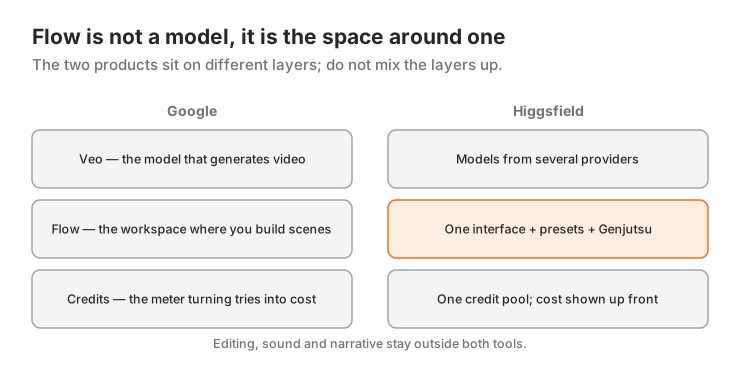
So "comparing Flow with Veo" is meaningless; Flow is the interface you use Veo through.
Where Flow is strong: assembling a scene
What sets Flow apart is not generating individual shots but binding them into a scene. Its standout tools:
Frames to Video. You supply a first and/or last frame and have the motion between them generated. Camera controls come with it: dolly in, pan left and similar moves are picked from a list. Anyone who has tried to describe a camera move in words knows how much that helps.
Ingredients to Video. You define characters, objects and styles up front and reference them in every prompt. This is Google's answer to cross-shot consistency. (The feature sits on the higher subscription tier.)
Scenebuilder. You lay your generated clips out as a single scene and can push a shot further with extend.
The sum: Flow is designed for someone thinking "I am building a piece of a film". The shot → scene → extend flow feels familiar.
Where Higgsfield is strong: range and intervention
Higgsfield is not tied to one model family; it gathers models from several companies behind one interface and one credit pool. That has three practical consequences:
You can choose the model. A different model per job: one handles motion better, another stylisation. Tied to a single model, you are stuck on whatever it is weak at.
Intervening in existing footage. With Genjutsu you can change something inside footage you already have, with motion and camera preserved. That is a fundamentally different capability from "generate from scratch".
Effect presets. Explosions, transformations and the like are picked from a list rather than described.
There is also the developer side: Higgsfield offers an API reaching 50+ models and an MCP connector into Claude. If you want to embed generation inside a product, that difference decides it — I covered how that works in a separate article.
Side by side
| Google Flow | Higgsfield | |
|---|---|---|
| Core approach | One model family (Veo) + film workshop | Multi-model aggregator + toolkit |
| Scene assembly | Scenebuilder, extend | Editing happens outside |
| Camera control | Ready-made camera moves | Ready-made moves and effect presets |
| Consistency | Ingredients (higher tier) | Reference images |
| Changing existing footage | Limited | Genjutsu (Motion Transfer / Object Swap) |
| Developer access | Model API (per second) | 50+ model API + MCP connector |
| Billing | Subscription tiers + credits | Credits; subscription or pay-as-you-go |
Cost: two different meters
On the Google side the meter splits in two. Inside Flow you spend credits; your subscription tier grants a monthly allowance, and the entry level includes a small daily free allowance. On the developer side the unit is seconds: you pay per generated second and the model tier (Lite / Fast / Standard) drives the price directly. Drafting on the cheap tier and running only the final on the expensive one is the single habit that cuts the bill most.
On the Higgsfield side there is one credit pool and the cost is shown before you generate. Pay-as-you-go exists alongside subscriptions; for a handful of videos a month it usually works out cheaper.
The truth that holds on both platforms: the bill is set by the number of attempts, not the resolution. Six low-resolution attempts plus one high-resolution final costs three to four times less than six attempts at full quality.
Which one for which job
Pick Flow when:
- You are building a scene and need shots to connect.
- You want to choose the camera move from a list.
- You are already in the Google ecosystem with a subscription.
- The job is generating from text or from frames.
Pick Higgsfield when:
- You have footage and need to change something inside it — few other tools do this.
- You want to try different models on the same job.
- Effect presets will speed you up.
- You are embedding generation inside your own product (API / MCP).
Use both: in practice this is what professional workflows look like. Generating shots in one tool and intervening in the other beats using either alone. The edit happens outside both anyway.
How to decide with measurement instead of opinion
The fastest way to end the debate is a small test on your own work:
- Take three shots from the same storyboard.
- Generate three attempts each, at low resolution, on both platforms.
- Note four things: how many attempts to get what you wanted, credits spent, total time, and the share of usable output.
- Show the results blind to a colleague.
Step four matters: which tool you like is independent of which produced the better output. A blind comparison filters that out.
Tools change, method stays
Both products will be different six months from now; model versions, prices and feature names move fast. What does not move: if you have learned to storyboard, keep shots short, build consistency through references and draft on the cheap tier, you will be productive with whatever tool you are handed.
So spend the time you would have spent on the tool debate finishing one job end to end instead.
Reference videos
A recording showing generative video wired into a real product flow: Watch Me Vibe Code an Animated App with Claude Fable 5.1 + Seedance 2.5.
Feature names, tiers and prices come from the vendors' own pages and change often; verify against the current page before deciding.
Frequently Asked Questions
What is Google Flow?
Flow is the creative workspace Google built around its Veo video models. You generate from text, from frames, or against characters, objects and styles you have defined as references, then assemble the clips into a single scene in Scenebuilder. Flow is not a model; it is the interface you use Veo through.
What is the difference between Google Flow and Higgsfield?
Flow is built around one model family and is strong at assembling scenes. Higgsfield gathers many models behind one interface, adds effect presets, and can modify existing footage through Genjutsu. If you are building a scene, Flow leads; if you need to intervene in footage, Higgsfield does.
Is Google Flow free?
The entry level includes a limited number of free credits per day, serious use runs on monthly subscription tiers, and some features are tied to the higher tier. On the developer side you pay per generated second, and the rate depends on the model tier.
Which one is cheaper?
Your working habits matter more than the platform. On both sides the bill multiplies attempts, resolution and duration; drafting at the cheapest tier and running only the final at high quality can cut the cost to a third.
Can I use both together?
Yes, and professional workflows usually do: generating shots in one tool and intervening in the other beats being locked to one. Editing and sound happen outside both anyway.
How do I decide which tool to use?
Generate the same three storyboard shots at low resolution on both platforms, and note how many attempts each needed, the credits spent and the share of usable output. Then show the results blind to someone who does not know your preference — that is when the decision becomes clear.
Related Posts
Making Video with AI: The Complete Guide from Idea to Publish
Script to storyboard, generation to edit, captions to thumbnail: the whole workflow for making video with AI, with tool selection and the cost maths.
What Is Higgsfield? A Practical Start to Making Video with AI
Which models Higgsfield hosts, how credits really work, how to produce your first shot, and which tool to reach for on which job.
Free AI Video Generation with LTX 2.5: Prompts and Settings
Generate your first video with LTX 2.5: text, image, and first/last-frame workflows, prompt structure, resolution and frame rules, multi-shot generation, audio.