
How to Install LongCat 2.5 Preview: News and Guide
8 min read
Meituan has released LongCat-2.5-Preview, the newest member of the LongCat family. The model arrives with a 1,048,576-token context window, text and image input, and an optional thinking mode. Its limited-time list price is $0.30 per million input tokens and $1.20 per million output tokens, and the detail that matters most is cached input at $0.006.
Together with the Space Bunny Alpha article, this is the second major model move in recent weeks. But there is an important difference between them: Space Bunny Alpha has no weights; LongCat does. The weights of LongCat-2.0 sit on Hugging Face under the MIT license, including 8-bit and 4-bit quantized versions. So this time the word "install" is not limited to calling a remote API.
Let me first set the news straight, then set the model up step by step.
This article is written as a news report and contains no hands-on testing. Every technical value here comes from LongCat's own API documentation, the Vercel AI Gateway model page and the open-weights model card. Sources are at the end.
The story in short
| Property | Value |
|---|---|
| Model id | LongCat-2.5-Preview |
| Developer | Meituan (LongCat family) |
| Release status | Preview |
| Context window | 1,048,576 tokens |
| Max output | 131,072 tokens |
| Input modalities | text, image |
| Thinking mode | optional, on by default |
| Input price (per million tokens) | $0.30 |
| Cached input (per million tokens) | $0.006 |
| Output price (per million tokens) | $1.20 |
| Own API base | https://api.longcat.chat/openai/v1 |
| Second compatible base | https://api.longcat.chat/anthropic/v1 |
| Vercel AI Gateway id | meituan/longcat-2.5-preview |
Who LongCat is
LongCat is the name of Meituan's family of large language models. The family started as an in-house research line focused on reasoning over long context, agentic coding and scalable AI systems. Under the LongCat name today there are long-context text models, vision models, audio and video generation models and deep research tooling.
Two technical decisions separate this family from other open-weights models.
Sparse attention (LongCat Sparse Attention). At a one-million-token context the real bottleneck is comparing every pair of tokens. LongCat Sparse Attention lowers that cost with a three-stage selection: hardware-aligned contiguous access, indexing shared across layers, and a two-stage coarse-to-fine scoring scheme. In short, the model does not read everything; it selects what it needs to read.
N-gram embedding. Because "the sparsity of MoE has crossed the sweet spot", the model adds a 135-billion-parameter N-gram embedding layer that competes with pure MoE at the same size. It captures the repetitive patterns of source code and saves memory.
Both decisions point the same way: they were made for coding and long-horizon tasks. Long context is not a side feature here; it is the design goal.
What LongCat-2.5-Preview brings
Two concrete changes stand out against the previous version.
Image input. LongCat-2.0 accepted text only. The preview combines image understanding, visual question answering and content summarization with text generation in one model. That means you can build an agent that reads a screenshot and writes code with a single model.
Optional thinking mode. The long reasoning step is controlled through the thinking field in the request body:
{ "thinking": { "type": "enabled" } }You turn it off with {"type":"disabled"}, and it arrives enabled by default. This is the exact opposite of Space Bunny Alpha's non-switchable reasoning. Between two models that do the same job, that difference shows up directly as latency on simple tasks.
The context window is 1,048,576 tokens, almost identical to Space Bunny Alpha's, but the output ceiling is lower: 131,072 tokens.
The real story in the price: caching
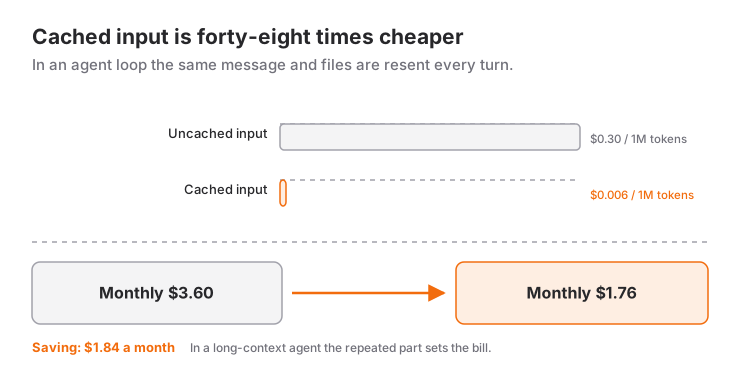
The $0.30 input price looks ordinary at first glance. The number that deserves attention is cached input at $0.006, forty-eight times cheaper.
Why does that matter? In an agent loop the same system message, the same tool schemas and the same file contents are resent on every turn. In the eight-turn loop we built, the message history keeps growing. Cached input means that repeated portion is almost free.
Let us do the arithmetic. One turn with 200,000 input tokens and 50,000 output tokens:
| Scenario | Input cost | Output cost | Turn total |
|---|---|---|---|
| Uncached | $0.0600 | $0.0600 | $0.1200 |
| Fully cached | $0.0012 | $0.0600 | $0.0612 |
That is $0.0588 saved on the same 200,000 input tokens. Across thirty turns a month, a few hours of active work, caching alone saves $1.76. Since the model's own price is $0.30, caching is the biggest single line item for anyone building a 1M-context agent.
Placed next to the table in the comparison article, this gets more interesting still: LongCat's cached price is technically "more expensive" than Space Bunny Alpha's zero, but it is a scalable number. Zero does not scale; $0.006 does.
Step 1: Get an API key
You need an account on LongCat's own API platform to get a key. Keys are issued at longcat.chat/platform/api_keys.
export LONGCAT_API_KEY="lc-..."Do not write the key into a file. Every sample below reads it from the LONGCAT_API_KEY environment variable.
Step 2: Send the first request with curl
LongCat exposes two compatible endpoints. Start with the OpenAI-compatible one:
curl https://api.longcat.chat/openai/v1/chat/completions \
  -H "Authorization: Bearer $LONGCAT_API_KEY" \
  -H "Content-Type: application/json" \
  -d '{
    "model": "LongCat-2.5-Preview",
    "messages": [
      { "role": "user", "content": "In one sentence, what is LongCat-2.5-Preview?" }
    ]
  }'
The response arrives in OpenAI shape: text in choices[0].message.content, token counts and cost in usage.
You can also query the model details:
curl https://api.longcat.chat/openai/v1/models/LongCat-2.5-Preview \
  -H "Authorization: Bearer $LONGCAT_API_KEY"
That call returns the context length, the supported parameters and the pricing. Reading a model's capabilities from this endpoint is always more correct than assuming them.
Step 3: Python and TypeScript
Nothing changes on the client side except the base URL:
import os

from openai import OpenAI

client = OpenAI(
    api_key=os.environ["LONGCAT_API_KEY"],
    base_url="https://api.longcat.chat/openai/v1",
    timeout=180.0,
    max_retries=2,
)

response = client.chat.completions.create(
    model="LongCat-2.5-Preview",
    messages=[{"role": "user", "content": "In one sentence, what is LongCat-2.5-Preview?"}],
    extra_body={"thinking": {"type": "enabled"}},
)

print(response.choices[0].message.content)
print("cost:", response.usage.cost)
import OpenAI from "openai";
const client = new OpenAI({
apiKey: process.env.LONGCAT_API_KEY,
baseURL: "https://api.longcat.chat/openai/v1",
timeout: 180_000,
maxRetries: 2,
});
const completion = await client.chat.completions.create({
model: "LongCat-2.5-Preview",
messages: [{ role: "user", content: "In one sentence, what is LongCat-2.5-Preview?" }],
thinking: { type: "enabled" },
});
console.log(completion.choices[0]?.message?.content);The thinking field is not in the standard OpenAI schema, which is why it has to go through extra_body on the Python side.
Step 4: Wire it into coding tools
LongCat's strongest suit is not ease of installation but the breadth of integration. The official documentation publishes separate guides for Claude Code, Codex, opencode, Cline, Kilo Code, Cherry Studio, Chatbox, CodeBuddy, OpenClaw, Hermes Agent, CC Switch and WorkBuddy. That list is itself a signal of an ecosystem built around one model.
opencode. The LongCat provider ships built in, so no manual configuration is needed:
opencode auth loginSelect LongCat in the provider list and paste your key. The key is stored at:
- macOS / Linux:
~/.local/share/opencode/auth.json - Windows:
%USERPROFILE%\.local\share\opencode\auth.json
To turn thinking off, edit ~/.config/opencode/opencode.json:
{
  "$schema": "https://opencode.ai/config.json",
  "provider": {
    "longcat": {
      "models": {
        "LongCat-2.5-Preview": {
          "options": {
            "thinking": {
              "type": "disabled"
            }
          }
        }
      }
    }
  }
}
Claude Code. LongCat also serves an Anthropic-compatible endpoint under /anthropic/v1. That lets tools expecting the Anthropic shape connect directly, so you can swap the model without changing your workflow. See LongCat's Claude Code guide for the details.
Vercel AI Gateway. If you do not use OpenRouter, the model is also callable through Vercel AI Gateway under meituan/longcat-2.5-preview. Same model, different routing layer.
The reality of running it locally
This is the most asked question and the answer is a little surprising.
The weights of LongCat-2.0 are open: they sit at meituan-longcat/LongCat-2.0 on Hugging Face under the MIT license, 1.8 trillion parameters, BF16 and F32 tensor types. There are also LongCat-2.0-FP8 and LongCat-2.0-INT8 quantized versions. The model card gives setup instructions for vLLM, SGLang and Transformers:
pip install vllm
vllm serve "meituan-longcat/LongCat-2.0"
The numbers matter here. 1.8 trillion parameters is roughly 3.6 terabytes of weights at BF16 precision. FP8 halves that. The existence of quantized versions should not create the expectation of a single-GPU setup: this is still a multi-card installation.
For LongCat-2.5-Preview the weights are not published. So "LongCat is open source" is not accurate without naming the version. The long-term direction looks that way, but today's reality is that the preview is reachable only through the API.
Who it suits
If you are building a long-context coding agent: this is what LongCat was designed for. A one-million-token window, sparse attention and a cached input price make the cost of a long session manageable.
If you use a Claude Code style tool: the Anthropic-compatible endpoint lets you change models without touching your workflow.
If the cost has to be zero: LongCat is not the answer. Space Bunny Alpha's zero price fits that job better, but it does not scale.
If you want to run it on your own server in production: look at the LongCat-2.0 weights, but do the hardware arithmetic. That option does not exist for 2.5 yet.
And remember this is a preview. The Preview tag in the version name means the same id may point at a different model tomorrow. The Space Bunny Alpha comparison explains in detail why preview labels matter.
Sources
- LongCat API documentation: Retrieve Model (model details endpoint, supported parameters,
thinking) - LongCat pricing: LongCat-2.5-Preview (cached and uncached input, output prices)
- LongCat guide: opencode (built-in provider,
auth.jsonpath, thinking mode configuration) - Vercel AI Gateway: LongCat 2.5 Preview (context window, max output, model id)
- Hugging Face: meituan-longcat/LongCat-2.0 (sparse attention, N-gram embedding, MIT license, vLLM/SGLang instructions, quantized versions)
- LongCat tool guides (Claude Code, Codex, Cline and other integrations)
Related Posts
LongCat 2.5 Preview and Competing AI Models
Meituan's LongCat-2.5-Preview against its rivals: published benchmark scores, price, context, thinking mode and the transparency angle.
How to Install Space Bunny Alpha: Step by Step
Setting up Space Bunny Alpha via OpenRouter: the API key, the first request, Python and TypeScript samples, image input, open-source agents.
Space Bunny Alpha vs Other AI Agents
Space Bunny Alpha compared with Claude, GPT, Gemini and free open models: price, the 1M context window, multimodal input and agent capabilities.