Flutter: Sizing and Spacing with SizedBox
Last updated:
6 min read

SizedBox is a lightweight widget that forces a fixed width and/or height on its child, or, when it has no child, simply occupies an empty box of the given size. The 16 pixels between two texts, a full-width button, a 40x40 icon box, showing "nothing" when a condition fails: all of it is done with this widget. In this post I go through its constructors, how it differs from Container, why the size you asked for is sometimes ignored, and the mistakes that come up most often.
Basic Usage
SizedBox(
  width: 200,
  height: 100,
  child: Container(
    color: Colors.blue,
    child: const Center(child: Text('200x100 box')),
  ),
)
You can give only one axis: SizedBox(width: 150, child: ElevatedButton(...)) fixes the button's width and leaves the height to the button itself. On the axis you leave out, SizedBox is transparent; the child is measured with whatever constraint the parent passes down on that axis.
Creating Gaps
The most common use is placing a childless SizedBox between siblings as a separator. Inside a Column you give height, inside a Row you give width:
Column(
  children: [
    const Text('First text'),
    const SizedBox(height: 16),
    const Text('Second text'),
    const SizedBox(height: 24),
    FilledButton(onPressed: () {}, child: const Text('Button')),
  ],
)
Gap values are constant, so write const SizedBox(height: 16); the same object is reused on every build. You could also create distance with Padding, but Padding wraps a child rather than sitting between siblings; that distinction is covered in the Padding post.
Named Constructors
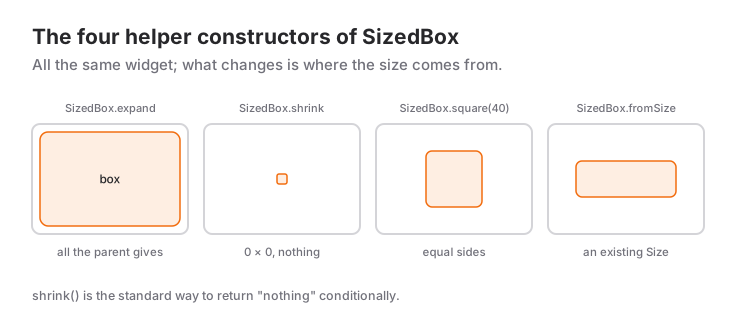
SizedBox has four helper constructors:
SizedBox.expand(child:): fills the maximum width and height the parent allows. It is shorthand forwidth: double.infinity, height: double.infinityand fails when the parent is unbounded on either axis.SizedBox.shrink(): an empty 0x0 box. The standard way to return "nothing" conditionally, and lighter than writingContainer().SizedBox.square(dimension: 40): a square box; it reads better for avatars, icon backgrounds, progress indicators and other equal-sided elements.SizedBox.fromSize(size: Size(120, 40)): for when you already hold aSizeobject.
// A badge, or nothing, depending on a condition
unreadCount > 0 ? Badge(label: Text('$unreadCount')) : const SizedBox.shrink()
Inside a children list, a collection-if is cleaner than the ternary: if (unreadCount > 0) Badge(...). shrink() is for places where a single child parameter must receive some widget.
Why Is the Size You Gave Being Ignored?
Internally SizedBox behaves like a ConstrainedBox: it merges the size you asked for with the constraints coming from the parent, and the parent's constraints always win. Flutter's official Understanding constraints guide walks through this "constraints go down, sizes go up" model example by example. If the parent says "be exactly 360 pixels wide" (a tight constraint), the box is 360 even if you wrote width: 100.
You will see this in three places most often:
// 1. Scaffold body: the SizedBox fills the whole screen, not 100x100
Scaffold(body: SizedBox(width: 100, height: 100, child: ...))

// 2. Inside Expanded: the width is whatever Expanded hands over
Row(children: [Expanded(child: SizedBox(width: 100, child: ...))])

// 3. crossAxisAlignment: stretch: the width becomes the Column's width
Column(crossAxisAlignment: CrossAxisAlignment.stretch, children: [SizedBox(width: 100, ...)])
The fix is the same every time: put the SizedBox inside a widget that loosens the tight constraint. Center, Align and UnconstrainedBox tell their child "you may be as small as you like", and then the SizedBox's size takes effect. Flutter's rule "constraints go down, sizes go up" is explained in the widget tree and layout introduction.
SizedBox and Container
Container also takes width and height, but Container is a do-everything wrapper: depending on the parameters you pass, it creates Padding, DecoratedBox, ConstrainedBox and Align widgets internally. If you only want a size, SizedBox produces fewer widgets and states your intent more clearly. If you need a color, border, shadow or rounded corners, use Container (or DecoratedBox directly). An empty Container grows to fill a bounded parent; an empty SizedBox stays at the size you gave it. That is why SizedBox, not Container, is the right tool for gaps.
When to Use It and When Not To
Use SizedBox:
- For a fixed gap between siblings (
const SizedBox(height: 16)). - To give a child a fixed size (a full-width button, a 48 pixel row height).
- To show nothing conditionally (
SizedBox.shrink()).
Switch to another tool:
- To fill the remaining space, use
Expandedrather thanSizedBox.expand; Expanded is the one that works inside Row and Column. The difference is explained in the Expanded post. - For flexible space ("push these two to opposite ends"), use
SpacerormainAxisAlignment: spaceBetween. - To keep a size within a range (at least 48, at most 200), use
ConstrainedBox. - For many identical gaps, current Flutter versions offer the
spacingparameter on Row and Column; one line instead of tenSizedBox(height: 8)entries.
Common Mistakes
1. height inside a Row, width inside a Column
Symptom: the gap does not show at all. SizedBox(height: 16) has zero width along a Row's main axis; it separates nothing horizontally. Use width in a Row and height in a Column.
2. double.infinity width inside a Row
Symptom: BoxConstraints forces an infinite width. Row gives its children unbounded width; SizedBox(width: double.infinity) tries to accept that infinity and layout blows up.
// Wrong
Row(children: [SizedBox(width: double.infinity, child: Text('x'))])

// Right: Expanded takes the remaining space
Row(children: [Expanded(child: Text('x'))])
double.infinity only makes sense where the parent is bounded on that axis (a Scaffold body, the horizontal axis of a Column).
3. Treating the ignored size as a Flutter bug
Symptom: you wrote SizedBox(width: 100) and got a box as wide as the screen. As explained above, the parent's tight constraint won. Wrap the box in Center or Align:
Scaffold(
  body: Center(
    child: SizedBox(width: 100, height: 100, child: ColoredBox(color: Colors.blue)),
  ),
)
4. An empty Container instead of shrink()
Symptom: something that should be invisible takes up unexpected space. An empty Container() grows to fill a bounded parent. const SizedBox.shrink() is always 0x0.
Mini Scenario: Profile Header
Picture the profile block at the top of a settings screen: a fixed-size avatar, name and email, a conditional "verified" mark, and a full-width edit button.
class ProfileHeader extends StatelessWidget {
  const ProfileHeader({super.key, required this.name, required this.email, required this.verified});

  final String name;
  final String email;
  final bool verified;

  @override
  Widget build(BuildContext context) {
    return Padding(
      padding: const EdgeInsets.all(16),
      child: Column(
        crossAxisAlignment: CrossAxisAlignment.stretch,
        children: [
          Row(
            children: [
              SizedBox.square(
                dimension: 56,
                child: CircleAvatar(child: Text(name.substring(0, 1))),
              ),
              const SizedBox(width: 16),
              Expanded(
                child: Column(
                  crossAxisAlignment: CrossAxisAlignment.start,
                  children: [
                    Text(name, style: Theme.of(context).textTheme.titleMedium),
                    const SizedBox(height: 4),
                    Text(email, overflow: TextOverflow.ellipsis),
                  ],
                ),
              ),
              const SizedBox(width: 8),
              verified
                  ? const Icon(Icons.verified, color: Colors.green)
                  : const SizedBox.shrink(),
            ],
          ),
          const SizedBox(height: 16),
          SizedBox(
            height: 48,
            child: OutlinedButton(onPressed: () {}, child: const Text('Edit Profile')),
          ),
        ],
      ),
    );
  }
}
SizedBox.square pins the avatar to 56x56; SizedBox(width: 16) and height: 4 are separators; Expanded lets the text block take the remaining width and truncates a long email. The button's SizedBox only gets a height: the width comes from the Column's crossAxisAlignment: stretch, so there is no need to write width: double.infinity. For the verified mark I used SizedBox.shrink(); if (verified) const Icon(...) in the Row's children list would do the same job.
Frequently Asked Questions
What is the difference between SizedBox and Container?
SizedBox only sets a size; Container creates extra widgets internally for color, padding, border and alignment. If you only need a size or a gap, SizedBox is lighter and states the intent more clearly.
Why is the width I gave my SizedBox not applied?
The parent's constraint takes precedence over what SizedBox asks for. In places that hand down tight constraints, such as a Scaffold body, Expanded or CrossAxisAlignment.stretch, the box ends up as large as the parent; wrap the SizedBox in Center or Align to loosen the constraint.
Are SizedBox.shrink() and an empty Container() the same?
No. SizedBox.shrink() is always 0x0; an empty Container() fills a bounded parent completely. Use shrink for conditionally showing nothing, or write a collection-if inside lists.
Do SizedBox.expand and Expanded do the same thing?
No. SizedBox.expand fills the maximum space the parent offers and works outside Row and Column too; Expanded only distributes the space left over by siblings inside Row, Column and Flex. Inside a Row, SizedBox.expand throws an infinite width error.
Related Posts
Flutter: ListView Widget Usage
A practical Flutter ListView guide: lazy lists with builder, separated, itemExtent, the real cost of shrinkWrap and fixing the unbounded height error.
Flutter: GridView Widget Usage
A practical Flutter GridView guide: count, extent and builder, the two grid delegates, the childAspectRatio overflow error and the real cost of shrinkWrap.
Flutter: Detailed Usage of Center Widget
How Center relates to Align, why it fills the available space, widthFactor, why it does not center vertically in a Column, and the common mistakes.