Flutter: Expanded vs Flexible vs Spacer, With Recipes
Last updated:
8 min read

There are three tools for sharing space inside a Row or Column: Expanded fills the remaining space, Flexible lets a child stay small, Spacer only opens a gap. This post first shows how the three differ on a single row, then walks through four everyday scenarios that combine them in one layout (a toolbar, a card footer, form rows and a responsive split screen) with code and reasoning. The single-widget details live in their own posts: flex math, nesting and Expanded errors in the Expanded deep dive, gap ratios and the scrollable-area traps in the Spacer post.
Live Demo
You can try the Expanded widget in the interactive example below:
💡 If the example above doesn't load, click DartPad to run it in a new tab.
Core Difference
All three are part of the same mechanism: a Row or Column first measures its fixed-size children, then shares the remaining space among the children that have a flex value. What differs is what the child does with its share.
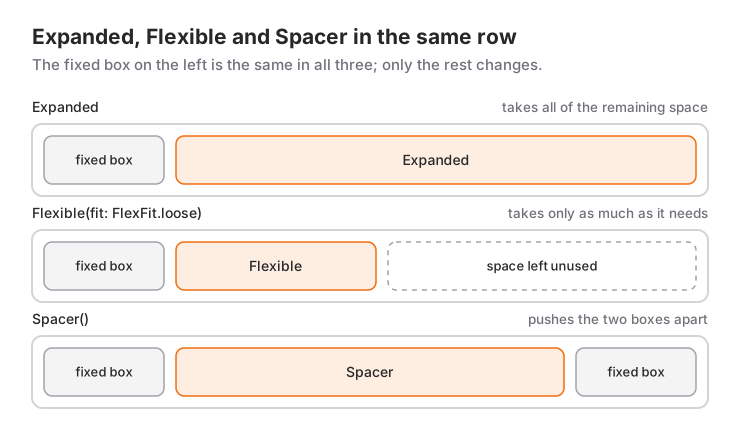
Expanded: The child must fill its whole share. It is shorthand forFlexible(fit: FlexFit.tight).Flexible: The defaultfitisFlexFit.loose, which means the child may take "at most" its share. If its own size is smaller it stays small; if it does not fit it is squeezed into the share.Spacer: AnExpandedwith nothing inside; it uses its share as invisible space and carries no content.
To see the difference between Flexible and Expanded, the child needs a size of its own. A short label is enough:
Row(
  children: [
    Flexible(
      child: Container(
        color: Colors.green,
        padding: const EdgeInsets.all(8),
        child: const Text('Short label'),
      ),
    ),
    const SizedBox(width: 8),
    const Icon(Icons.info_outline),
  ],
)
In this row the green area is as wide as the text and the icon sits right next to it. Make the text too long for the row and Flexible caps it at the remaining width, so the text wraps to a second line instead of overflowing. Write Expanded instead of Flexible in the same code and the green area stretches to the icon even with the short text, pushing the icon to the right edge.
Decision Table
Before the recipes, the short way to decide which widget goes on which child:
| Need | Tool |
|---|---|
| The child should fill all remaining space | Expanded |
| The child keeps its own size but shrinks when it does not fit | Flexible |
| Flexible gap between two items | Spacer |
| Fixed gap between two items | SizedBox |
| Items should wrap to the next line when they do not fit | Wrap |
Recipe 1: Toolbar
Picture the bottom bar of an editor screen: two icons on the left, a "Save" button on the right. Icons and button keep their own size; the gap between them should be flexible:
Row(
  children: [
    IconButton(onPressed: () {}, icon: const Icon(Icons.undo)),
    IconButton(onPressed: () {}, icon: const Icon(Icons.redo)),
    const Spacer(),
    FilledButton(onPressed: () {}, child: const Text('Save')),
  ],
)
Spacer could be replaced by mainAxisAlignment.spaceBetween here, but spaceBetween equalizes every gap; if the two icons must stay side by side, Spacer is the right tool. To add a title in the middle, put Expanded(child: Text(title, textAlign: TextAlign.center, overflow: TextOverflow.ellipsis)) in place of the Spacer: the title takes the remaining space and is cut with an ellipsis when it is long.
Recipe 2: Card Footer
The bottom line of a product card: price on the left, a favorite icon and an "Add to cart" button on the right:
Row(
  children: [
    Text('\$24.90', style: Theme.of(context).textTheme.titleMedium),
    const Spacer(),
    IconButton(onPressed: () {}, icon: const Icon(Icons.favorite_border)),
    FilledButton.tonal(onPressed: () {}, child: const Text('Add to cart')),
  ],
)
This line can overflow on a narrow screen when the price and the button label are long. Because Spacer is a flex child, it can shrink to zero; the overflow starts when the fixed children together are wider than the Row. At that point wrap the price in Flexible with overflow: TextOverflow.ellipsis, or replace the row with Wrap. The card component itself is covered in the Card usage post.
Recipe 3: Form Rows
In an address form, "City" and "Postal code" share one line, with the city field twice as wide:
Row(
  children: [
    Expanded(
      flex: 2,
      child: TextFormField(
        decoration: const InputDecoration(labelText: 'City'),
      ),
    ),
    const SizedBox(width: 12),
    Expanded(
      child: TextFormField(
        keyboardType: TextInputType.number,
        decoration: const InputDecoration(labelText: 'Postal code'),
      ),
    ),
  ],
)
Text fields inside a Row must be Expanded; left bare, the app throws (see below). The gap between them is fixed, so it is a SizedBox, not a Spacer. Validation and the Form widget are explained in the Form usage post.
Recipe 4: Responsive Split Screen
On tablet and desktop a list on the left and a detail pane on the right; on a phone only the list. The decision should depend on the width given to this widget, not on the screen width, which is what LayoutBuilder is for:
LayoutBuilder(
  builder: (context, constraints) {
    if (constraints.maxWidth < 720) {
      return const NoteList();
    }
    return const Row(
      children: [
        SizedBox(width: 320, child: NoteList()),
        VerticalDivider(width: 1),
        Expanded(child: NoteDetail()),
      ],
    );
  },
)
The list is a fixed 320 pixels and the detail pane takes everything else. If the list should grow proportionally too, replace the SizedBox with Expanded(flex: 1) and give the detail pane flex: 2. Choosing between LayoutBuilder and MediaQuery is covered in the MediaQuery post, and a full breakpoint-based responsive layout in the LayoutBuilder post.
When to Use It and When Not To
These three are the right tools in every Row and Column where space is shared between siblings. But in three situations you need something else:
- If the Row or Column sits inside a
SingleChildScrollView, the main axis has no limit;ExpandedandSpacerdo not work there. Give a fixed size or move the scrolling out of the outer widget. - For chips and tags of unknown count, even
Flexibleis not enough; items must move to the next line. UseWrap. - If the Row must wrap its content (
mainAxisSize: MainAxisSize.min),ExpandedandSpacerdefeat that intent, because both demand all remaining space. In such rows use onlyFlexibleandSizedBox. How a Row picks its own width is explained in the mainAxisSize post.
Common Mistakes
1. A bare TextField inside a Row
Symptom: An InputDecorator, which is typically created by a TextField, cannot have an unbounded width. A Row gives its children no width limit, and the text field cannot know how wide to be. The fix is wrapping the TextField in Expanded or Flexible. If you want a fixed width, SizedBox(width: 120, child: TextField(...)) also works.
2. Writing Flexible and expecting it to fill
Symptom: You wrote Flexible(child: Container(color: Colors.blue, child: Text('A'))) and the blue area is only as wide as the text. The default fit of Flexible is FlexFit.loose: the child is not forced to grow, and the Container wraps its child. If it should fill, use Expanded or set fit: FlexFit.tight.
3. Testing Flexible with a childless Container
Symptom: You wrote Flexible(child: Container(color: Colors.green)), the result looks exactly like Expanded, and you conclude there is no difference. There is one, but this example cannot show it. A Container with no child and no size grows as large as possible when it receives bounded constraints. A loose constraint says "at most this much", so the Container simply picks the largest allowed size and fills the whole share. To see the difference, use a child with its own size, like the label example above.
4. Spacer inside a scrollable area
SingleChildScrollView(
  child: Column(
    children: const [
      Text('Top'),
      Spacer(), // Error
      Text('Bottom'),
    ],
  ),
)
Symptom: RenderFlex children have non-zero flex but incoming height constraints are unbounded. Inside a scroll area the height is infinite and "remaining space" is undefined. Use a fixed SizedBox(height: 24); if you really want to pin the bottom item to the bottom of the screen, take the Column out of the scroll area and make the content part Expanded(child: SingleChildScrollView(...)).
5. Using them inside a non-Flex parent
All three can only be direct children of a Row, Column or Flex. Put them inside a Stack, Container or Padding and you get Incorrect use of ParentDataWidget. The most common form is a Padding slipping in between Expanded and its Row; the fix (swap the order) is covered in detail in the Expanded post.
Mini Scenario: A Product List Row
A product row that brings the four recipes together. Thumbnail on the left, title and description in the middle, price on the right; below, a favorite icon and an add-to-cart button:
class ProductRow extends StatelessWidget {
  const ProductRow({
    super.key,
    required this.title,
    required this.subtitle,
    required this.price,
  });

  final String title;
  final String subtitle;
  final String price;

  @override
  Widget build(BuildContext context) {
    final text = Theme.of(context).textTheme;
    return Card(
      child: Padding(
        padding: const EdgeInsets.all(12),
        child: Column(
          mainAxisSize: MainAxisSize.min,
          children: [
            Row(
              crossAxisAlignment: CrossAxisAlignment.start,
              children: [
                const SizedBox(width: 64, height: 64, child: Placeholder()),
                const SizedBox(width: 12),
                Expanded(
                  child: Column(
                    crossAxisAlignment: CrossAxisAlignment.start,
                    children: [
                      Text(title, style: text.titleMedium, maxLines: 1, overflow: TextOverflow.ellipsis),
                      Text(subtitle, style: text.bodySmall, maxLines: 2, overflow: TextOverflow.ellipsis),
                    ],
                  ),
                ),
                const SizedBox(width: 12),
                Text(price, style: text.titleMedium),
              ],
            ),
            const SizedBox(height: 8),
            Row(
              children: [
                const Spacer(),
                IconButton(onPressed: () {}, icon: const Icon(Icons.favorite_border)),
                FilledButton.tonal(onPressed: () {}, child: const Text('Add to cart')),
              ],
            ),
          ],
        ),
      ),
    );
  }
}
In the top row the image and the price are fixed, and the middle Column takes all the width between them through Expanded; a long title is cut with an ellipsis instead of overflowing, because Expanded gives the text a bounded width. The gaps are fixed, so they are SizedBox. In the bottom row the Spacer pushes the icon and the button to the right; since nothing sits on the left, mainAxisAlignment.end would give the same result, but Spacer keeps working without changes when you later add an "In stock" label on the left. The card's outer Column is mainAxisSize.min, so it contains no Expanded; if it did, the card would throw an infinite height error inside a list row.
Frequently Asked Questions
Why does a TextField inside a Row throw an error?
A Row gives its children no width limit, and a text field cannot have unbounded width. Wrap the TextField in Expanded or Flexible, or give it a fixed width with SizedBox.
Spacer or mainAxisAlignment?
If all gaps should be equal, spaceBetween or spaceEvenly is enough. If the gap must sit in a specific place or be shared in different proportions, use Spacer(flex:). Do not combine the two in one row: the Spacer takes all the free space, so spaceBetween has no visible effect.
When is Flexible preferred over Expanded?
When the child should keep its own size but shrink when space runs out. In content-wrapping layouts such as chat bubbles and chips Flexible is right; where all remaining space must be filled, Expanded is the choice.
Why do these widgets not work inside a ScrollView?
A scroll area offers infinite space on the main axis, and "remaining space" cannot be computed. Give a fixed size, or move the scrolling into the inner part wrapped in Expanded rather than around the Column.
Related Posts
Flutter: GridView Widget Usage
A practical Flutter GridView guide: count, extent and builder, the two grid delegates, the childAspectRatio overflow error and the real cost of shrinkWrap.
Flutter: Flexible Spaces with Spacer Widget
What Spacer is under the hood, sizing gaps with flex, how it differs from SizedBox and mainAxisAlignment, and why it breaks in scrollable areas.
Flutter: Screen-Based Scaling with MediaQuery
Sizing by screen with MediaQuery.sizeOf, paddingOf and textScalerOf; when LayoutBuilder or FractionallySizedBox is the better tool, and the common mistakes.