What Is a Harness? The Difference Between the Model and the Coding Tool (with DeepSeek)
Last updated:
14 min read
Picture this: you try DeepSeek in the browser and it knows everything you ask. Then you plug the same model into your editor and it performs far worse. Is the model bad, or are you doing something wrong?
Most likely neither. The difference comes from the harness. When we talk about vibe coding we keep comparing models — "is Claude better, or GPT, or DeepSeek" — but a serious share of the output quality lives outside the model, in the layer wrapped around it. This post is about what a harness is, what it actually does, and why the same model behaves like two different developers in two different tools.
The starting point for this post is Jack Roberts's video DeepSeek Harness = Claude Code for $0, which introduces DeepSeek's open-source harness. This article summarizes and expands on it; the step-by-step walk through the agent loop, the questions for choosing a harness and the security advice are additions of this post.
What is a model? What is a harness?
A model is a surprisingly simple thing: you put text in, you get text out. That's it. DeepSeek, Claude, GPT — all of them fit that definition. The model has no memory, cannot see your files, cannot run a terminal, does not remember the previous conversation. Think of it as a single function:
answer = model(text)A harness is the program written around that function. Claude Code, Cursor, Codex CLI, Cline, Continue, opencode — all harnesses. The code that calls the model, decides what to feed it, executes the instructions in its reply, and feeds the result back in.
The video's analogy is short: the model is the brain, the harness is the body. To stretch it a little: the model is an excellent engineer sitting in a locked room with no windows. No eyes, no hands, no memory. You slide a sheet of paper in, they write the answer on it, they slide it back. The harness is the person at the door: it decides which sheet goes in, what is written on it, and which file to open and carry back based on what came out.
Hand an excellent engineer a blank sheet and you will not get a good answer. That is not the engineer's fault.
The five jobs a harness does
When you open a coding tool, five things happen in the background. None of them are the model's job.
1. System prompt and rules
The harness puts its own instructions in front of your sentence: "You are a coding assistant, you can use these tools, you must read a file before writing to it, match the user's code style." Files at the root of your project — CLAUDE.md, .cursorrules, AGENTS.md — land here too.
This layer explains why the same model gives you one comment style in one tool and a different one in another.
2. Tool definitions
The model cannot read a file on its own. The harness hands it a list: read_file, write_file, run_command, search. The model then replies "I would like to call read_file("api/session.php") now." That is a request, not an action.
The harness is what actually makes the call. It reads the file, takes the contents, appends them to the next message, and sends them back to the model.
3. The agent loop
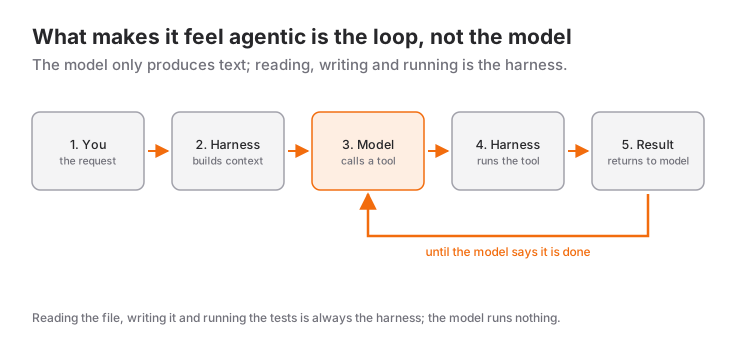
This is the heart of it. A harness does not do a single question and answer — it runs a loop:
- Send the user's request to the model.
- If the model wants to call a tool, call it.
- Append the tool's result to the conversation.
- Send it back to the model.
- Go to 2 until the model says "done" or a limit is hit.
The difference between DeepSeek in a chat window and DeepSeek inside an agent is exactly this loop. Chat gives you one turn; an agent might take thirty.
4. Context management
The model re-reads the entire history on every turn, and every model has a context limit. A thirty-turn session blows past that limit comfortably. This is where the harness decides: which file goes in whole, which gets summarized, which old step gets dropped, when to compact the conversation.
This is where good and bad harnesses separate the most. Same model — but one gives it the three relevant files while the other gives it thirty irrelevant ones. The second is both more expensive and worse.
5. Approval and the safety boundary
When the model says "run this command", does the harness ask you first, or just do it? Which directory can it not escape? Those decisions belong to the harness, not the model.
Anatomy of a turn: a DeepSeek example
Let's make it concrete. You have plugged DeepSeek into an agent tool and typed:
"In
api/session.php, fix the duration calculation so it trusts the server-side delta instead of the value coming from the client."
Roughly what happens behind the scenes:
Turn 1 — The harness sends the model: system prompt + tool list + project rules + your sentence. The model answers: "I need to read the file first: read_file("api/session.php")."
Turn 2 — The harness reads the file, appends 200 lines to the conversation, sends it back. This time the model says: "Line 41 uses $_POST['duration'] directly. Here is the change I propose: write_file(...)."
Turn 3 — Depending on your settings, the harness either asks you for approval or writes it. It reports the result to the model. The model: "Let's run the tests: run_command("php tests/session_test.php")."
Turn 4 — The test output goes back to the model. If it's red, the model fixes it and the loop continues. If it's green, the model says "done" and the loop closes.
Across those four turns, the only thing the model did was produce text. Reading the file, writing it, running the test, carrying the output back — all harness. What makes it feel like an agent is not the model, it's the loop.
Why the same model behaves differently in different tools
The answer is clear now. What changes when you run the same model in two tools:
- The system prompt. One says "read before you write", the other doesn't.
- The tool set. One has
run_command, the other doesn't. An agent that cannot run tests cannot verify that the code works. - Context selection. One indexes the project and finds the three relevant files; the other only sends the open tab.
- The turn limit. One allows thirty turns, the other cuts you off at five.
- Error feedback. One feeds the compiler error back to the model; the other shows it to you and stops.
That is the typical cause of the "good in the browser, bad in the editor" situation from the intro: if the extension only sends the currently open file, the model is forced to guess about a codebase it cannot see.
Where DeepSeek sits in this picture
I picked DeepSeek as the example because it makes the harness question more visible than the others do. A closed model usually comes with its maker's tool — model and harness ship from the same place, tuned together. With DeepSeek, the model and the harness can be chosen independently.
On one side, DeepSeek now has its own harness. In August 2026 it open-sourced DeepSeek Harness (dsh for short) under the MIT license. The project is still a developer preview, and the repository says plainly that compatibility-breaking changes are coming. Its architecture is built on the idea that "everything is a plugin": the model adapter, the tool registry, the session log and the agent loop itself are all replaceable parts. In the video it runs on a local machine and switches between DeepSeek, Claude and GPT models in the same interface; according to the video, local models can also be connected through Ollama, but Claude Code or Codex subscriptions cannot be used — it only works with API keys.
On the other side, DeepSeek's models also run in other harnesses. The API follows OpenAI's API shape, so it plugs into almost any agent tool that accepts an "OpenAI-compatible endpoint": change the base URL and the key, and you're running. Models released with open weights can also be hosted on your own server, if your hardware is up to it.
That freedom is both the flexibility and the trap:
- Chat model or reasoning model? DeepSeek's model family includes both chat models that answer directly and reasoning modes that think step by step. Reasoning models generally plan better but are slower and more expensive, and in some versions their tool-calling support is less settled than the chat model's. Before using one inside an agent, test tool calling with a trivial task first.
- Tool-calling quality is what decides it. Inside an agent, the one critical ability a model has is calling tools in the right format and the right order. A model that gives brilliant chat answers is useless as an agent if it cannot hit the tool-call format.
- Being cheap does not forgive a wasteful harness. DeepSeek's price advantage is real, but a bad harness hands it back over a thirty-turn loop. Cheap model plus wasteful harness can end up costing more than expensive model plus frugal harness.
- Versions move fast. Model names and capabilities get updated every few months; verify what your chosen model supports in the official docs before you rely on it. The mechanism in this post is stable — the model list is not.
Should you write your own harness?
The barest version of an agent loop really is about a hundred lines: a while loop, a tool list, a JSON parser. For learning, write one at least once — no article about harnesses teaches as much as writing your own loop does.
But don't build the tool you use daily from scratch. The value of an existing tool isn't the loop, it's everything around it: context compaction, project indexing, diff display, undo, the permission system, crash recovery. Those are months of work.
Five questions to ask when picking a harness
When you evaluate a new coding tool, don't look at the model name. Look at these:
- Which tools does it grant? Reading files isn't enough; running commands and tests matters just as much.
- How does it select context? Only the open file, a project index, or can I attach files by hand?
- What happens in a long session? When context fills up, does it silently forget, summarize, or tell me?
- Can I swap the model? Can I plug in my own API key and my own model? (Essential if you want to try something like DeepSeek.)
- What does it ask permission for? Does it check with me before writing files and running commands, or decide on its own?
The answers to those five make more difference than which model is underneath.
Is the cheap model actually cheaper?
You will hear "almost the same performance for a fraction of the price" a lot; the video, too, argues that DeepSeek offers 90-95% of the performance for a fraction of the cost, while conceding that it sits a step below Opus and GPT-5.6. Don't take claims like that at face value — measure it on your own work. It is easy to do:
- Pick five representative tasks — real work you actually do, not synthetic examples.
- Run the same five tasks on both setups.
- Record three things: tokens spent, whether the result was acceptable, and how long you spent fixing it.
The third one is the one that decides it. A cheap model that burns twice the tokens and hands you half an hour of cleanup is not cheap. A reasonable expectation: on routine, well-specified work the cheap model often holds up; on vague work that requires judgment, the gap can turn into a time cost well above the token cost.
So instead of committing to one setup, split the work: run the strong model where the hard decisions are made, and the cheap one where the volume is. The video draws a similar line: Claude Code or Codex when the output is client-facing and design quality matters; the DeepSeek harness as a "workhorse" for high-volume work where cost decides.
Handing your API key to a third-party harness
An open-source harness runs on your own machine and its telemetry may be off by default (the video says this is the case for DeepSeek Harness) — but you are still giving it your API key, your codebase, and sometimes access to external services. Four things before you set one up:
- Use a separate API key with a spending limit, not your main account key.
- Keep the key in an environment variable, never in a project file.
- Watch the network traffic on the first run and verify for yourself that telemetry is actually off.
- Start with automatic command execution restricted, and widen it as you get to know the tool.
None of this is paranoia; it is the standard hygiene you would apply to any third-party developer tool.
What this means for vibe coding
In my vibe coding writing I keep saying the same thing: the decisions are yours, the implementation is the model's. The harness is the third leg of that sentence — how your decisions actually reach the model. Your decision document can be perfect; if the harness never sends it, it means nothing.
So before you enter the "which model is better" debate, ask this instead: what am I giving my model, and what do I do with its answer? Once that's clear, the model choice gets easy.
To see which tool stands out for which job, see Vibe coding tools compared; for the method itself, 7 practical tips.
Frequently Asked Questions
What does harness mean in AI?
A harness is the software layer written around an AI model that turns it into a usable tool. It builds the system prompt, offers the model tools (reading files, running commands), executes the calls the model requests, and feeds the results back. Claude Code, Cursor, and Cline are all examples of harnesses.
What is the difference between a model and a harness?
A model is just a function that takes text and returns text; it has no memory, no file access, and no ability to act. A harness is the program that runs that function in a loop, supplies its context, and actually executes the tool calls in its reply. Agent behavior comes from the loop, not from the model.
Can I use DeepSeek in my own coding tool?
Yes. DeepSeek's API follows the OpenAI shape, so it works in most agent tools that let you set your own base URL and key. DeepSeek also has its own open-source harness, though it is still a developer preview. Before you commit, verify that the model you picked supports function calling.
Why do two tools using the same model give different results?
Because the model is the same but its input is not. The system prompt, the tool set, the files sent, the turn limit, and the error feedback all vary between tools. A tool that hands the model the three relevant files gets very different quality from one that only sends the open tab.
What is an agent loop?
It is the flow in which the harness calls the model repeatedly rather than once: send the request, run the tool the model asked for, append the result to the conversation, send it again. The loop continues until the model says it's done. That is why a tool feels like it is "working on its own".
Do I need to write my own harness?
Not for daily work; the value of an existing tool lies in context management and permissions, not in the loop. But I'd recommend writing a simple loop once for learning — it's about a hundred lines and it makes the topic clearer than any amount of reading.
Source
- Jack Roberts, DeepSeek Harness = Claude Code for $0 (YouTube, August 2026). The model/harness distinction, the features of DeepSeek Harness and the advice on which setup to pick for which job are based on this video.
- deepseek-ai/deepseek-harness (GitHub): the official repository, for the license, the developer-preview status and installation.
- The Open-Sourcing of DeepSeek Harness (InfoQ, August 2026): a summary of the plugin-based architecture.
Related Posts
Coding with Free AI: opencode and the Cheap Model Stack
Plugging your own key into open-source opencode and running free or near-free models: setup, provider config, and what free actually costs you.
Wiring JEV Into Your System: Harness, Cost and Known Limits
On its own JEV produces a cloud of probabilities. How to build the harness that turns it into action, which patterns to use, and where the model is weak.
What Is Hermes Agent? How to Install (Mac, Linux, Windows)
Hermes Agent is Nous Research's open-source terminal agent with memory and skills. One-line install, first setup and model choice, step by step.