Recapday Couple Mode: Why a Two-Person Group Needed Its Own Mode
7 min read
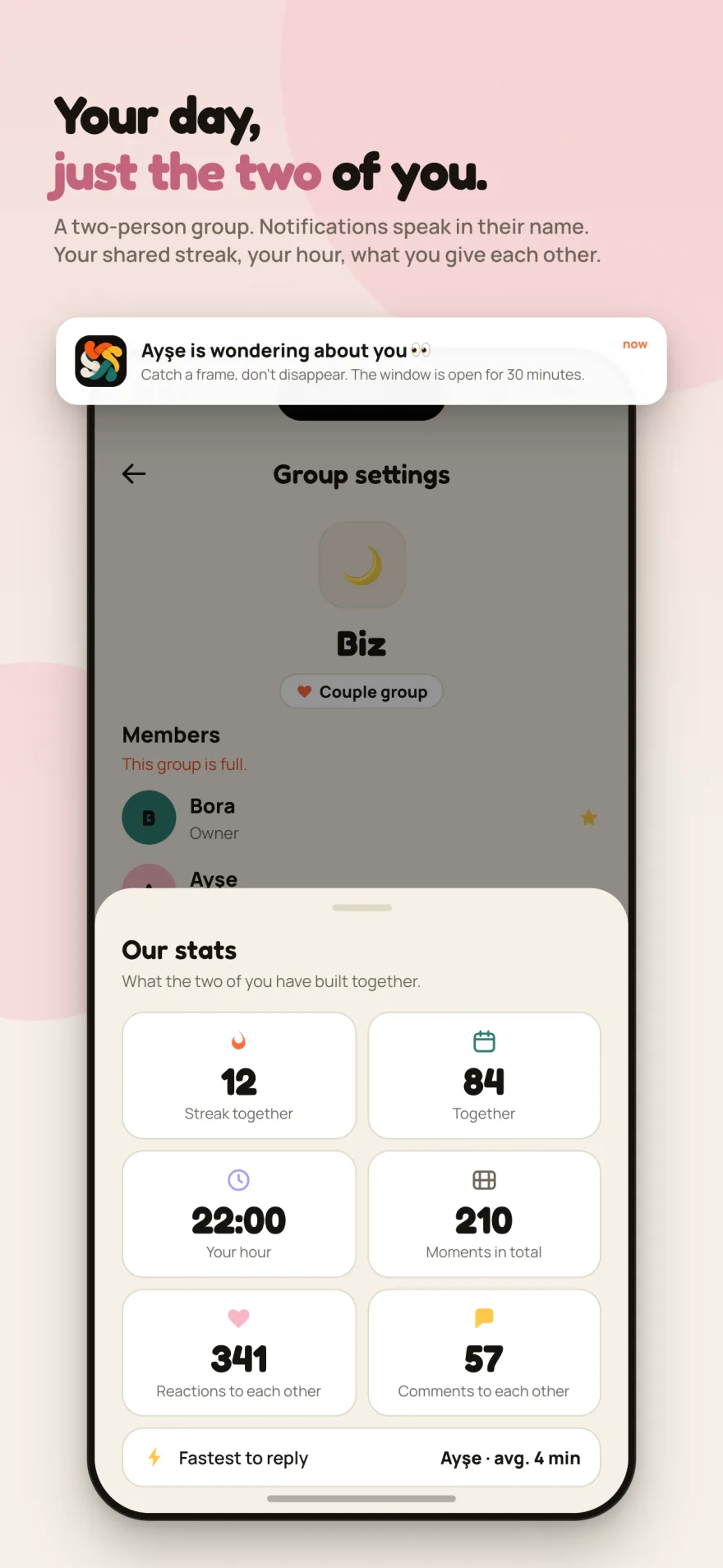
I built Recapday for groups of friends. The group picks a few capture times, everyone records a few seconds at those times, and at the end of the day the clips merge into a single vlog. Every part of the design assumed a crowd: up to ten members, an invite code, the group's feed, the group's schedule. Couple Mode grew out of that design, but not from a feature list. It came from a small discomfort that only shows up when you use the product in its smallest form.
Think of this post as a sequel to the Recapday decision log. That one covered architecture. This one follows a single feature from the first itch to the final flag, including the paths I ruled out.
The smallest group is the hardest one
Something strange happens when you set up a group app with just two people: everything works, and nothing feels right.
"The group's feed" is too formal for two. Two names sit under a heading that says "Members". The notification reads "Recapday: capture window is open", but in a two-person group it is obvious who is waiting for your clip, and nobody needs the app's name to tell them. Every sentence written for ten people lands a little distant when it is said to two.
The real difference is in behavior. In a crowd, recording a clip is a broadcast: you show something to a lot of people. In a group of two, recording a clip is a reply. If they recorded, you record. If they left a reaction, you leave one back. The number that matters stops being "how many clips are there" and becomes "what did we give each other".
Once I saw that, I could not ignore the two-person group. The product had set out to serve friend groups, but the scenario that promised the most intense daily use was the smallest group of all.
Three options, two rejected
The first idea was a separate app: a completely different product, "a daily vlog for couples". It was easy to reject. A second app means a second store submission, a second privacy policy, a second ffmpeg test cycle, a second website. It is the most expensive lesson from the decision log: adding a feature is cheap, adding a product is expensive.
The second option was to do nothing. Two people are a group too; anyone who wants to can create one and use it. That did not work either, because it left the distance in place. The two-person version of the app should not be a shrunken copy of the ten-person version.
The third option was a flag on the group: a "Couple group" setting in the group options. Same tables, same clips, same capture windows, same vlog engine. What changes is how a two-person group speaks to itself and what it chooses to count. That is the one I went with.
The reasoning was simple: Couple Mode is not a new data model. It is the existing model read for two people. A clip stays a clip, a reaction stays a reaction, a comment stays a comment. The app just interprets them differently.
What the flag changes
You turn Couple Mode on from the group settings by marking a two-person group as a "Couple group". From that moment, four things change.
Notifications arrive with your partner's name. Instead of the app name, the title is something like "Ayşe is thinking of you 👀", with the window duration underneath. It looks like a tiny change, but the whole mode is hiding in that sentence: the notification stops being a system message and becomes a call from a person.
A shared streak is kept. In a crowd, a streak meant little; if one of ten people skips a day, nobody loses anything. For two, the streak is the count of days you were both there. That is why it belongs to the couple, not to either person.
The "Our stats" panel opens. Shared streak, days together, your hour, total moments, mutual reactions, mutual comments, and the fastest reply time. The one principle behind the panel is the word "mutual": it does not show who shared more, it shows what the two of you gave each other. Leaving out any one-sided counter was a deliberate choice. Making one side look like "less" is not this product's job.
The group is full at two. A third person cannot join a couple group. That was designed as a guarantee rather than a limit: the app promises that a space for two stays a space for two.
What does not change matters just as much. Capture windows work exactly as before; miss the window and the moment is gone. At the end of the day the vlog is still rendered on the phone with ffmpeg, never uploaded to a server. The camera is still left to the user: portrait or landscape, your call. Couple Mode does not touch that core.
What I deliberately left out
Most of the features that come to mind for a "couples app" stayed out on purpose.
No location sharing. Recapday already collects no location, no contacts and no advertising ID, and Couple Mode is not the exception. "Where are you right now" is not a question this product answers.
No "who loves more" score. Every number in the panel above is mutual. A one-sided counter turns a space for two into a competition, and competition is not the point.
No nudges, no reminder spam, no guilt notifications along the lines of "your partner is waiting". A notification arrives when a capture window opens and goes quiet when it closes. The rule from the big groups applies to two people as well: the app does not chase you, it just tells you the time.
Nothing public. A couple group is a closed group like any other; the clips are visible to the two of you only, and there is no profile or discover feed. On the technical side this comes from keeping identity in Firebase while the data lives on my own server. Couple Mode inherited that split unchanged.
Where AI fit into this decision
Most of Recapday was written with vibe coding, and so was Couple Mode: the stats screen, the notification strings in three languages, the toggle in the group settings. Those parts were done quickly.
But the model did not make the observation that "a group of two is a different thing", and it could not have. That came from using the product in its smallest form. The same goes for choosing a mode over a separate app: the person who knows where the cost lives makes that call, not the tool that writes the code.
Lessons
I took three things away from this feature, and none of them is specific to Recapday.
One: try the smallest use case by hand. Something designed for ten people does not break at two, but it becomes a stranger. That estrangement is the most valuable feedback in the product.
Two: a mode almost always beats a new product. A flag that reads the same data differently is cheaper than a second store submission, and it does not split your existing users.
Three: what you count matters more than what you show. The heart of Couple Mode is not a screen, it is the word "mutual". Once that word was chosen, the rest of the panel fell into place on its own.
Recapday is free on the App Store and on Google Play. Couple Mode is one tap away in the group settings.
Frequently Asked Questions
How do I turn on Couple Mode in Recapday?
Create a two-person group, or open the settings of an existing two-person group, and mark it as a "Couple group". Personalised notifications, the shared streak and the "Our stats" panel switch on from that moment.
Can a third person join a couple group?
No. A couple group is full at two, and no third person can be invited. If you want a bigger group, create a regular group instead.
Who can see the clips in Couple Mode?
Only the two of you. Recapday has no public profiles, no discover feed and no search; a couple group is closed like every other group. The daily vlog is rendered on your phone and never uploaded to a server.
Does Couple Mode cost anything?
No. Like the rest of Recapday, Couple Mode is free, with no ads and no in-app purchases.
Related Posts
How I Built Recapday: A Decision Log From Idea to Store
The architecture behind Recapday: why identity lives in Firebase but data on my own server, why I deleted the social features, and what was irreversible.
What Is Claude Sonnet 5.5? Benchmarks, Cost, Free Plan
Claude Sonnet 5.5 is now the free plan's default model. It scores 70.6% on Terminal-Bench 4.0 at $2 / $10 per million tokens. How it compares.
What Is GPT-6.1 Sol? Price, Performance, Who Can Use It
GPT-6.1 Sol offers near-Astra intelligence at a fifth of the price: $2 / $10. New plan tiers, Ultrafast speed and who can use it, explained.