Firebase Auth With Your Own PHP Server: Token Verification and Account Deletion Without Composer
Last updated:
6 min read
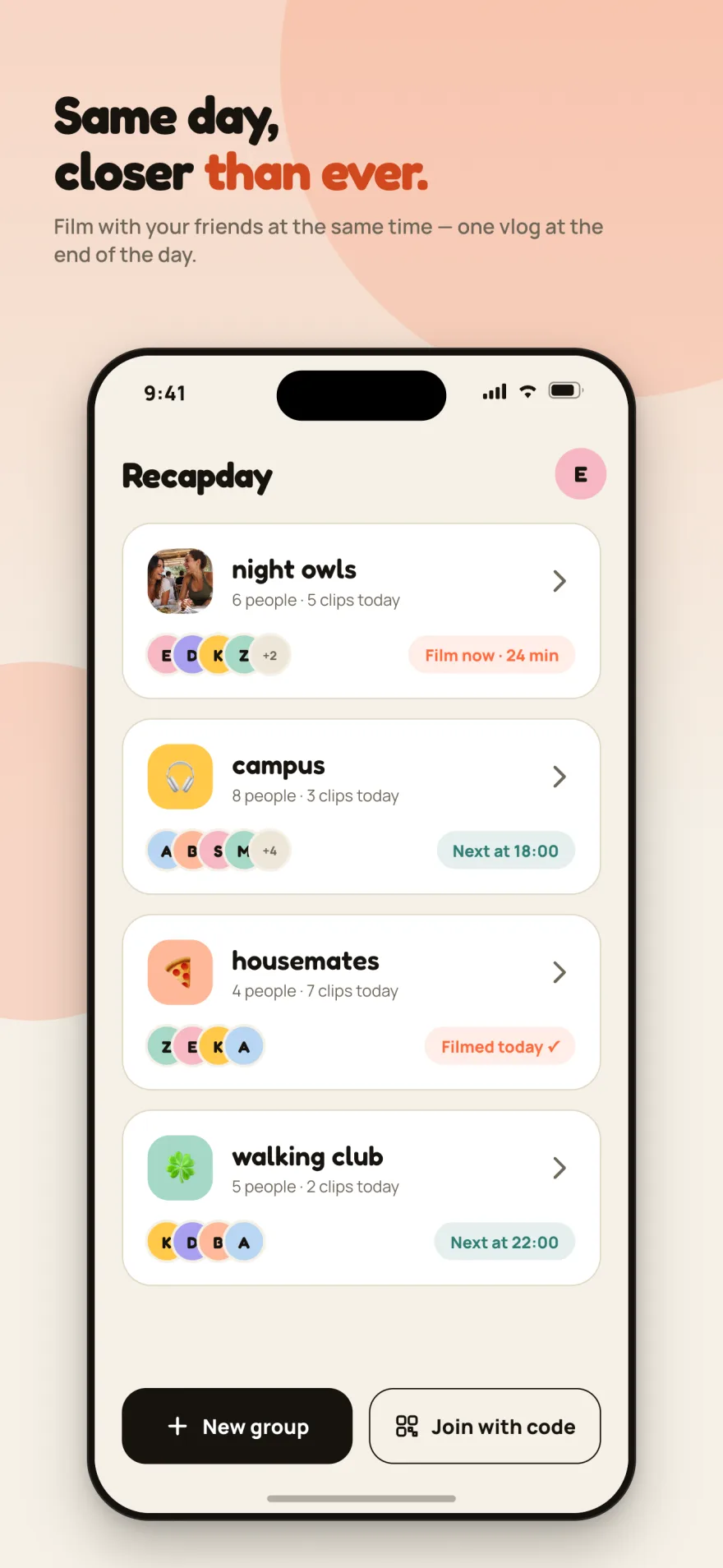
The most consequential decision I made building Recapday was to use Firebase for identity only. Groups, clips, comments, media files — all of it lives on my own Hostinger server, on plain PHP and MySQL.
That split has a price: the server has to verify by itself that the Firebase ID token the client sent was really signed by Google. And since I can't run composer on shared hosting, there was no firebase/php-jwt to reach for.
This post covers two things end to end:
- Verifying a Firebase ID token in dependency-free PHP
- Building the account-deletion flow the stores require, working both in-app and on the web
Part 1: Verifying the token
A Firebase ID token is a JWT signed with RS256. Firebase's guide to verifying ID tokens also explains how to proceed with a third-party JWT library in languages the Admin SDK doesn't support. Verification is three steps:
- Check the signature against Google's public key
- Check that the audience (
aud) and issuer (iss) belong to your project - Check that it hasn't expired
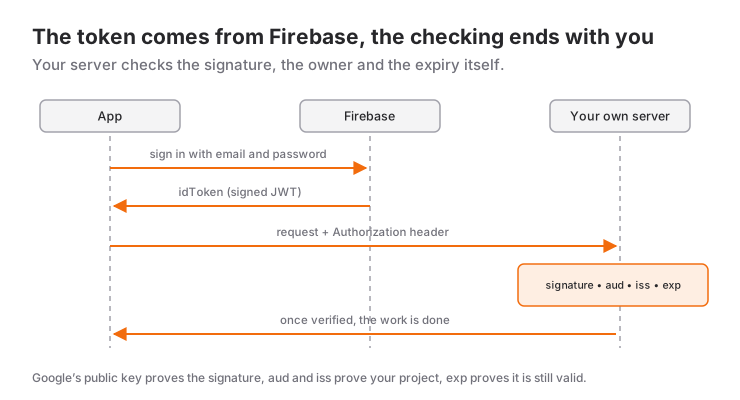
PHP's openssl extension covers all three.
Fetching Google's certificates
Google publishes the x509 certificates used to verify token signatures at a fixed address:
const GOOGLE_CERT_URL =
    'https://www.googleapis.com/robot/v1/metadata/x509/[email protected]';
These rotate regularly, but downloading them on every request would be absurd — that's an outbound HTTP call on every API hit. Cache the response to disk and respect the lifetime in the Cache-Control header.
Verifying the signature
The critical part is these lines:
[$h, $p, $s] = explode('.', $jwt);

$header = json_decode(b64url_decode($h), true);
if (($header['alg'] ?? '') !== 'RS256') {
    fail('Unsupported signature type.', 401, 'token_bozuk');
}

$certs = google_certs();
$pem = $certs[$header['kid']] ?? null;
if ($pem === null) fail('Unknown key.', 401, 'token_bozuk');

$pub = openssl_pkey_get_public($pem);
$valid = openssl_verify("$h.$p", b64url_decode($s), $pub, OPENSSL_ALGO_SHA256);
if ($valid !== 1) fail('Signature check failed.', 401, 'token_bozuk');
The signed text is "$h.$p" — the base64url header and payload with the dot between them. Decoding and re-encoding them breaks the signature; you have to use the raw strings.
Checking alg is not optional. Skip it and an attacker can send alg: none and have an unsigned token accepted — the best-known JWT vulnerability there is.
Verifying the claims
A valid signature alone is not enough. The token might come from a different Firebase project:
$iss = 'https://securetoken.google.com/' . FIREBASE_PROJECT_ID;

if (($claims['iss'] ?? '') !== $iss)                fail('Bad issuer.', 401);
if (($claims['aud'] ?? '') !== FIREBASE_PROJECT_ID) fail('Bad audience.', 401);
if (($claims['exp'] ?? 0) < time())                 fail('Expired.', 401);
Skipping the aud check means a token issued by any Firebase project is valid against your API. It's a common mistake.
Mapping to your own user
Once verification passes you have the Firebase UID in sub. You keep a row in your own users table carrying that UID, created on first sign-in.
The subtlety: don't key on email. Sign in with Apple supports "Hide My Email", and the user can change it later. The only stable identity is the UID.
Part 2: Account deletion
Both the App Store and Play Store require that an app allowing account creation also allows account deletion. Play goes one step further: deletion must be possible without installing the app, from a web address.
So you need two separate paths.
Path 1: From inside the app
The user taps Profile → Delete account. Their server data and their Firebase identity are both removed.
The order matters here. In my first version I deleted the server data first, then tried to delete the Firebase user. As Firebase's Flutter user-management guide notes, deletion requires a recent sign-in; when that call failed with requires-recent-login, the result was a user whose data was gone but who was still signed in.
The correct order:
Future<void> hesabiSil() async {
  // Refresh the credential first: deletion requires a recent login.
  await _yenidenDogrula();

  await _api.delete('/me');

  try {
    await _auth.currentUser?.delete();
  } finally {
    // Even if the Firebase deletion fails, sign out: the server data
    // is gone, the user must not stay inside.
    await cikisYap();
  }
}
The finally block is the point: once the server data is deleted, the user goes out regardless of what Firebase does.
Path 2: On the web, with no app
This is the harder half. How does a web page safely act on "delete this account" from an unauthenticated visitor?
The flow I built has two steps:
- The visitor enters their email. If an account exists, the server generates a six-digit code and emails it.
- The visitor enters the code. If it matches, deletion happens immediately — no manual approval queue.
What the server side is careful about:
- The code is stored hashed (HMAC-SHA256). Someone reading the database can't read the code.
- Whether an account exists is never leaked. The response is identical either way, right down to equalising the timing. Otherwise the form becomes an "is this email registered" oracle.
- Rate limiting per email and per IP.
- Deletion runs under a
FOR UPDATErow lock, so two simultaneous requests can't both proceed.
Deleting the Firebase user from the server
In the web flow there is no session, so a client-side currentUser.delete() isn't available. You have to delete with Firebase Admin privileges from the server, the way Firebase's server-side user-management docs describe. And again, no composer.
The chain is three steps:
service account key (JSON)
  → build a JWT signed with RS256
  → exchange it at oauth2.googleapis.com/token for an access token
  → call accounts:lookup / accounts:delete on identitytoolkit.googleapis.com
This time you're signing the JWT rather than verifying one:
$jwt_govde = [
    'iss'   => $sa['client_email'],
    'scope' => 'https://www.googleapis.com/auth/identitytoolkit',
    'aud'   => $sa['token_uri'] ?? 'https://oauth2.googleapis.com/token',
    'iat'   => time(),
    'exp'   => time() + 3600,
];
Then accounts:lookup turns the email into a UID, and accounts:delete removes it.
A warning about the service account key: that JSON file is full control of your project. It must live in a directory the web can't reach, with an .htaccess containing Require all denied. After setting it up, open the file's URL in a browser and confirm you get a 403. I confirmed it; if I hadn't, I wouldn't have known.
What this setup costs and buys
Costs: you write what an SDK would have written. Around 200 lines of PHP, and a mistake in the verification logic is a security hole rather than a bug.
Buys: media and data on your own server, predictable cost, vendor lock-in limited to identity. For an app hosting video, that difference is not small.
I wrote up Recapday's overall architecture and why this decision was made in a separate post.
Frequently Asked Questions
Can an ID token be verified without the Firebase Admin SDK?
Yes. The token is a JWT signed with RS256, so a third-party JWT library or PHP's own openssl extension is enough. This is also the route to take in languages the Admin SDK does not support.
What exactly is being checked during verification?
Three things: that the signature validates against Google's public key, that the aud and iss claims belong to your project, and that the token has not expired. If any one of them fails, the request is rejected.
Why does account deletion need two separate paths?
Both the App Store and Play Store require accounts to be deletable in apps that let users create one. Play Store goes a step further and requires deletion to be possible from a web address without installing the app, so you need both an in-app path and a web path.
What order should the deletion steps follow?
Refresh the credentials first, then delete the data on your server, and delete the Firebase user last. In the reverse order, when Firebase fails with requires-recent-login you are left with a user whose data is gone but who is still signed in.
Related Posts
How I Built Recapday: A Decision Log From Idea to Store
The architecture behind Recapday: why identity lives in Firebase but data on my own server, why I deleted the social features, and what was irreversible.
Merging Videos on Device With ffmpeg: Turning Mixed Aspect Ratios Into One Vlog
How Recapday merges vertical, horizontal and still clips into one 1920x1080 vlog on the phone with ffmpeg: blurred padding, text, music, compression.
Is Tiny Glade on Mobile? iOS, Android and How to Play It
Tiny Glade has no official iPhone or Android version. Here is where to get it safely, two ways to play it on your phone and similar games for mobile.