The Real Cost of Building 5 Apps with Vibe Coding: 3 Months, $60
Last updated:
7 min read
Plenty of people say "I built an app with AI". Almost nobody says what it cost them. And every article without a number leaves the reader with the same question: what would I pay if I did this?
My answer is specific: five apps, a three-month development period, $60 total. One $20-a-month model subscription, three months. That is the whole software bill.
This article covers what that $60 bought, what it did not cover, and what actually turned out to be expensive. Because an honest cost article also lists the line items that usually get hidden to make the total look smaller.
The five apps
| App | What it does | Stack |
|---|---|---|
| LevelUpStudy | Exam study tracking, focus sessions, streaks | SwiftUI interface, a 3D study desk built with SceneKit, own PHP + MySQL API, Firebase only for auth and notifications |
| Recapday | Turns short clips shot during the day into one evening vlog | Flutter, on-device merging with ffmpeg, PHP + MySQL, Firebase only for auth |
| MimBop | Voice-mimicry party game, 5 modes, 3D sound hunt | iOS + Android |
| Talkamble | Matches people who are out walking by shared language and starts a voice chat | Matching and audio infrastructure |
| Golden Pixel | Mining in a 3-million-pixel cave plus color-by-number canvases | Unity 6, fully offline, ad-free |
LevelUpStudy (App Store), Recapday (App Store and Google Play), MimBop (App Store and Google Play), Talkamble (App Store and Google Play) and Golden Pixel (Google Play) are live. None is a demo or a weekend project: the ones that need it have authentication and their own backend (Golden Pixel runs fully offline), and all of them have tests and builds prepared for store review.
What the $60 covered
It covered exactly one thing: the model subscription. $20 a month, three months.
What that bought is work you would otherwise buy separately:
- Interface design. Every screen, icon and color palette across five apps.
- Illustration and animation. Characters, the 3D scene, game art.
- Backend code. PHP APIs, MySQL schemas, authentication flows.
- Store assets. Screenshots, description copy, localisation into three languages.
Priced at market rates that list runs into six figures. But that comparison is misleading, because what you buy from an agency also includes deciding what to build. Here I made the decisions; the model only executed them.
What it did not cover — the un-hidden bill
The $60 is the cost of the software. Getting an app into a store has its own unavoidable line items:
- Apple Developer Program: $99 a year. There is no way around it for iOS. One account covers all five apps, so that $99 divides by five.
- Google Play developer account: $25, one time. If you are shipping to Android.
- Domain and hosting. Needed if you run your own API. I already had a site, so it added nothing; from scratch it is a few dollars a month.
- A test device. The simulator does not show you everything; you have to run it on a real phone.
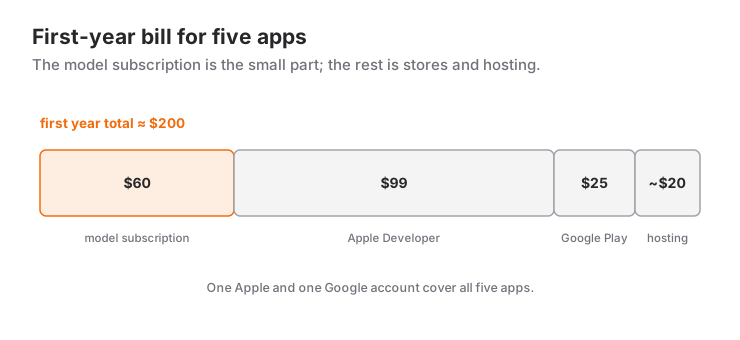
So for someone starting from zero, the first-year bill looks roughly like this:
model subscription (3 months × $20)    $60
Apple Developer (annual)               $99
Google Play (one time)                 $25
hosting (3 months)                  ~$15-30
-------------------------------------------
total                              ~$200-215
Two hundred dollars. For five apps. Put that number next to a single agency quote for one app.
What is actually expensive: rework, not time
Now the honest part. The real cost of this is not measured in dollars.
Store review. Every rejected build means a fix, a resubmission and a wait. Writing the code takes hours; that loop takes days. I wrote up the App Store publishing process separately, because that is where the difficulty actually lives.
The price of a wrong architectural decision. In Recapday, whether videos lived in Firebase Storage or on my own server produced a bill that scaled directly with user count. If you do not see that up front, the model will not argue — it does what you asked. Undoing the decision costs far more than making it correctly the first time.
Not reviewing what the model produced cheaply. Because generation is cheap, you catch yourself thinking "I will just regenerate it". But generating a screen three times is slower than describing it properly once.
None of this shows up on the subscription. All of it shows up on the calendar. Inside those three months, time spent writing code is the minority.
The three things that actually set the cost
With the same $60 I could have produced far less, or far more. Three habits made the difference:
1. Keep a decision document. For each app, a list of what we are building and what we are not. Without a written scope the model adds everything you mention and the app bloats. The most expensive feature is the one you delete later.
2. Use what already exists. Do not generate everything. Standard micro-animations, icon sets, existing libraries — generating those is both slower and worse. I went into that split in the AI animation article: what belongs to the character gets generated, what belongs to the interface gets taken off the shelf.
3. Ship to the store early. Instead of perfecting first, meet the review process early. Taking a rejection in month three costs much more than taking one in month one.
But did it make money?
There is no revenue figure in this article, because what I measured is cost. What I can say is that the break-even point is very low. A portfolio whose entire first-year outlay is around two hundred dollars does not need enormous download numbers to pay for itself.
The real value sits elsewhere: I got to genuinely test five different ideas. In the traditional model the budget goes into one idea, and if that idea misses, the story ends. Here, if one of five lands, the cost of the other four is already noise.
That is the under-discussed effect of vibe coding: it does not make building apps cheap — it makes being wrong cheap.
The order I would repeat
- Start with one idea and constrain the scope in writing.
- Open the Apple/Google accounts in week one; do not let approvals block you.
- Ship the first version with half the feature list.
- Take the rejection early and learn the rules.
- Reuse the same skeleton for the second app — that is where the speed-up really begins.
For the method itself see the vibe coding beginner's guide, and for tooling the tool comparison. What running several agents at once looks like is in the making of Kalecik: a 3D game built with five parallel Claude Code sessions and running on an iPhone the first night.
These are my own 2026 expenses; subscription and store fees change.
Frequently Asked Questions
How much does it cost to build an app with AI?
In my case, three months of development across five apps came to $60 total: a single $20-a-month model subscription. That excludes store fees; iOS needs the $99-a-year Apple Developer Program and Android a one-time $25 Google Play account.
What would someone starting from scratch pay in year one?
Roughly $200–215: the model subscription ($60 for three months), Apple Developer ($99), Google Play ($25) and a few months of hosting. That total sits far below an agency quote for a single app, and it covers five.
Do stores accept apps built with vibe coding?
Yes; stores judge whether the app follows the rules, not how the code was written. The difficulty is review rather than code: rejections come from things like a missing privacy policy, no account-deletion flow, or misleading screenshots.
What is the biggest hidden cost?
A wrong architectural decision. The model does what you ask and does not push back; if you decide where data lives incorrectly at the start, the cost grows with your user count. Reversing it costs many times more than getting it right initially.
Is finishing an app in three months realistic?
I built five apps in three months, but none consumed that whole period; the work ran in parallel and most of the time went to store process, corrections and decisions rather than writing code. A first version of a single app, with tight scope, can be out in a few weeks.
Does this approach actually make money?
I am not sharing revenue here, but the break-even point is low: a portfolio costing around two hundred dollars in its first year does not need large download numbers to cover itself. The real gain is being able to test five ideas instead of committing the budget to one.
Related Posts
What Is Claude Sonnet 5.5? Benchmarks, Cost, Free Plan
Claude Sonnet 5.5 is now the free plan's default model. It scores 70.6% on Terminal-Bench 4.0 at $2 / $10 per million tokens. How it compares.
What Is GPT-6.1 Sol? Price, Performance, Who Can Use It
GPT-6.1 Sol offers near-Astra intelligence at a fifth of the price: $2 / $10. New plan tiers, Ultrafast speed and who can use it, explained.
A 3D Game in One Day: Building BOINGWARD with AI Agents
I started from a Unity design pack and switched to Godot the same morning. Parallel Claude Code sessions produced 148 commits and a playable 3D pogo game.