What Is Vibe Coding? A Realistic Beginner's Guide
Last updated:
8 min read

The question I have heard the most this past year is: "What is vibe coding, does it actually work, can I use it?" In this guide I cover the term, the tools, and a method that works for beginners, all based on my own projects. To keep it honest and not sound like AI marketing copy, I included concrete examples and the things that did not work for me.
What is vibe coding, in one paragraph?
Vibe coding is a way of working where you describe the goal to an AI model instead of writing every line, then steer, test, and accept the code the model produces. Decision-making stays with you. Writing, testing, and refactoring become the model's job.
The term went viral in early 2025 from an Andrej Karpathy tweet, but the underlying idea is not new: pair programming with an AI. What is new is that the models finally produce output you can actually ship.
Think of it this way: a few years ago you Googled "how to sort a list in Python", copied the answer, adapted it. Now you tell the model "write this function, handle the edge cases, add the tests", and the model does it. You read, you accept, you move on.
How vibe coding differs from generic "AI coding"
"AI-assisted coding" is a huge umbrella. Three things separate vibe coding from the rest:
- The goal is yours. Not "build me an e-commerce app", but "when a user adds an item to the cart, decrement the stock; if two requests arrive at the same time, only one should succeed".
- The decision is yours. Architecture, trust boundary, libraries — those live in a document. The model writes to those rules.
- The audit is yours. The model does not check its own work. Asking "any dead code in this file?" or "did you test this function?" is your job.
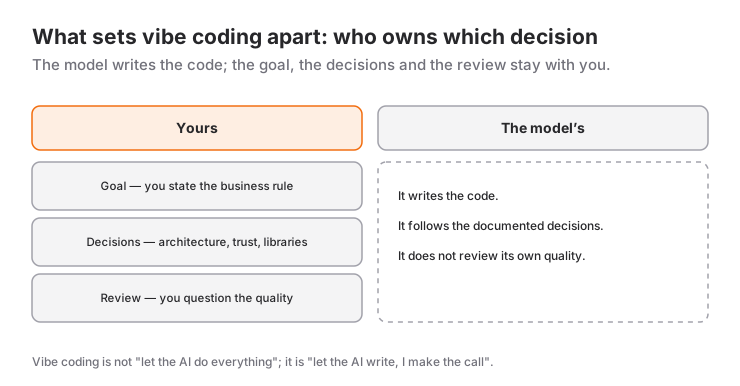
So vibe coding is not "let the AI do everything". It is "let the AI write the code, I will make the decisions".
Which tools can you use for vibe coding?
Vibe coding is a method, not a single product. You can mix and match the tools below. As of mid-2026, these are the ones I actually use day to day.
Claude (Anthropic)
Holds context well across large codebases. When you say "understand this module, then add a new endpoint to it", it forgets less than the alternatives. My favorite when architectural decisions are written down.
ChatGPT (OpenAI)
One of the fastest options for day-to-day Q&A, error message decoding, and small snippets. When I want a quick answer, this is where I start.
Cursor
AI inside the editor. File-level refactor, test generation, terminal command suggestions. The killer feature is staying in the editor: select a file, say "modernize this", and the job is done.
OpenAI Codex / Codex CLI
OpenAI's coding agent. Not a chat window you ask questions in — a tool you hand a task to from the terminal or the cloud, which then opens and edits files on its own. Great for multi-file "do this task in this repo" work.
GitHub Copilot
The most mature editor integration. The "flow" feeling is strongest here: the model suggests as you type, you accept or skip.
Windsurf and Cline
Editor-first agentic tools. Built for long, multi-file tasks. You say "set up this project, write the tests, add a README" and walk away.
Practical tip: most experienced developers use two or three tools together. I use Cursor + Claude daily, ChatGPT for quick questions, and Codex CLI for terminal automation.
How does a beginner learn vibe coding?
Learning vibe coding is not "learning prompt engineering". It is learning how to hand a real problem to a model in a way it can solve. The healthiest path I have seen, from years of teaching:
1. Learn the language basics first
The model can produce code, but you need fundamentals to evaluate what it produces. Variables, functions, conditions, loops, error handling — without these the model output is "looks like it works" level. Algorithms + language basics first, vibe coding second.
2. Learn to make the decisions
Writing code is not hard. Making decisions is. Train yourself to ask three questions:
- Where does this data live? (client, server, database?)
- Who do we trust for this value? (user input, server time?)
- What does "success" mean? (HTTP 200, transaction commit, right value on screen?)
If you can answer these three in writing, your prompt is already correct.
3. Give small tasks
Instead of "build the app", try "write the session-complete endpoint, single transaction, the same session cannot complete twice." That one sentence contains four decisions: which endpoint, transaction rule, idempotency rule, behavior boundary. The model writes the rest.
4. Keep tests in sync
Move critical values (time, score, identity, permissions) into pure functions and lock them with tests. This is vibe coding's biggest safety net. If the model breaks the same spot later, the tests warn you.
5. Audit
After each phase, ask the model:
- Any dead code?
- Any duplicated functions?
- Any magic strings?
"It works" is not enough. "It keeps working" is the bar.
Can you actually ship an app with vibe coding?
Yes. LevelUpStudy, currently live on the App Store, was built with this method. SwiftUI interface, 3D scene with SceneKit, PHP + MySQL API, Firebase notifications, and a shipped App Store build. The full story is in Shipping an App Store App with Vibe Coding.
Short version: I made the architectural decisions, the model wrote the code, I tested it. The model got most things right the first time, but I had to come back many times to close the gap between "works" and "works correctly."
Where vibe coding actually falls short
To be honest, vibe coding does not solve everything. It falls short when:
- The code is tiny and trivial. Asking the model to add two numbers is slower than typing it.
- The calculation is security-critical. Money, permissions, authentication — these are not handed to the model. They are written by the model but audited line by line with tests and code review.
- It is time for an architectural decision. "Where does this data go?" the model cannot answer. It can list options. You pick.
- It is a product decision. "Should break minutes earn points?" That is a product question, not a technical one.
Where beginners actually get stuck
Four traps I see over and over when teaching — all four are about habits, not about method:
- Accepting code you have not read. Shrugging and moving on because it runs is the most expensive habit there is. You do not have to inspect every line, but you should be able to explain, in your own words, what that file does. If you cannot, do not accept it yet.
- Asking for too much at once. "Build the whole app" on your first project leaves you with a pile you cannot debug, because you have no idea where to look. One screen, one endpoint, one function.
- Summarizing the error message. Do not say "it throws an error" — paste the whole thing, stack trace included. A model forced to guess will take you somewhere wrong with great confidence.
- Skipping the fundamentals and jumping straight to the tool. Without variables, loops, functions and error handling, the model's output stays at "looks like it works". A project at that level stops at the first real bug, because nobody there can read the error.
Final thought
Vibe coding does not make a good developer unnecessary. It changes how much a good developer can ship. You are still the one who decides, sets the limits, and audits the result. The model is just the most productive pair partner you have ever had.
If you are starting from zero: learn algorithms and language basics first, then try this method. If you are already experienced: pick a small personal project, take it end to end with vibe coding. After a week you will answer "what worked for me, what did not" yourself.
You can find the tools, the method, and the examples in a more compact form on the Vibe Coding guide page. And if you get stuck, 1:1 lessons are available.
Frequently Asked Questions
Is vibe coding suitable for beginners?
The model can produce code, but you need fundamentals to evaluate it. Learn algorithms and the language basics first, then use vibe coding to move faster.
Can you make money with vibe coding?
Yes. Vibe coding cuts prototype and MVP timelines significantly, which speeds up freelance work and your own product. But the quality of the code is your responsibility.
Which tool should I start with?
For beginners, ChatGPT is a good starting point: day-to-day Q&A, debugging, small snippets. As you progress, add Cursor (editor AI) and Claude (large project context).
Will vibe coding kill software development?
No, but it will change how software is made. Ten years ago developers copied and pasted from Google; today they take code from the model and audit it. Both are still writing software — just with different tools.
Where can I learn vibe coding in English?
Start with the resources in this article and the Vibe Coding guide page. English has the richest ecosystem: Anthropic's blog, OpenAI's blog, and Cursor's docs are all strong starting points.
Related Posts
Vibe Coding Tools Compared: When to Use Claude, ChatGPT, Cursor, and Codex
A hands-on comparison of Claude, ChatGPT, Cursor, Codex and GitHub Copilot from real projects: strengths, weaknesses and when to use each one.
The Vibe Coding Method: 7 Practical Tips and the Art of Writing Prompts
Seven tips that actually work in vibe coding: writing prompts, a decision document, small tasks, tests, auditing and refactoring.
What Is GPT-6.1 Sol? Price, Performance, Who Can Use It
GPT-6.1 Sol offers near-Astra intelligence at a fifth of the price: $2 / $10. New plan tiers, Ultrafast speed and who can use it, explained.