Flutter: TabBar and TabBarView Usage
Last updated:
5 min read

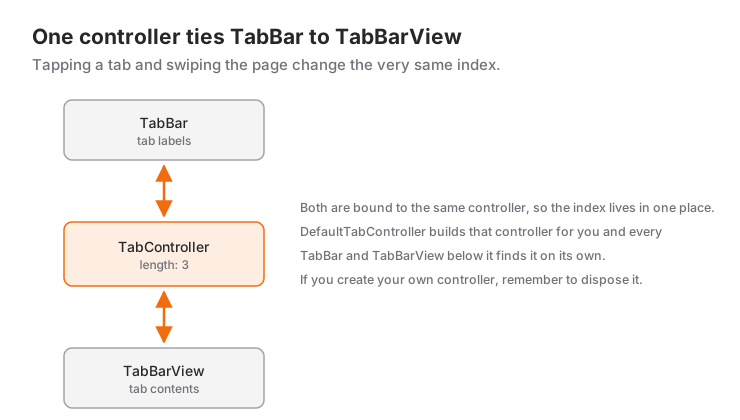
TabBar and TabBarView present sibling content of one screen (Active / Completed / Canceled) as side-by-side pages. The user switches by tapping a tab or swiping left and right, and the piece that keeps both in sync is the TabController. That is also where the real decision sits: should Flutter manage the controller, or should you? This post covers that decision, keeping the state of tab content, and the errors you are most likely to meet.
Live Demo
You can try this widget in the interactive example below:
💡 If the example above doesn't load, click DartPad to run it in a new tab.
Simple Usage with DefaultTabController
If the tabs only switch content, DefaultTabController is the shortest path. No StatefulWidget, no dispose to think about; TabBar and TabBarView find the controller in the tree on their own:
DefaultTabController(
  length: 3,
  child: Scaffold(
    appBar: AppBar(
      title: const Text('Tabs'),
      bottom: const TabBar(
        tabs: [
          Tab(icon: Icon(Icons.home), text: 'Home'),
          Tab(icon: Icon(Icons.search), text: 'Search'),
          Tab(icon: Icon(Icons.person), text: 'Profile'),
        ],
      ),
    ),
    body: const TabBarView(
      children: [
        Center(child: Text('Home')),
        Center(child: Text('Search')),
        Center(child: Text('Profile')),
      ],
    ),
  ),
)
Notice that the TabBar sits in the bottom slot of the AppBar; a Tab can take an icon, a text, or both. If a widget further down needs to switch tabs, DefaultTabController.of(context).animateTo(2) does the job.
Managing Your Own TabController
Create the controller yourself when something else depends on the active tab: hiding a FAB, updating the title, selecting a tab from code. The controller drives an animation and therefore wants a vsync, which SingleTickerProviderStateMixin provides:
class _MyPageState extends State<MyPage>
    with SingleTickerProviderStateMixin {
  late final TabController _tabController;

  @override
  void initState() {
    super.initState();
    _tabController = TabController(length: 3, vsync: this);
  }

  @override
  void dispose() {
    _tabController.dispose();
    super.dispose();
  }
}
You pass the same _tabController as controller to both the TabBar and the TabBarView. Why initState and dispose always travel as a pair is explained in the lifecycle post.
// Go to a specific tab
_tabController.animateTo(2);

// Index of the active tab
final current = _tabController.index;
TabBar Properties
| Property | Description |
|---|---|
tabs |
List of Tab widgets |
controller |
TabController (falls back to a DefaultTabController if omitted) |
isScrollable |
Enables horizontal scrolling when tabs don't fit |
tabAlignment |
Alignment of the tabs (start, center, fill, startOffset) |
indicatorColor / indicatorWeight |
Color and thickness of the underline |
indicatorSize |
Whether the line spans the tab or only the label |
labelColor / unselectedLabelColor |
Colors of selected and unselected tabs |
dividerColor |
The thin divider below the bar in Material 3 |
Scrollable Tabs
More than five or six tabs won't fit on screen; make the bar horizontally scrollable with isScrollable: true:
const TabBar(
  isScrollable: true,
  tabAlignment: TabAlignment.start,
  tabs: [
    Tab(text: 'All'),
    Tab(text: 'Flutter'),
    Tab(text: 'Swift'),
    Tab(text: 'Algorithms'),
    Tab(text: '.NET'),
  ],
)
The tabAlignment line is not decoration; the mistakes section shows why.
Keeping Tab State
TabBarView drops off-screen tabs from memory. If the user scrolls down a list, switches tabs and comes back, the list is at the top again, and form fields are reset too. Add AutomaticKeepAliveClientMixin to the tab's state to prevent that:
class _OrderListState extends State<OrderList>
    with AutomaticKeepAliveClientMixin {
  @override
  bool get wantKeepAlive => true;

  @override
  Widget build(BuildContext context) {
    super.build(context); // required by the mixin
    return ListView.builder(
      itemCount: 30,
      itemBuilder: (context, index) => ListTile(
        title: Text('${widget.status} order #${index + 1}'),
      ),
    );
  }
}
Don't add it to every tab by reflex; each tab kept alive occupies memory. Use it where losing state actually annoys the user.
When to Use It and When Not To
Tabs fit two to six sibling views of the same context: the states of an order, the posts and likes of a profile.
- For the main sections of an app (Home, Search, Profile) use a BottomNavigationBar rather than tabs; the bottom bar is close to the thumb and stays put across screens.
- For a simple filter that doesn't change pages (List / Grid),
SegmentedButtonis lighter. - If steps must be completed in order (address, payment, confirmation), tabs send the wrong message; use a
Stepperor a page-by-page flow. - A horizontally swipeable gallery or a map inside a tab competes with the swipe of
TabBarView. In that case you can give theTabBarViewphysics: const NeverScrollableScrollPhysics()and leave switching to taps only.
Common Mistakes
1. No TabController for TabBar. You didn't pass a controller to the TabBar, and there is no DefaultTabController above it. Either wrap the Scaffold in a DefaultTabController or pass your own controller to both TabBar and TabBarView. Passing it to one and forgetting the other produces the same kind of error.
2. Controller's length property (3) does not match the number of tabs (2) present in TabBar's tabs property. The length value, the number of tabs and the number of children in the TabBarView must all match. Update all three when adding a tab; deriving the number from a list (length: _tabs.length) removes the problem at the root.
3. Forgetting dispose, or the wrong mixin. Without dispose, the controller's ticker and listeners are never released and stay in memory after the page is gone. If the same state also holds a second AnimationController, SingleTickerProviderStateMixin fails with "multiple tickers were created"; switch to TickerProviderStateMixin then.
4. The listener fires twice. When a tab is tapped, the addListener callback runs both when the animation starts and when it ends. For one-off work, filter with indexIsChanging:
void _onTabChanged() {
  if (_tabController.indexIsChanging) return; // run when the animation is done
  setState(() {});
}
5. A gap to the left of scrollable tabs in Material 3. With isScrollable: true the default alignment is TabAlignment.startOffset, which indents the first tab. If the tabs should start at the edge, write tabAlignment: TabAlignment.start. The thin line below the bar also comes with Material 3; dividerColor: Colors.transparent removes it.
Mini Scenario: An Orders Screen
Say the My Orders screen has three tabs. The "new order" button should appear only on the Active tab, and when the user switches tabs and returns, the list should be where they left it. The first requirement calls for our own controller, the second for keep-alive:
class OrdersPage extends StatefulWidget {
  const OrdersPage({super.key});

  @override
  State<OrdersPage> createState() => _OrdersPageState();
}

class _OrdersPageState extends State<OrdersPage>
    with SingleTickerProviderStateMixin {
  late final TabController _tabController;

  @override
  void initState() {
    super.initState();
    _tabController = TabController(length: 3, vsync: this);
    _tabController.addListener(_onTabChanged);
  }

  void _onTabChanged() {
    if (_tabController.indexIsChanging) return; // run when the animation is done
    setState(() {}); // refresh FAB visibility
  }

  @override
  void dispose() {
    _tabController.dispose();
    super.dispose();
  }

  @override
  Widget build(BuildContext context) {
    return Scaffold(
      appBar: AppBar(
        title: const Text('My Orders'),
        bottom: TabBar(
          controller: _tabController,
          tabs: const [
            Tab(text: 'Active'),
            Tab(text: 'Completed'),
            Tab(text: 'Cancelled'),
          ],
        ),
      ),
      body: TabBarView(
        controller: _tabController,
        children: const [
          OrderList(status: 'Active'),
          OrderList(status: 'Completed'),
          OrderList(status: 'Cancelled'),
        ],
      ),
      floatingActionButton: _tabController.index == 0
          ? FloatingActionButton(
              onPressed: () {},
              child: const Icon(Icons.add),
            )
          : null,
    );
  }
}
OrderList is the widget from the keep-alive section above. The listener calls setState only once the switch has completed, so the FloatingActionButton changes when the new tab has settled, not in the middle of the animation. When dispose shuts the controller down, the listener attached to it goes with it.
Frequently Asked Questions
DefaultTabController or my own TabController?
If the tabs only switch content, DefaultTabController is enough and needs less code. Create your own TabController when another part of the UI depends on the active index or when you select tabs from code.
How do I disable swiping between tabs?
Give the TabBarView physics: const NeverScrollableScrollPhysics(). Switching by tapping a tab keeps working.
Why does the content reset when I switch tabs?
TabBarView removes invisible pages from the tree, and their state goes with them. Add AutomaticKeepAliveClientMixin to the tab's state class and return true from wantKeepAlive.
Can I use a TabBar outside the AppBar?
Yes. TabBar is an ordinary widget; you can place it in a Column with a TabBarView wrapped in Expanded below it. Both only need to see the same controller.
Related Posts
Flutter: Drawer Widget and Side Menu Usage
Build a side menu with Flutter Drawer: basic setup, the Material 3 NavigationDrawer, closing the menu before navigating, and the Scaffold.of context fix.
Flutter: AppBar Widget and Customization
A practical Flutter AppBar guide: title, leading, actions and bottom, the Material 3 scrolled-under color change, and fixes for common mistakes.
Flutter: BottomNavigationBar vs NavigationBar
Migrating from BottomNavigationBar to Material 3 NavigationBar: property mapping, labelBehavior, a decision guide and an adaptive shell example.