Flutter: BottomNavigationBar vs NavigationBar
Last updated:
7 min read

Flutter ships two widgets for bottom navigation: BottomNavigationBar from the Material 2 era and NavigationBar, added with Material 3. Both do the same job, switching between three to five top-level destinations; the differences are in looks, API names and how customization works. This is not a "how to use it" post but a decision and migration guide: which one to pick for which project, what each property turns into when you move an existing bar over, and which differences surprise people most after the switch. The fundamentals that apply to both widgets, keeping currentIndex in state and preserving page state with IndexedStack, are covered in detail in the BottomNavigationBar usage post, so I will not repeat them here.
Live Demo
You can try the bottom navigation example in the interactive demo below:
💡 If the example above doesn't load, click DartPad to run it in a new tab.
The Two Widgets Side by Side
The same three destinations, two different widgets:
// Material 2 generation
BottomNavigationBar(
  currentIndex: index,
  onTap: (value) => setState(() => index = value),
  items: const [
    BottomNavigationBarItem(icon: Icon(Icons.home_outlined), activeIcon: Icon(Icons.home), label: 'Home'),
    BottomNavigationBarItem(icon: Icon(Icons.search), label: 'Search'),
    BottomNavigationBarItem(icon: Icon(Icons.person_outline), activeIcon: Icon(Icons.person), label: 'Profile'),
  ],
)

// Material 3 generation
NavigationBar(
  selectedIndex: index,
  onDestinationSelected: (value) => setState(() => index = value),
  destinations: const [
    NavigationDestination(icon: Icon(Icons.home_outlined), selectedIcon: Icon(Icons.home), label: 'Home'),
    NavigationDestination(icon: Icon(Icons.search), label: 'Search'),
    NavigationDestination(icon: Icon(Icons.person_outline), selectedIcon: Icon(Icons.person), label: 'Profile'),
  ],
)
The structure is identical; only the vocabulary changed. NavigationBar choosing the word "destination" is no accident: the same vocabulary is used by NavigationRail and NavigationDrawer, which makes moving between the three widgets easy. The scenario at the end shows what that buys you.
Property Mapping Table
The table to keep next to you during a migration:
| BottomNavigationBar | NavigationBar | Note |
|---|---|---|
items |
destinations |
Different list type |
BottomNavigationBarItem |
NavigationDestination |
label is a String in both |
currentIndex |
selectedIndex |
Still lives in State |
onTap |
onDestinationSelected |
Same signature: void Function(int) |
activeIcon |
selectedIcon |
Falls back to icon when omitted |
type: fixed / shifting |
none | NavigationBar always uses equal widths |
showUnselectedLabels, showSelectedLabels |
labelBehavior |
A single enum |
selectedItemColor, unselectedItemColor |
NavigationBarThemeData.iconTheme / labelTextStyle |
State-based colors |
backgroundColor, elevation |
backgroundColor, elevation |
Same |
| none | indicatorColor, indicatorShape |
The pill behind the selected item |
BottomNavigationBarItem.backgroundColor |
none | Per-item backgrounds do not exist in M3 |
Visible Differences
NavigationBar draws a pill-shaped indicator behind the selected item. Its color comes from the theme's secondaryContainer, and it slides under the icon with an animation when the selection changes. BottomNavigationBar highlights only through icon and label color.
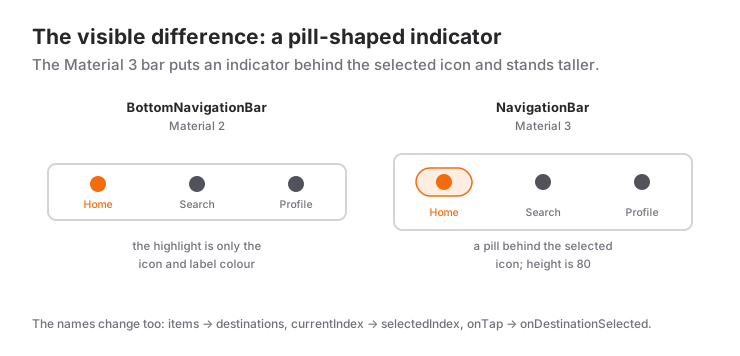
The height differs: NavigationBar is 80 logical pixels tall by default and always shows labels; the classic bar is shorter. The "the bar got thicker" feeling after a migration comes from here. It can be reduced through the height parameter, but decide knowingly: 80 is preferred for Material 3 touch-target guidance.
Label behavior is controlled through a single enum:
NavigationBar(
  labelBehavior: NavigationDestinationLabelBehavior.onlyShowSelected, // alwaysShow (default), alwaysHide
  // ...
)
The "only the selected label is visible" behavior of the shifting type maps to onlyShowSelected; the per-item background color has no counterpart in Material 3, and you should not look for one.
Theming with NavigationBarThemeData
With BottomNavigationBar we wrote colors straight on the widget. NavigationBar expects a WidgetStateProperty-based theme instead, where the selected and unselected states are resolved in one function:
final scheme = ColorScheme.fromSeed(seedColor: Colors.teal);

ThemeData(
  colorScheme: scheme,
  navigationBarTheme: NavigationBarThemeData(
    height: 72,
    indicatorColor: scheme.primaryContainer,
    labelTextStyle: WidgetStateProperty.resolveWith((states) {
      final selected = states.contains(WidgetState.selected);
      return TextStyle(
        fontSize: 12,
        fontWeight: selected ? FontWeight.w600 : FontWeight.w400,
      );
    }),
    iconTheme: WidgetStateProperty.resolveWith((states) {
      final selected = states.contains(WidgetState.selected);
      return IconThemeData(
        color: selected ? scheme.onPrimaryContainer : scheme.onSurfaceVariant,
      );
    }),
  ),
)
This looks longer at first, but the payoff is that every NavigationBar in the app is managed from one place, and when colorScheme changes for dark mode the colors follow automatically. The widget also has parameters such as indicatorColor and backgroundColor; use those when a single screen needs to override the theme.
Which One, When?
- Choose NavigationBar when starting a new project and
ThemeDataruns on Material 3 (the default in current Flutter versions). Theme colors, the indicator and typography come ready-made, and talking to a designer over the Material 3 guidelines gets easier. - Choose NavigationBar when tablet or web support is planned. Because the same destination list can be handed to a
NavigationRail, switching to a side rail on wide screens takes a few lines. - Stay on BottomNavigationBar when the project runs the Material 2 look with
useMaterial3: falseand no theme migration is planned soon. Mixing the two widgets makes the app look inconsistent. - Stay on BottomNavigationBar when the per-item background color (
shifting) is part of the design. M3 has no such behavior. - Use neither when there are more than five destinations. Move the extras into a Drawer; the Material 3 counterpart is
NavigationDrawer.
Once the choice is made, remember the part that is the same in both: the selected index lives in State, and body becomes an IndexedStack to preserve page state.
Migration Steps
Moving an existing BottomNavigationBar over is usually a ten-minute job:
- Turn the
itemslist intodestinations; convert eachBottomNavigationBarItemto aNavigationDestinationand renameactiveIcontoselectedIcon. currentIndex→selectedIndex,onTap→onDestinationSelected. Your state field andsetStatelogic do not change.- Delete the
typeline. If you usedshowUnselectedLabels: false, writelabelBehavior: onlyShowSelectedinstead. - Move
selectedItemColorandunselectedItemColorintoiconThemeandlabelTextStyleof aNavigationBarThemeData. - Run the app and look at the height; set
heightif needed.
Common Mistakes
1. Looking for selectedItemColor, and it is not there
Symptom: you cannot find a parameter on NavigationBar to change the selected icon color; indicatorColor only paints the pill behind it.
Cause: Material 3 hands out colors through state-resolved theme properties.
Fix: as shown above, give NavigationBarThemeData.iconTheme a WidgetStateProperty.resolveWith that returns selected and unselected IconThemeData. The same approach applies to labelTextStyle.
2. All labels are visible after the migration
Symptom: the old bar showed only the selected item's label; the new one shows all of them.
Cause: the default labelBehavior of NavigationBar is alwaysShow; the hiding behavior of shifting does not carry over automatically.
Fix: pass labelBehavior: NavigationDestinationLabelBehavior.onlyShowSelected. For accessibility, showing labels is usually the better choice, so make this change deliberately.
3. The selectedIndex out-of-range assertion
Symptom: when the destination list gets shorter depending on the user's role, the app crashes with an assertion about selectedIndex.
Cause: the stored index (say 3) no longer exists in the new list; NavigationBar requires the index to be between 0 and destinations.length - 1.
Fix: clamp the index whenever the list changes: _selectedIndex = _selectedIndex.clamp(0, destinations.length - 1).
4. Both generations mixed in one app
Symptom: a NavigationBar on one screen, a BottomNavigationBar in another shell; the user sees two different heights and highlight styles while moving around.
Fix: bottom navigation should live in a single shell widget. Migrate that one shell in one go rather than screen by screen.
Mini Scenario: NavigationBar on Phones, NavigationRail on Tablets
The real return on NavigationBar shows up on wide screens. We define the destination list once and hand it to a bottom bar on narrow screens and to a side rail on wide ones; the selected index and the pages are shared. How to pick the breakpoint is covered in the breakpoints section of the LayoutBuilder post.
class AdaptiveShell extends StatefulWidget {
  const AdaptiveShell({super.key});

  @override
  State<AdaptiveShell> createState() => _AdaptiveShellState();
}

class _AdaptiveShellState extends State<AdaptiveShell> {
  int _selectedIndex = 0;

  static const _destinations = [
    (icon: Icons.home_outlined, selectedIcon: Icons.home, label: 'Home'),
    (icon: Icons.search, selectedIcon: Icons.search, label: 'Search'),
    (icon: Icons.person_outline, selectedIcon: Icons.person, label: 'Profile'),
  ];

  static const List<Widget> _pages = [HomePage(), SearchPage(), ProfilePage()];

  void _select(int i) => setState(() => _selectedIndex = i);

  @override
  Widget build(BuildContext context) {
    final wide = MediaQuery.sizeOf(context).width >= 600;
    final body = IndexedStack(index: _selectedIndex, children: _pages);

    if (wide) {
      return Scaffold(
        body: Row(
          children: [
            NavigationRail(
              selectedIndex: _selectedIndex,
              onDestinationSelected: _select,
              labelType: NavigationRailLabelType.all,
              destinations: [
                for (final d in _destinations)
                  NavigationRailDestination(
                    icon: Icon(d.icon),
                    selectedIcon: Icon(d.selectedIcon),
                    label: Text(d.label),
                  ),
              ],
            ),
            const VerticalDivider(width: 1),
            Expanded(child: body),
          ],
        ),
      );
    }

    return Scaffold(
      body: body,
      bottomNavigationBar: NavigationBar(
        selectedIndex: _selectedIndex,
        onDestinationSelected: _select,
        destinations: [
          for (final d in _destinations)
            NavigationDestination(
              icon: Icon(d.icon),
              selectedIcon: Icon(d.selectedIcon),
              label: d.label,
            ),
        ],
      ),
    );
  }
}
The destinations sit in one constant list as Dart 3 records; both widgets are generated from it, so adding a tab is a one-line change. The detail to notice is that the IndexedStack is the same object in both branches: page States survive the phone-to-tablet switch (a window resize, for instance) because the position and type of the widget in the tree do not change. NavigationRail wants its label as a Widget, NavigationDestination wants a String; a small difference, but one that produces a compile error.
Frequently Asked Questions
Is BottomNavigationBar deprecated? Do I have to migrate?
No, the classic widget keeps working and has not been removed. In new Material 3 projects NavigationBar is the natural choice; a working Material 2 app does not need to be migrated for that reason alone.
How do I change the selected icon color in NavigationBar?
There is no selectedItemColor equivalent. In ThemeData.navigationBarTheme, give iconTheme and labelTextStyle values via WidgetStateProperty.resolveWith that depend on WidgetState.selected; use indicatorColor for the pill.
Does NavigationBar have a shifting type?
No. Label hiding is done with labelBehavior: onlyShowSelected; per-item background colors do not exist in Material 3.
Does the IndexedStack and state logic change during migration?
No. The selected index still lives in State and pages are still preserved with IndexedStack; only the bar's parameter names change.
Related Posts
Flutter: BottomNavigationBar Usage
Flutter BottomNavigationBar: currentIndex in state, keeping page state with IndexedStack, fixed vs shifting, the vanishing-items bug and a cart badge example.
Flutter: AppBar Widget and Customization
A practical Flutter AppBar guide: title, leading, actions and bottom, the Material 3 scrolled-under color change, and fixes for common mistakes.
Flutter: Light and Dark Themes with ThemeData
Building a Flutter theme with ThemeData: ColorScheme.fromSeed, light and dark themes, ThemeMode, reading with Theme.of, TextTheme, component themes, extensions.