Flutter: AlertDialog Usage and Customization
Last updated:
6 min read

AlertDialog is the modal window that appears in the middle of the screen when the user has to make a decision. While it is open, the screen behind it does not respond, so we reach for it when an action is hard to undo (deleting, signing out) or when a warning must be read before going on. The showDialog function that puts it on screen returns a Future, which means we can await the user's choice and continue from there.
Live Demo
You can try this widget in the interactive example below:
💡 If the example above doesn't load, click DartPad to run it in a new tab.
Basic Usage
An AlertDialog never shows up on its own. We hand it to showDialog, which pushes it as a new route:
showDialog<void>(
  context: context,
  builder: (dialogContext) {
    return AlertDialog(
      title: const Text('No connection'),
      content: const Text('Check your internet connection and try again.'),
      actions: [
        TextButton(
          onPressed: () => Navigator.of(dialogContext).pop(),
          child: const Text('OK'),
        ),
      ],
    );
  },
);
I named the builder parameter dialogContext on purpose. The dialog is a separate route, and closing it with its own context rather than the page's context is the safest habit. The mistakes section below shows why.
Confirmation Dialog and Awaiting the Result
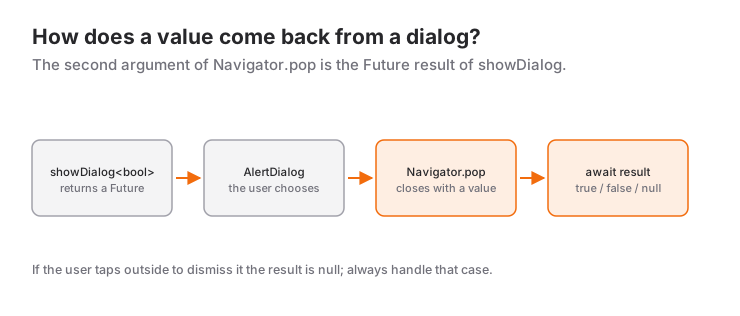
Navigator.pop takes an optional second argument, and that value becomes the result of the Future returned by showDialog:
Future<void> _showConfirmDialog() async {
  final result = await showDialog<bool>(
    context: context,
    builder: (dialogContext) => AlertDialog(
      title: const Text('Confirm Delete'),
      content: const Text('Do you want to delete this item?'),
      actions: [
        TextButton(
          onPressed: () => Navigator.pop(dialogContext, false),
          child: const Text('NO'),
        ),
        TextButton(
          onPressed: () => Navigator.pop(dialogContext, true),
          child: const Text('YES'),
        ),
      ],
    ),
  );

  if (result == true) {
    // Delete operation
  }
}
The returned type is bool?. If the user taps outside the dialog or presses the back button, the result is null. That is why we write if (result == true) instead of if (result): a null simply counts as "canceled". If await still feels shaky, read the try-catch and async/await post first.
Getting Input
content accepts any widget. For a single value, a TextField is enough:
// In the State class: final controller = TextEditingController();

final name = await showDialog<String>(
  context: context,
  builder: (dialogContext) => AlertDialog(
    title: const Text('Enter Name'),
    content: TextField(
      controller: controller,
      autofocus: true,
      decoration: const InputDecoration(hintText: 'Your name...'),
    ),
    actions: [
      TextButton(
        onPressed: () => Navigator.pop(dialogContext),
        child: const Text('CANCEL'),
      ),
      TextButton(
        onPressed: () => Navigator.pop(dialogContext, controller.text),
        child: const Text('SAVE'),
      ),
    ],
  ),
);
Keep the controller in your State class and release it in dispose(). Calling controller.dispose() right after the dialog closes looks tidy, but the TextField still uses the controller during the closing animation and you get an error.
Once you need several fields and validation, put a Form widget inside the dialog, or better, move the whole thing to its own page.
Important Properties
| Property | Description |
|---|---|
icon |
Icon shown above the title |
title |
Dialog title |
content |
Dialog content |
actions |
Buttons at the bottom |
scrollable |
Makes title and content scroll when they are long |
shape |
Dialog shape |
backgroundColor |
Background color |
Note that barrierDismissible is a parameter of showDialog, not of AlertDialog.
barrierDismissible
To stop the dialog from closing when the user taps outside of it:
showDialog<void>(
  context: context,
  barrierDismissible: false, // Tapping outside does nothing
  builder: (dialogContext) => PopScope(
    canPop: false, // The Android back button does not close it either
    child: AlertDialog(
      title: const Text('Required Choice'),
      content: const Text('You must pick an option to continue.'),
      actions: [
        TextButton(
          onPressed: () => Navigator.pop(dialogContext),
          child: const Text('GOT IT'),
        ),
      ],
    ),
  ),
);
barrierDismissible: false only disables the outside tap. The Android back button still closes the dialog. If that has to be blocked as well, wrap the dialog in PopScope(canPop: false). Save this for steps that are truly mandatory, because trapping the user is rarely good UX.
Platform-Aware Dialogs: showAdaptiveDialog
When the same code should open a Material dialog on Android and a Cupertino-style dialog on iOS and macOS, use showAdaptiveDialog together with AlertDialog.adaptive:
showAdaptiveDialog<bool>(
  context: context,
  builder: (dialogContext) => AlertDialog.adaptive(
    title: const Text('Sign out?'),
    content: const Text('You will need to sign in again.'),
    actions: [
      TextButton(
        onPressed: () => Navigator.pop(dialogContext, false),
        child: const Text('Cancel'),
      ),
      TextButton(
        onPressed: () => Navigator.pop(dialogContext, true),
        child: const Text('Sign Out'),
      ),
    ],
  ),
);
The dialog frame adapts to the platform, but whatever you put in actions is drawn as is. To make the buttons look native on iOS too, write a small helper that returns a CupertinoDialogAction instead of a TextButton on Apple platforms.
When to Use It and When Not To
An AlertDialog stops the user. Spend that power only on moments that deserve it:
- Use it to confirm irreversible actions, warn about unsaved changes, explain why a permission is needed, or grab one quick value.
- Don't use it for purely informational messages such as "Saved". Those must not interrupt the flow; the right tool is a SnackBar.
- Don't use it for long option lists or multi-field forms.
showModalBottomSheetorSimpleDialoghandles option lists better, and a form is more comfortable on a separate page. Returning values from a bottom sheet and controlling its height are covered in the BottomSheet post.
A rule of thumb: if the dialog text is longer than two sentences or it has more than two buttons, you are probably using the wrong component.
Common Mistakes
1. Using context after an await without checking it
Symptom: the analyzer reports use_build_context_synchronously ("Don't use 'BuildContext's across async gaps"). At runtime, if the user left the page while the dialog was open, you end up working with a context that is no longer in the tree and the app throws.
Fix: after every await, check before you touch the context.
final ok = await showDialog<bool>(context: context, builder: _buildDialog);
if (!context.mounted) return;
if (ok == true) Navigator.of(context).pop();
Inside a State class, if (!mounted) return; does the same job.
2. setState does not update the dialog
Symptom: you put a Checkbox in the dialog, tap it, the value changes but the UI does not. Close and reopen the dialog and the box is suddenly checked.
Cause: the dialog is a separate route. The page's setState rebuilds the page, not the dialog.
Fix: wrap the dialog content in a StatefulBuilder (or extract it into its own StatefulWidget).
bool dontAskAgain = false;

showDialog<void>(
  context: context,
  builder: (dialogContext) => StatefulBuilder(
    builder: (context, setDialogState) => AlertDialog(
      title: const Text('Exit'),
      content: CheckboxListTile(
        value: dontAskAgain,
        title: const Text("Don't ask again"),
        onChanged: (v) => setDialogState(() => dontAskAgain = v ?? false),
      ),
    ),
  ),
);
3. Overflowing content
Symptom: yellow and black stripes with "A RenderFlex overflowed by … pixels on the bottom" when the keyboard opens or on a small screen.
Fix: if content holds a Column, give it mainAxisSize: MainAxisSize.min and set scrollable: true on the AlertDialog. Why a Column grabs more room than it needs inside a dialog is covered in the dialog recipe of the mainAxisSize post.
4. Closing the dialog with the wrong context
Symptom: in apps with nested Navigators (for example tabs with their own navigator), pressing the button leaves the dialog on screen and closes the page underneath.
Cause: showDialog uses the root navigator by default, while Navigator.pop(context) with the page's context finds the nearest, inner navigator.
Fix: close the dialog with the dialogContext you get from builder. That is why every example in this post uses that name.
Mini Scenario: Confirm Before Deleting, Notify After
Picture a notes app. When the user wants to delete a note we ask first, and once the delete finishes we show a short notification. The Note model and the repository object are assumed to exist in the app already:
Future<void> _confirmAndDelete(Note note) async {
  final confirmed = await showDialog<bool>(
    context: context,
    builder: (dialogContext) => AlertDialog(
      icon: const Icon(Icons.delete_outline),
      title: const Text('Delete this note?'),
      content: Text('"${note.title}" will be removed permanently.'),
      actions: [
        TextButton(
          onPressed: () => Navigator.pop(dialogContext, false),
          child: const Text('Cancel'),
        ),
        FilledButton(
          onPressed: () => Navigator.pop(dialogContext, true),
          child: const Text('Delete'),
        ),
      ],
    ),
  );

  if (confirmed != true) return; // Cancelled or tapped outside

  await widget.repository.delete(note.id);

  if (!mounted) return;
  ScaffoldMessenger.of(context).showSnackBar(
    SnackBar(content: Text('"${note.title}" deleted')),
  );
}
Three decisions are worth pointing out. First, the title asks the question and the buttons give the answer: with "Delete/Cancel" instead of "Yes/No" the user knows what they are pressing without reading the body. Second, the dangerous action is emphasised with a FilledButton while canceling stays a quiet TextButton. Third, after two awaits the context is never touched without a mounted check. The outcome itself is reported with a SnackBar rather than another dialog, because there is no longer any reason to stop the user.
Frequently Asked Questions
How do I prevent an AlertDialog from closing when tapping outside?
Pass barrierDismissible: false to showDialog. If the Android back button should not close it either, wrap the dialog in PopScope(canPop: false).
Why does showDialog return null?
When the user dismisses the dialog without pressing one of your buttons, by tapping outside or using the back button, the route is popped without a value and the result is null. Compare the result with result == true to handle that case.
What is the difference between AlertDialog and SimpleDialog?
AlertDialog is designed for a message with action buttons below it. SimpleDialog has no button row and shows a short list of choices built from SimpleDialogOption items.
How do I make the dialog look native on iOS?
With showAdaptiveDialog and AlertDialog.adaptive, iOS and macOS get a Cupertino-style dialog. For native-looking buttons, use CupertinoDialogAction on those platforms.
Related Posts
Flutter: BottomSheet and showModalBottomSheet
Flutter's showModalBottomSheet: returning values, isScrollControlled, useSafeArea, showDragHandle, keyboard insets, DraggableScrollableSheet, persistent sheets.
Flutter: Card Widget and Design Usage
Flutter Card guide: Material 3 Card.filled and Card.outlined, clipBehavior with images, tappable cards with InkWell, common mistakes and a product card.
Flutter: AppBar Widget and Customization
A practical Flutter AppBar guide: title, leading, actions and bottom, the Material 3 scrolled-under color change, and fixes for common mistakes.