
Automating App Store Connect Release Prep with the API
10 min read
Getting an app ready for the App Store usually means hours of forms in the App Store Connect web interface: a name, subtitle, description and keywords for every language, screenshots for every device size, a price, an age rating, and then an archive and upload from Xcode. For Kalecik, most of that work went through the App Store Connect API instead, driven by small Python and Bash scripts.
This post walks through those scripts: generating a JWT from the API key, setting up a price schedule, validating and pushing store listings in 50 languages and regions, letting the game engine render its own screenshots, and uploading a build with one command. I also cover what the API could not do and the Android side. The general order of the steps and the review process are in my App Store publishing guide, so here I focus only on the automation.
In the interest of honesty: like the rest of the game, these scripts were written by Claude Code agents. How the game came together with five parallel sessions is covered in the series hub post. I opened the developer account, chose the name and the price, and checked the results. One more important note: Kalecik is not on the store yet. Two builds are uploaded and the listing text and price schedule are ready, but I put the review submission on hold myself, with a simple rule: we don't go to the App Store until the game is really finished.
The foundation: a JWT from the .p8 key
The App Store Connect API expects a short-lived JWT on every request. The token is signed with ES256 using the API key you create in App Store Connect, which comes as a .p8 file. tools/asc.py is the small client every other script builds on:
import json, os, time, urllib.request
import jwt  # PyJWT; ES256 needs "pyjwt[crypto]" installed

KEY_ID = "<KEY_ID>"
ISSUER = "<ISSUER_ID>"
KEY_PATH = os.path.expanduser(f"~/.appstoreconnect/private_keys/AuthKey_{KEY_ID}.p8")
BASE = "https://api.appstoreconnect.apple.com"

def token() -> str:
    with open(KEY_PATH) as f:
        key = f.read()                 # read from disk, never printed anywhere
    now = int(time.time())
    return jwt.encode(
        {"iss": ISSUER, "iat": now, "exp": now + 900, "aud": "appstoreconnect-v1"},
        key, algorithm="ES256", headers={"kid": KEY_ID, "typ": "JWT"})

def call(method: str, path: str, body=None):
    req = urllib.request.Request(BASE + path, method=method,
        data=json.dumps(body).encode() if body is not None else None,
        headers={"Authorization": "Bearer " + token(), "Content-Type": "application/json"})
    with urllib.request.urlopen(req, timeout=60) as r:
        raw = r.read()
        return r.status, (json.loads(raw) if raw else {})
Three details matter. The token is valid for 15 minutes (exp), and every request mints its own, so expiry is never an issue. The key file lives outside the project folder, in ~/.appstoreconnect/private_keys/ where Apple's tools also look; since a .p8 can be downloaded only once, backing it up is on you. The third matters especially when agents are involved: the key's contents never appear in any output. The real client also returns error responses as JSON, so scripts can report something like a 403 without crashing.
A price schedule in a single POST
Pricing in App Store Connect is a "price schedule": a base territory plus optional manual prices for specific countries. My first idea was around 50 TL in Turkey and 3 dollars elsewhere. We ended up with a $2.99 base price in the US and a manual 79.99 TL in Turkey; for other countries such as Germany, Apple derives the equivalent from the base price (2.99 € there). tools/asc_pricing.py sets all this up with one POST /v1/appPriceSchedules request and can optionally add a launch week:
def schedule(launch: str | None):
    prices = [(US_299, None, None)]                          # US base price, open-ended
    if launch:
        start = datetime.date.fromisoformat(launch)
        end = start + datetime.timedelta(days=7)
        prices += [(TR_7999, None, start.isoformat()),       # 79.99 TL until launch
                   (TR_4999, start.isoformat(), end.isoformat()),  # 49.99 TL launch week
                   (TR_7999, end.isoformat(), None)]         # back to 79.99 TL after
    else:
        prices += [(TR_7999, None, None)]
    included, refs = [], []
    for i, (point, start, end) in enumerate(prices):
        pid = "${price%d}" % i                               # temporary id for a resource created in the same request
        refs.append({"type": "appPrices", "id": pid})
        included.append({"type": "appPrices", "id": pid,
            "attributes": {"startDate": start, "endDate": end},
            "relationships": {"appPricePoint": {"data": {"type": "appPricePoints", "id": point}}}})
    body = {"data": {"type": "appPriceSchedules", "relationships": {
                "app": {"data": {"type": "apps", "id": "<APP_ID>"}},
                "baseTerritory": {"data": {"type": "territories", "id": "USA"}},
                "manualPrices": {"data": refs}}},
            "included": included}
    return call("POST", "/v1/appPriceSchedules", body)
US_299 and the others are Apple's "price point" IDs, which you look up in the app's appPricePoints list, filtered by territory. The nice part is that a new schedule replaces the old one entirely. I can re-plan the launch discount later with a single flag like --launch 2026-11-05, with no clicking through dates in the web UI.
Store listings in 50 locales, with rules
The game's interface is in 20 languages, while its store text covers 50 languages and regions (more on why below). Each locale has a store/listing/<locale>.json file with the name, subtitle, keywords, promotional text and description. Run without arguments, tools/asc_metadata.py sends nothing; it only validates. First, Apple's length limits:
LIMITS = {"name": 30, "subtitle": 30, "keywords": 100, "promotionalText": 170, "description": 4000}Then the keyword rules. The keyword field is 100 characters and every one counts, so the script catches wasted characters (shortened):
CATEGORY = {"app", "apps", "game", "games", "oyun", "oyunu", "spiel", "jeu", "juego"}

def keyword_problems(t: dict) -> list[str]:
    out = []
    kw = t.get("keywords", "")
    if ", " in kw:
        out.append("space after a comma")            # spaces count toward the 100
    items = [k.strip() for k in kw.split(",") if k.strip()]
    if len({k.lower() for k in items}) != len(items):
        out.append("duplicate keyword")
    title = (t["name"] + " " + t["subtitle"]).lower()
    for k in items:
        if k.lower() in title:
            out.append(f"{k!r} is already in the name or subtitle")  # those words are indexed anyway
        if k.lower() in CATEGORY:
            out.append(f"{k!r} is a category word")
    return out
The real script also flags singular and plural pairs and uses a different check for languages that do not separate words with spaces (Chinese, Japanese, Thai). Once everything is clean, --push sends it. Pushing is idempotent: if a locale already exists it gets a PATCH, otherwise a POST, so running the script twice gives the same result. Categories, the copyright line and the age rating answers are written in the same run.
The Portugal lesson
One item on my testing list read "English in the Portuguese store." The reason is simple: Portugal's App Store looks for a pt-PT localization, not the pt-BR text. Without it, the app shows up in English. The same goes for regional storefronts such as Mexico (es-MX) or French-speaking Canada (fr-CA). So the script's locale list gained 19 more storefront locales that would otherwise fall back to English (pt-PT, es-MX, fr-CA, en-GB and so on). The lesson: "which languages do I support?" and "which text will each storefront show?" are not the same question.
The region code lesson
Later I filled out the list to cover every language Apple supports: Bengali, Tamil, Urdu, Slovenian and other languages of India. The text was ready, but some of these languages never reached App Store Connect. The cause was, again, the locale code: Apple accepts short codes for the older languages (sv, hi, tr), but these newer ones need the region-suffixed code. It is ur-PK, not ur; ta-IN, not ta; sl-SI, not sl. The script's list gained these 11 languages with the right codes, bringing the total to 50. Then I read everything back from the API and counted: both the app info and the version text exist in 50 locales, with no empty fields. The lesson: after pushing, read the data back and count it; not seeing an error doesn't mean the record was saved.
The game engine takes the screenshots
Instead of playing in the simulator and grabbing frames, tools/store_shots.gd runs the game inside a SubViewport at the exact store size. The window size is irrelevant; the output always has the precise pixel dimensions:
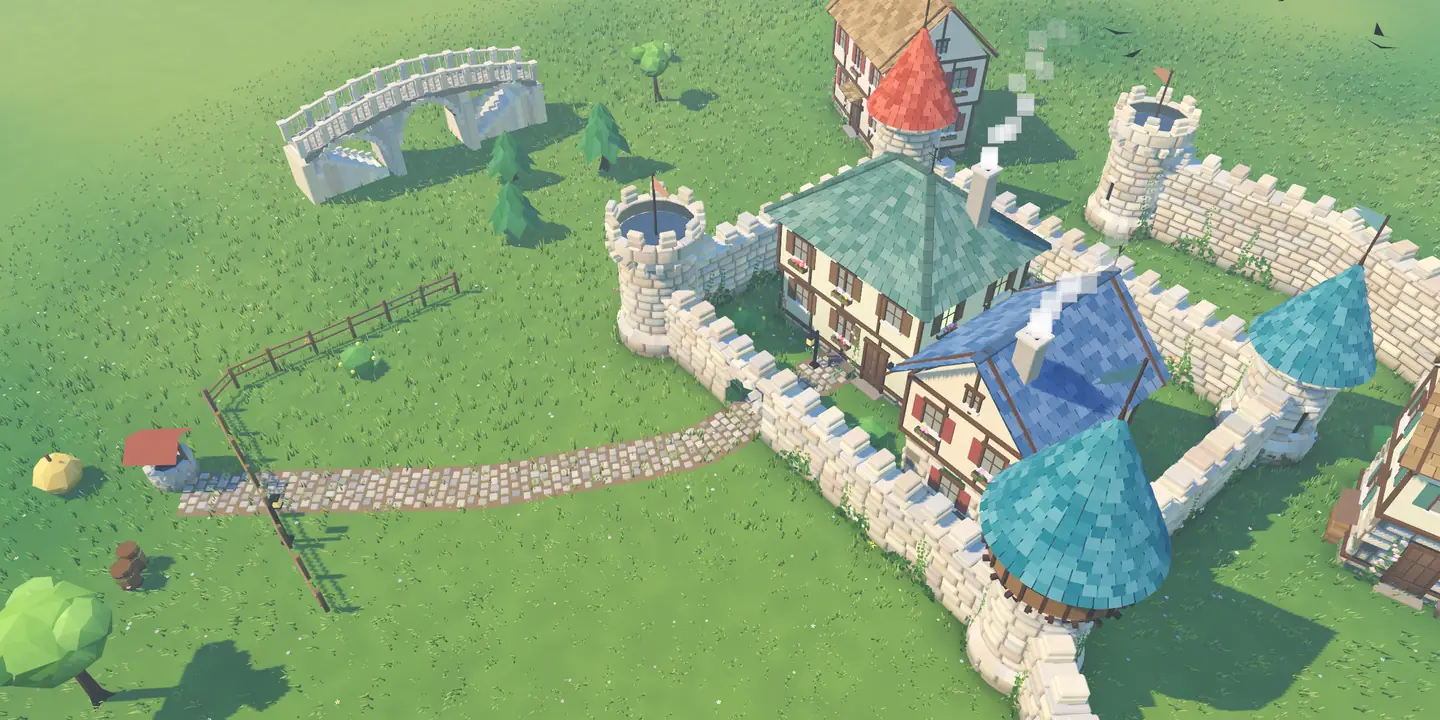
UI hidden, rendered by the engine itself. The Kalecik images on this site were made the same way.
## [folder name, pixel size]
const DEVICES := [["iphone69", Vector2i(2868, 1320)], ["ipad13", Vector2i(2752, 2064)]]

var sv := SubViewport.new()
sv.size = size                          # independent of the window: exact store size
sv.msaa_3d = Viewport.MSAA_4X
sv.render_target_update_mode = SubViewport.UPDATE_ALWAYS
root.add_child(sv)
var m: Node = load("res://main.tscn").instantiate()
sv.add_child(m)                         # the sample village builds itself
# ...
m.ui.visible = false                    # UI hidden: only the village in the frame
m.rig.set_view(target, yaw, distance)   # camera and time of day per shot
await RenderingServer.frame_post_draw
sv.get_texture().get_image().save_png(file)
There are 10 shots per device: the village by day, evening, night, winter, the pond and the bridge, and so on. Each shot's camera angle and time of day come from a table, and the weather is forced clear every time so no rain drifts into a frame. With the UI hidden, the same set works for every language; shots that do show in-game text have language-specific versions in a separate folder. When a feature lands, regenerating the whole set is one command.
tools/asc_screenshots.py uploads them in three steps. The PNGs are first converted to JPEG with macOS's sips tool (about a fifth of the size, per a note in the code), then:
# 1) reserve: send the file name and size, get upload instructions back
_, out = call("POST", "/v1/appScreenshots", {"data": {"type": "appScreenshots",
    "attributes": {"fileName": name, "fileSize": len(data)},
    "relationships": {"appScreenshotSet": {"data": {"type": "appScreenshotSets", "id": set_id}}}}})
shot = out["data"]
# 2) send each chunk to the URL, with the method and headers Apple specifies
for op in shot["attributes"]["uploadOperations"]:
    chunk = data[op["offset"]:op["offset"] + op["length"]]
    req = urllib.request.Request(op["url"], data=chunk, method=op["method"],
        headers={h["name"]: h["value"] for h in op.get("requestHeaders", [])})
    urllib.request.urlopen(req, timeout=120).read()
# 3) commit: the MD5 checksum confirms the file arrived intact
call("PATCH", f"/v1/appScreenshots/{shot['id']}", {"data": {"type": "appScreenshots", "id": shot["id"],
    "attributes": {"uploaded": True, "sourceFileChecksum": hashlib.md5(data).hexdigest()}}})
Right now screenshots are uploaded for en-US and Turkish. The same script handles other languages with a --locale= flag.
One-command builds: ios_release.sh
The longest part of the pipeline is the build. tools/ios_release.sh runs in this order: snapshot, parse check, Godot release export, Xcode archive, .ipa, upload. A shortened version (IDs are placeholders):
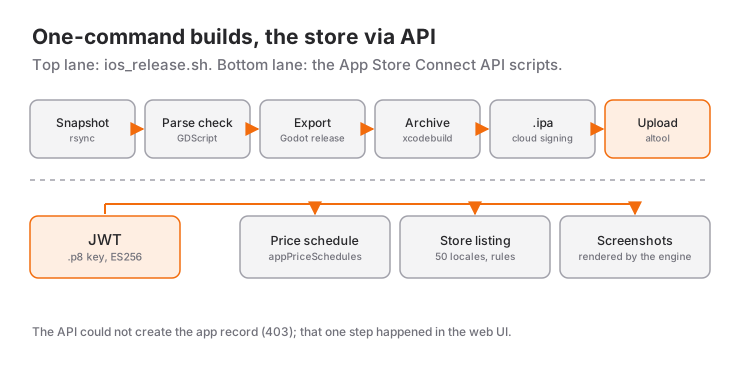
# Build number: one past the higher of App Store Connect and the local record
BUILD=$(( (LAST_ASC > LAST_LOCAL ? LAST_ASC : LAST_LOCAL) + 1 ))

# Snapshot: other agent sessions keep editing the real folder
rsync -a --delete --exclude .git/ --exclude export/ ./ "$SNAP/"

# Parse every script so a half-finished edit never ships
godot --headless --path "$SNAP" --check-only --script "$rel"

godot --headless --path "$SNAP" --export-release "iOS" "$OUT/Kale.ipa"

AUTH=(-allowProvisioningUpdates -authenticationKeyPath "$KEY_PATH"
      -authenticationKeyID "<KEY_ID>" -authenticationKeyIssuerID "<ISSUER_ID>")
xcodebuild -project "$PROJ" -scheme "$SCHEME" -configuration Release \
  -destination 'generic/platform=iOS' -archivePath "$ARCHIVE" "${AUTH[@]}" \
  CURRENT_PROJECT_VERSION=$BUILD archive
xcodebuild -exportArchive -archivePath "$ARCHIVE" -exportPath "$IPA_DIR" \
  -exportOptionsPlist ExportOptions.plist "${AUTH[@]}"
xcrun altool --upload-app --type ios --file "$IPA" --apiKey "<KEY_ID>" --apiIssuer "<ISSUER_ID>"
The reasoning behind a few of these choices:
- Snapshot and parse check. Several agent sessions were editing the game at the same time. If a build started right when one of them had a file half-written, broken code could go to the store. So the script copies the tree first and runs
--check-onlyon every GDScript file in the copy; on an error it stops and says to wait a minute and try again. - Cloud signing. This Mac has no local distribution certificate. With
-allowProvisioningUpdatesplus the API key, Xcode lets Apple manage signing in the cloud, and there is no keychain wrangling. - Build number. App Store Connect never accepts the same build number twice. If the number came only from a local file, it could collide after an upload from another machine or one that failed halfway. The script reads existing builds from the API and adds one to the higher of the two.
- Info.plist patch. After the export, a small Python script adds the permission purpose strings (English and Turkish) and the
ITSAppUsesNonExemptEncryption = falsedeclaration, so the encryption question does not come up on every upload.
So far this pipeline has uploaded builds 1.0 (1) and 1.0 (2).
What the API could not do
Not everything went through the API:
- Creating the app record. Trying to create the app through the API returned a 403. The record itself, meaning the name, bundle ID and primary language, was created in the App Store Connect web interface. Everything after that could be done through the API.
- Age rating. Reading
ageRatingDeclarationsdirectly (GET) turned out to be forbidden. Reading goes through the app info instead, withGET /v1/appInfos/{id}/ageRatingDeclaration; writing usesPATCH. - Territory availability. The script can do the initial setup (excluding mainland China, where a paid game needs a license), but later changes go through the web interface.
In short, the API is excellent at repetitive work, while one-time setup steps still need the web UI.
The Android side: APK and Google Play
Android has its own, shorter pipeline. tools/android.sh exports a debug APK from Godot and, if a phone is connected over USB, installs and launches it:
godot --headless --path . --export-debug "Android" export/android/Kale.apk
adb install -r export/android/Kale.apk
adb shell monkey -p com.ahmetbalaman.kale -c android.intent.category.LAUNCHER 1
The first APK came out on the project's first night, and I sent it once to a friend who uses Android. Saving photos to the gallery needed no extra plugin: on Android 10 (API 29) and later the game writes to MediaStore through Godot's JavaClassWrapper, though that fix has not been verified on a device yet. A debug APK is fine for testing, but Google Play requires a signed release package. That is why the Google Play version is still in preparation; you can follow its status on the Kalecik page.
If you are curious about the work that came before release prep, the previous post in the series, the game that heated my iPhone, covers how we fixed the phone running hot.
Frequently Asked Questions
Can you create a new app with the App Store Connect API?
In our attempt, no: the create-app request returned a 403, and the record was created in the web interface. The steps after that, such as pricing, listings, screenshots, categories and age rating, all worked through the API.
How do you keep an App Store Connect API key safe?
A .p8 file can be downloaded only once, so keep a secure backup. Store it outside the project folder and the git repository, and never print its contents to any log. Give your scripts only the key ID and the file path, and mint a short-lived token for each request.
Can you upload a build without a local distribution certificate?
Yes. When you pass -allowProvisioningUpdates to xcodebuild together with the API key's path, key ID and issuer ID, signing is managed on Apple's side in the cloud. Kalecik's builds were uploaded this way, with no distribution certificate on the machine.
Which sizes were used for the store screenshots?
2868×1320 for iPhone (6.9-inch, landscape) and 2752×2064 for iPad (13-inch, landscape), 10 shots each. Required sizes can change over time, so check what App Store Connect asks for before you upload.
Can a Godot game go to Google Play as a debug APK?
No. A debug APK is fine for testing on a device and sharing with friends. Submitting to Google Play requires a signed release package, and that is the step Kalecik's Google Play version is at now.
Related Posts
The Game That Heated My iPhone: Godot Mobile Performance
My Godot game made an iPhone 15 Pro Max hot. The root cause was 120 fps; the fixes were a frame-rate governor, shadow proxies, grass chunks and threads.
Royalty-Free Game Music: Generating Every Sound in Code
Kalecik uses no recordings: stones, birds, sheep and 37 music pieces were all generated in Python. No loops, a music watchdog, and LUFS instead of ears.
Procedural Stone Walls, Gates and Bridges in Godot
How a finger stroke in Kalecik becomes a stone wall, an arched gate, a bridge or a house: smoothing, seeded masonry and chunked meshes in Godot 4.