Running a Trilingual Blog Without Breaking hreflang
8 min read
This site carries close to 400 posts, and each one is published in Turkish, English and German. Linking those three correctly — hreflang — is a simple job in theory: every page points at its counterparts.
In practice it is a thing that breaks silently. When it breaks nothing errors, the page keeps working, and the search engine simply starts treating two pages as separate and as copies of each other.
This article walks the real architecture of this site: which decision solved which concrete problem, and which bug showed up in production. The code samples are not decoration; they are from the running source.
The problem: two dictionaries never stay in sync
In the first setup, translation pairs lived in two separate dictionaries: one mapping Turkish to English, another mapping English back to Turkish. That looks sensible — until one of them is not updated.
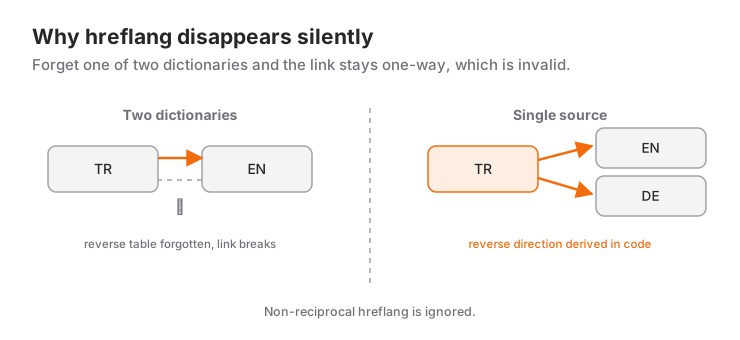
When a post's English slug changes and you forget the reverse table, this happens: the Turkish page points at the English one, and the English page does not point back. One-directional hreflang is invalid. Google ignores a link that is not reciprocated, and the two pages end up unaware of each other.
The fix was to delete the second dictionary:
/**
 * Single source of truth: Turkish slug -> slug in the other languages.
 *
 * The reverse directions (EN/DE -> TR) are derived from this table; no second
 * dictionary is kept. The two used to be synced by hand, and when one was
 * forgotten the hreflang disappeared silently.
 */
const explicitEnglishPairs: Record<string, string> = {
  'agent-skill-nedir-ise-yarayan-yetenek-nasil-yazilir':
    'what-is-an-agent-skill-how-to-write-useful-skills-en',
  // ...
};
The rule: the Turkish slug is the source, everything else is derived. The reverse direction is computed in code, so there is no second place to keep in sync — because anything requiring synchronisation eventually breaks.
A second convenience: on the English side the default rule is <turkish-slug>-en. Posts that follow the rule never enter the table at all. German slugs are written out explicitly, because they are built from German words for SEO reasons.
The price and the payoff of translated slugs
Why is the German article's slug was-ist-ein-agent-skill-... rather than agent-skill-nedir-...-de? Because the slug is a signal that shows up in search results and affects click-through. Showing a German searcher an address made of Turkish words both looks odd and loses the term match.
The price: every German slug has to be written by hand. The payoff: each language ranks with its own vocabulary. Across 400 posts that trade has paid off heavily.
Not writing the FAQ twice
To be eligible for the expandable question-and-answer box in search results, a page needs FAQPage markup. The classic approach is writing the questions both in the article body and in a separate JSON-LD block — keeping the same text in two places.
Like everything kept in two places, it drifts: you fix the answer in the article and the markup keeps the old one.
Here the single source is the markdown itself. The "Frequently Asked Questions" section at the end of a post is parsed and the FAQPage schema is generated from it:
/** FAQ headings in all three languages; parenthesised variants are caught too. */
const FAQ_HEADING =
  /^#{2,3}\s*.*(sık(ça)?\s+sorulan\s+sorular|frequently\s+asked\s+questions|häufig\s+gestellte\s+fragen|\bfaq\b).*$/i;
The writer only writes the article; the markup is a by-product of the build. Because all three languages' headings are collapsed into one expression, the German post goes through the same path.
Category pages: filter versus hub
Initially categories lived only in the client-side filter on the blog list: ?category=flutter. Fine for a human, nothing for a search engine. Google does not treat ?category= as a separate page, and the category label on a post linked nowhere.
Every category is now a static hub page:
/tr/blog/kategori/flutter/
/en/blog/category/flutter/
/de/blog/kategorie/flutter/
Three changes arrived together: the category name became that language's own word, breadcrumbs appeared on post pages, and each hub gathered its language's posts under its own heading and intro.
The SEO name for this is a topic cluster: instead of scattered posts, a page that gathers a subject and posts that link into it. Scattered posts cannot pass authority to each other.
Generating imagery in three languages — and killing CLS
The diagrams in these posts exist in three languages. Drawing them by hand meant writing the same coordinates three times; fix one and forget another and nobody would notice. So diagrams come out of a single generator: shared geometry, labels per language.
SVG was chosen for more than file size: text inside an SVG stays real text, so both search engines and screen readers can read it.
The critical detail is this: markdown's ![]() syntax has no place for image dimensions. An image without dimensions occupies zero height until it loads, then pushes the text down. That jump is measured as CLS in Core Web Vitals and affects ranking directly.
The fix is writing a size table at generation time:
export const diagramSizes: Record<string, { width: number; height: number }> = {
  '/assets/diyagram/harness-turu.svg': { width: 740, height: 412 },
  // ...
};
While the markdown is rendered, that table is read and width and height are written onto the <img> tag. Because the table is produced at build time, nothing has to read files during render.
A one-year cache: the detail that breaks quietly
This was the most instructive bug, and it happened in production.
The site's icons come from the Material Symbols font — not all of it, but a subset of the ~95 glyphs actually used, a 10 KB file. That file is served immutable with a one-year max-age so it is not re-downloaded on every page.
Here is the catch: when the subset is updated with a new icon, the filename stays the same. A returning visitor's browser keeps using the old font for a year, and the new icons render as raw text for them. Perfect on your machine, broken for the visitor.
The fix is stamping the font URL with a hash derived from its contents:
/fonts/material-symbols-outlined.woff2?v=8097db93When the subset changes the stamp changes and the browser fetches the new file. When it does not change, the one-year cache benefit is preserved.
The general lesson: an aggressive cache is a trap for every asset whose filename does not change.
The lang attribute in a static export
One last detail: the <html lang="..."> attribute on every page. A German page shipping with lang="tr" sends a mixed signal even when hreflang is correct.
A post-build script verifies this across all localised pages and corrects it when needed:
Verified HTML language for 361 localized pages (361 corrected).Seeing that line on every build removes the question "did this break again?". No SEO decision survives if it is not verifiable — because you cannot see when it broke.
Five things to take away
The specifics belong to this site; the reasoning behind them does not:
- Keep a single source. Any second copy that needs syncing will eventually diverge.
- Derive markup from content. Writing the FAQ twice ends with the two disagreeing.
- A parameter is not a page. Anything you want ranked separately needs its own address.
- Put dimensions on images. CLS is the cheapest Core Web Vitals metric to fix and the most neglected.
- Version everything you cache. Caching a file whose name never changes for a year means leaving your visitors on the old version.
None of the five was designed up front; each was added after something broke. That is what technical SEO actually looks like: not planned, learned.
Code samples come from this site's source; versions and paths change over time.
Frequently Asked Questions
What is hreflang and why do I need it?
hreflang is the annotation that links language versions of the same content. Done correctly, a search engine shows each user the version in their language and does not treat the pages as duplicates of each other. Missing it leaves your pages unaware of one another, so you end up competing against yourself on the same topic.
Why does hreflang break silently?
Because nothing errors when it does. The most common cause is keeping translation pairs in two separate dictionaries and forgetting one: page A points at page B, and B does not point back. Non-reciprocal hreflang is treated as invalid. The fix is a single source with the reverse direction derived in code.
Should translated pages have translated slugs?
Yes. The slug appears in search results and affects click-through; showing a German searcher an address made of Turkish words loses the term match and reads as untrustworthy. The price is writing each slug by hand, and it is worth paying.
How should FAQPage schema be generated?
From a single source. Writing the questions both in the article and in a separate JSON-LD block ends with the two copies diverging. On this site the "Frequently Asked Questions" section at the end of each post is parsed and the schema generated from it, so the author only writes the article.
Do blog categories need their own pages?
If you want them ranked separately, yes. A client-side filter like ?category=flutter serves a human fine, but a search engine does not count it as a separate page. Giving each category its own address, heading and intro turns scattered posts into a cluster that can pass authority.
Why do images need width and height?
An image without declared dimensions occupies no space until it loads, then pushes the text down. That jump is measured as CLS in Core Web Vitals and affects ranking. Because markdown's ![]() syntax has nowhere to put dimensions, you write them into a table at build time and attach them to the <img> tag during rendering.
Related Posts
When Is Gemini 4 Carbon Coming? Who Can Use It?
Right now only selected cyber defenders can use Gemini 4 Carbon. It is not in the Gemini app, the API or Antigravity, and Google has given no date.
What Is Gemini 4 Carbon? Cybersecurity, Price, Access
Google announced Gemini 4 Carbon on Oct 28: #1 on Artificial Analysis at 59, same price as Argon. For now it is open only to selected cyber defenders.
Gemini 4 Carbon vs Argon vs Claude Opus 5.5 vs GPT-6 Astra
Gemini 4 Carbon is first on the index but not everywhere: Opus 5.5 leads agentic coding, Astra leads FrontierSWE, and its error rate is higher than Argon's.