Introduction to OOP: Why Procedural Programming Falls Short
Last updated:
5 min read
Years ago, my first programming experience was simple: write code from top to bottom, line by line. Declare variables, write functions, call them, get results. It seemed straightforward. Until projects started to grow.
One day, I found myself lost in a 2000-line single file. "Which function calls which?", "Who modified this variable?" – while struggling with these questions, I realized: something was fundamentally wrong.
Procedural Programming: Started Well But...
Procedural programming is actually a logical approach. Think of it like a recipe:
// Procedural approach - Simple calculator
double balance = 1000;

void Deposit(double amount)
{
    balance += amount;
    Console.WriteLine($"Deposited: ${amount}, New balance: ${balance}");
}

void Withdraw(double amount)
{
    if (balance >= amount)
    {
        balance -= amount;
        Console.WriteLine($"Withdrawn: ${amount}, New balance: ${balance}");
    }
    else
    {
        Console.WriteLine("Insufficient balance!");
    }
}

// Usage
Deposit(500);
Withdraw(200);
Nice, it works. But what if we had multiple accounts? What if each account had different properties? Credit accounts, savings accounts, foreign currency accounts...
This is exactly where the procedural approach starts to crack.
Spaghetti Code: Everyone's Nightmare
The biggest problem with procedural code: everything is interconnected. Change one thing, and something else breaks. We call this "spaghetti code." When you look at a plate of spaghetti, can you tell which noodle goes where? That's what the code becomes.
// Spaghetti code example - Real-life code to avoid
string account1_owner = "John";
double account1_balance = 1000;
string account1_type = "checking";

string account2_owner = "Jane";
double account2_balance = 5000;
string account2_type = "savings";

string account3_owner = "Bob";
double account3_balance = 2500;
string account3_type = "foreign";

// Money transfer? Which one to which? Which variable to use?
// Add new account? account4, account5, account6...
// What about 100 accounts? 🤯
As this code grows, it becomes unmanageable. Every new feature we add increases complexity exponentially.
The Real World Doesn't Work Like This
Let's stop and think for a moment. In the real world, there are objects:
- Car: Has color, speed, brand. Can be started, stopped.
- Bank Account: Has owner, balance. Money can be deposited, withdrawn.
- Phone: Has model, battery level. Can make calls, send messages.
These objects have properties and behaviors (methods). And the best part: they're independent of each other!
Starting one car doesn't affect another car. Sending a message to one phone doesn't drain another phone's battery.
That's exactly what OOP does: it translates real-world objects into code.
OOP: Bringing the Real World into Code
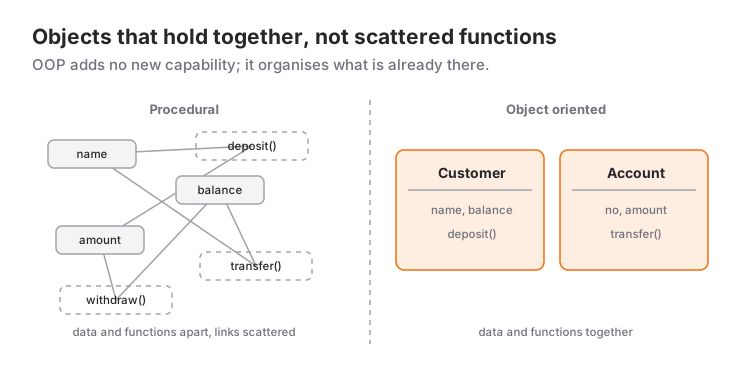
With Object-Oriented Programming (OOP), let's write the same bank account example:
public class BankAccount
{
    // Properties
    public string AccountOwner { get; set; }
    public double Balance { get; private set; }
    public string AccountType { get; set; }

    // Constructor - Called when object is created
    public BankAccount(string owner, double initialBalance, string type)
    {
        AccountOwner = owner;
        Balance = initialBalance;
        AccountType = type;
    }

    // Behaviors (Methods)
    public void Deposit(double amount)
    {
        Balance += amount;
        Console.WriteLine($"${amount} deposited to {AccountOwner}'s account.");
    }

    public bool Withdraw(double amount)
    {
        if (Balance >= amount)
        {
            Balance -= amount;
            Console.WriteLine($"${amount} withdrawn from {AccountOwner}'s account.");
            return true;
        }
        Console.WriteLine("Insufficient balance!");
        return false;
    }

    public void ShowBalance()
    {
        Console.WriteLine($"{AccountOwner} - {AccountType}: ${Balance}");
    }
}
Now if we want to create 100 accounts:
// Each account carries its own data and behavior
BankAccount johnAccount = new BankAccount("John", 1000, "Checking");
BankAccount janeAccount = new BankAccount("Jane", 5000, "Savings");
BankAccount bobAccount = new BankAccount("Bob", 2500, "Foreign");

johnAccount.Deposit(500);
janeAccount.Withdraw(1000);
bobAccount.ShowBalance();

// Operations on John's account don't affect Jane's!
How clean is that? Each account lives in its own universe. They don't affect each other.
The 4 Pillars of OOP
OOP isn't just about writing classes. There are 4 fundamental principles behind it, and Microsoft's object-oriented programming reference for C# explains them in terms of classes, structs and records. We'll cover these in detail in upcoming posts, but let's get introduced:
1. Encapsulation
Protecting data. Not being able to directly modify the Balance variable from outside. Only accessing it through Deposit and Withdraw methods. The tools that make this possible are covered one by one in the access modifiers post.
2. Inheritance
Eliminating code repetition. SavingsAccount and CheckingAccount classes can inherit common properties from BankAccount. How this is built with virtual, override and base is explained in the inheritance and polymorphism guide.
3. Polymorphism
The same method exhibiting different behaviors. The Withdraw method might deduct interest fees in a savings account but not in a checking account.
4. Abstraction
Hiding complexity. The user just calls Deposit(), without needing to know about database operations, logging, sending notifications happening behind the scenes. C# gives you two tools for abstraction; I compare when to pick which in interface vs abstract class.
Which Languages Support OOP?
OOP is language-agnostic. Many modern languages support OOP:
| Language | OOP Support | Notes |
|---|---|---|
| C# | ✅ Full | Microsoft's OOP-focused language |
| Java | ✅ Full | "Everything is an object" philosophy |
| Python | ✅ Full | Dynamic and flexible OOP |
| Dart | ✅ Full | Flutter's language |
| Swift | ✅ Full | Apple ecosystem |
| JavaScript | ⚠️ Prototype-based | Class syntax added in ES6 |
| C | ❌ None | Procedural language |
In this blog series, we'll use C#; you can follow the whole language in Microsoft's official C# guide. Why?
- Clean and readable syntax
- Full OOP support
- Excellent IDE support (Visual Studio, Rider)
- Widely used in real-world projects
When Should You Use OOP?
OOP isn't a silver bullet. Procedural might be sufficient for small scripts and simple automation tasks. But:
✅ Use OOP:
- If the project will grow
- If multiple developers will work on it
- If maintenance and extensibility matter
- If you're modeling real-world objects
❌ Procedural is Fine:
- One-time scripts
- Small automation tasks
- Performance-critical low-level operations
Next Step: Class and Object
In this post, we learned why OOP exists, the limitations of procedural approach, and the 4 fundamental principles. If you would rather work through these foundations with a teacher, the post on which criteria matter when choosing a .NET expert teacher gathers the selection criteria in one place.
In the next post, we'll dive deep into Class and Object concepts. We'll make these concepts concrete with the "Cake mold vs Cake" analogy.
Keep your code clean and your mind at peace! 🚀
This is the first post of the OOP with C# series. In the continuation of the series, we'll cover Class, Constructor, Access Modifiers, and many more topics.
Frequently Asked Questions
Do I need to know procedural programming before learning OOP?
Yes, you need the basics: variables, loops, conditions and methods. OOP doesn't replace them; it tells you how to organize them inside classes.
Does everything in C# have to live inside a class?
On the surface, no: thanks to top-level statements you can write code directly in Program.cs, and the compiler wraps it in a class behind the scenes. When you define your own types, you use a class, struct or record.
Why start with class when struct and record exist?
A class is a reference type, supports inheritance and is the only construct where all four OOP principles can be demonstrated. A struct is for small value types and a record for immutable data carriers; both are much easier to learn once the class mindset is in place.
Related Posts
C# Constructor: The Hidden Hero of Object Creation
What is a constructor and why do you need it? Default, parameterized and overloaded constructors explained with real examples.
C# Class and Object: Blueprint vs Product
Learn the core OOP building blocks, Class and Object, through the cake mold analogy, with Property, Method and Instance examples.
C# Access Modifiers: Lock the Doors or Leave Them Open?
What are public, private, protected and internal? How Getter/Setter methods secure data, explained with a bank account example.