C# Access Modifiers: Lock the Doors or Leave Them Open?
Last updated:
4 min read
Beginners' favorite thing: Making everything public. It works, no errors, everyone can access everything. Great, right?
No. Not at all.
One day your colleague using your code directly sets the balance variable to -1000. Or assigns 500 to the age field. Or writes the password field to a log file.
This is exactly why Access Modifiers exist – to prevent this chaos; the C# language reference page on access modifiers defines all six accessibility levels.
Real-Life Analogy: Your Home
Think about your home:
- public: Your door, everyone can see and enter (very dangerous!)
- private: Your bedroom, only you can enter
- protected: Family room, only family members can enter
- internal: Common area in the apartment building, only residents can access
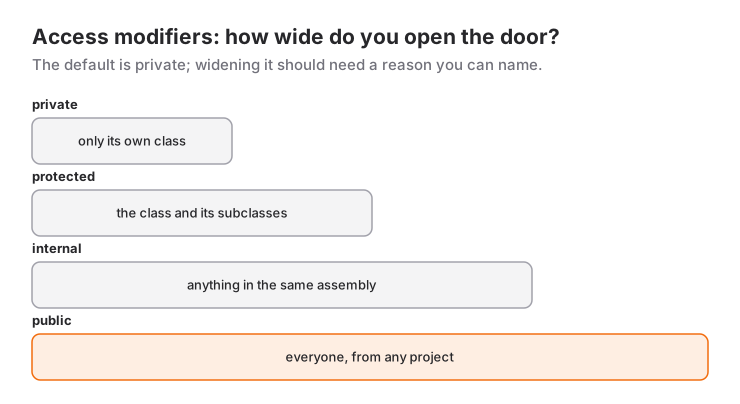
Now let's translate this to code.
public: Open to Everyone
public means "everyone can access." From outside the class, from the project, from everywhere.
public class User
{
    public string Name { get; set; }
    public string Password { get; set; }  // ⚠️ DANGER!
}

// Somewhere else...
User user = new User();
user.Password = "1234";  // Direct access - Bad!
Console.WriteLine(user.Password);  // Password readable - Very bad!
Because password is public, everyone can read and modify it. This is a serious security vulnerability.
private: Only the Owner Can Access
private members can only be accessed from within the class where they're defined. No one from outside can see or modify them.
public class BankAccount
{
    public string AccountOwner { get; set; }
    private double _balance;  // Only this class can access
    private string _pin;      // Must never leak outside

    public BankAccount(string owner, double initialBalance, string pin)
    {
        AccountOwner = owner;
        _balance = initialBalance;
        _pin = pin;
    }

    public void Deposit(double amount)
    {
        if (amount > 0)
        {
            _balance += amount;
            Console.WriteLine($"✅ ${amount:F2} deposited. New balance: ${_balance:F2}");
        }
    }

    public bool Withdraw(double amount, string enteredPin)
    {
        if (enteredPin != _pin)
        {
            Console.WriteLine("❌ Wrong PIN!");
            return false;
        }

        if (amount > _balance)
        {
            Console.WriteLine("❌ Insufficient balance!");
            return false;
        }

        _balance -= amount;
        Console.WriteLine($"✅ ${amount:F2} withdrawn. Remaining balance: ${_balance:F2}");
        return true;
    }

    public double GetBalance()
    {
        return _balance;  // We allow reading, not modifying
    }
}
Usage:
BankAccount account = new BankAccount("John", 5000, "1234");

account.Deposit(1000);
// ✅ $1000.00 deposited. New balance: $6000.00

account.Withdraw(500, "1234");
// ✅ $500.00 withdrawn. Remaining balance: $5500.00

account.Withdraw(500, "4321");
// ❌ Wrong PIN!

// These DON'T WORK:
// account._balance = 1000000;  // ❌ Can't access private
// Console.WriteLine(account._pin);  // ❌ Can't access private
You can't modify the balance directly. You must use methods to deposit or withdraw money. And these methods perform the necessary checks.
protected: Family Members Can Access
protected means accessible from within the class and from classes that inherit from it.
public class LivingBeing
{
    public string Name { get; set; }
    protected int _health;  // Only LivingBeing and derivatives can access

    public LivingBeing(string name, int health)
    {
        Name = name;
        _health = health;
    }

    public void ShowStatus()
    {
        Console.WriteLine($"{Name}: Health {_health}");
    }
}

public class Player : LivingBeing
{
    public int Score { get; set; }

    public Player(string name) : base(name, 100)
    {
        Score = 0;
    }

    public void TakeDamage(int amount)
    {
        _health -= amount;  // ✅ Can access protected (derived class)
        Console.WriteLine($"💥 {Name} took {amount} damage! Remaining health: {_health}");

        if (_health <= 0)
        {
            Console.WriteLine($"☠️ {Name} died!");
        }
    }

    public void PickUpHealthPack()
    {
        _health += 25;  // ✅ Can access protected
        if (_health > 100) _health = 100;
        Console.WriteLine($"💚 {Name} picked up health pack! Health: {_health}");
    }
}

// Usage
Player player = new Player("John");
player.ShowStatus();  // John: Health 100

player.TakeDamage(30);    // 💥 John took 30 damage! Remaining health: 70
player.TakeDamage(50);    // 💥 John took 50 damage! Remaining health: 20
player.PickUpHealthPack();  // 💚 John picked up health pack! Health: 45

// This DOESN'T WORK:
// player._health = 9999;  // ❌ protected not accessible from outside
We could access the _health field from inside the Player class because it inherits from LivingBeing. But we can't access it from outside. The : LivingBeing syntax here is inheritance; how it works together with virtual and override is covered in the inheritance and polymorphism guide.
internal: Project-Level Access
internal members can only be accessed from within the same project (assembly). They can't be accessed from different projects.
// Inside MyLibrary project
public class DataProcessor
{
    internal string _connectionString = "Server=localhost;Database=App;";

    internal void WriteLog(string message)
    {
        Console.WriteLine($"[LOG] {message}");
    }

    public void SaveData(string data)
    {
        WriteLog($"Saving data: {data}");  // ✅ Access from same project OK
        // Save operations...
    }
}

// Another class in the same project
public class ReportGenerator
{
    private DataProcessor _processor = new DataProcessor();

    public void GenerateReport()
    {
        _processor.WriteLog("Generating report...");  // ✅ internal access OK
    }
}
But from another project:
// In a different project
DataProcessor processor = new DataProcessor();
processor.WriteLog("Test");  // ❌ Can't access internal from outside
processor.SaveData("Data");  // ✅ public method, accessible
Getter and Setter: Controlled Access
In the Class and Object post we saw why a property beats a field; now we go one step further. You can give different access levels to property getters and setters, as the C# documentation on properties explains:
public class Product
{
    private decimal _price;

    public string Name { get; set; }

    // Everyone can read, only class can modify
    public decimal Price
    {
        get { return _price; }
        private set
        {
            if (value >= 0)
                _price = value;
        }
    }

    // Read-only property
    public string PriceText => $"${_price:N2}";

    // Only readable from within class
    private int _stock;
    public int Stock
    {
        get => _stock;
        internal set => _stock = value;  // Only same project can modify
    }

    public Product(string name, decimal price, int stock)
    {
        Name = name;
        Price = price;  // private set works (we're inside the class)
        _stock = stock;
    }

    public void ApplyDiscount(int percent)
    {
        Price = _price * (100 - percent) / 100;  // private set works
        Console.WriteLine($"🏷️ {percent}% discount applied! New price: {PriceText}");
    }
}
Usage:
Product laptop = new Product("MacBook Pro", 2499, 10);

Console.WriteLine(laptop.Price);  // ✅ Read: 2499
Console.WriteLine(laptop.PriceText);  // ✅ $2,499.00

// laptop.Price = 100;  // ❌ ERROR! private set

laptop.ApplyDiscount(10);
// 🏷️ 10% discount applied! New price: $2,249.10
Real-World Example: User Management System
Now let's use all access modifiers together:
public class User
{
    // Public: Everyone can see
    public int Id { get; private set; }
    public string Username { get; private set; }
    public string Email { get; private set; }
    public DateTime RegistrationDate { get; private set; }

    // Private: Only this class
    private string _passwordHash;
    private int _failedLoginAttempts;
    private const int MAX_FAILED_ATTEMPTS = 3;

    // Protected: This class and derivatives
    protected bool _isActive;
    protected DateTime? _lastLoginDate;

    // Internal: Within project
    internal string _sessionToken;

    public User(int id, string username, string email, string password)
    {
        Id = id;
        Username = username;
        Email = email;
        _passwordHash = HashPassword(password);
        RegistrationDate = DateTime.Now;
        _isActive = true;
        _failedLoginAttempts = 0;
    }

    public bool Login(string password)
    {
        if (!_isActive)
        {
            Console.WriteLine("❌ Account is disabled!");
            return false;
        }

        if (_failedLoginAttempts >= MAX_FAILED_ATTEMPTS)
        {
            Console.WriteLine("🔒 Account locked! Too many failed attempts.");
            return false;
        }

        if (HashPassword(password) != _passwordHash)
        {
            _failedLoginAttempts++;
            Console.WriteLine($"❌ Wrong password! ({_failedLoginAttempts}/{MAX_FAILED_ATTEMPTS})");
            return false;
        }

        _failedLoginAttempts = 0;
        _lastLoginDate = DateTime.Now;
        _sessionToken = Guid.NewGuid().ToString();

        Console.WriteLine($"✅ Welcome, {Username}!");
        return true;
    }

    public bool ChangePassword(string oldPassword, string newPassword)
    {
        if (HashPassword(oldPassword) != _passwordHash)
        {
            Console.WriteLine("❌ Current password is wrong!");
            return false;
        }

        if (newPassword.Length < 6)
        {
            Console.WriteLine("❌ Password must be at least 6 characters!");
            return false;
        }

        _passwordHash = HashPassword(newPassword);
        Console.WriteLine("✅ Password changed successfully!");
        return true;
    }

    private string HashPassword(string password)
    {
        // In real application, use secure hash algorithm
        return Convert.ToBase64String(
            System.Text.Encoding.UTF8.GetBytes(password + "salt123")
        );
    }

    public void ShowProfile()
    {
        Console.WriteLine($"\n👤 USER PROFILE");
        Console.WriteLine($"ID: {Id}");
        Console.WriteLine($"Username: {Username}");
        Console.WriteLine($"Email: {Email}");
        Console.WriteLine($"Registration: {RegistrationDate:MM/dd/yyyy}");
        Console.WriteLine($"Status: {(_isActive ? "Active ✅" : "Inactive ❌")}");
        Console.WriteLine($"Last Login: {_lastLoginDate?.ToString("MM/dd/yyyy HH:mm") ?? "Never logged in"}");
    }
}

// Admin class - Inherits from User
public class Admin : User
{
    public string Permission { get; set; }

    public Admin(int id, string username, string email, string password, string permission)
        : base(id, username, email, password)
    {
        Permission = permission;
    }

    public void BanUser(User user)
    {
        // protected field access - OK because we're a derived class
        // But user._isActive = false; WON'T WORK - different instance
        Console.WriteLine($"🚫 {user.Username} has been banned!");
    }

    public void ViewSystemLogs()
    {
        // internal field access - OK because we're in the same project
        Console.WriteLine($"📋 Admin {Username} viewing logs...");
        Console.WriteLine($"🔑 Session Token: {_sessionToken}");
    }
}
Usage:
// Regular user
User john = new User(1, "john_dev", "[email protected]", "password123");

john.Login("wrong");      // ❌ Wrong password! (1/3)
john.Login("wrong");      // ❌ Wrong password! (2/3)
john.Login("password123"); // ✅ Welcome, john_dev!

john.ShowProfile();

john.ChangePassword("password123", "newPass456");
// ✅ Password changed successfully!

// These DON'T WORK:
// john._passwordHash = "hack";  // ❌ private
// john._isActive = false;       // ❌ protected

// Admin operations
Admin admin = new Admin(0, "superadmin", "[email protected]", "admin123", "FullAccess");
admin.Login("admin123");
admin.ViewSystemLogs();
Summary Table
| Modifier | Same Class | Derived Class | Same Project | Outside |
|---|---|---|---|---|
| public | ✅ | ✅ | ✅ | ✅ |
| private | ✅ | ❌ | ❌ | ❌ |
| protected | ✅ | ✅ | ❌ | ❌ |
| internal | ✅ | ❌* | ✅ | ❌ |
| protected internal | ✅ | ✅ | ✅ | ❌ |
| private protected | ✅ | ✅** | ❌ | ❌ |
*Derived class can access internal if in same project.
**Only derived classes in the same project can access.
When to Use Which?
| Situation | Recommended |
|---|---|
| Should be accessible from outside | public |
| Only within class | private (think of this as default) |
| Derived classes should access | protected |
| Shared within project | internal |
| Sensitive data (password, token) | private + controlled access via methods |
Introduction to Encapsulation
Access modifiers are actually the building blocks of one of the four principles we met in the introduction to OOP: Encapsulation.
Encapsulation says:
- Hide the data (
private) - Provide controlled access (methods and properties)
- Protect the object's internal state
Next in the series comes inheritance and polymorphism, where protected shows its real power. For the abstraction side there is the interface vs abstract class post.
Conclusion: Think Private by Default
Golden rule: Start everything as private, open up as needed.
// ❌ Bad - Everything public
public class Bad
{
    public string password;
    public int balance;
}

// ✅ Good - Minimum necessary access
public class Good
{
    private string _password;
    private int _balance;

    public int Balance => _balance;  // Read-only

    public void ValidatePassword(string password) { ... }
    public void UpdateBalance(int amount) { ... }
}
Clean and secure code! 🚀
This is the fourth post of the OOP with C# series. In the previous post, we covered the Constructor; inheritance and polymorphism follow next.
Frequently Asked Questions
What is the default if I don't write an access modifier?
For class members (fields, properties, methods) the default is private. For a class declared at namespace level the default is internal; if it should be used from outside the project you must write public explicitly.
What is the difference between protected internal and private protected?
protected internal means "derived class OR same assembly"; either one is enough. private protected means "derived class AND same assembly"; only derived classes inside the same project can access the member.
What is the difference between private set and init?
private set allows assignment from inside the class at any time. init only allows assignment while the object is being created (in the constructor or an object initializer) and never afterwards, which makes it the choice for immutable objects.
Related Posts
Introduction to OOP: Why Procedural Programming Falls Short
The journey from procedural to object-oriented programming: escaping spaghetti code and turning real problems into maintainable code.
C# Constructor: The Hidden Hero of Object Creation
What is a constructor and why do you need it? Default, parameterized and overloaded constructors explained with real examples.
C# Class and Object: Blueprint vs Product
Learn the core OOP building blocks, Class and Object, through the cake mold analogy, with Property, Method and Instance examples.