ASP.NET Core Minimal API: Build Your First REST API
Last updated:
9 min read
A Minimal API is the ASP.NET Core way of defining HTTP endpoints in a single Program.cs file, without controller classes, attributes or a folder structure; Microsoft's Minimal APIs quick reference lists every Map... method and binding rule in one place. It is the first tool to reach for when you need a small service that feeds a mobile app or a frontend, when you are learning, or when you want to try an idea quickly. In this post we start from an empty project and write a REST API that lists, adds, updates and deletes books, and along the way we cover route parameters, model binding, TypedResults, dependency injection and validation.
Creating the Project
With the .NET SDK installed, two commands in the terminal are enough (Microsoft's step-by-step Minimal API tutorial shows the same flow for Visual Studio and VS Code as well):
dotnet new web -o BookApi
cd BookApi
dotnet run
The web template is the leanest ASP.NET Core project there is. The generated Program.cs is only a few lines long:
var builder = WebApplication.CreateBuilder(args);
var app = builder.Build();

app.MapGet("/", () => "Hello World!");

app.Run();
The builder part is where services and settings are prepared; the app part is where requests are handled. The Now listening on: http://localhost:... line in the dotnet run output tells you which port the app uses. The port is generated per project, so wherever I write 5000 below, substitute your own.
The Data Model and an In-Memory Service
Let's return to the library example from the class and object post and move the books into an API. Models first. In Program.cs, type declarations have to sit below the top-level code, so add them at the end of the file:
public record Book(int Id, string Title, string Author, int Year);

public record BookRequest(string? Title, string? Author, int Year);
There are two types for a reason: the Id is decided by the server, not the client. Data coming in is a BookRequest, data going out is a Book.
Databases are not the topic here, so we write a simple service that keeps data in memory. Hiding it behind an interface means the endpoints will not change when you move to a real database later. I explained the reasoning behind that separation in interface vs abstract class.
public interface IBookStore
{
    IReadOnlyList<Book> GetAll(string? author);
    Book? Find(int id);
    Book Add(BookRequest request);
    bool Update(int id, BookRequest request);
    bool Remove(int id);
}

public class InMemoryBookStore : IBookStore
{
    private readonly ConcurrentDictionary<int, Book> _books = new();
    private int _lastId;

    public IReadOnlyList<Book> GetAll(string? author) =>
        _books.Values
            .Where(b => author is null ||
                        b.Author.Contains(author, StringComparison.OrdinalIgnoreCase))
            .OrderBy(b => b.Id)
            .ToList();

    public Book? Find(int id) => _books.GetValueOrDefault(id);

    public Book Add(BookRequest request)
    {
        int id = Interlocked.Increment(ref _lastId);
        var book = new Book(id, request.Title!.Trim(), request.Author!.Trim(), request.Year);
        _books[id] = book;
        return book;
    }

    public bool Update(int id, BookRequest request)
    {
        if (!_books.TryGetValue(id, out var old))
            return false;

        var updated = old with
        {
            Title = request.Title!.Trim(),
            Author = request.Author!.Trim(),
            Year = request.Year
        };
        return _books.TryUpdate(id, updated, old);
    }

    public bool Remove(int id) => _books.TryRemove(id, out _);
}
Why a ConcurrentDictionary rather than a List<Book>? A web server handles several requests at once on different threads. Requests sharing one store object can corrupt an ordinary list. Interlocked.Increment is there for the same reason: two simultaneous POST requests must not receive the same Id.
The Endpoints: MapGet, MapPost, MapPut, MapDelete
Now the top part of Program.cs. Add two using lines at the start of the file and register the service:
using System.Collections.Concurrent;
using Microsoft.AspNetCore.Http.HttpResults;

var builder = WebApplication.CreateBuilder(args);

// One store instance lives for the whole application
builder.Services.AddSingleton<IBookStore, InMemoryBookStore>();

var app = builder.Build();

app.MapGet("/", () => "Book API is running");

var books = app.MapGroup("/books");

// GET /books  and  GET /books?author=orwell
books.MapGet("/", (string? author, IBookStore store) =>
    TypedResults.Ok(store.GetAll(author)));

// GET /books/3
books.MapGet("/{id:int}", Results<Ok<Book>, NotFound> (int id, IBookStore store) =>
    store.Find(id) is { } book
        ? TypedResults.Ok(book)
        : TypedResults.NotFound());

// POST /books
books.MapPost("/", Results<Created<Book>, ValidationProblem> (BookRequest request, IBookStore store) =>
{
    var errors = Validate(request);
    if (errors.Count > 0)
        return TypedResults.ValidationProblem(errors);

    var book = store.Add(request);
    return TypedResults.Created($"/books/{book.Id}", book);
});

// PUT /books/3
books.MapPut("/{id:int}", Results<NoContent, NotFound, ValidationProblem> (int id, BookRequest request, IBookStore store) =>
{
    var errors = Validate(request);
    if (errors.Count > 0)
        return TypedResults.ValidationProblem(errors);

    return store.Update(id, request)
        ? TypedResults.NoContent()
        : TypedResults.NotFound();
});

// DELETE /books/3
books.MapDelete("/{id:int}", Results<NoContent, NotFound> (int id, IBookStore store) =>
    store.Remove(id)
        ? TypedResults.NoContent()
        : TypedResults.NotFound());

app.Run();
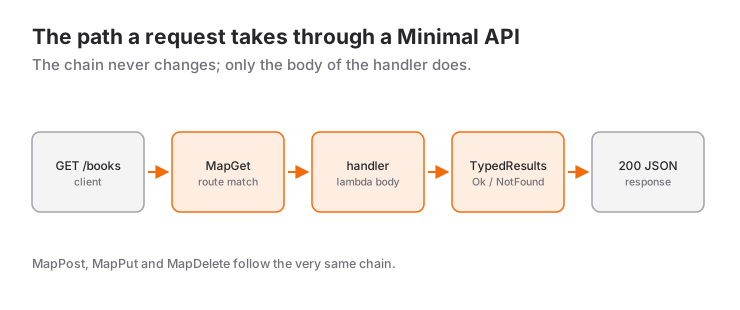
MapGroup("/books") keeps the shared path prefix in one place. Each Map... method corresponds to an HTTP verb: GET reads, POST creates, PUT updates, DELETE removes.
Route Parameters and Model Binding
The framework fills in the lambda parameters for you; this is called model binding. The code above uses four different sources:
int idcomes from the{id:int}segment of the route template. The names have to match exactly.:intis a route constraint; a request to/books/abcgets a 404 without ever reaching the endpoint.string? authoris not in the route, so it is read from the query string (?author=orwell). Being nullable makes it optional.BookRequest requestis a complex type, so it is read from the JSON in the request body.IBookStore storeis registered as a service, so it comes from dependency injection.
If you want to state the source explicitly, there are the [FromRoute], [FromQuery], [FromHeader], [FromBody] and [FromServices] attributes. On the JSON side the default is camelCase: the Title property goes out as title, and casing is ignored when reading.
Results and TypedResults
An endpoint can return a plain object; the framework turns it into JSON with status 200. When you need to choose the status code yourself, there are two helper classes. Methods such as Results.Ok(...) and Results.NotFound() return IResult. TypedResults offers the same methods but returns concrete types (Ok<Book>, NotFound). That has two benefits: the possible responses of an endpoint are visible in its signature and the OpenAPI document picks them up automatically, and in unit tests you can check the returned type directly.
If an endpoint can return more than one type, you write the lambda's return type explicitly as Results<Ok<Book>, NotFound>. That is the odd-looking expression in front of the lambdas in the example.
Dependency Injection
The line builder.Services.AddSingleton<IBookStore, InMemoryBookStore>() says: "Whenever someone asks for an IBookStore, hand them an InMemoryBookStore, and use the same object for the whole application." The endpoints never know the concrete class. If you write a SqlBookStore based on Entity Framework tomorrow, this line is the only place that changes.
As the ASP.NET Core dependency injection documentation explains, there are three lifetimes: AddSingleton (one object for the application), AddScoped (one object per HTTP request) and AddTransient (a new object every time one is requested). Our service keeps data in memory, so singleton is a must. Request-based resources such as a database context usually use scoped. The service classes receive their own dependencies through the same mechanism, via constructor parameters.
Validation Basics
Do not trust data coming from the client. The simplest approach, and one that works on every version, is to check by hand and return a ValidationProblem. Put this local function after the app.Run(); line and before the type declarations:
static Dictionary<string, string[]> Validate(BookRequest request)
{
    var errors = new Dictionary<string, string[]>();

    if (string.IsNullOrWhiteSpace(request.Title))
        errors["title"] = ["Title must not be empty."];

    if (string.IsNullOrWhiteSpace(request.Author))
        errors["author"] = ["Author must not be empty."];

    if (request.Year < 1450 || request.Year > DateTime.Now.Year)
        errors["year"] = ["Year must be between 1450 and the current year."];

    return errors;
}
ValidationProblem produces a standard error body with status 400 and the application/problem+json content type; the client reads which field was rejected and why from the errors object. Whether DataAnnotations attributes such as [Required] and [Range] run automatically in Minimal APIs depends on your .NET version: newer versions added built-in support, older ones need an endpoint filter or a library like FluentValidation. Check the documentation for the version you target.
The OpenAPI Document
For the people who will consume your API you can generate an OpenAPI (formerly Swagger) document describing the endpoints, parameters and response types. I will not name a single "right package" here, because the built-in tooling has changed between .NET versions: for a while the project templates shipped with a third-party Swagger library, later versions brought Microsoft's own OpenAPI document generation to the front and left the UI as a separate choice. The most reliable route is to run dotnet new webapi with your installed SDK, look at what the template wires up and how, and follow the official documentation for that version. Whichever tool you pick, TypedResults and explicit return types are what make the document accurate.
Mini Scenario: Testing the API with curl and an .http File
With the app running, open a second terminal. Let's add a book:
curl -i -X POST http://localhost:5000/books \
  -H "Content-Type: application/json" \
  -d '{"title":"1984","author":"George Orwell","year":1949}'
The response is 201 Created with a Location: /books/1 header, and the body contains the created book:
{"id":1,"title":"1984","author":"George Orwell","year":1949}The other requests:
curl "http://localhost:5000/books?author=orwell"
curl -i http://localhost:5000/books/99          # 404 Not Found
curl -i -X DELETE http://localhost:5000/books/1  # 204 No Content
Send invalid data ("title":"", "year":3000) and you get status 400 with this body:
{
  "title": "One or more validation errors occurred.",
  "status": 400,
  "errors": {
    "title": ["Title must not be empty."],
    "year": ["Year must be between 1450 and the current year."]
  }
}
Instead of retyping commands you can add a books.http file to the project. Visual Studio, Rider and VS Code (with the REST Client extension) send the requests in that file with one click:
@host = http://localhost:5000

GET {{host}}/books

###

POST {{host}}/books
Content-Type: application/json

{
  "title": "Animal Farm",
  "author": "George Orwell",
  "year": 1945
}

###

PUT {{host}}/books/1
Content-Type: application/json

{
  "title": "Nineteen Eighty-Four",
  "author": "George Orwell",
  "year": 1949
}
Commit this file to the repository and everyone who opens the project finds a ready-made way to try the API.
When to Use It and When Not To
Minimal APIs are a good choice for services with a small number of endpoints, microservices, mobile app backends, prototypes, and the stage where you are learning ASP.NET Core. You get less code, fewer concepts and a quick start. If you are thinking of going through that learning stage with a teacher, the guide to choosing a teacher for C# and ASP.NET explains what to look out for.
The alternative is a controller-based Web API (the controller flavour of the webapi template, or MVC). In large projects with dozens of endpoints, filters, custom model binders and established team habits, the controller structure brings order by itself. You can write a large project with Minimal APIs too, but then the order is yours to create: split endpoints with MapGroup and move each group into an extension method in its own file. Piling everything into Program.cs is comfortable in a small project and a problem in a big one.
Common Mistakes
1. Registering the in-memory service with AddScoped
Symptom: the POST returns 201, but the GET that follows returns an empty list. Cause: every request creates a new store object and the data disappears with it. Fix: use AddSingleton for a service that keeps state in memory.
2. Naming the lambda parameter differently from the route parameter
books.MapGet("/{id:int}", (int bookId) => bookId);   // Wrong
books.MapGet("/{id:int}", (int id) => id);           // Correct
Symptom: every request returns 400 Bad Request. The framework cannot find bookId in the route, looks in the query string, does not find it there either and rejects the request; in the development logs you will see a message saying a required parameter was not provided from the query string.
3. Forgetting the Content-Type header on a POST
Symptom: 415 Unsupported Media Type. By default curl treats data sent with -d as form data. Fix: add -H "Content-Type: application/json".
4. Returning different TypedResults types without declaring a return type
// Does not compile
books.MapGet("/{id:int}", (int id, IBookStore store) =>
    store.Find(id) is { } book ? TypedResults.Ok(book) : TypedResults.NotFound());
The symptom is quite misleading: CS1661: Cannot convert lambda expression to type 'RequestDelegate'.... The real cause is that Ok<Book> and NotFound share no common type, so the compiler cannot give the lambda a type. Fix: declare the return type as Results<Ok<Book>, NotFound>, or use Results.Ok / Results.NotFound.
Frequently Asked Questions
Are Minimal APIs used in real projects, or only for demos?
They are used in real projects; routing, dependency injection, authentication and the middleware pipeline are the same as with controllers. The difference lies in how the code is organized, and with Minimal APIs that responsibility is yours.
Should I choose Results or TypedResults?
For new code I recommend TypedResults: return types are visible in the signature, the OpenAPI document is more accurate, and tests are easier to write. Results is handy for quick experiments where you do not want to spell out the return type.
Why is my data gone after restarting the app?
Because we keep it only in memory. For persistence, implement the IBookStore interface in a new class that uses a database and change the registration line; the endpoints stay the same.
Can I write async endpoints in a Minimal API?
Yes. Make the lambda async and return a Task<...>; for endpoints that call a database or another HTTP service, that is the right way to do it.
Related Posts
C# Interface vs Abstract Class: Differences and When to Use
C# interface vs abstract class: what each can contain, multiple interfaces, a decision guide, a payment example and typical exam questions with answers.
C# Inheritance and Polymorphism: virtual, override and new
C# inheritance and polymorphism guide: base, constructor chaining, virtual/override vs new, sealed, is/as and the classic "what does this print?" question.
Introduction to OOP: Why Procedural Programming Falls Short
The journey from procedural to object-oriented programming: escaping spaghetti code and turning real problems into maintainable code.