Sorting Algorithms Exam Questions with Worked Solutions
Last updated:
9 min read

A data structures and algorithms midterm or final almost always contains a sorting question, and it rarely asks you to write code: it hands you an array and says "show the array after each pass". In this post I compare the five classic algorithms in one table and then solve the question types you will actually meet, by hand and step by step. Marks are usually lost not because the algorithm is unknown but because the trace is incomplete or in the wrong format, so the solutions show the format too.
If the complexity notation looks unfamiliar, read the Big O notation and time complexity guide first; the table below builds on it.
Comparison Table for the Five Algorithms
| Algorithm | Best | Average | Worst | Extra space | Stable? | In-place? |
|---|---|---|---|---|---|---|
| Bubble sort (with early exit) | O(n) | O(n²) | O(n²) | O(1) | Yes | Yes |
| Selection sort | O(n²) | O(n²) | O(n²) | O(1) | No | Yes |
| Insertion sort | O(n) | O(n²) | O(n²) | O(1) | Yes | Yes |
| Merge sort | O(n log n) | O(n log n) | O(n log n) | O(n) | Yes | No |
| Quick sort | O(n log n) | O(n log n) | O(n²) | O(log n) average stack | No | Yes |
Two terms need to be precise. A stable sort keeps elements with equal keys in their input order. An in-place sort does not use an auxiliary array proportional to the input. The bubble sort row is for the version with the "no swap, so stop" check; without it the best case is O(n²) as well. Always check which version your exam means.
Code: The Three Simple Algorithms
The comparison and swap counts in the solutions refer to exactly this code.
static void BubbleSort(int[] a)
{
    for (int i = 0; i < a.Length - 1; i++)
    {
        bool swapped = false;
        for (int j = 0; j < a.Length - 1 - i; j++)
        {
            if (a[j] > a[j + 1])
            {
                (a[j], a[j + 1]) = (a[j + 1], a[j]);
                swapped = true;
            }
        }
        if (!swapped) break; // no swap in this pass: array is sorted
    }
}

static void SelectionSort(int[] a)
{
    for (int i = 0; i < a.Length - 1; i++)
    {
        int min = i;
        for (int j = i + 1; j < a.Length; j++)
            if (a[j] < a[min]) min = j;
        if (min != i) (a[i], a[min]) = (a[min], a[i]);
    }
}

static void InsertionSort(int[] a)
{
    for (int i = 1; i < a.Length; i++)
    {
        int key = a[i];
        int j = i - 1;
        while (j >= 0 && a[j] > key)
        {
            a[j + 1] = a[j]; // shift the larger element one step right
            j--;
        }
        a[j + 1] = key;
    }
}
Code: Merge Sort and Quick Sort
static void MergeSort(int[] a, int left, int right)
{
    if (left >= right) return;
    int mid = (left + right) / 2;
    MergeSort(a, left, mid);
    MergeSort(a, mid + 1, right);
    Merge(a, left, mid, right);
}

static void Merge(int[] a, int left, int mid, int right)
{
    int[] l = a[left..(mid + 1)];
    int[] r = a[(mid + 1)..(right + 1)];
    int i = 0, j = 0, k = left;
    while (i < l.Length && j < r.Length)
        a[k++] = l[i] <= r[j] ? l[i++] : r[j++]; // <= keeps the sort stable
    while (i < l.Length) a[k++] = l[i++];
    while (j < r.Length) a[k++] = r[j++];
}

static void QuickSort(int[] a, int low, int high)
{
    if (low >= high) return;
    int p = Partition(a, low, high);
    QuickSort(a, low, p - 1);
    QuickSort(a, p + 1, high);
}

// Lomuto partition: pivot = last element
static int Partition(int[] a, int low, int high)
{
    int pivot = a[high];
    int i = low - 1;
    for (int j = low; j < high; j++)
    {
        if (a[j] < pivot)
        {
            i++;
            (a[i], a[j]) = (a[j], a[i]);
        }
    }
    (a[i + 1], a[high]) = (a[high], a[i + 1]);
    return i + 1;
}
Quick sort has more than one partition scheme (Lomuto, Hoare), both listed in the reference article on quicksort. The intermediate arrays differ between them, so use the scheme from your lecture slides and state which one you used at the top of your answer.
Question 1: Bubble Sort — The Array After Each Pass
Question: Sort [5, 1, 4, 2, 8] with bubble sort (early-exit version). Show the array after each pass and give the total number of comparisons and swaps.
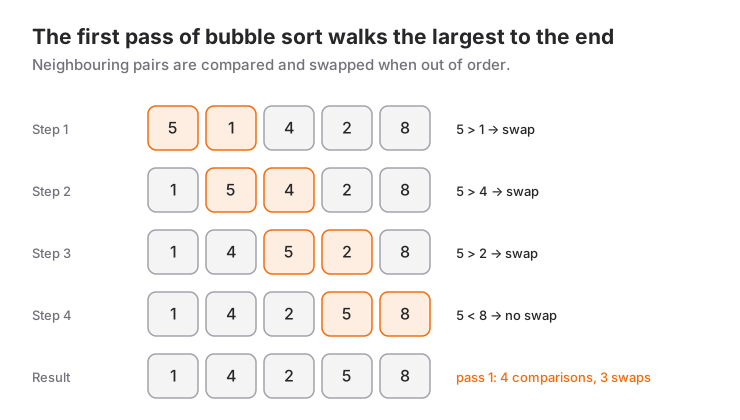
Solution: Each pass compares neighbouring pairs from left to right; the largest element "bubbles" to the end.
Start   : [5, 1, 4, 2, 8]
Pass 1  : [1, 4, 2, 5, 8]   4 comparisons, 3 swaps (5-1, 5-4, 5-2)
Pass 2  : [1, 2, 4, 5, 8]   3 comparisons, 1 swap (4-2)
Pass 3  : [1, 2, 4, 5, 8]   2 comparisons, 0 swaps -> stop
Total: 9 comparisons, 4 swaps. Without the early exit a fourth pass with 1 comparison would run, giving n(n−1)/2 = 10. The array is already sorted after pass 2, but the algorithm only finds that out in pass 3, the first pass without a swap; leaving that pass out is the most common mistake.
Question 2: Selection Sort Trace
Question: Sort [64, 25, 12, 22, 11] with selection sort and show every pass.
Solution: Each pass finds the minimum of the unsorted part and makes a single swap with the first element of that part.
Start   : [64, 25, 12, 22, 11]
Pass 1  : [11, 25, 12, 22, 64]   minimum 11 <-> 64
Pass 2  : [11, 12, 25, 22, 64]   minimum 12 <-> 25
Pass 3  : [11, 12, 22, 25, 64]   minimum 22 <-> 25
Pass 4  : [11, 12, 22, 25, 64]   minimum 25 already in place, no swap
The number of comparisons does not depend on the input: 4 + 3 + 2 + 1 = 10. There are 3 swaps. That is selection sort's one real strength: at most n−1 swaps, which matters when writes are expensive.
Question 3: Insertion Sort and Counting Comparisons
Question: Sort [7, 3, 5, 1, 9, 2] with insertion sort. Give the number of comparisons and shifts in each step.
Solution: A "comparison" here means one evaluation of a[j] > key.
Start        : [7, 3, 5, 1, 9, 2]
i=1, key=3   : [3, 7, 5, 1, 9, 2]   1 comparison,  1 shift
i=2, key=5   : [3, 5, 7, 1, 9, 2]   2 comparisons, 1 shift
i=3, key=1   : [1, 3, 5, 7, 9, 2]   3 comparisons, 3 shifts
i=4, key=9   : [1, 3, 5, 7, 9, 2]   1 comparison,  0 shifts
i=5, key=2   : [1, 2, 3, 5, 7, 9]   5 comparisons, 4 shifts
Total: 12 comparisons, 9 shifts. There is a neat way to check this: the number of shifts equals the number of inversions in the array. The inversions are (7,3), (7,5), (7,1), (7,2), (3,1), (3,2), (5,1), (5,2), (9,2) — exactly 9.
Question 4: Merge Sort — The Split and Merge Tree
Question: Write the merge steps of merge sort for [38, 27, 43, 3, 9, 82, 10] in the order they happen.
Solution: Following the divide-and-conquer definition of merge sort, mid = (left + right) / 2 splits the 7-element array into 4 + 3. Merges happen in the order the recursion returns:
Split:  [38, 27, 43, 3]                 [9, 82, 10]
        [38, 27]   [43, 3]              [9, 82]   [10]

1) [38] + [27]            -> [27, 38]                      1 comparison
2) [43] + [3]             -> [3, 43]                       1 comparison
3) [27, 38] + [3, 43]     -> [3, 27, 38, 43]               3 comparisons
4) [9] + [82]             -> [9, 82]                       1 comparison
5) [9, 82] + [10]         -> [9, 10, 82]                   2 comparisons
6) [3, 27, 38, 43] + [9, 10, 82] -> [3, 9, 10, 27, 38, 43, 82]   6 comparisons
14 comparisons in total. Note that the left half is finished completely before the right half starts; writing step 4 before step 2 shows the recursion order wrongly.
Question 5: Quick Sort — The First Partition
Question: Apply Lomuto partitioning with the last element as pivot to [10, 80, 30, 90, 40, 50, 70]. What does the array look like after the first partition?
Solution: pivot = 70, i = -1. j moves left to right; for every element smaller than the pivot, i is incremented and the element is swapped with a[i].
j=0 (10 < 70)  i=0  [10, 80, 30, 90, 40, 50, 70]
j=1 (80)       -    [10, 80, 30, 90, 40, 50, 70]
j=2 (30 < 70)  i=1  [10, 30, 80, 90, 40, 50, 70]
j=3 (90)       -    [10, 30, 80, 90, 40, 50, 70]
j=4 (40 < 70)  i=2  [10, 30, 40, 90, 80, 50, 70]
j=5 (50 < 70)  i=3  [10, 30, 40, 50, 80, 90, 70]
Final swap a[4] <-> a[6]:  [10, 30, 40, 50, 70, 90, 80]
The pivot 70 lands at index 4, its final position. The recursion continues with [10, 30, 40, 50] and [90, 80]; one partition turns the right part into [80, 90]. The whole sort costs 6 + 3 + 2 + 1 + 1 = 13 comparisons.
Question 6: Quick Sort's Worst Case and Pivot Choice
Question: If the pivot is always the last element, how many comparisons does [1, 2, 3, 4, 5, 6] need? How do you avoid this?
Solution: The array is sorted, so the pivot is the maximum every time; each partition produces one part of n−1 elements and one empty part. The comparisons add up to 5 + 4 + 3 + 2 + 1 = 15 = n(n−1)/2, which is O(n²). The recursion depth grows to n, so the extra space becomes O(n). The same happens with a reverse-sorted array, and with the first element as pivot.
The fix is to choose the pivot independently of the input: a random pivot, or the median of the first, middle and last element (median-of-three).
// Added at the top of Partition: move a random element to the end, rest unchanged
int r = Random.Shared.Next(low, high + 1);
(a[r], a[high]) = (a[high], a[r]);
A random pivot does not remove the worst case, but it no longer depends on one specific input; the expected running time is O(n log n).
Question 7: Which One Is Stable? A Small Scenario
Question: Records sorted by name are to be sorted by grade: (Ali,85), (Berk,70), (Can,85), (Deniz,70). Compare the output of selection sort and insertion sort.
Solution:
Selection sort:
Pass 1 : (Berk,70), (Ali,85), (Can,85), (Deniz,70)
Pass 2 : (Berk,70), (Deniz,70), (Can,85), (Ali,85)   <- Ali dropped behind Can
Pass 3 : no change

Insertion sort:
Result : (Berk,70), (Deniz,70), (Ali,85), (Can,85)
The long-distance swap in selection sort threw Ali behind Can: two records with equal grades changed order, so the algorithm is not stable. Insertion sort only shifts strictly larger elements and keeps the name order. The same distinction exists in real code: in .NET, Array.Sort and List<T>.Sort are unstable, LINQ OrderBy is stable — the Array.Sort documentation states outright that the order of equal elements might not be preserved.
var students = new[] { ("Ali", 85), ("Berk", 70), ("Can", 85), ("Deniz", 70) };
var byGrade = students.OrderBy(s => s.Item2).ToArray(); // name order kept for equal grades
Question 8: Nearly Sorted Data and Comparison Bounds
Question: (a) Which algorithm do you choose for a nearly sorted array such as [1, 2, 4, 3, 5, 6, 8, 7], and why? (b) When two sorted arrays of 4 elements each are merged, what is the minimum and maximum number of comparisons?
Solution (a): Insertion sort. Its running time is O(n + d), where d is the number of inversions. Here d = 2, so 9 comparisons and 2 shifts are enough. Selection sort makes 28 comparisons on the same array no matter what. Bubble sort with early exit finishes in 7 + 6 = 13 comparisons, but if a small element sits at the end (for example [2, 3, 4, 5, 1]) it moves only one step left per pass and the number of passes approaches n. Merge sort gains nothing from the input being sorted.
Solution (b): Minimum 4: if every element of one array is smaller than the other ([1,2,3,4] + [5,6,7,8]), that array is exhausted after four comparisons and the rest is copied. Maximum n + m − 1 = 7: if the elements interleave ([1,3,5,7] + [2,4,6,8]), every step up to the last element needs a comparison.
When to Use It and When Not To
- Insertion sort: small arrays (a few dozen elements) and nearly sorted data. Not for large random data.
- Merge sort: when you need stability and a guaranteed O(n log n), or when sorting linked lists or data that does not fit in memory. Not when O(n) extra space is a problem.
- Quick sort: general-purpose in-memory sorting; fast in practice with a good pivot. If you need stability or cannot accept the worst case, pick merge sort or heap sort.
- Bubble and selection sort: teaching tools. In production code use
Array.SortorOrderByinstead of your own sort; the value of knowing these algorithms is understanding how those built-ins behave and what they cost.
If you need to keep data sorted while inserting and deleting all the time, a sorted structure such as a binary search tree is a better tool than sorting again and again.
Common Mistakes
1. Wrong inner loop bound. With j < a.Length, a[j + 1] runs past the array and the program crashes with IndexOutOfRangeException. The correct bound is j < a.Length - 1 - i; forgetting the - i does not crash, it just wastes comparisons.
2. Breaking stability with one character. Writing >= instead of a[j] > key in insertion sort, or < instead of <= in merge, still sorts correctly but reorders equal elements. The symptom is sneaky: tests with plain numbers pass, records come out in the wrong order.
while (j >= 0 && a[j] >= key) // WRONG: shifts equal elements too, stability is lost
while (j >= 0 && a[j] > key)  // RIGHT
3. Swapping at every smaller element in a selection sort trace. Selection sort makes at most one swap per pass. If you swap immediately whenever the scan finds a smaller element, you have traced a different algorithm and your intermediate arrays will not match the answer key.
4. Saying "quick sort is O(n log n)" and moving on. That is the average case. If the question asks for the worst case, the answer is O(n²), and you are expected to name the input-pivot combination that causes it.
If you want to practise these question types on your own course's past papers, the exam support page explains how I work.
Frequently Asked Questions
Which sorting algorithm comes up most in exams?
Trace questions favor bubble, selection and insertion sort; analysis questions favor the merge sort recursion and quick sort's worst case. The safe route is to be able to trace all five by hand.
Why is quick sort so popular if its worst case is O(n²)?
It works in place, is cache-friendly, and with a random or median-of-three pivot the worst case is very rare in practice. Its constant factors in the average case tend to be smaller than merge sort's.
When does a stable sort really matter?
When you sort the same data by more than one key in sequence. If you sort by name first and then by grade, and want names to stay ordered within equal grades, the second sort has to be stable.
What exactly should I count in a "number of comparisons" question?
Count only operations that compare two data elements; index checks such as j >= 0 do not count. If your lecturer defines it differently, use that definition and state what you counted at the top of your answer.
Related Posts
Binary Search Tree Exam Questions: Insert, Delete, Traverse
The BST property, insert, search and delete, inorder/preorder/postorder traversal, height and the degenerate case; 7 exam questions with drawn trees.
Big O Notation and Time Complexity: A Practical Guide
What Big O means and how to find the complexity of loops and recursion: O/Ω/Θ, the Master theorem, space complexity and 8 solved exercises.
Algorithm Teacher: Data Structures and Algorithm Analysis
How to choose a tutor for data structures and algorithms: what to ask in a trial lesson, exam versus interview prep, and the order to study topics in.