
Flutter: Explizite Animationen mit AnimationController
Zuletzt aktualisiert:
5 Min. Lesezeit

Implizite Animationen sind großartig, aber manchmal brauchen Sie mehr Kontrolle. Wenn Sie eine Animation nach Belieben starten, anhalten, umkehren oder in der Geschwindigkeit ändern wollen, kommen explizite Animationen ins Spiel.
Der AnimationController ist das Herz der Animations-Engine von Flutter. Er ist wie ein Dirigent, der für jedes Bild einen Wert erzeugt – und Sie führen ihn.
Implizit oder explizit: Wann nehmen Sie was?
Eine kurze Erinnerung:
| Merkmal | Implizit | Explizit |
|---|---|---|
| Verwendung | Automatisch über setState | Manuelle Steuerung |
| Codemenge | Wenig (3–5 Zeilen) | Mehr (15–30 Zeilen) |
| Kontrolle | Begrenzt | Vollständig |
| Start/Stopp | Automatisch | Manuell |
| Einsatz | Einfache Übergänge | Komplexe Animationen |
| Beispiel | AnimatedContainer | AnimationController |
Wann sollten Sie explizit arbeiten?
- Wenn die Animation per Buttondruck starten soll
- Wenn die Animation endlos laufen soll
- Wenn Sie mehrere Animationen synchronisieren wollen
- Wenn die Animation von Nutzereingaben abhängen soll (z. B. von der Scrollstrecke)
- Wenn Sie die Animation umkehren wollen
Grundlagen des AnimationController
Der AnimationController erzeugt einen stetig steigenden Wert von 0.0 bis 1.0 (oder in einem beliebigen Bereich Ihrer Wahl).
Grundlegende Verwendung
class BasicAnimationDemo extends StatefulWidget {
  @override
  _BasicAnimationDemoState createState() => _BasicAnimationDemoState();
}

class _BasicAnimationDemoState extends State<BasicAnimationDemo>
    with SingleTickerProviderStateMixin {
  late AnimationController _controller;

  @override
  void initState() {
    super.initState();
    _controller = AnimationController(
      duration: Duration(seconds: 2),
      vsync: this, // TickerProvider required
    );
  }

  @override
  void dispose() {
    _controller.dispose(); // To prevent memory leaks!
    super.dispose();
  }

  @override
  Widget build(BuildContext context) {
    return Column(
      mainAxisAlignment: MainAxisAlignment.center,
      children: [
        AnimatedBuilder(
          animation: _controller,
          builder: (context, child) {
            return Transform.rotate(
              angle: _controller.value * 2 * 3.14159, // 360 degrees
              child: child,
            );
          },
          child: Icon(Icons.star, size: 100, color: Colors.amber),
        ),
        SizedBox(height: 40),
        Row(
          mainAxisAlignment: MainAxisAlignment.center,
          children: [
            ElevatedButton(
              onPressed: () => _controller.forward(),
              child: Text('Start'),
            ),
            SizedBox(width: 10),
            ElevatedButton(
              onPressed: () => _controller.reverse(),
              child: Text('Reverse'),
            ),
            SizedBox(width: 10),
            ElevatedButton(
              onPressed: () => _controller.reset(),
              child: Text('Reset'),
            ),
          ],
        ),
      ],
    );
  }
}
Live-Demo
Sie können explizite Animationen im interaktiven Beispiel unten ausprobieren:
💡 Falls das Beispiel oben nicht lädt, klicken Sie auf DartPad, um es in einem neuen Tab auszuführen.
Was ist ein TickerProvider?
Der Parameter vsync ist erforderlich. Was macht dieser TickerProvider also?
Warum wird er gebraucht?
Flutter versucht, 60 Bilder pro Sekunde zu zeichnen (60 FPS). Der AnimationController erzeugt für jedes Bild einen neuen Wert. Ist das Widget aber gar nicht sichtbar (weil Sie etwa auf eine andere Seite gewechselt sind), verbraucht die Animation unnötig CPU-Leistung.
vsync stoppt die Animation automatisch, wenn das Widget nicht auf dem Bildschirm ist. Das bringt:
- Weniger Akkuverbrauch
- Weniger CPU-Last
- Bessere Performance
Welches Mixin sollten Sie verwenden?
// If there's a single animation
class _MyWidgetState extends State<MyWidget>
    with SingleTickerProviderStateMixin {
  late AnimationController _controller;
}

// If there are multiple animations
class _MyWidgetState extends State<MyWidget>
    with TickerProviderStateMixin {
  late AnimationController _controller1;
  late AnimationController _controller2;
  late AnimationController _controller3;
}
Methoden des AnimationController
Stellen Sie sich den AnimationController wie einen Videorekorder vor:
1. forward() – abspielen
Lässt die Animation von Anfang bis Ende laufen (0.0 → 1.0):
_controller.forward();

// Start from a specific value
_controller.forward(from: 0.5); // Start from 0.5
2. reverse() – zurückspulen
Lässt die Animation vom Ende zum Anfang laufen (1.0 → 0.0):
_controller.reverse();

// Reverse from a specific value
_controller.reverse(from: 0.8);
3. reset() – zurücksetzen
Setzt die Animation auf 0.0 zurück (sie läuft dabei nicht):
_controller.reset();4. stop() – anhalten
Hält die Animation beim aktuellen Wert an:
_controller.stop();5. repeat() – Endlosschleife
Wiederholt die Animation fortlaufend:
// Infinite loop (0 → 1 → 0 → 1 ...)
_controller.repeat();

// With reverse (0 → 1 → 0 → 1 ...)
_controller.repeat(reverse: true);

// Repeat a specific number of times
_controller.repeat(reverse: true, period: Duration(seconds: 1));
6. animateTo() – zu einem bestimmten Wert
Animiert vom aktuellen Wert zu einem bestimmten Wert:
_controller.animateTo(0.7); // Go from current value to 0.7

// With custom duration
_controller.animateTo(
  0.5,
  duration: Duration(milliseconds: 500),
  curve: Curves.easeInOut,
);
7. animateBack() – zurückgehen
Animiert rückwärts vom aktuellen Wert zu einem bestimmten Wert:
_controller.animateBack(0.3);Tween: Werte umrechnen
Der AnimationController erzeugt nur Werte zwischen 0.0 und 1.0. Was aber, wenn wir Werte zwischen 0 und 360 (Grad) oder zwischen 50 und 200 (Pixel) brauchen?
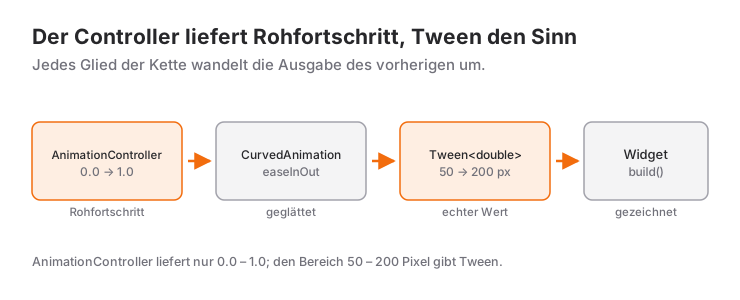
Tween (von „between“) rechnet die Werte um.
Grundlegende Verwendung von Tween
class TweenDemo extends StatefulWidget {
  @override
  _TweenDemoState createState() => _TweenDemoState();
}

class _TweenDemoState extends State<TweenDemo>
    with SingleTickerProviderStateMixin {
  late AnimationController _controller;
  late Animation<double> _sizeAnimation;
  late Animation<Color?> _colorAnimation;

  @override
  void initState() {
    super.initState();
    _controller = AnimationController(
      duration: Duration(seconds: 2),
      vsync: this,
    );

    // Size animation: 50 → 200
    _sizeAnimation = Tween<double>(
      begin: 50,
      end: 200,
    ).animate(_controller);

    // Color animation: Red → Blue
    _colorAnimation = ColorTween(
      begin: Colors.red,
      end: Colors.blue,
    ).animate(_controller);
  }

  @override
  void dispose() {
    _controller.dispose();
    super.dispose();
  }

  @override
  Widget build(BuildContext context) {
    return Column(
      mainAxisAlignment: MainAxisAlignment.center,
      children: [
        AnimatedBuilder(
          animation: _controller,
          builder: (context, child) {
            return Container(
              width: _sizeAnimation.value,
              height: _sizeAnimation.value,
              decoration: BoxDecoration(
                color: _colorAnimation.value,
                borderRadius: BorderRadius.circular(20),
              ),
            );
          },
        ),
        SizedBox(height: 40),
        ElevatedButton(
          onPressed: () {
            if (_controller.status == AnimationStatus.completed) {
              _controller.reverse();
            } else {
              _controller.forward();
            }
          },
          child: Text('Run Animation'),
        ),
      ],
    );
  }
}
Verbreitete Tween-Typen
// Number (double)
Tween<double>(begin: 0, end: 100)

// Number (int)
IntTween(begin: 0, end: 255)

// Color
ColorTween(begin: Colors.red, end: Colors.blue)

// Offset (position)
Tween<Offset>(begin: Offset.zero, end: Offset(1.0, 0.0))

// Size
Tween<Size>(begin: Size(50, 50), end: Size(200, 200))

// BorderRadius
Tween<BorderRadius>(
  begin: BorderRadius.circular(0),
  end: BorderRadius.circular(50),
)

// TextStyle
TextStyleTween(
  begin: TextStyle(fontSize: 14),
  end: TextStyle(fontSize: 32, fontWeight: FontWeight.bold),
)
CurvedAnimation: der Animation Charakter geben
Tween rechnet Werte um, CurvedAnimation bestimmt den Charakter der Animation:
_controller = AnimationController(
  duration: Duration(seconds: 2),
  vsync: this,
);

// Apply curve
final curvedAnimation = CurvedAnimation(
  parent: _controller,
  curve: Curves.elasticOut, // Elastic effect
);

// Use with Tween
_sizeAnimation = Tween<double>(
  begin: 50,
  end: 200,
).animate(curvedAnimation);
Verschiedene Kurven
// Smooth in-out
Curves.easeInOut

// Elastic (like a spring)
Curves.elasticOut

// Bounce
Curves.bounceOut

// Overshoot
Curves.anticipate

// Acceleration
Curves.accelerate

// Deceleration
Curves.decelerate
AnimatedBuilder: performanter Neuaufbau
AnimatedBuilder baut nur das nötige Widget neu auf:
AnimatedBuilder(
  animation: _controller,
  builder: (context, child) {
    // This part rebuilds every frame
    return Transform.rotate(
      angle: _controller.value * 2 * 3.14159,
      child: child, // This doesn't rebuild!
    );
  },
  child: Icon(Icons.star, size: 100), // Static, cached
)
Performance-Tipp: Der Parameter child ist für Widgets gedacht, die sich während der Animation nicht ändern. Flutter speichert sie zwischen und erzeugt sie nicht in jedem Bild neu.
Animationsstatus: den Zustand mitverfolgen
Sie können den Status der Animation verfolgen:
@override
void initState() {
  super.initState();
  _controller = AnimationController(
    duration: Duration(seconds: 2),
    vsync: this,
  );

  _controller.addStatusListener((status) {
    if (status == AnimationStatus.completed) {
      print('Animation completed!');
      _controller.reverse(); // Auto reverse
    } else if (status == AnimationStatus.dismissed) {
      print('Animation back to start!');
    }
  });
}
Statusarten
AnimationStatus.forward    // Going forward (0 → 1)
AnimationStatus.reverse    // Going backward (1 → 0)
AnimationStatus.completed  // Completed (at 1.0)
AnimationStatus.dismissed  // Back to start (at 0.0)
Beispiele aus der Praxis
1. Endlose Drehung (Lade-Spinner)
class LoadingSpinner extends StatefulWidget {
  @override
  _LoadingSpinnerState createState() => _LoadingSpinnerState();
}

class _LoadingSpinnerState extends State<LoadingSpinner>
    with SingleTickerProviderStateMixin {
  late AnimationController _controller;

  @override
  void initState() {
    super.initState();
    _controller = AnimationController(
      duration: Duration(seconds: 2),
      vsync: this,
    )..repeat(); // Infinite loop
  }

  @override
  void dispose() {
    _controller.dispose();
    super.dispose();
  }

  @override
  Widget build(BuildContext context) {
    return Center(
      child: AnimatedBuilder(
        animation: _controller,
        builder: (context, child) {
          return Transform.rotate(
            angle: _controller.value * 2 * 3.14159,
            child: child,
          );
        },
        child: Icon(Icons.refresh, size: 50, color: Colors.blue),
      ),
    );
  }
}
2. Pulsierende Herz-Animation
class PulsingHeart extends StatefulWidget {
  @override
  _PulsingHeartState createState() => _PulsingHeartState();
}

class _PulsingHeartState extends State<PulsingHeart>
    with SingleTickerProviderStateMixin {
  late AnimationController _controller;
  late Animation<double> _scaleAnimation;

  @override
  void initState() {
    super.initState();
    _controller = AnimationController(
      duration: Duration(milliseconds: 800),
      vsync: this,
    )..repeat(reverse: true); // Back and forth

    _scaleAnimation = Tween<double>(
      begin: 0.8,
      end: 1.2,
    ).animate(CurvedAnimation(
      parent: _controller,
      curve: Curves.easeInOut,
    ));
  }

  @override
  void dispose() {
    _controller.dispose();
    super.dispose();
  }

  @override
  Widget build(BuildContext context) {
    return Center(
      child: AnimatedBuilder(
        animation: _scaleAnimation,
        builder: (context, child) {
          return Transform.scale(
            scale: _scaleAnimation.value,
            child: child,
          );
        },
        child: Icon(Icons.favorite, size: 100, color: Colors.red),
      ),
    );
  }
}
3. Kombination aus Einblenden und Hochschieben
class FadeSlideIn extends StatefulWidget {
  final Widget child;

  FadeSlideIn({required this.child});

  @override
  _FadeSlideInState createState() => _FadeSlideInState();
}

class _FadeSlideInState extends State<FadeSlideIn>
    with SingleTickerProviderStateMixin {
  late AnimationController _controller;
  late Animation<double> _opacityAnimation;
  late Animation<Offset> _slideAnimation;

  @override
  void initState() {
    super.initState();
    _controller = AnimationController(
      duration: Duration(milliseconds: 600),
      vsync: this,
    );

    _opacityAnimation = Tween<double>(
      begin: 0.0,
      end: 1.0,
    ).animate(CurvedAnimation(
      parent: _controller,
      curve: Curves.easeOut,
    ));

    _slideAnimation = Tween<Offset>(
      begin: Offset(0, 0.3), // From below
      end: Offset.zero,
    ).animate(CurvedAnimation(
      parent: _controller,
      curve: Curves.easeOut,
    ));

    _controller.forward();
  }

  @override
  void dispose() {
    _controller.dispose();
    super.dispose();
  }

  @override
  Widget build(BuildContext context) {
    return AnimatedBuilder(
      animation: _controller,
      builder: (context, child) {
        return FadeTransition(
          opacity: _opacityAnimation,
          child: SlideTransition(
            position: _slideAnimation,
            child: child,
          ),
        );
      },
      child: widget.child,
    );
  }
}

// Usage:
FadeSlideIn(
  child: Text('Hello World!', style: TextStyle(fontSize: 32)),
)
4. Animation eines Fortschrittsbalkens
class AnimatedProgressBar extends StatefulWidget {
  final double progress; // 0.0 - 1.0

  AnimatedProgressBar({required this.progress});

  @override
  _AnimatedProgressBarState createState() => _AnimatedProgressBarState();
}

class _AnimatedProgressBarState extends State<AnimatedProgressBar>
    with SingleTickerProviderStateMixin {
  late AnimationController _controller;
  late Animation<double> _progressAnimation;

  @override
  void initState() {
    super.initState();
    _controller = AnimationController(
      duration: Duration(milliseconds: 500),
      vsync: this,
    );

    _progressAnimation = Tween<double>(
      begin: 0,
      end: widget.progress,
    ).animate(CurvedAnimation(
      parent: _controller,
      curve: Curves.easeOut,
    ));

    _controller.forward();
  }

  @override
  void didUpdateWidget(AnimatedProgressBar oldWidget) {
    super.didUpdateWidget(oldWidget);
    if (widget.progress != oldWidget.progress) {
      _progressAnimation = Tween<double>(
        begin: _progressAnimation.value,
        end: widget.progress,
      ).animate(CurvedAnimation(
        parent: _controller,
        curve: Curves.easeOut,
      ));
      _controller.forward(from: 0);
    }
  }

  @override
  void dispose() {
    _controller.dispose();
    super.dispose();
  }

  @override
  Widget build(BuildContext context) {
    return Container(
      width: double.infinity,
      height: 20,
      decoration: BoxDecoration(
        color: Colors.grey[300],
        borderRadius: BorderRadius.circular(10),
      ),
      child: AnimatedBuilder(
        animation: _progressAnimation,
        builder: (context, child) {
          return FractionallySizedBox(
            alignment: Alignment.centerLeft,
            widthFactor: _progressAnimation.value,
            child: Container(
              decoration: BoxDecoration(
                color: Colors.blue,
                borderRadius: BorderRadius.circular(10),
              ),
            ),
          );
        },
      ),
    );
  }
}
5. Wackel-Animation
class ShakeWidget extends StatefulWidget {
  final Widget child;
  final bool shake;

  ShakeWidget({required this.child, this.shake = false});

  @override
  _ShakeWidgetState createState() => _ShakeWidgetState();
}

class _ShakeWidgetState extends State<ShakeWidget>
    with SingleTickerProviderStateMixin {
  late AnimationController _controller;
  late Animation<double> _shakeAnimation;

  @override
  void initState() {
    super.initState();
    _controller = AnimationController(
      duration: Duration(milliseconds: 500),
      vsync: this,
    );

    _shakeAnimation = Tween<double>(
      begin: 0,
      end: 10,
    ).animate(CurvedAnimation(
      parent: _controller,
      curve: Curves.elasticIn,
    ));
  }

  @override
  void didUpdateWidget(ShakeWidget oldWidget) {
    super.didUpdateWidget(oldWidget);
    if (widget.shake && !oldWidget.shake) {
      _controller.forward(from: 0).then((_) => _controller.reverse());
    }
  }

  @override
  void dispose() {
    _controller.dispose();
    super.dispose();
  }

  @override
  Widget build(BuildContext context) {
    return AnimatedBuilder(
      animation: _shakeAnimation,
      builder: (context, child) {
        return Transform.translate(
          offset: Offset(_shakeAnimation.value * (_controller.value > 0.5 ? -1 : 1), 0),
          child: child,
        );
      },
      child: widget.child,
    );
  }
}

// Usage:
class LoginScreen extends StatefulWidget {
  @override
  _LoginScreenState createState() => _LoginScreenState();
}

class _LoginScreenState extends State<LoginScreen> {
  bool _showError = false;

  void _login() {
    // Failed login
    setState(() => _showError = true);
    Future.delayed(Duration(milliseconds: 500), () {
      setState(() => _showError = false);
    });
  }

  @override
  Widget build(BuildContext context) {
    return ShakeWidget(
      shake: _showError,
      child: TextField(
        decoration: InputDecoration(
          labelText: 'Password',
          errorText: _showError ? 'Wrong password!' : null,
        ),
      ),
    );
  }
}
Mehrere Animationen synchronisieren
Mehrere Animationen mit einem einzigen Controller:
class MultiAnimationDemo extends StatefulWidget {
  @override
  _MultiAnimationDemoState createState() => _MultiAnimationDemoState();
}

class _MultiAnimationDemoState extends State<MultiAnimationDemo>
    with SingleTickerProviderStateMixin {
  late AnimationController _controller;
  late Animation<double> _rotationAnimation;
  late Animation<double> _scaleAnimation;
  late Animation<Color?> _colorAnimation;

  @override
  void initState() {
    super.initState();
    _controller = AnimationController(
      duration: Duration(seconds: 3),
      vsync: this,
    );

    // Rotation during 0.0 - 0.5
    _rotationAnimation = Tween<double>(
      begin: 0,
      end: 2 * 3.14159,
    ).animate(CurvedAnimation(
      parent: _controller,
      curve: Interval(0.0, 0.5, curve: Curves.easeInOut),
    ));

    // Scaling during 0.5 - 1.0
    _scaleAnimation = Tween<double>(
      begin: 1.0,
      end: 2.0,
    ).animate(CurvedAnimation(
      parent: _controller,
      curve: Interval(0.5, 1.0, curve: Curves.easeOut),
    ));

    // Color change during 0.0 - 1.0
    _colorAnimation = ColorTween(
      begin: Colors.blue,
      end: Colors.red,
    ).animate(_controller);
  }

  @override
  void dispose() {
    _controller.dispose();
    super.dispose();
  }

  @override
  Widget build(BuildContext context) {
    return Column(
      mainAxisAlignment: MainAxisAlignment.center,
      children: [
        AnimatedBuilder(
          animation: _controller,
          builder: (context, child) {
            return Transform.rotate(
              angle: _rotationAnimation.value,
              child: Transform.scale(
                scale: _scaleAnimation.value,
                child: Container(
                  width: 100,
                  height: 100,
                  decoration: BoxDecoration(
                    color: _colorAnimation.value,
                    borderRadius: BorderRadius.circular(20),
                  ),
                ),
              ),
            );
          },
        ),
        SizedBox(height: 40),
        ElevatedButton(
          onPressed: () {
            if (_controller.status == AnimationStatus.completed) {
              _controller.reverse();
            } else {
              _controller.forward();
            }
          },
          child: Text('Start Animation'),
        ),
      ],
    );
  }
}
TweenSequence: Animation in Etappen
Unterschiedliche Werte in unterschiedlichen Abschnitten:
final _colorAnimation = TweenSequence<Color?>([
  TweenSequenceItem(
    tween: ColorTween(begin: Colors.red, end: Colors.blue),
    weight: 33.3, // 33.3% portion
  ),
  TweenSequenceItem(
    tween: ColorTween(begin: Colors.blue, end: Colors.green),
    weight: 33.3,
  ),
  TweenSequenceItem(
    tween: ColorTween(begin: Colors.green, end: Colors.red),
    weight: 33.4,
  ),
]).animate(_controller);
Tipps für die Performance
1. Vergessen Sie dispose() nicht
@override
void dispose() {
  _controller.dispose(); // Mandatory!
  super.dispose();
}
Vergessen Sie es, entsteht ein Speicherleck. Die Reihenfolge von initState und dispose innerhalb eines State beschreibe ich ausführlich im Beitrag zum Lebenszyklus in Flutter.
2. Verwenden Sie AnimatedBuilder
// ❌ Bad - Entire widget rebuilds
@override
Widget build(BuildContext context) {
  return Transform.rotate(
    angle: _controller.value * 2 * 3.14159,
    child: ExpensiveWidget(),
  );
}

// ✅ Good - Only necessary part rebuilds
@override
Widget build(BuildContext context) {
  return AnimatedBuilder(
    animation: _controller,
    builder: (context, child) {
      return Transform.rotate(
        angle: _controller.value * 2 * 3.14159,
        child: child,
      );
    },
    child: ExpensiveWidget(), // Cached
  );
}
3. Animieren Sie nicht ohne Grund
// ❌ 100 widgets animating at once
ListView.builder(
  itemCount: 100,
  itemBuilder: (context, index) {
    return AnimatedBuilder(
      animation: _controller,
      builder: (context, child) {
        return Transform.scale(
          scale: 1.0 + _controller.value * 0.2,
          child: ListTile(title: Text('Item $index')),
        );
      },
    );
  },
)

// ✅ Good - Only visible ones should animate (lazy loading)
4. Nutzen Sie const-Widgets
AnimatedBuilder(
  animation: _controller,
  builder: (context, child) {
    return Transform.rotate(
      angle: _controller.value * 2 * 3.14159,
      child: child,
    );
  },
  child: const Icon(Icons.star, size: 100), // const!
)
Häufige Fehler und ihre Lösungen
Fehler 1: vsync vergessen
// ❌ Error: vsync required
_controller = AnimationController(
  duration: Duration(seconds: 2),
);

// ✅ Correct
class _MyWidgetState extends State<MyWidget>
    with SingleTickerProviderStateMixin {
  late AnimationController _controller;

  @override
  void initState() {
    super.initState();
    _controller = AnimationController(
      duration: Duration(seconds: 2),
      vsync: this, // this is TickerProvider
    );
  }
}
Fehler 2: dispose() vergessen
// ❌ Memory leak!
@override
void dispose() {
  super.dispose();
}

// ✅ Correct
@override
void dispose() {
  _controller.dispose();
  super.dispose();
}
Fehler 3: falsches Mixin gewählt
// ❌ 3 animations but Single is used
class _MyWidgetState extends State<MyWidget>
    with SingleTickerProviderStateMixin {
  late AnimationController _controller1;
  late AnimationController _controller2;
  late AnimationController _controller3; // Error!
}

// ✅ Correct
class _MyWidgetState extends State<MyWidget>
    with TickerProviderStateMixin {
  late AnimationController _controller1;
  late AnimationController _controller2;
  late AnimationController _controller3;
}
Fehler 4: zu lange Dauer
// ❌ 10 seconds is too long
AnimationController(
  duration: Duration(seconds: 10),
  vsync: this,
)

// ✅ 2-3 seconds is ideal
AnimationController(
  duration: Duration(seconds: 2),
  vsync: this,
)
Zusammenfassung
AnimationController: Steuermechanismus, der Werte zwischen 0.0 und 1.0 erzeugtvsync: Stoppt Animationen außerhalb des Bildschirms automatisch (spart Akku)Tween: Rechnet Werte um (0–1 → 50–200 usw.)CurvedAnimation: Gibt der Animation Charakter (easeInOut, elasticOut usw.)AnimatedBuilder: Baut für die Performance nur das nötige Widget neu auf- Status Listener: Verfolgt den Zustand der Animation (completed, dismissed usw.)
- Methoden: forward(), reverse(), repeat(), reset(), stop()
- Mixin: SingleTickerProviderStateMixin (eine Animation) oder TickerProviderStateMixin (mehrere)
dispose(): Pflicht, um Speicherlecks zu vermeiden- Performance: const-Child und AnimatedBuilder verwenden
Explizite Animationen geben Ihnen in Flutter die volle Kontrolle. Die Lernkurve ist etwas steiler, aber die eindrucksvollen Animationen, die dabei entstehen, sind es wert! Wenn Sie dieselbe Kontrolle zwischen Seiten möchten, sind Hero-Animationen und Seitenübergänge der nächste Schritt.
Häufig gestellte Fragen
Welches TickerProvider-Mixin sollte ich wählen?
Bei einem einzelnen AnimationController genügt SingleTickerProviderStateMixin. Enthält ein State mehrere Controller, brauchen Sie TickerProviderStateMixin.
Was passiert, wenn ich dispose() weglasse?
Der Controller hört seinem Ticker weiter zu, auch wenn das Widget den Baum längst verlassen hat – das führt zu einem Speicherleck. Schließen Sie deshalb jeden Controller in der dispose()-Methode des State.
Wann sollte ich von impliziten zu expliziten Animationen wechseln?
Sobald Sie Animationen selbst starten, anhalten, wiederholen, umkehren oder synchronisieren müssen. Für einen einfachen Wechsel von A nach B brauchen implizite Widgets wie AnimatedContainer deutlich weniger Code.
Verwandte Artikel
Flutter: Hero-Animationen und Seitenübergänge
Flutter-Hero-Animationen: Tag-Zuordnung, Dauer und Kurve des Flugs, flightShuttleBuilder, typische Fehler und eigene Seitenübergänge mit PageRouteBuilder.
Flutter: Maximale Wirkung mit impliziten Animationen
Mit AnimatedContainer, AnimatedOpacity, AnimatedPositioned und weiteren impliziten Animations-Widgets fast ohne Code animieren.
Flutter: Helles und dunkles Theme mit ThemeData
Ein Flutter-Theme mit ThemeData aufbauen: ColorScheme.fromSeed, helles und dunkles Theme, ThemeMode, Theme.of, TextTheme, Komponenten-Themes, ThemeExtension.